Main Features of FocuSee
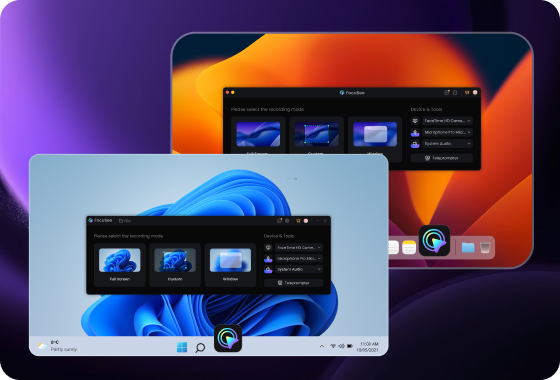
Works on Both Windows and macOS — No Platform Limits
FocuSee works seamlessly on both Windows and Mac, making it a more flexible choice for individuals and teams across different devices. Whether you're recording tutorials, product walkthroughs, or software demos, you can rely on the same workflow and consistent output quality regardless of your operating system. This eliminates platform barriers and ensures a unified video production experience across teams.
Smarter Editing with AI-Powered Automation
FocuSee goes beyond the basic auto-zoom workflow of Screen Charm by adding AI-powered editing that actually improves your raw footage. It can automatically reduce background noise, enhance voice clarity, and remove silent gaps or filler words—so your recordings sound cleaner and more professional without manual effort. As a result, you spend far less time editing while still getting high-quality output.
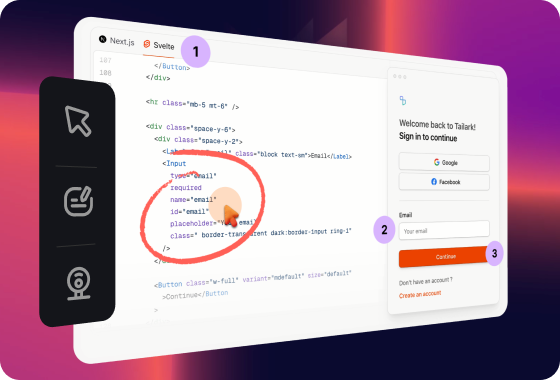
More Advanced Visual Effects for Clearer Communication
While Screen Charm focuses mainly on clean zoom effects, FocuSee provides more advanced visual tools to help you explain and highlight content more effectively. You can use 3D motion effects, smooth transitions, cursor highlights, and built-in annotations like text, arrows, and shapes to guide viewers step by step. These features make it easier to emphasize key actions and improve clarity—especially in tutorials and product demos.
FocuSee Vs. Screen Charm
 FocuSee FocuSee |
 Screen Charm Screen Charm |
||
| Operating System | Windows / Mac |


|
|
Create Recording | Screen Record on Computer |
| Screen Record for iPhone & iPad | |||
| Screen Record for Android Devices | |||
| Keyboard Shortcuts Recording | |||
| Recording Preset | limited | ||
| Editing Features | Video Clipping & Cropping | ||
| Canvas & Aspect Ratio Adjustment | |||
| Background Color / Gradient | |||
| Automatic Zoom Effects | |||
| Cursor Tracking | |||
| 3D Motion Effects | |||
| Motion Blur | |||
| Captions/Subtitles | |||
| Annotations (Text, Arrows, Shapes) | |||
| Spotlight Highlight | |||
| On-screen Shortcut Display | |||
| Mosaic | |||
| Device Mockup | |||
| Camera | Mirror Camera | ||
| Camera Background Blur | |||
| Camera Size & Roundness | |||
| Custom Camera Layout | limited | ||
| Camera Filters | |||
| Camera Frame | |||
| Mouse Cursor | Mouse Cursor Size & Styles | ||
| Mouse Click Sound | |||
| Blur Mouse Cursor | |||
| Cursor Movement Animation | |||
| Mouse Click Effects | |||
| Automatically Hide Static Cursor | |||
| AI Video Editing | AI Virtual Avatar | ||
| AI Noise Reduction | |||
| Remove Silence and Fillers | |||
| AI Voice Enhancement | |||
| AI Video Title | |||
| Export & Share | Export as MP4 | ||
| Export as GIF | |||
| Shareable Links | |||
| Long-term Stability | Actively maintained with frequent updates | Smaller team, slower updates | |
| Price Plans | • Start from $19.99/month • One-time purchase available |
• One-time purchase (~$79) | |
Check What You Can Do with FocuSee
Frequently Asked Questions
Is there a Screen Charm alternative for Windows?
Yes. FocuSee is a strong Screen Charm alternative that works on both Windows and Mac, while Screen Charm is currently macOS-only.
What is the main difference between Screen Charm and FocuSee?
Screen Charm focuses on simple auto-zoom screen recording for macOS users, while FocuSee provides a more complete solution with AI editing, cross-platform support, and richer video effects.
Which tool is better for product demos and tutorials?
Both tools support screen recording, but FocuSee is better suited for professional tutorials and product demos due to its AI editing features, visual enhancements, and cross-platform flexibility.
Does Screen Charm support Windows?
No, Screen Charm currently does not support Windows. FocuSee supports both Windows and macOS.
Effortless Recording & Editing, Professional Output