5 SaaS Product Demo Video Makers That Turn Screen Recordings into Polished Demos

Creating SaaS product demo videos used to require recording software, video editors, and hours of manual work. Today, specialized demo video makers can automatically add zoom effects, captions, cursor highlights, and branding, helping teams create professional product walkthroughs in minutes.
To help you find the right solution, we tested the most popular SaaS product demo video makers based on ease of use, automation, editing capabilities, and output quality.
All tools mentioned in this article were tested on a MacBook Pro (M2, 16-inch, 2023) with macOS Ventura, using both Chrome and native app versions where available. Testing focused on screen recording quality, automation features, and export options.
Quick Comparison Table for SaaS Product Demo Video Makers
| FocuSee | Descript | Loom | Camtasia | Vimeo Create | |
| Best Use Case | Marketing homepage & onboarding demos | Scripted demos & tutorials | Internal sharing & quick updates | Professional polished videos | Social media marketing |
| Key Features | Auto zoom & highlights, AI captions, multi-resolution export | Text-based editing, AI voiceover, screen recording | Simple screen recording, short links | Advanced editing, annotations, effects | Templates, branding tools, multi-platform export |
| Pricing | $29/mo | $12/mo | Free / $8/mo | $249 one-time | $7/mo |
We Tested 5 SaaS Product Demo Video Makers: Here’s the Best One
We have categorized these tools by their primary strength so you can match the software to your specific role.
1. FocuSee
Best For: Marketing teams and founders who need high-polish assets instantly without editing skills.
FocuSee operates as an intelligent SaaS explainer video maker. It is distinct because it automates the editing process during the export. When you record, the software tracks your mouse movements. In post-production, it automatically applies zoom and pan effects and cursor highlights. It is the ideal tool for users who want to avoid manual keyframing entirely.

Show Mouse Cursor
Key Features:
- Smart Focus & Auto-Zoom: Automatically adds smooth zoom-in and spotlight effects to highlight important actions, giving your walkthroughs a clear and polished look.
- Customizable Cursor Effects: Enhance on-screen clarity with adjustable cursor styles, highlight rings, click animations, and auto-hide behavior for distraction-free tutorials.
- Automatic Subtitles in 50+ Languages: Generate highly accurate captions in seconds—ideal for boosting accessibility and reaching global audiences.
- Background Removal & Blur: Instantly replace or blur your background without needing a green screen, helping you present in a clean, professional environment anywhere.
- AI Audio Enhancement: Remove noise, echoes, breathing, and mouth sounds automatically to deliver crisp, studio-level audio.
- AI Smart Cut: Clean up recordings by auto-removing filler words, dead air, and long pauses, making your videos concise and more engaging.
Starting Price: $0 ~$19/month (Check site for lifetime deals).
Pros: Automatically zooms in on clicks; generates ready-to-use social media backgrounds; extremely fast workflow.
Cons: Limited audio editing capabilities (you can’t do complex sound mixing); less control over specific transition timing compared to manual editors.
Verdict: The best balance of speed and polish for marketers.
2. Loom
Best For: Quick, asynchronous internal updates and support tickets.
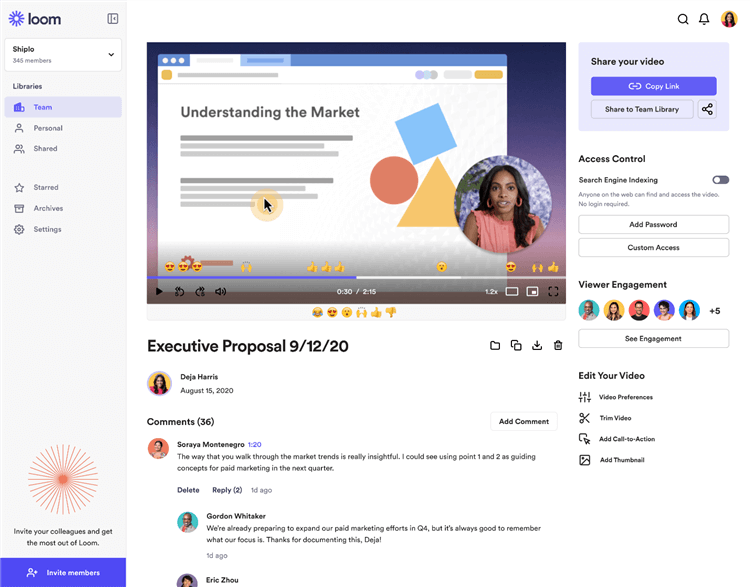
Best SaaS Product Demo Video Maker – Loom
Loom is the industry standard for quick communication. While excellent for internal bug reports or quick customer support replies, it lacks the advanced brand kit and editing polish required for homepage assets. It is a screen recorder for SaaS product demos where speed trumps aesthetics.
- Starting Price: Free tier available; Business plan ~$12.50/user/mo.
- Pros: Ubiquitous; instant sharing via link; great AI features for removing “ums” and “ahs.”
- Cons: “Filler word removal” can sometimes sound robotic; video quality compression is high; limited visual editing (no fancy zooms or pans).
- Verdict: Essential for support, but not polished enough for your home page.
3. Descript
Best For: Content creators who prefer text-based editing.
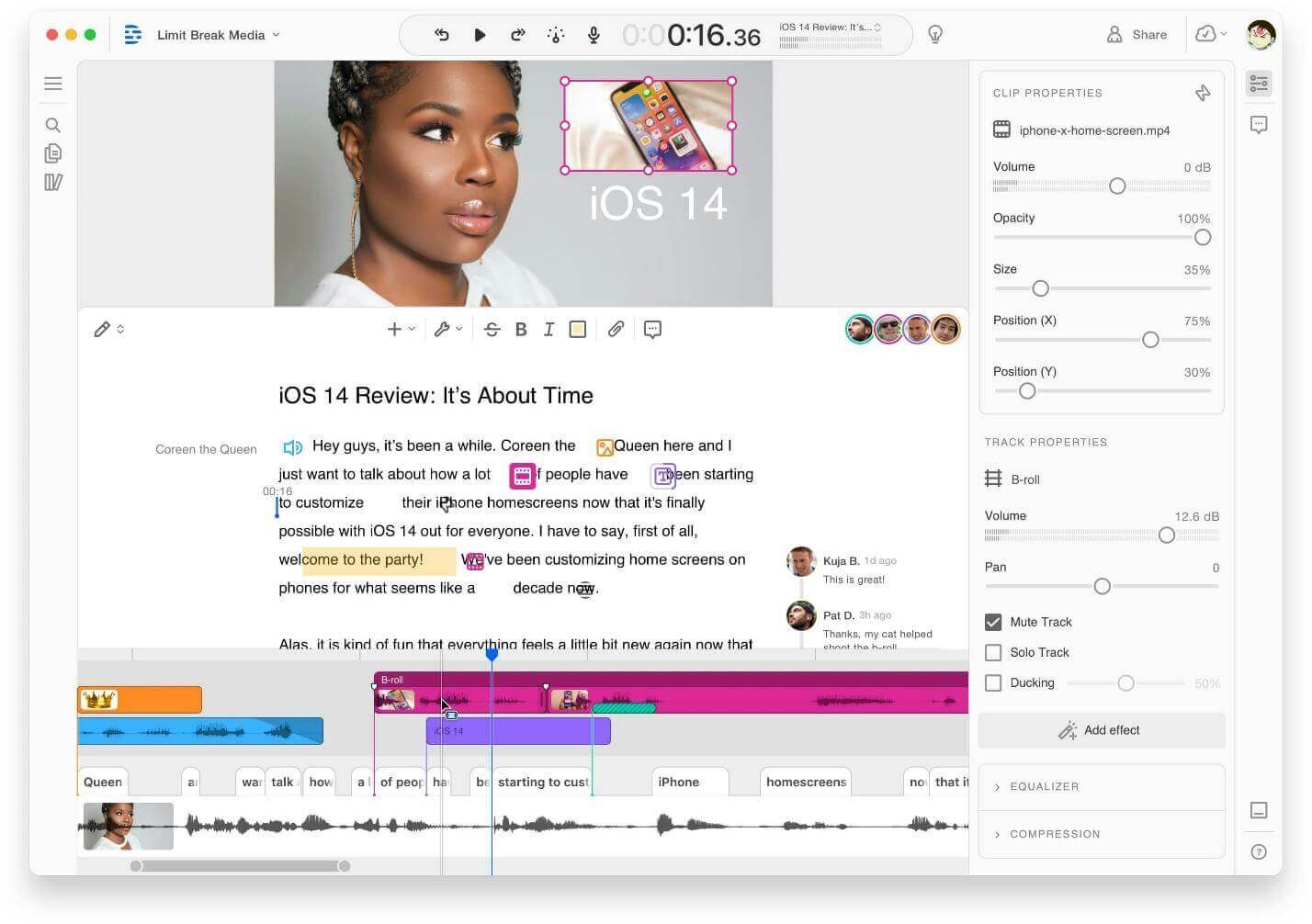
Descript is famous for allowing you to edit video by editing the transcript. If you need to fix a voiceover by deleting text, this is a strong contender. However, for visual screen recording edits (like zooming into a specific button), it has a steeper learning curve than FocuSee.
- Starting Price: Free tier available; Creator plan ~$12/user/mo.
- Pros: Edit video like a Word doc; incredible AI voice cloning (“Overdub”); Studio Sound removes background noise instantly.
- Cons: The visual interface for screen recording edits (zooming/cropping) is clunky compared to its audio features; learning curve is moderate.
- Verdict: Perfect if your demo relies heavily on a scripted voiceover.
4. Camtasia
Best For: Instructional designers requiring detailed manual control.
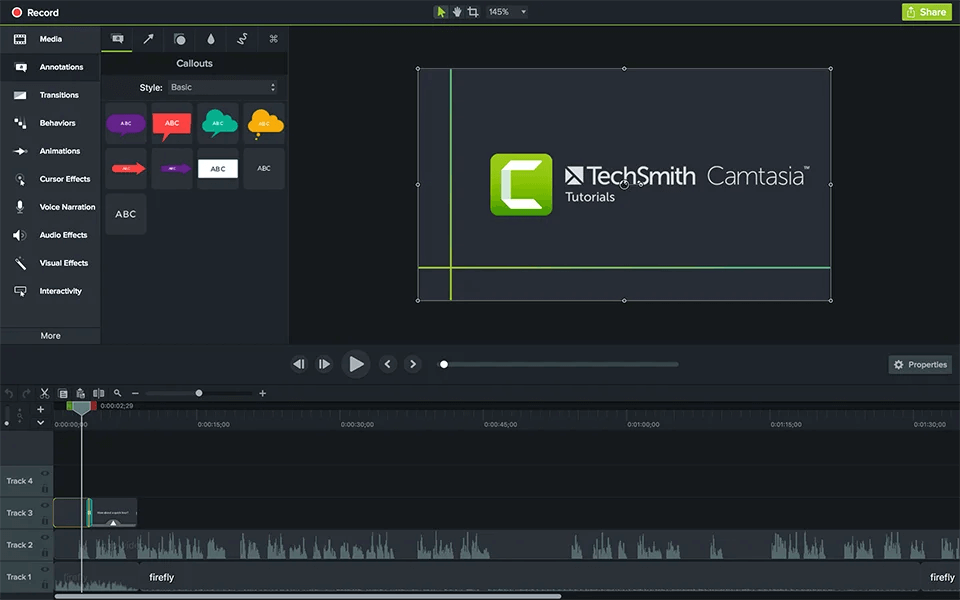
Best SaaS Product Demo Video Maker – Camtasia
Camtasia is the classic product walkthrough video maker for those who want deep control. It offers a multi-scene editor, advanced annotations, and granular audio effects. It is powerful but requires significant time to master compared to automated tools.
- Starting Price: ~$179/year (Subscription) or perpetual license options.
- Pros: Unlimited control over animations, callouts, and layers; handles long-form recording well; industry standard for education.
- Cons: Expensive; steeper learning curve (feels like traditional editing software); interface can feel dated.
- Verdict: The right choice for comprehensive “Academy” or “University” training courses.
5. Vidyard
Best For: Sales teams focused on outbound prospecting.
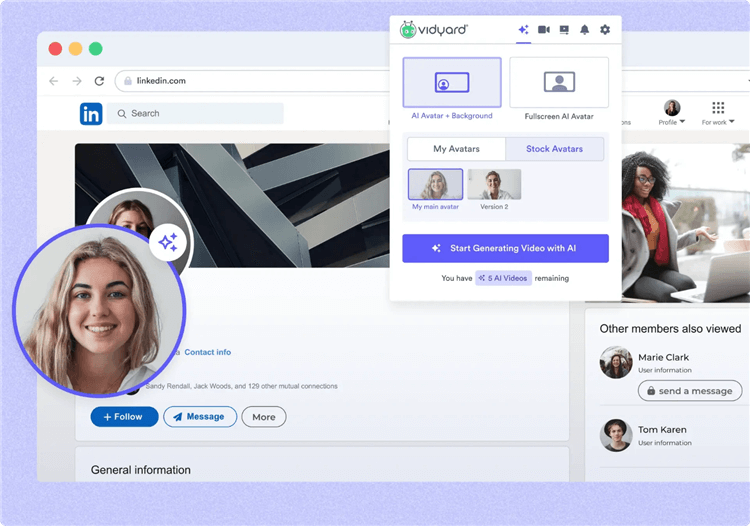
Best SaaS Product Demo Video Maker – Vidyard
Vidyard is optimized for sales enablement. It excels at generating a shareable link with analytics (views, drop-off) to track prospect engagement. While it is a great product demo video tool for sales, its editing capabilities are lighter than FocuSee or Camtasia.
- Starting Price: Free tier; Pro plans start ~$19/mo (Enterprise is significantly higher).
- Pros: Deep integration with HubSpot/Salesforce; notifies you when a prospect watches; allows for “animated GIF previews” in email.
- Cons: Very basic editing tools; aimed at 1-to-1 communication rather than one-to-many marketing assets.
- Verdict: Essential for Account Executives, but not for the Product Marketer.
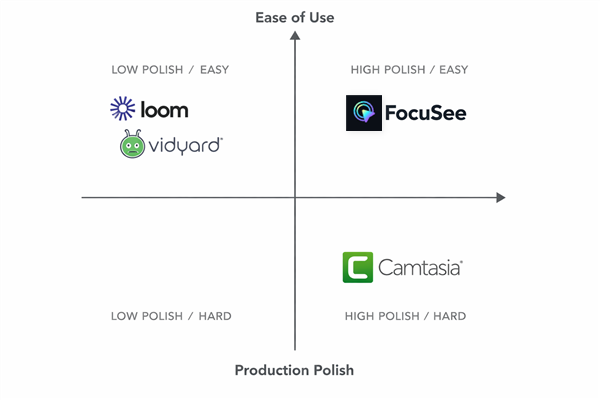
Quadrant Chart of Best SaaS Product Demo Video Makers
Recommendation: Why FocuSee Wins for Marketing Speed
For Maya, the breakthrough came when she switched to FocuSee. She needed to solve the “boring screen recording” problem—static wide shots that fail to direct the viewer’s eye—without spending hours manually animating keyframes.
However, no tool is perfect. If you need complex audio layering or 4K/60fps gaming-level recording, you might find FocuSee limiting. But for standard SaaS dashboards, it solves the core pain points of the non-technical marketer:
- Smart Focus & Auto-Zoom: The software treats your mouse cursor as a cameraman. It instantly transforms a flat recording into a dynamic video that zooms in on buttons and form fields automatically.
- Mouse Click Highlights: To address the need for clarity, this feature ensures that every user interaction is visually distinct, guiding the viewer through the product walkthrough.
- AI Voice & Auto-Subtitles: If you are hesitant about recording your own voice, the AI voice capabilities allow you to type a script and generate professional audio tracks in minutes.
While FocuSee is a paid tool, the ROI is time saved. For Maya, this meant shipping five micro-demos in a single afternoon.
How to Choose the Right Tool for Your Needs
Step 1: Identify Your Use Case
- Marketing homepage walkthrough: FocuSee / Vimeo Create
- Scripted tutorials: Descript
- Quick internal team updates: Loom
Step 2: Consider Automation Features
- Auto zoom & highlights: FocuSee
- AI captions & voiceover: Descript
Step 3: Budget and Long-Term Costs
- One-time license: Camtasia
- Subscription model: FocuSee, Descript, Vimeo, Loom
Quick Takeaway: FocuSee is ideal for marketing demos, Loom works best for internal sharing, and Descript is perfect for script-driven tutorials.
Strategic Decision: Interactive Demos vs. Product Demonstration Video
Before we evaluate specific software, we must address a critical strategic choice that many guides bury at the bottom. What kind of asset do you actually need?
There are two distinct categories of tools in 2025:
- Interactive Demo Platforms (e.g., Arcade, Navattic): These create a “sandbox” experience where the user clicks through a simulated version of your product. These are best for product-led growth (PLG), where you want the user to “feel” the software.
- Product Demo Video Makers (e.g., FocuSee, Camtasia): These create standard MP4 video files. These are best for product walkthroughs on YouTube, social media ads, and hero sections where you want to control the narrative and guide the user passively.
This guide focuses on Category 2: Product Demo Video Makers. If you need a narrative-driven video that you can upload to Vimeo, YouTube, or LinkedIn, keep reading.
Beyond the Tool: The “Micro-Demo” Strategy & Script Template
Here is a critical tip that most other guides miss: the highest ROI comes from distribution and iteration speed, not just editing features.
A common mistake is creating one long “everything” demo. Instead, you should use your product walkthrough video maker to produce 5–8 modular “Micro-Demos” (15–45 seconds each) mapped to specific funnel stages.
By creating modular content, you can update specific scenes quickly when your UI changes without re-recording the entire suite. Adhere to this script template for maximum engagement:
- Hook (0:00-0:05): State the problem immediately. “Stop wasting time on manual data entry.”
- Pain (0:05-0:15): Agitate the issue. “Most teams lose 10 hours a week here, copying and pasting rows.”
- Solution (0:15-0:30): Show the specific feature in action. Use zoom and pan to highlight the one-click resolution.
- Proof (0:30-0:40): Display the final result/output.
- CTA (0:40-0:45): End with a clear directive. “Try the import tool free today.”
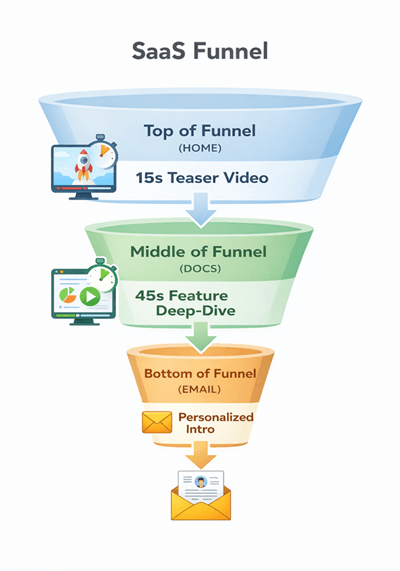
SaaS Funnel
Frequently Asked Questions on SaaS Product Demo Video Maker
Q1: Which SaaS demo video maker automatically zooms in on important actions?
A: FocuSee offers auto-zoom and highlights key clicks or mouse movements, making it ideal for product walkthroughs.
Q2: What tool is best for creating scripted demo videos with AI voiceover?
A: Descript allows text-based editing and AI voiceover, making scripted tutorials fast and polished.
Q3: Can I use Loom for marketing demo videos?
A: Loom is best for quick internal sharing. For marketing or public-facing demos, FocuSee or Vimeo Create is recommended.
Q4: Which tool offers the most professional editing options?
A: Camtasia provides advanced editing features, effects, and annotations for polished demo videos, suitable for teams with video editing expertise.
Final Verdict: Which Tool Fits Your Growth Stage?
Your choice ultimately depends on your role and your immediate goal. Let’s revisit the user scenarios to guide your final decision:
- If you are Maya (Product Marketing/Founder), you need high polish, automation, and speed for landing pages. FocuSee is your best fit. It solves the “I don’t have an editor” pain point by automating zooms.
- If you are in Sales, you need tracking and speed for outbound emails. Vidyard or Loom are your go-to tools for generating a shareable link with analytics.
- If you are in Education/Training, you need deep control for long-form content. Camtasia remains the king of the “Academy” format.
The most important step is to stop overthinking the tool and start capturing your product’s value. You do not need to be a video expert to create a demo that converts. Download the free trial of FocuSee (or your tool of choice) today, record your first micro-demo using the script above, and solve your deadline problem in minutes, not days.