Screen Studio vs Tella: Which Auto-Editing Screen Recorder is Best?

Hands-on Test: Screen Studio vs Tella
We recorded the same 5-minute software tutorial with both tools and measured setup, recording, editing, and export time.
| Screen Studio | Tella | |
| Setup Time | 2 min | 3 min |
| Recording | 5 min | 5 min |
| Basic Editing | 3 min | 6 min |
| Export/Share | 2 min | 1 min |
| Total Workflow | 12 min | 15 min |
| Auto-Zoom | Yes | Yes |
| Cursor Effects | Automatic | Manual |
| Local Rendering | Yes | No |
Result: Screen Studio required less post-production for a screen-focused tutorial, while Tella was faster for cloud-based sharing and offered more flexibility for clip-based editing.
Screen Studio Overview: Cinematic Polish for Mac Users
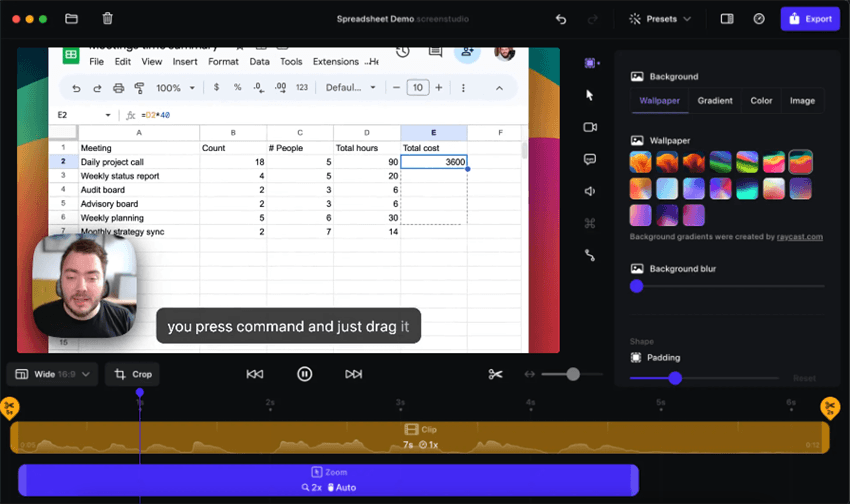
Screen Studio Interface – Mac Only
In our test, Screen Studio required minimal manual editing to produce a polished software tutorial. It automatically tracks your mouse, applies smooth zooms, and polishes cursor movements to create high-quality demo videos.
🚨 Major Dealbreaker for PC Users: Screen Studio is strictly a macOS application. If you are on a Windows PC, you cannot download, install, or find a workaround to use this software natively on your operating system at all.
Pros:
- Excellent Mac-native application with high-performance rendering.
- Built-in cinematic auto-zoom and cursor smoothing that require no manual keyframing.
- Clean, minimalist interface designed specifically for macOS.
Cons:
- Mac-exclusive: Completely excludes the Windows market.
- Pricing structure can be confusing for some, as it typically involves a one-time purchase combined with paid annual updates for new features.
If you have a Mac and want a highly polished native tool, Screen Studio is a strong choice. But if you work on a PC, you will need to look elsewhere.
Tella Overview: Browser-Based Recording and Cloud Sharing
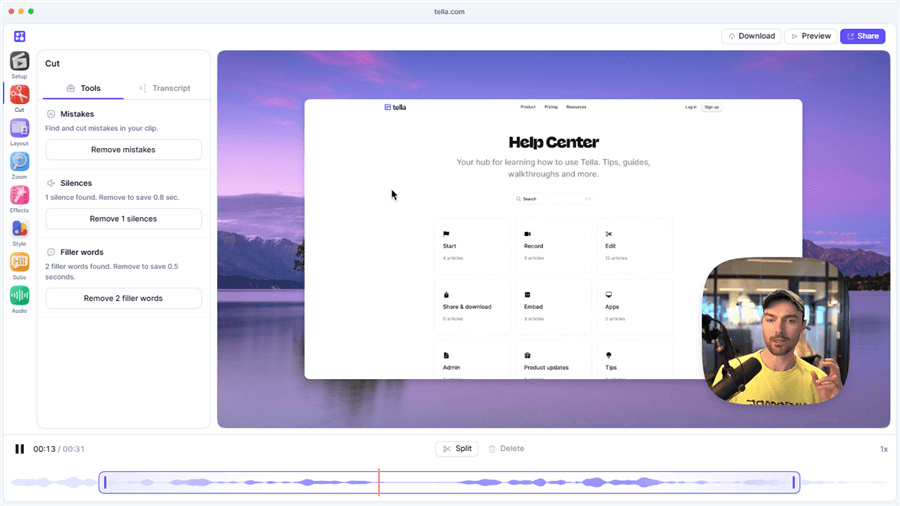
Tella Interface
Tella approaches screen recording differently by focusing on browser-based workflows and easy online collaboration. It is built for creators and teams who want to record from their browser, edit via transcripts, and share links instantly.
Pros:
- Cross-platform support (works on both Mac and Windows via the browser).
- Transcript-based editing makes trimming out mistakes as easy as editing text.
- Highly customizable layouts for arranging your camera and screen.
Cons:
- Heavily cloud-dependent: You need an active internet connection to render and process your final videos.
- Operates on a recurring subscription pricing model.
- Browser-based recording can sometimes lack the deep performance, high resolution, and offline stability of a native desktop application.
Tella is a great option for heavy collaborators who do not mind a subscription and cloud reliance, but it might frustrate users who want to edit and render high-quality files locally on their own machines.
Feature Comparison: Screen Studio vs Tella vs FocuSee
To help you compare your options side-by-side, here is how Screen Studio, Tella, and a top Screen Studio alternative like FocuSee stack up across key decision factors.
| Screen Studio | Tella | FocuSee | |
| Supported Platforms | macOS only | Mac, Windows (Web) | Windows & macOS |
| Application Type | Native desktop app | Cloud / Browser app | Native desktop app |
| Auto-Editing | Cinematic zoom, cursor smoothing | Transcript editing, custom layouts | Smart zoom, cursor tracking, auto-captions |
| Rendering | Local processing | Cloud rendering | Local processing (up to 4K) |
| Pricing | Paid license | Subscription | Varies by plan |
| Best For | Mac creators | Browser collaboration | Cross-platform product demos |
While Screen Studio and Tella serve different user needs, FocuSee bridges the gap by offering the native desktop performance and auto-zoom of Screen Studio, but for both Windows and Mac users.
The Windows Dilemma and Offline Rendering Limits
If you are comparing Screen Studio and Tella, you might quickly run into a frustrating workflow gap. For PC creators looking for a Screen Studio for Windows solution, you have to navigate two major hurdles:
- The OS Restriction: Screen Studio completely ignores the PC market. There is no workaround to run it on a Windows operating system. This leaves PC users hunting for an alternative that can replicate those smooth, cinematic zoom effects without requiring hours of manual keyframing in complex editing software.
- The Cloud-Dependency Tradeoff: While Tella technically solves the Windows compatibility issue, it introduces a different limitation: cloud reliance. Because Tella relies on browser recording and cloud servers, it lacks deep offline processing capabilities. If you have a slow internet connection, or if you simply prefer to keep your video files securely on your local hard drive for fast offline rendering, Tella’s cloud workflow might cause workflow disruptions.
This creates a clear need for a native desktop application that offers Screen Studio-style automatic polish but works seamlessly offline across both operating systems.
FocuSee: The Best Alternative for Windows and Offline Users
For users who need cinematic auto-zoom and cursor polish but are on a Windows PC—or those who simply prefer a native, cross-platform desktop app over Tella’s cloud workflow—FocuSee provides an ideal solution.
FocuSee is an AI-powered auto-editing screen recorder designed natively for both Windows and macOS desktop environments. It eliminates the “Windows dilemma” by bringing automated video enhancement directly to your local machine, allowing you to create polished tutorials and demos without a steep learning curve or cloud rendering delays.
How FocuSee streamlines your workflow:
Step 1. Record your screen natively: Launch the desktop app on Mac or Windows and select your recording area.
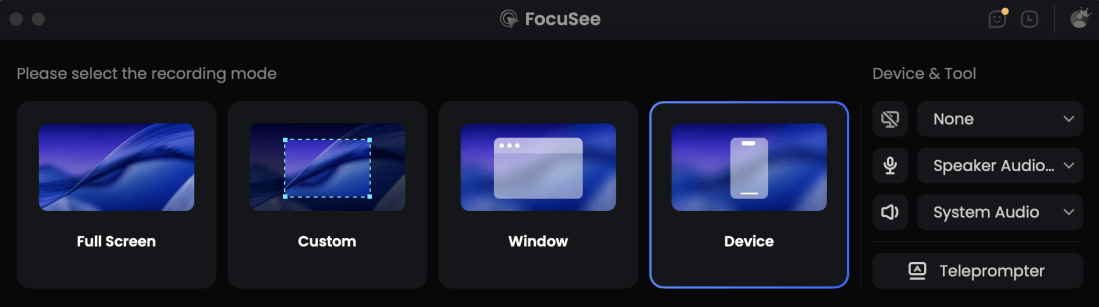
Choose Recording Model
Step 2. Let AI enhance the visuals: FocuSee automatically applies smart zooms, highlights your cursor clicks, and generates AI subtitles (under supported conditions).
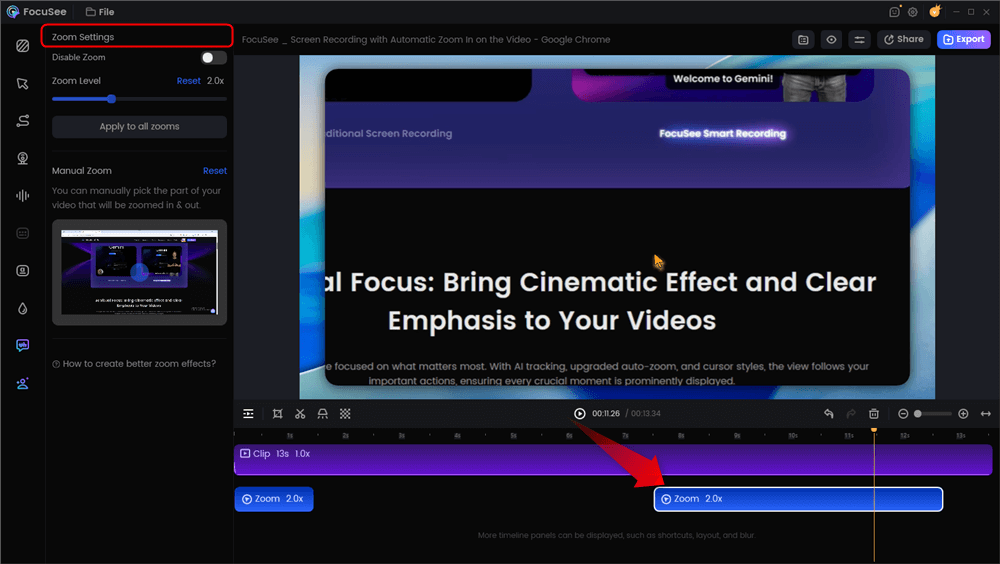
Automatic Zoom Effects
Step 3. Refine locally: Adjust camera layouts, trim out pauses, or add annotations directly on your computer.
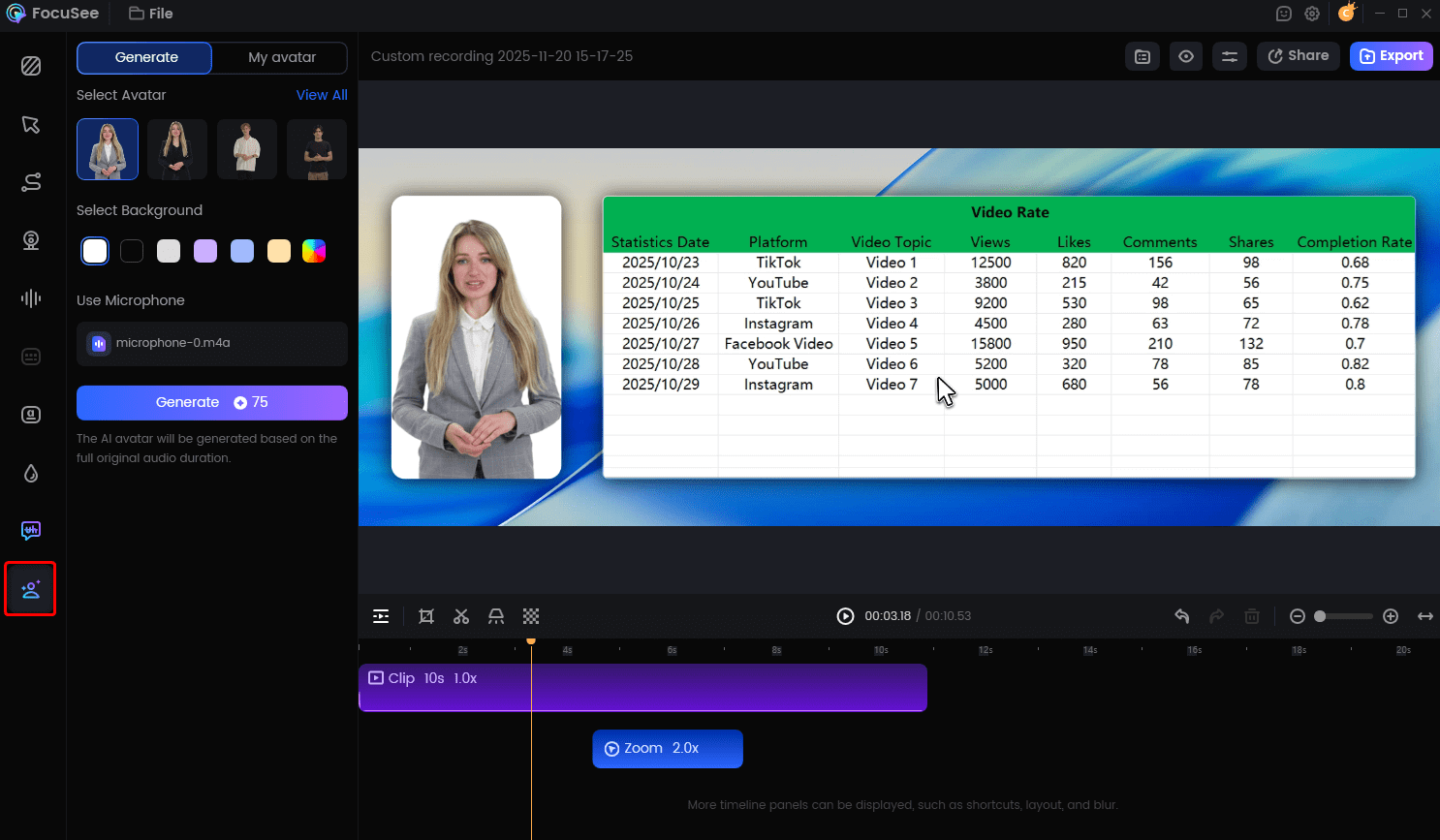
Create Your AI Acatar
Step 4. Export offline: Render your final polished video locally, supporting exports up to 4K where compatible, without relying on an internet connection.
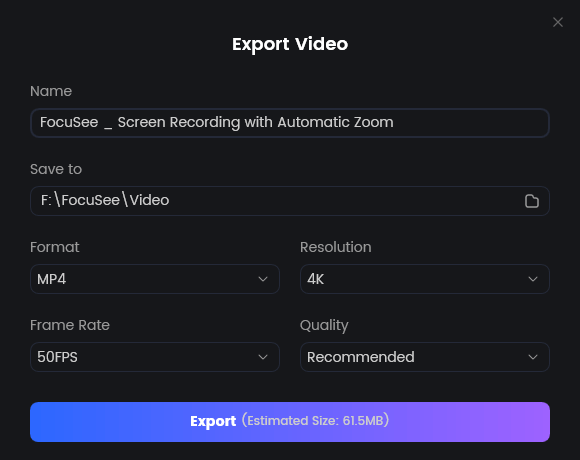
Export Your Video
By processing your video locally, FocuSee gives you the performance of a native app while saving you hours of manual editing time.
How to Decide: Which Recorder Fits Your Workflow?
Choosing the right auto-editing screen recorder ultimately depends on your operating system, rendering preference, and collaboration style. Here is a quick scenario-based guide to help you decide:
- Choose Screen Studio if: You are strictly working on a Mac, you are willing to pay for a native application with one-time licenses (and annual feature updates), and your primary goal is achieving the highest level of cinematic visual polish with zero Windows requirements.
- Choose Tella if: You collaborate heavily with a remote team, need quick browser access without installing heavy software, prefer transcript-based text editing, and do not mind paying a recurring subscription or relying on an internet connection for cloud rendering.
- Choose FocuSee if: You are on a Windows PC and want Screen Studio-style auto-zoom effects, OR you prefer the stability of native cross-platform desktop performance over browser apps, making it a highly recommended Tella alternative for those who want to process high-quality local files without cloud dependencies.
Common FAQs About Screen Studio, Tella, and Alternatives
Is Screen Studio available on Windows?
No, Screen Studio is strictly a macOS application. It cannot be downloaded or used on a Windows PC.
Do I need an internet connection to render videos with Tella?
Yes. Because Tella is primarily a browser-based application, it relies heavily on cloud infrastructure to render and process your final videos.
What is the best alternative to Screen Studio for PC?
FocuSee is a highly recommended alternative for Windows users. It provides similar native desktop auto-zoom capabilities, cursor tracking, and local file rendering for PC creators.
How does Screen Studio pricing compare to Tella?
Screen Studio generally uses a paid license model with annual fees for continuing updates, whereas Tella operates on a standard recurring SaaS subscription model. Pricing models change, so it is best to check their official pages for current rates.
Can I get cinematic auto-zoom on Windows without Screen Studio?
Yes. You can achieve automatic zoom and cursor spotlight effects natively on Windows by using FocuSee, which handles these edits automatically during the recording process.
Which screen recorder is best for offline processing and high-quality local rendering?
Native desktop applications like Screen Studio (for Mac) and FocuSee (for both Mac and Windows) are best for offline processing because they utilize your computer’s local hardware rather than relying on a cloud server.
Final Verdict: Which Auto-Editing Screen Recorder Fits You?
When comparing Screen Studio and Tella, the final decision largely comes down to your platform (Mac vs Windows) and your preferred application type (Native Desktop vs Cloud/Browser).
Screen Studio is a fantastic tool for Mac users who want flawless native polish, but it completely leaves PC users in the dark. On the other hand, Tella solves the cross-platform issue but ties your workflow to the browser and cloud infrastructure, which isn’t ideal for those who prefer offline editing and local file control.
If you want the best of both worlds—the automatic cinematic zoom of Screen Studio combined with cross-platform native desktop performance—FocuSee is the clear next step.
Ready to streamline your tutorial creation without worrying about OS limitations or cloud delays? Try FocuSee to bring AI-powered auto-editing directly to your Windows or Mac desktop.