Screen Studio Review: Quick Verdict, Pricing, & Windows Alternatives

Screen Studio has become one of the most popular screen recording tools for creators, educators, and marketers. Its signature auto-zoom effects, smooth cursor tracking, and polished animations make it easy to create professional-looking videos with minimal editing.
But before you subscribe, two questions matter most: Is Screen Studio worth the price, and is it the right choice if you’re not a Mac user?
While Screen Studio delivers impressive results, it is limited to macOS and comes with a premium subscription cost. For Windows users—or anyone looking for better value—the key question is whether a more affordable alternative can deliver the same polished recording experience.
In this review, we’ll examine Screen Studio’s features, pricing, pros and cons, and compare it with the best alternatives available in 2026.
Core Features: Why Do Creators Love Screen Studio?
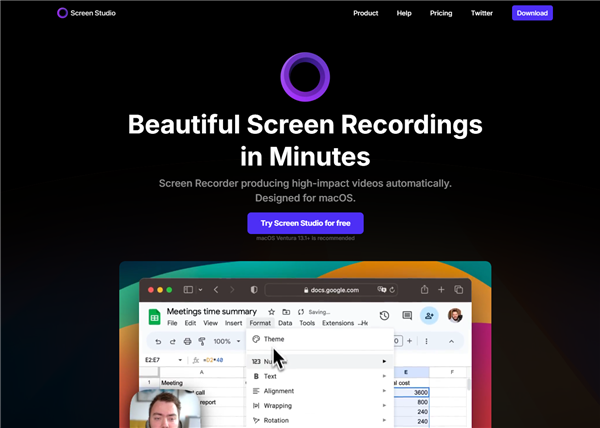
Screen Studio has earned its stellar reputation primarily through its “visual-first” approach to screen recording. Instead of forcing creators to manually edit every keyframe in a complex timeline, it automates the most tedious parts of video polish.
Screen Studio
Its standout feature is the cinematic auto-zoom. The software intelligently follows your cursor, creating seamless zoom-ins and pans that make tutorials and product demos look highly produced with zero manual effort. The intuitive UI ensures there is virtually no learning curve for these basic visual adjustments. For creators looking for dedicated Mac video recording software that prioritizes aesthetics, this is a major draw.
Beyond zooming, Screen Studio applies automatic cursor smoothing—removing the jerky, erratic mouse movements typical in raw screen captures—and offers beautiful background generation tools to give your videos a polished, studio-quality frame. For creators who want maximum visual impact with minimal editing, Screen Studio’s physics engine delivers exceptional results.
Screen Studio Pros and Cons
To help you decide if this tool is right for your workflow, here is a fair breakdown of its strengths and weaknesses:
Pros:
- Beautiful visual polish: Offers cinematic auto-zoom and seamless panning out of the box.
- Zero learning curve: The sleek UI makes applying visual effects incredibly easy.
- Excellent cursor tracking: Automatically smooths out mouse movements for a professional look.
- High-quality backgrounds: Easily add stylized backgrounds and device frames.
Cons:
- Strictly Mac-only: This completely blocks out Windows users and cross-platform teams.
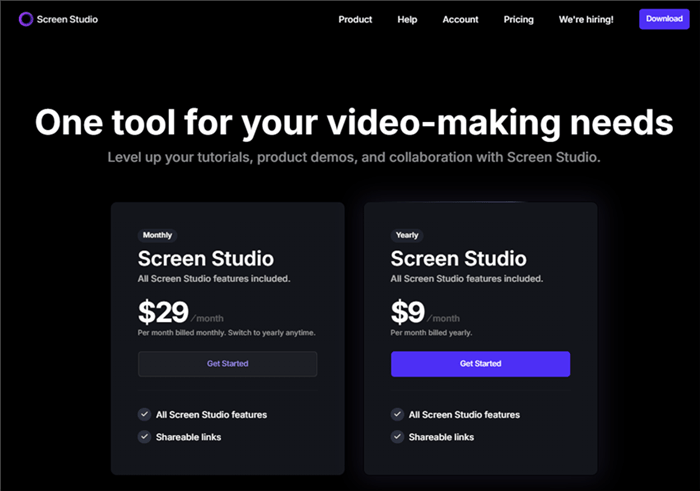
- Premium pricing: Screen Studio now uses a subscription model starting at $29/month or $108/year ($9/month billed annually). While the annual plan is significantly cheaper, many creators still consider it expensive compared with one-time-purchase alternatives.
- Lacks AI speech workflows: Does not include automatic subtitles, teleprompter, or filler-word removal.
- Basic timeline editing: Focuses on visual physics rather than advanced multi-clip timeline assembly.
If the lack of Windows support or missing AI editing tools is a roadblock for you, you will need to explore alternatives designed for cross-platform, comprehensive auto-editing.
Screen Studio Pricing: Is It Worth the Cost?
One of the biggest considerations for potential buyers is Screen Studio’s pricing. Unlike many screen recording tools that offer a one-time purchase option, Screen Studio now follows a subscription model.
Screen Studio Pricing
At the time of writing, Screen Studio costs $29 per month or $108 per year (equivalent to $9/month when billed annually). Both plans include all features, future updates, commercial usage rights, and support. New customers can also try the software for free before purchasing.
Is it worth the price? For Mac creators who regularly produce polished product demos, tutorials, and social media videos, the automatic zooming, cursor smoothing, and cinematic motion effects can save considerable editing time, making the annual plan easier to justify.
However, users looking for AI-powered editing workflows may find the pricing harder to justify. At $108 per year, Screen Studio focuses primarily on visual presentation rather than features such as AI subtitle generation, teleprompter support, filler-word removal, or advanced automatic editing. If those capabilities are important to your workflow, a more comprehensive alternative may provide better overall value.
The Big Dealbreaker: Is There a Screen Studio for Windows?
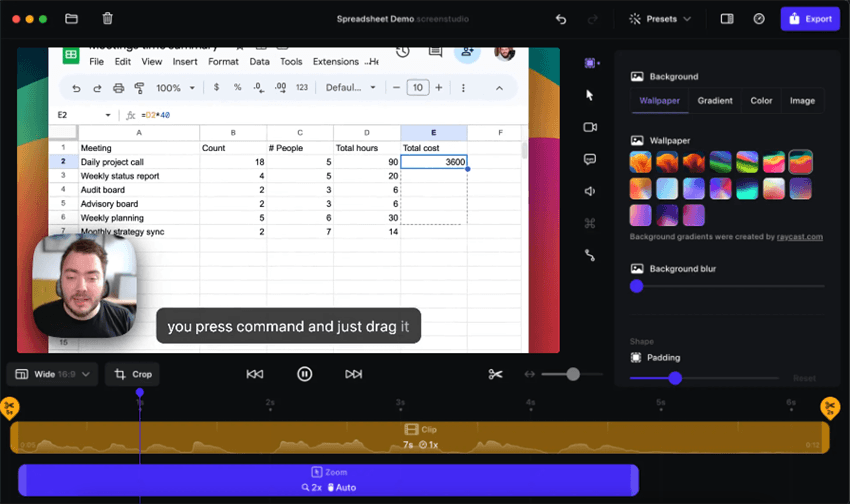
No, there is no Screen Studio version for Windows. The software is built exclusively for macOS.
Screen Studio Interface – Mac Only
This is often the biggest dealbreaker for potential users. Because it relies heavily on native Apple frameworks to render its visual physics and cursor smoothing, the developers have not created a PC version. This leaves a massive gap for Windows users, SaaS teams using PCs, and cross-platform creators who want that same cinematic auto-zoom effect.
This OS limitation can be especially painful for collaboration. Imagine a cross-platform SaaS company: the marketing manager uses a Mac and creates beautiful Screen Studio promos, but the customer support team uses PCs. Because the support team cannot install the software, it becomes impossible to share project files or maintain a consistent, branded video style across the company’s help center.
It can be incredibly frustrating to find a tool that perfectly automates your visual editing, only to realize it doesn’t support your operating system. Fortunately, the market has responded, and there are now dedicated options mimicking Screen Studio for Windows that offer similar automated zoom features while officially supporting PC ecosystems.
The Best Screen Studio Alternative: FocuSee
If you are looking for a Screen Studio alternative that delivers similar visual results while offering broader platform support and better value, FocuSee is one of the strongest options available.
Unlike Screen Studio, which is limited to macOS and starts at $29/month or $108/year, FocuSee is available on both Windows and Mac and offers a more affordable pricing structure, including a lifetime purchase option for users who prefer a one-time payment.
Record Screen with Cursor Following
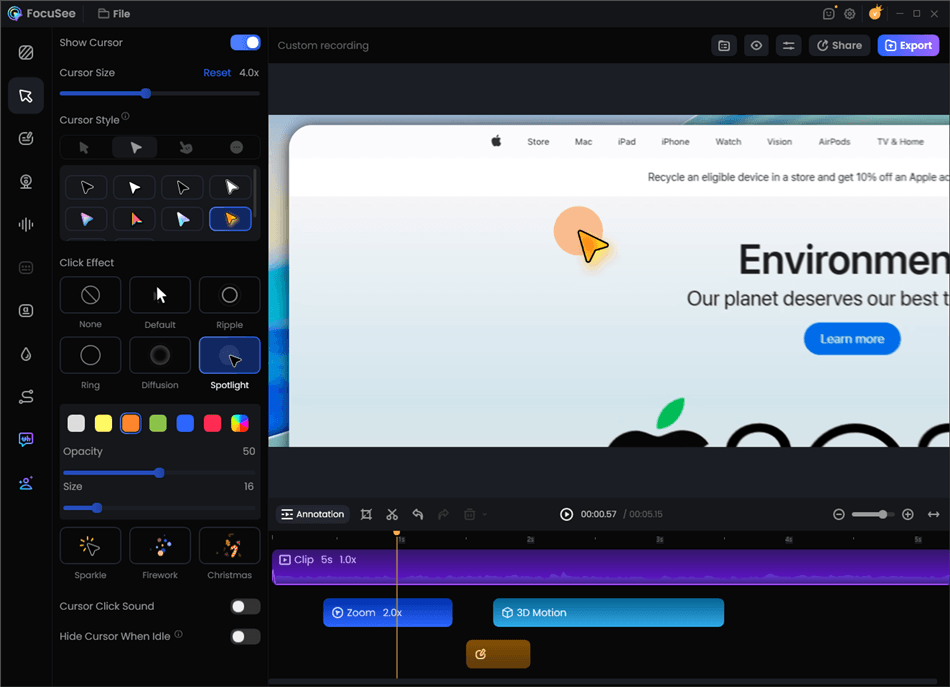
What makes FocuSee particularly compelling is that it can achieve the same signature visual effects that made Screen Studio popular. Features such as automatic zoom-ins, cursor tracking, click highlighting, smooth motion effects, and visual focus enhancements help create professional-looking tutorials and product demos without manual editing.
However, FocuSee goes beyond visual polish. While Screen Studio primarily focuses on screen recording aesthetics, FocuSee combines those effects with additional productivity and AI-powered editing tools, making it a more complete workflow solution for content creators, educators, marketers, and product teams.
Key advantages of FocuSee include:
- Available on both Windows and macOS.
- More affordable than Screen Studio, with lifetime licensing available.
- Automatic zoom and cursor tracking comparable to Screen Studio.
- AI subtitle generation for faster video production.
- Built-in filler-word and silence removal to clean up narration.
- Webcam recording, annotations, backgrounds, and branding options.
- End-to-end workflow from recording to export without requiring a separate editor.
With FocuSee, users do not need to sacrifice visual quality to gain flexibility. You can achieve the same polished screen-recording style associated with Screen Studio while benefiting from cross-platform compatibility, richer editing features, and a more budget-friendly pricing model.
Comparison: Screen Studio vs. FocuSee
To make your decision easier, here is a direct, objective comparison between Screen Studio’s visual-first approach and FocuSee’s comprehensive AI approach.
| Screen Studio | FocuSee | |
| Platform Support | macOS only | Windows & macOS |
| Auto Zoom Effects | ✅ | ✅ |
| Cursor Tracking | ✅ | ✅ |
| AI Subtitles | ❌ | ✅ |
| Filler Word Removal | ❌ | ✅ |
| Teleprompter | ❌ | ✅ |
| One-Time Purchase | ❌ | ✅ |
| Starting Price | $29/month | Lower-cost plans available |
| Best For | Mac users focused on visual polish | Users wanting more features with similar effects |
The Verdict on Features:
Screen Studio is the undisputed champion for Mac purists who want the absolute best cinematic visual physics and UI polish. However, if you are looking for a true cross-platform Screen Studio alternative, FocuSee is the superior choice for PC users and anyone who needs a complete auto-editing workflow that includes AI subtitles, audio cleanup, and teleprompter guidance alongside smart zooms.
Other Notable Alternatives
While FocuSee is the closest direct alternative for auto-editing, there are other tools on the market depending on your needs:
- Basic Native Recorders: Tools like QuickTime (Mac) or the Windows Snipping Tool are free and easy, but they completely lack editing, zooming, or AI capabilities.
- Traditional Video Editors: Software like Camtasia or Premiere Pro offers full manual timeline control. These are incredibly powerful but require you to manually keyframe every zoom, cut out every filler word by hand, and type your own subtitles—costing you hours of editing time.
For creators who want the perfect balance of automated visual zooms and AI-assisted audio/text editing without the manual labor, FocuSee remains the most practical workflow alternative.
Final Verdict: Should You Buy Screen Studio or Choose an Alternative?
Ultimately, deciding whether to buy Screen Studio comes down to your operating system and your workflow priorities.
If you are on a Mac, have a premium budget, and your only goal is creating the most visually beautiful, cinematic screen zooms with zero learning curve, Screen Studio is a fantastic, highly recommended choice.
However, if you use a Windows PC, or if you are a cross-platform creator who wants a tool that also handles the tedious parts of audio and text editing, Screen Studio will leave you wanting more. For users who need smart visual zooms combined with AI subtitles, filler-word removal, and teleprompter guidance, FocuSee is the better, more comprehensive choice.
Ready to speed up your screen recording workflow with smart zooms and AI editing on either Windows or Mac? Download FocuSee today and see how much time you can save on your next tutorial or product demo.
Frequently Asked Questions
Is Screen Studio worth it?
Screen Studio is worth considering if you are a Mac user who wants to create polished screen recordings with minimal editing. Its automatic zoom effects, smooth cursor movements, and cinematic animations make it especially useful for product demos, tutorials, and social media videos. However, if you need Windows support, AI editing features, or a more affordable option, other alternatives may offer better value.
How much does Screen Studio cost?
Screen Studio currently uses a subscription pricing model. It costs $29 per month or $108 per year when billed annually. The subscription includes all features, future updates, commercial usage rights, and customer support. Unlike some screen recorders, Screen Studio does not offer a lifetime purchase option.
Is Screen Studio only for Mac?
Yes. Screen Studio is currently available only for macOS and does not have an official Windows version. This makes it a great choice for Mac users but a limitation for Windows users, PC-based teams, and cross-platform workflows. Users looking for a Screen Studio alternative for Windows can consider tools like FocuSee.
Can I use Screen Studio for free?
Screen Studio offers a free trial that allows users to test its features before purchasing. However, continued access requires a paid subscription. The free trial is mainly designed to help users evaluate whether its cinematic recording effects and editing workflow fit their needs.
What is Screen Studio used for?
Screen Studio is mainly used to create professional-looking screen recordings, including product demos, software tutorials, app walkthroughs, and social media videos. Its automatic zoom, cursor smoothing, and visual effects help turn basic screen captures into more engaging videos without requiring advanced editing skills.
What are the best alternatives to Screen Studio?
The best Screen Studio alternative depends on your needs. If you want similar automatic zoom effects with support for both Windows and Mac, FocuSee is a strong option. If you need advanced manual video editing, tools like Camtasia or Premiere Pro may be better suited. For free screen recording, OBS Studio is a popular choice, although it requires more manual editing.
Does Screen Studio have AI editing features?
Screen Studio focuses primarily on cinematic screen recording effects rather than AI-powered editing workflows. It does not currently include features such as automatic subtitles, filler-word removal, AI audio cleanup, or teleprompter support. Users who need these AI-assisted editing features may prefer a more comprehensive screen recording tool.
What is the difference between Screen Studio and FocuSee?
Screen Studio is a Mac-only screen recorder focused on creating cinematic videos with automatic zooms, cursor effects, and smooth animations. FocuSee works on both Windows and macOS while offering similar visual effects plus additional editing features such as AI subtitles, filler-word removal, teleprompter support, webcam recording, and branding tools.