How to Run Effective Training Sessions in 2026: A Practical Framework

Facing a room of disengaged employees—whether in person or on muted screens—is frustrating. As an L&D leader, your goal is to build real competence, but long, passive onboarding sessions quickly lose attention and make effectiveness hard to measure.
Take John, an L&D manager onboarding 50 remote sales reps on a new CRM. His slide-heavy sessions led to low engagement and poor adoption.
By combining active learning with targeted prerequisite videos, he turned onboarding into an interactive, high-impact experience. This guide shows the exact framework he used.
This article was co-created by Lucas Chen and Loris. Loris is a Lead Content Editor & L&D Specialist, specializing in turning onboarding from passive teaching into active facilitation. The frameworks in this guide have been tested in 50+ corporate training scenarios using standard tools like Windows, macOS, Teams, Zoom, and modern LMS platforms.
Understanding Why Traditional Corporate Training Sessions Fail
Before adopting modern instructional design, it helps to analyze exactly why older procedures consistently underperform. The biggest reason instructional events fail is passive delivery. Simply presenting information does not lead to learning.
When a presenter displays text-dense slides and speaks simultaneously, the human brain struggles to process both inputs efficiently, causing cognitive overload. Participants lose attention quickly, and instructors cannot gauge understanding until the event is already over.
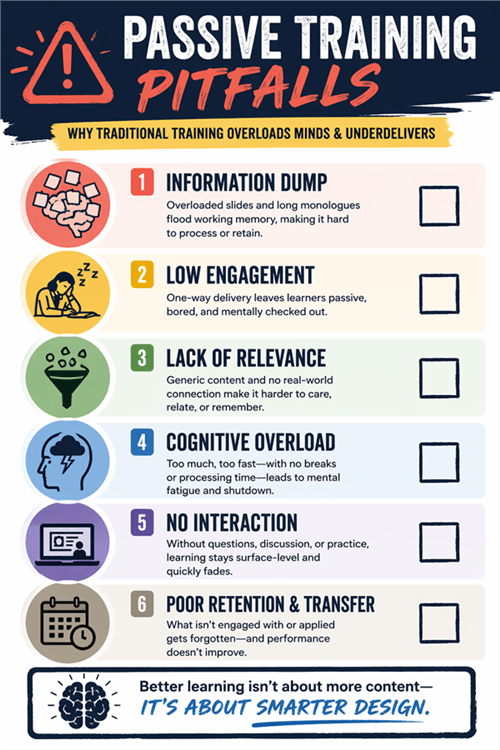
Why Traditional Corporate Training Sessions Fail
Top Pitfalls of Passive Delivery
- Information Dumping: Attempting to cover too many topics in one sitting prevents long-term retention.
- Lack of Assessment: Waiting until the end of a long course to evaluate understanding means the instructor cannot correct mistakes in the moment.
- Irrelevant Content: Generic presentations that do not address the specific daily tasks of the audience lead to immediate disengagement.
- Poor Reference Documentation: Failing to provide clear, accessible materials leaves employees without reliable support after the event concludes.
Recognizing these common obstacles allows you to deliberately design your upcoming learning and development programs to avoid them.
The Hybrid Approach: Live Facilitation vs. Prerequisite Microlearning
When planning corporate instruction, you do not have to choose strictly between exhausting live lectures and entirely automated online training sessions. Human resources and onboarding rely heavily on connection and culture. The solution is a hybrid “flipped classroom” model.
Traditional live lectures carry a high time cost. An instructor must repeatedly deliver the exact same background information, exhausting the trainer and limiting the frequency of employee onboarding.
By creating professional, bite-sized video assets for the technical or background knowledge, you reduce the time spent lecturing. Employees review these videos beforehand. Then, your valuable live time is reserved entirely for interactive discussion, authentic human connection, and problem-solving.
Scaling Employee Training Sessions with FocuSee Video Automation
Creating prerequisite training materials doesn’t have to be time-consuming. FocuSee streamlines the entire process by combining screen recording with AI-powered post-production—helping teams produce clear, structured microlearning videos in minutes.
FocuSee Official Website
For software training (like onboarding a new CRM), clarity matters more than anything. FocuSee ensures learners stay focused with Smart Focus and Auto-Zoom, while its built-in annotation tools reinforce key actions with on-screen cues—so viewers not only watch, but understand.
Instead of spending hours editing, AI handles subtitles, removes filler words, and cleans audio automatically. The result is a consistent, professional training asset you can reuse at scale.
Key Features of FocuSee
- Smart Focus & Auto-Zoom – Automatically highlights clicks and critical UI areas
- Annotations (Text, Arrows, Shapes) – Add visual guidance to explain steps and decisions clearly
- AI Smart Cut – Removes filler words, silences, and unnecessary pauses
- Auto Subtitles – High-accuracy speech recognition for instant captions
- Cursor Highlighting – Keeps attention on user actions
- Multi-source Recording – Capture screen, mic, system audio, and webcam independently
- Noise Reduction – Improves audio clarity automatically
- Local Export – Full control with no forced cloud upload
- Cross-Platform – Stable performance on Windows and macOS
Simple Workflow to Create Training Videos:
Step 1. Record the Workflow: Capture your screen while demonstrating the task step-by-step.
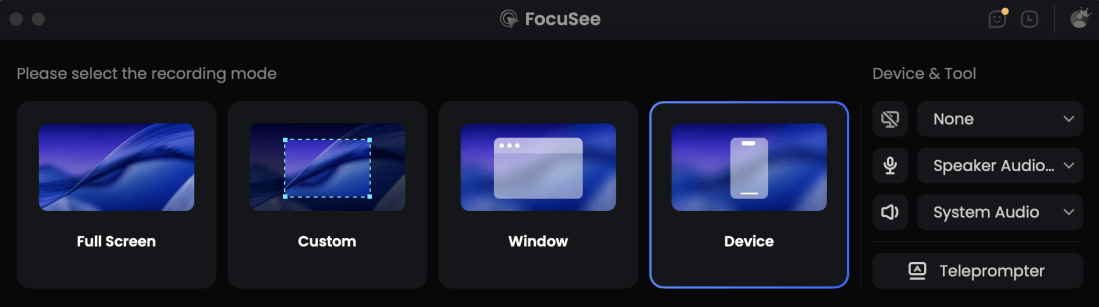
Choose the Recording Model
Step 2. Auto-Enhance with AI: Let FocuSee apply zooms, cuts, subtitles, and audio cleanup.
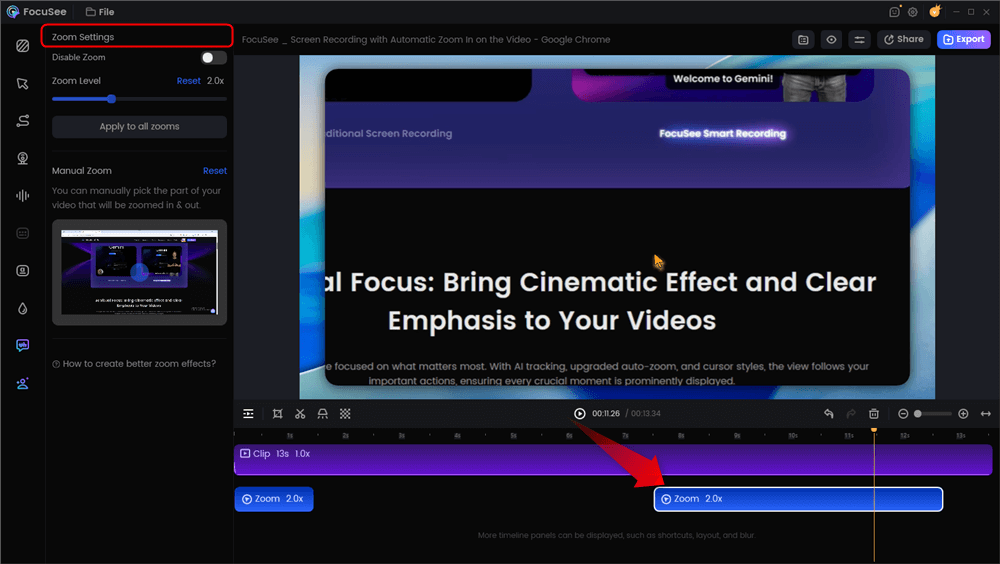
Automatic Zoom Effects
Step 3. Add Annotations for Clarity: Insert arrows, labels, or highlights to explain key actions and decisions.
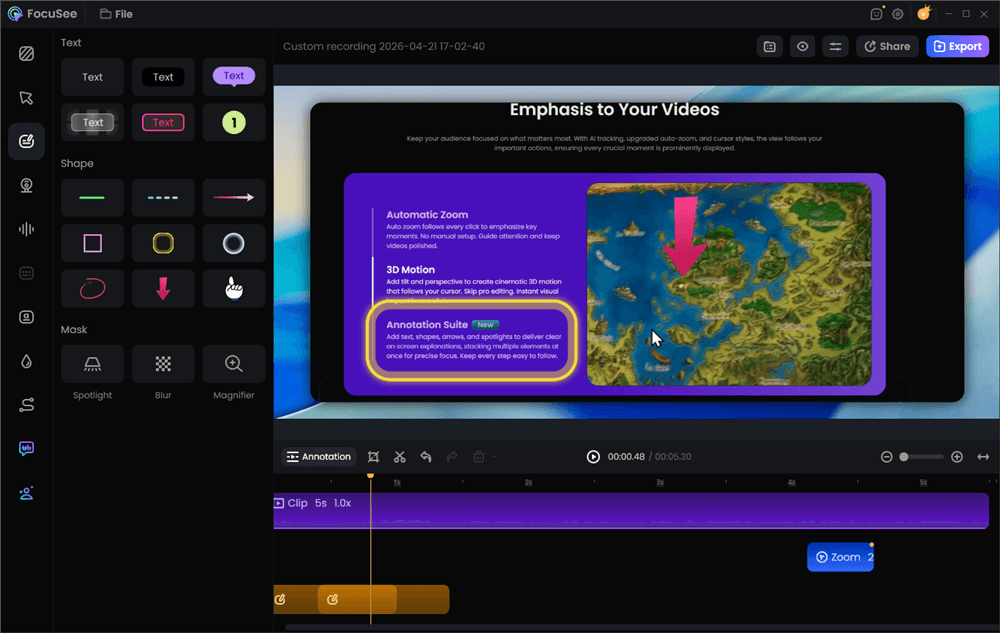
Add Annotations for Clarity
Step 4. Export & Deploy: Share the final video in your LMS or onboarding flow.
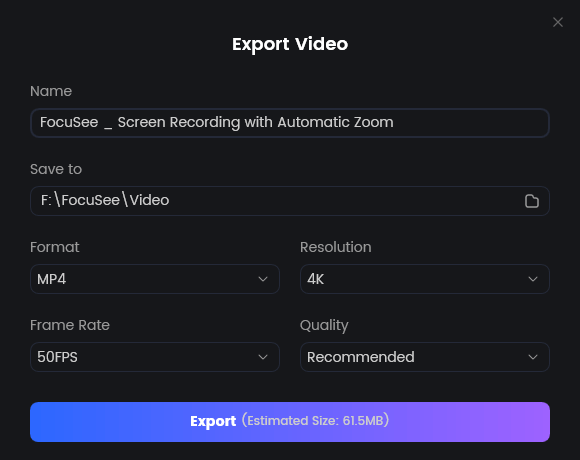
Export Your Video
A Step-by-Step Training Session Plan and Agenda Template
Many professionals lack a clear agenda. A well-structured training session plan resolves this by organizing time allocations and learning objectives into a dependable facilitator guide.
Here is the exact 60-minute template John applied to his CRM onboarding.
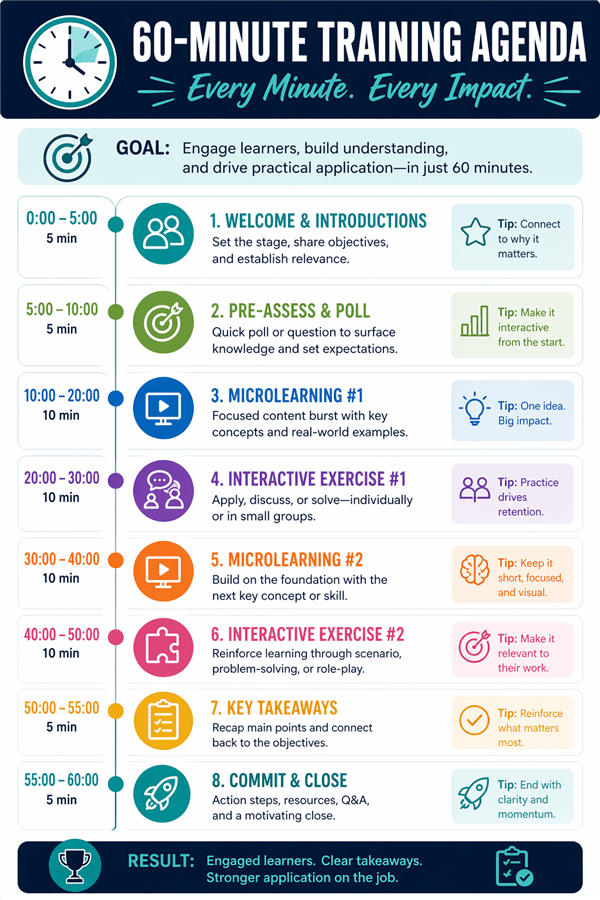
A Step-by-Step Training Session Plan and Agenda
60-Minute Facilitator Guide Template
- Introduction and Objectives (5 Minutes): State the exact learning outcomes. Explain what participants will be able to do by the end of the hour.
- Core Concept Review (10 Minutes): Briefly review the prerequisite FocuSee video materials. Do not re-teach the whole concept; just clarify the most vital points.
- Interactive Application (25 Minutes): Break attendees into smaller groups to apply the concept. Provide a highly specific scenario.
- Group Debrief and Discussion (15 Minutes): Bring participants back to share findings. This is where you correct misunderstandings.
- Assessment and Wrap-Up (5 Minutes): Administer a brief knowledge check and outline the next steps.
Pro-Tip: In-Person vs. Remote Logistics
In a physical conference room, moving people into groups takes a few minutes of chair-shuffling. Keep physical handouts ready. For virtual events (Zoom or Teams), breakout rooms are instantaneous, but participants cannot see your main screen once they leave the main room. Always paste the exact group instructions into the global chat before opening the virtual rooms.
Shifting to Active Learning: Staff Training Sessions Ideas
This shift from “teaching” to “facilitating learning” changes the entire dynamic of a room. Effective training sessions incorporate active participation, which significantly improves retention. If participants simply listen to a speaker, they detach.
High-Impact Engagement Techniques
- Real-World Scenarios: Provide a documented problem a customer recently faced. John, for instance, gave his sales groups a sample customer profile and asked them to log the details correctly in the new CRM.
- Peer Teaching: Assign a small segment of the material to a participant and ask them to explain it back to the group.
- Live Polling: Insert digital polls between major segments to test comprehension immediately.
Facilitation Rescue Tactics
Even with a great agenda, live instruction can feel intimidating. Here is exactly how to handle common facilitation roadblocks:
- The Silent Breakout Room: You ask for findings, and the room stares at you blankly. The Rescue: Use the “Think-Pair-Share” method. Ask everyone to write down their answer individually for 60 seconds first. People are much more willing to speak up when they have their thoughts already written on paper.
- The Dominator: One participant answers every single question. The Rescue: Politely redirect by saying, “I appreciate that perspective, Sarah. Let us hear from someone on the operations side of the room,” or “Thank you! Who else has a different approach?”
- The Off-Topic Tangent: A participant asks a complicated question about an unrelated workflow. The Rescue: Use a “Parking Lot.” Write the question on a whiteboard or a shared document, promising to address it via email after the event concludes so the main group stays on schedule.
How to Measure Training Effectiveness (Beyond the Basic Quiz)
A common mistake is assessing success purely by asking, “Did you like this presentation?” at the end. To truly measure training effectiveness, you need actual Key Performance Indicators (KPIs). L&D professionals rely on frameworks like the Kirkpatrick Model to track real business impact:
- Level 1: Reaction. Administer a digital survey immediately after the interactive application phase to gauge if the material was clear and relevant.
- Level 2: Learning. Conduct a hands-on demonstration. Instead of a multiple-choice quiz, John asked his reps to share their screen and log a mock sales call in the CRM to prove competence.
- Level 3: Behavior. Follow up 30 days later. Speak with managers to observe if employees are actually applying the new software or skills in their daily workflows.
- Level 4: Results. Track hard business metrics. Are support tickets decreasing? Are onboarding times shrinking? Are sales quotas improving 60 days post-onboarding?
Frequently Asked Questions About Training Sessions
To finalize your preparation, review these actionable answers to common questions regarding corporate instruction.
What are training sessions?
They are structured educational events designed to teach employees specific skills, software, or company procedures, ranging from technical software demonstrations to soft-skills development.
How do I plan a training session?
Start by defining clear learning objectives. Then, build an agenda allocating time for an introduction, concept delivery, extensive interactive application, and a final assessment.
What should be included?
A successful event includes an agenda, standardized prerequisite materials (like screen-recording videos), active group exercises, and a robust evaluation framework.
How long should instruction last?
For maximum focus, limit continuous instruction to 60 to 90 minutes. For half-day requirements, break the timeline into smaller 20-minute microlearning segments separated by breaks.
How can I make instruction more engaging?
Shift from lecturing to facilitating. Use live polling, breakout discussions, and real-world scenarios to force participants to actively apply the information.
What tools are best for running these events?
Combine reliable video conferencing software (Teams, Zoom) with automated video creation tools like FocuSee. This allows you to generate professional, distraction-free prerequisite materials easily.
How do I measure effectiveness?
Go beyond a basic quiz. Use a demonstration of skill at the end of the hour, then follow up 30 days later to track behavioral changes and business KPIs like reduced error rates.
What are examples of effective formats?
Strong examples include hands-on software simulations, role-playing customer service calls, and peer-to-peer coding reviews.
How do I structure a training agenda?
Divide your allotted time using a ratio of roughly 25% instruction to 75% application and discussion. Keep core concept delivery brief.
What is the difference between a standard format and a workshop?
Standard formats generally feature a slightly higher ratio of direct instruction. A workshop is inherently collaborative, requiring participants to build a product or solve a highly specific problem together as the main activity.
Conclusion
Rebuilding your employee onboarding process does not have to be a terrifying endeavor. By implementing a structured agenda and transitioning from passive lectures to active learning, you resolve the issue of participants zoning out.
You no longer need to feel anxious standing in front of a quiet room. By assigning prerequisite videos and saving your live time for genuine human connection and problem-solving, you transform the entire employee experience. Pairing these engagement techniques with automated video creation is a highly reliable method for modern teams. FocuSee removes the technical burden of post-production, allowing you to generate professional, distraction-free microlearning assets in minutes.
Take back control of your curriculum. Shift from teaching to facilitating, and watch your team’s engagement and retention soar. Download FocuSee for free to experience how automated zoom and instant editing can streamline your prerequisite materials today.