Video Landing Page Strategy: The Blueprint for Higher Conversions

If you manage paid acquisition for a SaaS or service business, you know the specific anxiety of watching your Cost Per Click (CPC) rise while trial signups stall. You suspect your current page isn’t communicating value fast enough, so you investigate a video landing page strategy hoping for a solution.
Many marketers instinctively embed a standard product demo on their landing page and call it a day. However, this often leads to a drop in conversions. Mobile load times spike because of heavy scripts, and analytics frequently show that only a fraction of visitors ever press play. The issue isn’t the video itself; it is the implementation.
To turn a campaign around, you need a “video-first” strategy that prioritizes user behavior over aesthetics. This requires a crisp headline matching the ad promise, a muted autoplay teaser to hook attention, and a technically optimized player that doesn’t kill your page speed. This guide moves beyond generic advice to provide the specific technical execution, wireframe layouts, and optimization techniques required to ensure your video assets lower your customer acquisition costs.
What Is a Video Landing Page
What Is a Video Landing Page?
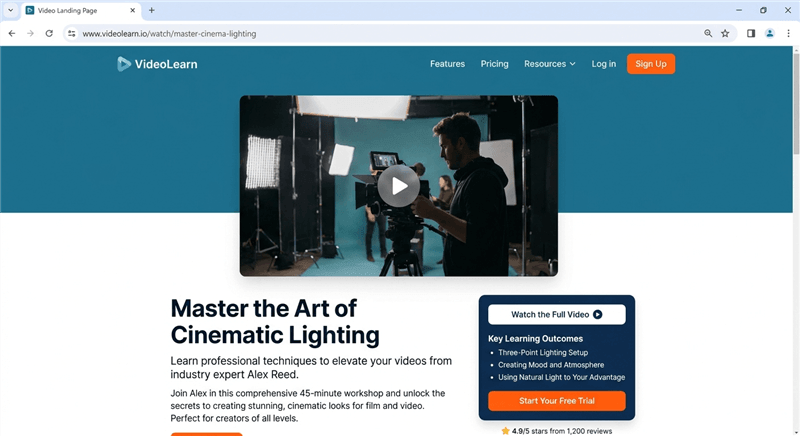
A video landing page is a landing page where a video is the primary element used to communicate the product’s value and guide visitors toward a conversion. Instead of relying mainly on text or static images, the page places a short explainer or product demo video near the top of the layout to quickly show how the product works.
In many SaaS and service businesses, the video typically appears above the fold and works together with a headline and call-to-action button. The goal is to help visitors understand the product faster, reduce friction, and increase conversion rates.
A landing page video can take several formats depending on the audience and traffic source, including:
- Product demo videos showing the interface and workflow
- Explainer videos focusing on the problem and solution
- Video sales letters (VSLs) are commonly used for services or coaching offers
When implemented correctly—with fast loading, clear messaging, and a strong call-to-action—a video landing page can significantly improve engagement and help visitors make decisions more quickly.
High-Converting Video Landing Page Layout (Proven Structure)
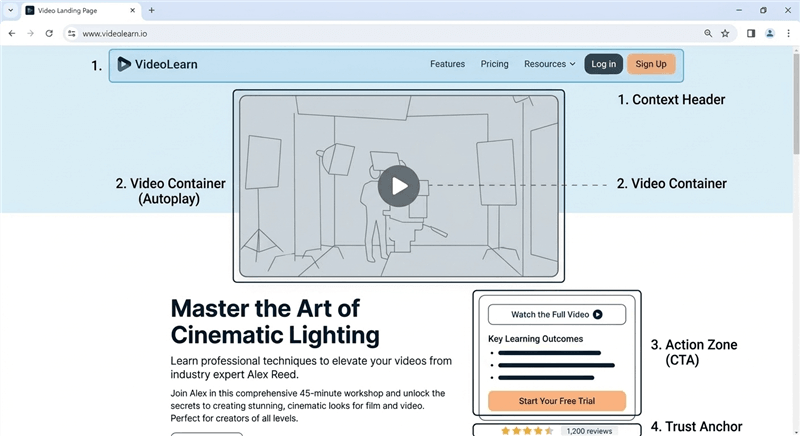
Most video landing page tests fail because teams change the media but do not adjust the page hierarchy. A video cannot stand alone; it needs context. Below is the structural wireframe—the “blueprint”—that consistently drives the highest conversion rates for cold traffic. The “Video-First” wireframe:
The Context Header (H1 + Subhead):
- Goal: Match the ad copy immediately.
- Placement: Top center or top left.
- Content: A headline that promises a specific outcome (e.g., “Generate Reports in Seconds”) and a subhead that clarifies how (e.g., “No coding required”).
The Visual Hook (The Video Container):
- Goal: Prove the headline’s claim instantly.
- Placement: Directly below the subhead (Above the Fold).
- Behavior: For cold traffic, use muted autoplay with open captions. This acts as a dynamic “motion GIF” that hooks the eye without disrupting the user experience.
- Mobile Consideration: Ensure your video player supports the
playsinlineattribute. This prevents the video from taking over the entire screen on iOS devices, keeping the user grounded on your page where the signup button lives.
The Action Zone (Primary CTA):
- Goal: Capture intent the moment it is generated.
- Placement: Immediately below the video container or side-by-side (desktop only).
- Content: A high-contrast button. Do not hide this below the fold.
The Trust Anchor (Social Proof):
- Goal: Reduce risk perception.
- Placement: A clear row of “Trusted By” logos or a single powerful testimonial directly under the CTA.
Wireframe diagram of a high-converting video landing page structure
Autoplay vs Click-to-Play: Best Video Settings for Landing Pages
Where you place the video and how it behaves depends entirely on your traffic source. A “one-size-fits-all” approach will hurt your conversion rate optimization (CRO) efforts.
1. Cold Traffic (Ads/Social)
For users who don’t know your brand, use a hero section video placed above the fold. Crucially, you must avoid autoplay with sound. It increases annoyance and triggers browser-level blocking.
Use the layout described in the Blueprint above. The video functions as a teaser. If they want to hear more, they can unmute or click to expand.
2. Warm Traffic (Email/Retargeting)
These users already have context. A click-to-play interaction is preferred here.
- Placement: Position this product demo video landing page element slightly lower, perhaps near the pricing or a detailed feature breakdown.
- Interaction: Since these users have higher intent, you can rely on them to initiate the experience. This allows you to use a heavier, higher-quality player without worrying as much about the immediate “hook.”
How to Create a Professional Landing Page Video (Without Manual Editing)
Once you have a strategy, the bottleneck becomes asset creation. To launch a video sales letter landing page or a product demo video, you generally face a choice between expensive agencies and time-consuming manual editing.
The Cost of Manual Editing
For marketing teams asking how to create a video landing page quickly, the manual route (using tools like OBS and Premiere Pro) often creates a new set of problems.
- The Focus Problem: On a high-resolution screen, your mouse cursor is tiny. Viewers on mobile devices cannot see which buttons you are clicking.
- The Editing Time Sink: To fix this, you have to manually zoom in on every click and smooth out your cursor movements in post-production. A 90-second demo can take hours of editing to look professional.
Automating the “Pro” Look with FocuSee
To solve the production bottleneck without sacrificing quality, we recommend using FocuSee. It is designed specifically to bridge the gap between a raw screen recording and a professional demo.
Automatic Zoom Effects
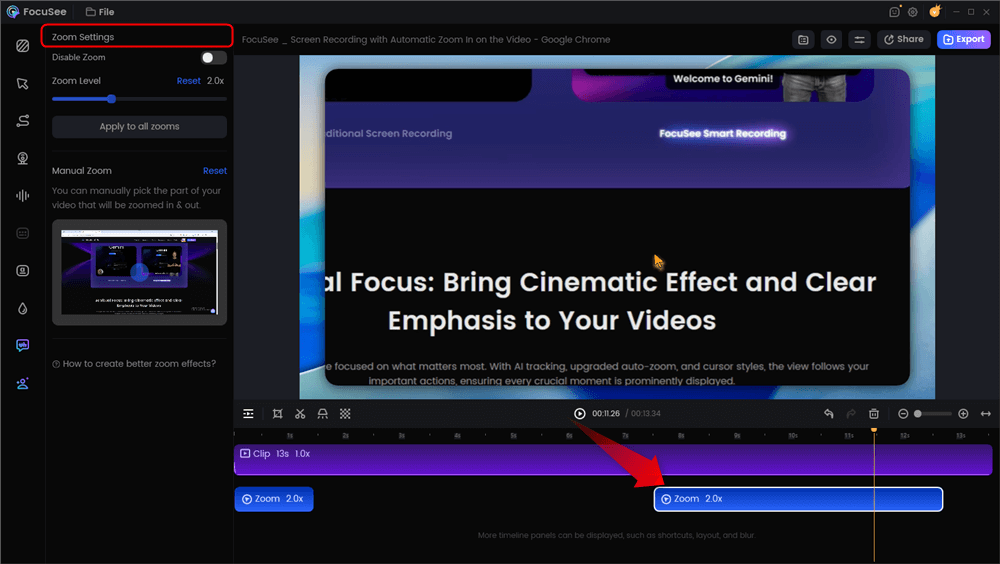
FocuSee solves the “Focus Problem” automatically. When you record, the software tracks your mouse movements and applies Smart Focus & Auto-Zoom to the areas you click on. This ensures the viewer’s eye is guided exactly where you want it—a critical factor for keeping engagement rate/watch time high on a landing page.
Additionally, since we established that muted autoplay is best for cold traffic, captions are mandatory. FocuSee generates Auto-Captions in 50+ languages automatically. This allows you to export a video that is ready for your “Video-First” wireframe immediately, without needing a secondary subtitle editor.
Here is a landing page video we created via FocuSee:
How to Add Video to a Landing Page Without Slowing Page Speed
A common fear is that adding video will destroy your page speed / Core Web Vitals scores, specifically LCP (Largest Contentful Paint). This is valid if you use standard iframe embeds. Here is exactly how to solve it.
1. The Facade Technique (Lazy Loading)
Instead of loading the heavy video player (YouTube/Vimeo/Wistia) immediately, you display a lightweight image that looks like a video player. The actual video scripts only load when the user clicks.
How to implement it:
- WordPress Users: If you use a plugin like WP Rocket, enable the “LazyLoad for iframes/videos” setting. It automatically creates the facade for you. Alternatively, the Presto Player plugin handles this natively.
- Custom Code: If you are coding the page, use the
srcdocattribute on your iframe. This allows you to set the thumbnail as the placeholder HTML, preventing the external request until interaction. - Wistia Users: Use the “Popover” embed type. While not a strict facade, it keeps the initial page weight lower than an inline embed because the player assets initialize differently.
2. Video SEO Schema
To ensure search engines understand your content, you must wrap your video in Schema markup (VideoObject). This does not happen automatically with most embeds.
How to implement it:
- The Tool: Use a generator like Merkle’s Schema Markup Generator or TechnicalSEO.com. Select “Video” from the dropdown.
- The Data: You will need the Video Name, Description, Upload Date, and Thumbnail URL.
- The Code: The tool will generate a JSON-LD code block. Paste this snippet into the <head> or body of your landing page.
How to Optimize Video Landing Page Conversion Rates
To truly optimize a video landing page, you must look beyond basic vanity metrics like view count. Success is defined by conversion lift. Use the framework below to diagnose exactly which part of your video strategy is underperforming.
The Metric Debugging Framework
| Metric | Diagnosis | Fix | |
| Low Play Rate | Play Rate < 10% | Thumbnail or placement is weak | Use a stronger thumbnail or move the video above the fold |
| Early Drop-off | Drop-off at 0:10 | Weak opening hook | Show the result in the first 10s |
| Watch but No Buy | High watch, low conversion | Next step unclear | Add a clear CTA near or inside the video |
A/B Testing Checklist
When running A/B testing, ensure you isolate variables. Do not test a new video and a new headline simultaneously. Start by testing the thumbnail image. Once you have a high play rate, test the video length (e.g., 60 seconds vs. 90 seconds). This methodical approach prevents false positives.
Video Landing Page FAQ
What is the ideal landing page video length?
For top-of-funnel traffic, the sweet spot is typically 60-90 seconds. This is long enough to explain the value proposition but short enough to maintain retention. For deep-dive demos on product pages, 2-5 minutes is acceptable, provided the user has high intent.
How do I add a CTA without annoying users?
Avoid mid-roll interruptions. Instead, use a persistent button next to the video player, or use an end screen CTA that appears only after the video finishes. If you use Wistia or similar tools, you can add a clickable CTA overlay that appears non-intrusively in the corner during the last few seconds.
Do video landing pages help SEO?
Yes, if implemented correctly. Video increases “time on page” (dwell time), which is a positive signal to Google. However, if the video causes the page to load slowly, it will hurt your rankings. Always use the facade technique and proper schema markup to get the benefits without the speed penalty.
Should I use a VSL or a Product Demo?
If you are selling a complex service or coaching program, a video sales letter landing page (VSL) focusing on the “transformation” is best. If you are selling software, a product demo video landing page that shows the interface in action is usually more effective.
Which hosting is best: Wistia, Vimeo, or YouTube?
For pure conversion focus, Wistia is superior due to its clean player, lack of ads, and data integration. Vimeo is a strong second choice. YouTube should be avoided for landing pages where the goal is conversion, as its algorithm creates off-ramps (ads and suggested videos) that distract users.
Conclusion
Building a high-converting video landing page doesn’t require a Hollywood budget or weeks of delay. It requires a strategy that respects the user’s time and reduces decision friction. By following the “Video-First” wireframe, implementing the facade technique to protect your page speed, and rigorously testing your thumbnails, you can turn a passive page into an active sales engine.
Don’t let technical hurdles paralyze your progress. Start by recording a simple, focused demo that addresses your customer’s core pain point. Tools like FocuSee can help you bypass the editing learning curve, giving you a professional asset with auto-zooms and captions in minutes. Regain control of your acquisition costs today—your next high-converting asset is just a screen recording away.