What is a Video Sales Letter? The High-Converting Guide

Running paid traffic to a landing page that refuses to convert is one of the most disheartening experiences for a founder. You watch the visitor count tick up, but the sign-ups remain flat. It feels like pouring water into a bucket with a hole in the bottom. You suspect your current copy isn’t landing, or perhaps visitors are bouncing because they don’t have the patience to read a wall of text.
For SaaS founders like “Brandon”—a user whose campaign we analyzed for this guide—this is a daily reality. Brandon’s analytics showed high traffic but zero demo bookings. The issue wasn’t the product; it was the delivery. His landing page relied on dense, technical paragraphs to explain a complex tool. By the time visitors understood what the software did, they had already clicked away.
He knew he needed a video sales letter (VSL) to control the narrative, but he felt stuck. Every template looked like a hype-filled internet marketing scam, and he didn’t know if he should show his face or just record his screen. This guide clears up that confusion. We will outline exactly how to structure a modern VSL, which tools reduce production time from days to minutes, and how to place it on your site to fix your conversion leaks.
What is a Video Sales Letter? (And Why Text Is Losing)
A video sales letter (VSL) is a direct-response video designed to persuade a viewer to take a specific action, such as buying a product, scheduling a demo, or starting a free trial. Unlike a generic brand video or “About Us” clip, a VSL uses a scripted narrative to guide the user through a psychological sales funnel. It replaces or augments traditional long-form written copy.
The Shift from Text to Video
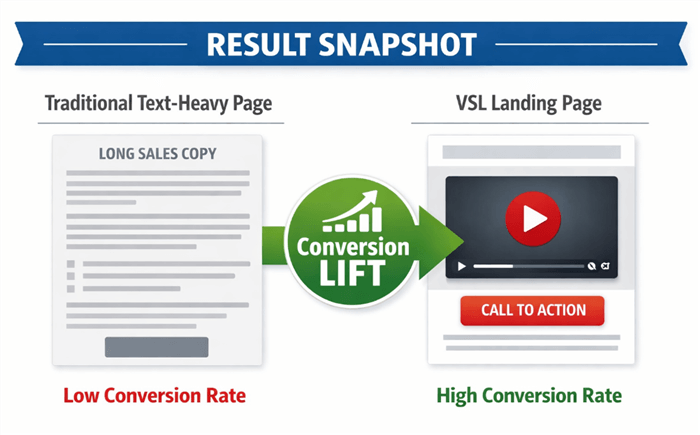
Video Sales Letter Landing Page
A high-converting video sales letter works because it dictates the pace of the pitch. On a text-based page, users skim headlines and miss the nuance of your argument. In a video, you control the emphasis, ensuring they hear the value proposition exactly as intended.
Consider Brandon’s case. Despite decent click-through rates on his ads, his sign-ups were non-existent. He realized visitors were bouncing before reading his complex technical copy. By implementing a VSL, he moved visitors from passive skimming to active watching. This addresses the core problem: modern buyers require immediate clarity before they commit.
The Modern VSL Blueprint: Structure, Script, and Timing
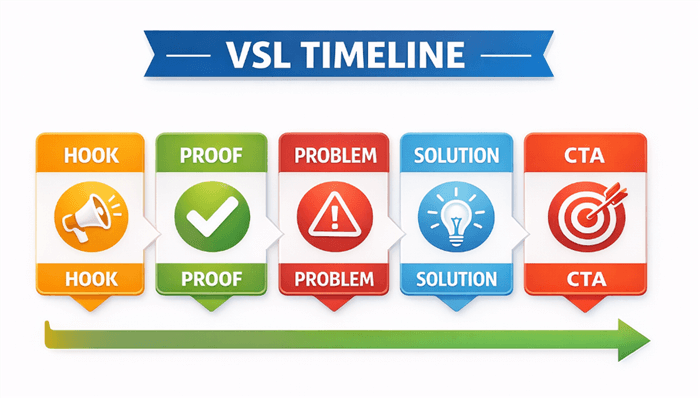
A common question is how to create a video sales letter that holds attention. The answer lies in a specific, timeline-based structure. Most VSLs fail because they delay proof. Viewers don’t need a long backstory first—they need immediate orientation regarding what the product is and the outcome it delivers.
To maximize retention, structure your script using these timestamps. Pay close attention to the “Mechanism” section, as this is where most scripts fall apart.
0:00–0:15: The Hook & Proof. State the big promise and immediately back it up. Don’t say “I have a secret method.” Say “Here is the result we achieved last week.” This front-loads credibility.
0:15–0:45: Problem Agitation. Articulate the user’s pain points better than they can. If you can describe their problem accurately, they automatically trust your solution.
0:45–1:30: The Unique Mechanism. Introduce your solution. This is the “secret sauce” that explains why your offer works when others failed. Without this, your product looks like a commodity.
- What does a mechanism sound like? It shouldn’t be generic (“we work hard”). It must be specific.
- SaaS Example: Instead of “fast syncing,” call it “One-Click Bidirectional Sync Technology.”
- Coach/Course Example: Instead of “eat better,” call it the “Metabolic Confusion Framework.”
- Agency Example: Instead of “we do cold outreach,” call it the “Inbox Warm-Up Protocol.”
By naming your mechanism, you turn a generic feature into a proprietary asset that the viewer feels they must have.
1:30–End: Offer & CTA. Present the offer stack (product + bonuses), remove risk with a guarantee, and provide a clear Call to Action (CTA).
In our analysis of Brandon’s campaign, his first draft failed because he spent two minutes on his company’s history. Viewers bounced. When he switched to this modern blueprint—showing a specific result in the first 10 seconds and naming his “Data-Bridge Mechanism”—he saw a measurable lift in trial conversions. This structure respects the viewer’s time and builds trust instantly.
VSL Timeline
Visual Formats: Face-to-Camera vs. Voiceover Slides
Searching for video sales letter examples often results in a mix of high-budget productions and simple slideshows. This creates confusion about which format is right for your business. The best format depends on your industry and the level of trust required to close the sale.
1. Face-on-Camera (Talking Head)
This format is essential for coaches, consultants, and personal brands. If the product is you or your expertise, the viewer needs to see your face to build a connection. It establishes high trust but requires good lighting and audio.
2. Voiceover + Slides (The “Ugly” VSL)
Popularized in the direct response world, this format uses simple black text on a white background with a voiceover. It is effective for B2B offers where the logic of the argument matters more than the visuals. It is low budget and forces the viewer to read along, which aids retention.
3. The Hybrid Model (Best for SaaS & Courses)
For software products and course creators, the hybrid model is superior. This combines a “face bubble” or intro clip of the founder with direct visuals of the value being delivered.
- For SaaS: Start with a face intro, then switch to a screen recording of the software solving the problem.
- For Course Creators: Start with your face to build rapport, then switch to a screen share of your curriculum, a digital whiteboard session, or a “behind the scenes” look at the member’s area.
In Brandon’s case, the hybrid format was key. He used a quick face-to-camera intro to establish a human connection, then immediately switched to a screen share to demonstrate the software’s interface. This proves the product is real and easy to use, overcoming skepticism.
The Efficient Solution: Automating VSL Production
Once you decide to create a video sales letter, the biggest bottleneck is no longer your script — it’s editing.
Manual tools like Premiere Pro or Final Cut offer full control, but for non-editors, they’re slow, complex, and often lead to unfinished projects. A single minute of video can take 10+ hours to polish, and many founders quit before publishing.
That’s why dedicated VSL tools exist.
Instead of spending days keyframing, syncing audio, and fixing mistakes, automated tools handle the repetitive work for you — like cursor zooms, captions, and layout polish — so you can focus on selling, not editing.
If you already have a script but lack technical skills, automation is the fastest path from idea to live VSL. Tools like FocuSee are ideal for SaaS demos and direct-response videos, giving you professional visuals without the learning curve of traditional editors.
FocuSee specifically addresses the most common obstacles in VSL production:
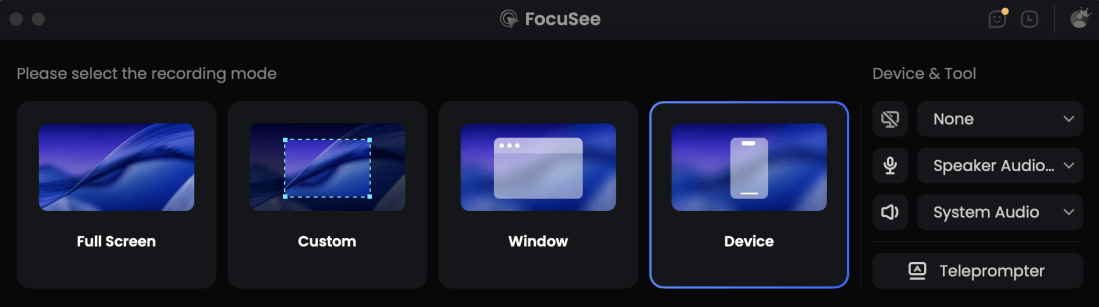
Record Sale Video Via FocuSee
Obstacle 1. “I keep forgetting my lines.”
Attempting to memorize a script often results in awkward pauses and multiple takes. FocuSee’s Built-in Teleprompter displays your script on-screen during recording. This ensures you deliver your value proposition and handle objections smoothly and confidently, without looking away from the camera.
Obstacle 2. “My screen recording looks boring and static.”
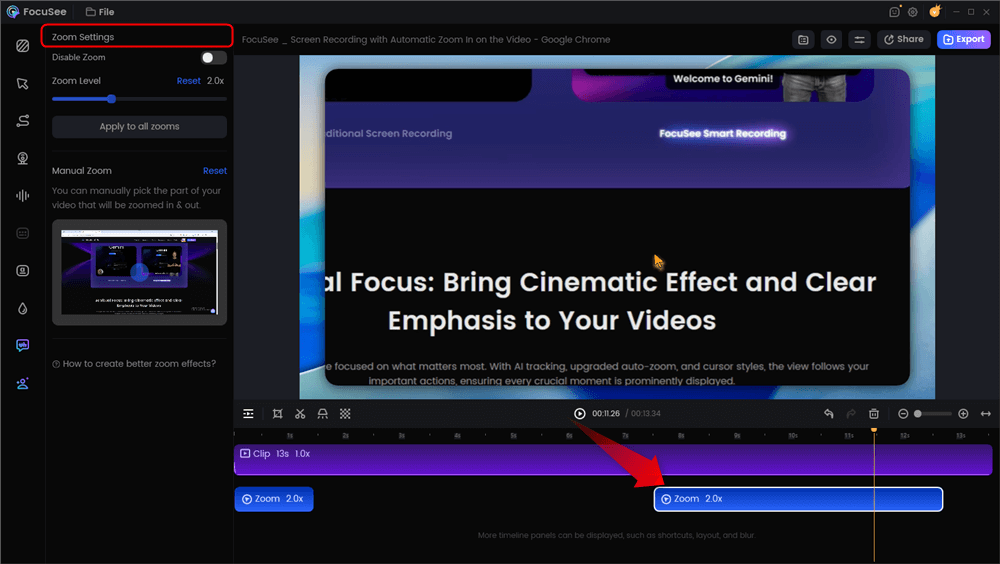
Viewer retention drops if the visual is static. FocuSee’s Smart Focus & Auto-Zoom (Spotlight) automatically detects where you click and zooms in to emphasize key actions. This keeps the viewer’s eye guided toward your unique mechanism without you needing to manually set keyframes.
- Visualizing the Script:
The biggest gap for beginners is translating words to visuals. FocuSee helps bridge this by allowing you to record the visual demonstration while reading the script, then automatically generating captions.
- Script says: “Click here to sync your contacts.”
- Screen shows: Mouse moving to ‘Sync’ button with an automatic zoom effect.
Automatic Zoom Effects
Obstacle 3. “I don’t want to be on camera.”
Not everyone is comfortable showing their face. FocuSee’s AI Visual Avatar lets you present your VSL as a professional avatar, delivering your script naturally while keeping your identity private.
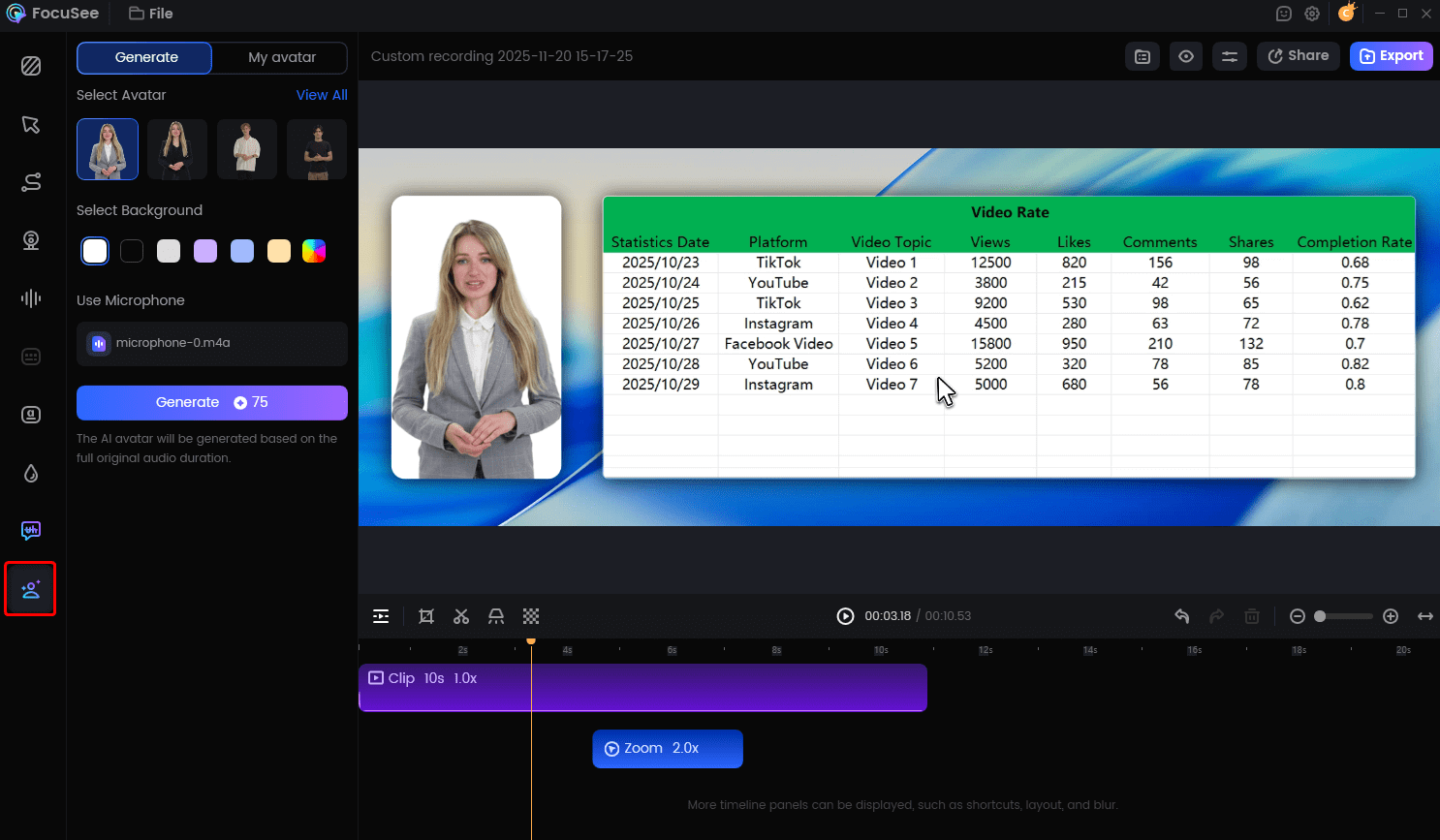
Create Your AI Avatar
Obstacle 4. “My recording environment is noisy and my voice sounds bad.”
Background noise and unclear audio hurt credibility. FocuSee’s noise reduction and voice enhancement clean up your recordings, making your voice clear and professional—even in less-than-ideal environments.
Check out this short VSL video we made using FocuSee.
Implementation: The VSL Pre-Launch Checklist
A high-converting VSL landing page relies on user experience (UX) as much as the script itself. Even the best video will fail if the page loads slowly or the button is impossible to find. Instead of guessing, follow this pre-launch checklist to ensure your page is ready to convert traffic.
1. Mobile Optimization & Muted Autoplay
Over 60% of your traffic will likely be mobile. On mobile devices, browsers often block autoplaying videos that have sound.
- Set Video to “Muted Autoplay”: Ensure the video starts playing instantly without sound.
- Hard-Code Captions: Since the sound is off, captions are mandatory. If you don’t have them, the viewer will scroll past.
- Check Responsive Player: Resize your browser window. Does the video player shrink correctly, or does it break the page?
2. The Sticky CTA Strategy
Historically, marketers advised hiding the Call to Action (CTA) button until the pitch was made. However, modern attention spans make this risky. A better strategy is the “always-visible” or sticky CTA.
- Sticky Button Code: On mobile, ensure the “Start Free Trial” or “Buy Now” button sticks to the bottom of the screen as the user scrolls.
- Why this matters: This allows the “impulse buyer” to convert the second they are convinced. You do not want them scrolling back up to find the button, getting distracted, and leaving.
3. Load Speed Audit
- Video Hosting: Do not self-host your video on WordPress. Use a dedicated host (like YouTube, Vimeo, or Wistia) or a tool like FocuSee that handles bandwidth.
- Page Speed: Test the page on Google PageSpeed Insights. If it takes more than 3 seconds to load, you will lose 30%+ of your traffic before they see the headline.
This setup allows ready buyers to convert immediately without waiting for the video to finish, capturing the “impulse” conversion effectively.
Common Mistakes and Troubleshooting Conversions
If you launch your video sales letter funnel and the results are lackluster, do not scrap the entire project. Instead, use a diagnostic approach to identify the leak. Traditional long-form sales letters are being replaced by VSLs precisely because video allows for more rapid engagement, but this also means you must capture attention instantly.
A/B Testing Priorities
When troubleshooting, follow this hierarchy of testing:
- High Bounce Rate? Fix the Headline and Hook. If people land on the page but leave within 10 seconds, your headline isn’t relevant, or the first 15 seconds of the video (the hook) failed to promise a clear benefit.
- Low Watch Time? Fix the Agitation. If users drop off after 30–60 seconds, you likely failed to articulate their pain points or the story dragged on too long. Tighten the editing.
- High Watch Time, Low Clicks? Fix the Offer. If they watch until the end but don’t click the CTA, your video was entertaining, but the offer stack or price point wasn’t compelling. Revisit your bonuses and guarantee.
By isolating these variables, you can incrementally improve your conversion rate. Start by testing a new headline—it’s the fastest change with the highest potential impact.
Conclusion
Creating a video sales letter doesn’t require a film degree or an expensive production team. It requires understanding your customer’s pain, a solid script structure, and the right tools to execute it quickly. Brandon moved from flat sign-ups to a healthy conversion rate not by becoming a video expert, but by focusing on clarity and using tools that automated the heavy lifting.
Don’t let the fear of editing or “sounding salesy” keep you from fixing your conversion problem. You have the blueprint and the strategy. Now, you just need to hit record. With tools like FocuSee, you can turn your script into a polished, professional video in minutes, complete with auto-zoom and captions. Take control of your sales funnel today.
Frequently Asked Questions
What is a video sales letter (VSL)?
A VSL is a sales pitch delivered through video rather than text. It guides the viewer through a persuasive argument (Problem-Agitation-Solution) to drive a specific action, like a purchase or sign-up.
How long should a video sales letter be?
A standard video sales letter length ranges from 5 to 20 minutes, depending on the price point. Lower-ticket items ($50–$100) often need only 5 minutes, while high-ticket offers ($1,000+) may require 15–20 minutes to build sufficient value and handle objections.
Can I use a VSL for SaaS, or is it only for courses?
Yes, you can use it for SaaS. In fact, a video sales letter for SaaS is highly effective when using a “hybrid” format that combines a founder’s introduction with direct screen recordings of the software solving a specific problem.
How do I write a VSL script that doesn’t sound salesy?
Focus on “Problem-Agitation-Solution.” Instead of using aggressive sales language, describe the user’s problem in detail so they feel understood. Then position your product as the logical solution to that problem. This shifts the tone from selling to helping.
How do I add testimonials and proof into a VSL?
Interject social proof immediately after making a big claim. You can use screenshots of customer results, video snippets of testimonials, or logos of companies you have worked with. Do not save all proof for the end; sprinkle it throughout to maintain credibility.