6 Promo Video Ideas You Can Create in Under 10 Minutes (2026 Guide)

An upcoming product launch is exciting, but the pressure to create a compelling promo video can quickly lead to creative block and production anxiety. You know you need high-quality video, but the thought of cameras, studios, and complex editing is overwhelming. You’re looking for actionable promo video ideas—specifically, creative promo video ideas for small businesses—that don’t require you to be on camera or have a big budget.
This guide provides a clear, tested production method for creating professional videos using just your screen. It’s designed to help you produce effective marketing videos yourself, solving the problem for anyone who feels they lack the resources or confidence to get started.
How to Make a Promo Video Without a Camera: 3 Core Ideas
Camera shyness and a lack of equipment are two of the biggest obstacles to video creation. For software and digital products, the solution is to make your screen the main character. These “faceless” promo video ideas put your product front and center, delivering value without requiring you to step in front of a lens.
1. The Zoom-in Feature Highlight
This is a high-energy screen recording focused on a single, powerful feature. The technique uses dynamic zoom and pan effects to guide the viewer’s eye to key actions, clicks, and outcomes. It works because it’s direct and value-oriented. Viewers immediately see the product in action, answering their primary question: “How does this solve my problem?” This format is perfect for social media teaser video ideas that need to make an impact in seconds.
2. Cursor-led Storytelling
In this style, your cursor becomes the narrator. Through deliberate movements, selections, and highlights, you guide the audience through a simple workflow or user journey. The cursor’s motion creates a follow-along experience that feels personal and authentic. This method improves screen recording aesthetics by making the demo feel less like a passive recording and more like an active, guided tour. It is one of the most engaging tutorial video styles for demonstrating a process.
3. The Kinetic Typography Explainer
When your message is more conceptual, kinetic typography (animated text) is an effective tool. You can overlay bold, animated text on top of a simple screen recording or a colored background to explain key benefits, statistics, or your value proposition. This approach is visually engaging and doesn’t require complex on-screen action. While screen recording tools handle the video, you can easily create these text animations in free graphic design tools like Canva or video editors like CapCut. This makes it a powerful option for high-level announcement videos or brand storytelling.
Choosing Your Production Method: Manual vs. AI Tools
Once you have an idea, you need to select the right production method. Your choice will directly impact the time you spend and the quality of your final video. The two primary options are a manual workflow using built-in tools or a streamlined process with an AI-assisted application.
| Criteria | The Manual Method (QuickTime + iMovie) |
The AI-Assisted Method (FocuSee) |
| Time Investment | High — manual zooms, cuts, and highlights take hours. | Low — auto zooms & silence removal finish edits in minutes. |
| Final Polish | Moderate — requires skill to make visuals dynamic. | High — AI creates engaging motion and pro-level pacing. |
| Technical Skill | Intermediate — must learn keyframes and transitions. | Beginner — record, review, and apply AI edits. |
| Repurposing | Low — changing aspect ratios requires re-editing. | High — export 16:9, 9:16, or 1:1 with one click. |
How to Create a Promo Video in 10 Minutes
This is the workflow that makes a high-impact promo video achievable in minutes. Using an AI-assisted tool like FocuSee, you can execute a professional concept without the steep learning curve. The answer to “Can I make a marketing video just by recording my screen?” is yes—provided you use a tool that automates the polish.
Here’s a simple procedure to create a “Zoom-in Feature Highlight” video:
Step 1. Start Your Recording
Open FocuSee and select the screen area you want to record. Click the record button and perform the actions you want to showcase. Don’t worry about being perfect; just complete the workflow.
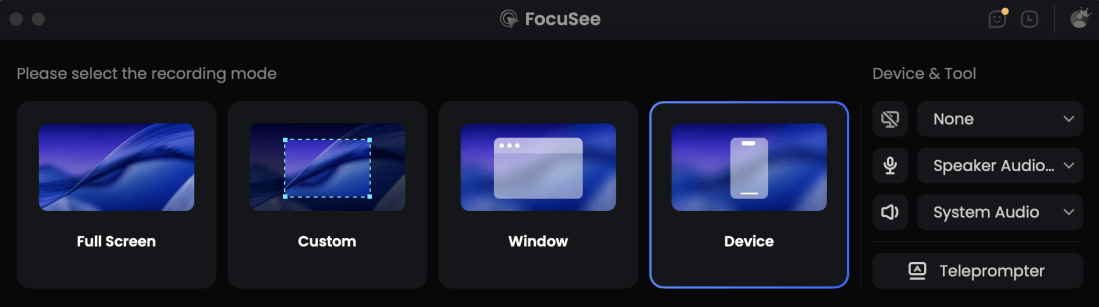
Choose the Recording Model
Step 2. Let AI Do the Heavy Lifting:
Once you stop recording, FocuSee automatically analyzes the video. Its “Intelligent Visual Focus” feature adds dynamic zoom and pan effects based on your cursor movements, instantly solving anxiety about the video looking static or unprofessional. It also uses “AI Smart Cut” to identify and remove unnecessary pauses, saving you from tedious manual trimming.
Step 3. Review and Refine (The Easy Part):
Your timeline is now populated with automated edits. This is where you have creative control without the technical burden. You can easily adjust the intensity of a zoom effect with a simple slider, drag to change the timing of a transition, or click to add a text overlay. The process is visual and intuitive, not technical.
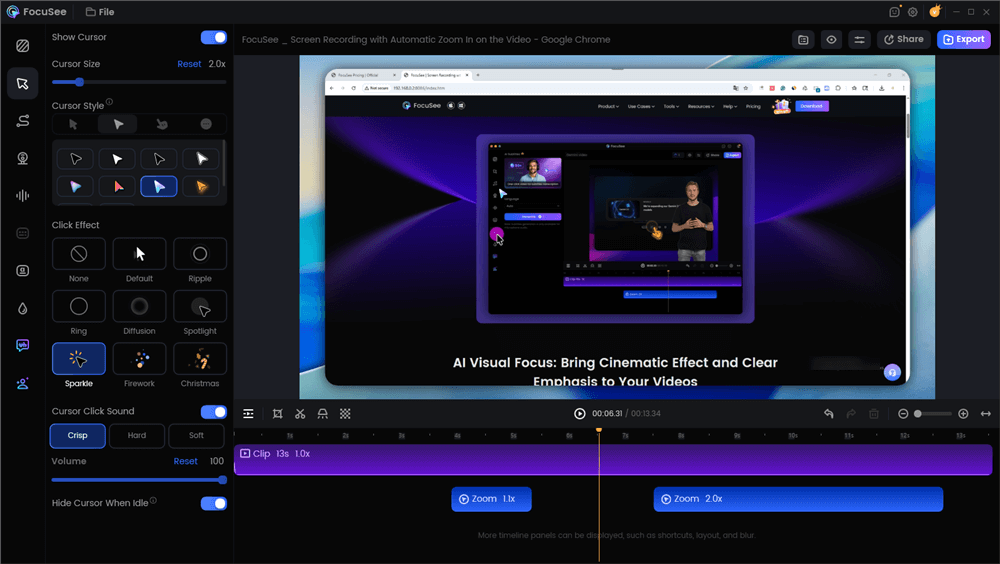
Edit the Promo Video with Auto Effects
Step 4. Export and Share:
Select an aspect ratio preset (e.g., 16:9 for YouTube, 9:16 for TikTok) and export your video. The entire process, from recording to a finished MP4, can take less than 10 minutes.
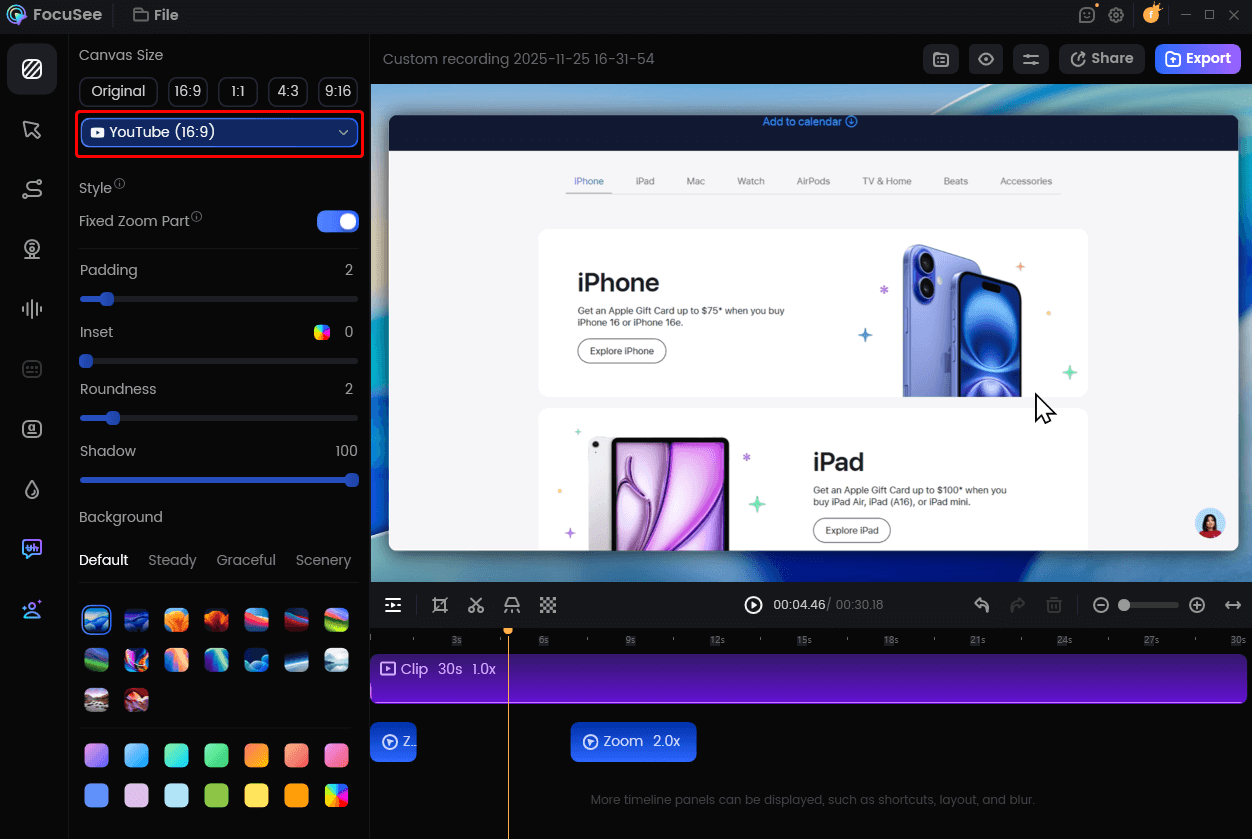
Change Video Size for YouTube
3 Advanced B2B Marketing Video Concepts
Beyond simple demos, screen recordings can be a powerful medium for B2B marketing video concepts that build trust and demonstrate expertise. These ideas add a layer of narrative to the same simple production workflow.
1. The Behind-the-Scenes (BTS) Workflow
Instead of showing a polished feature, record a video of you using your own tool to accomplish a real-world task. For example, a project management software company could show its team planning a sprint inside its own app. This behind-the-scenes (BTS) approach offers authentic social proof and makes the product’s value tangible. It shifts the focus from selling a feature to sharing a process.
2. The UGC-Style Problem/Solution
Start your video by showcasing a real customer question or problem, perhaps taken from a community forum or support ticket (with permission). Then, use a screen recording to walk through the exact steps to solve it with your tool. This format uses a form of AI user-generated content (AI UGC) to frame the narrative. It demonstrates that you listen to your users and makes the solution highly relatable to other customers facing the same issue.
3. The AI Avatar Product Update
For recurring updates or announcements, consistency is key. You can record a standard feature demo and then overlay an AI-generated avatar to deliver the voiceover. This technique adds a human element without requiring anyone to be on camera, and it ensures a consistent presenter for all your update videos. This is an emerging example of current software demo video trends that blends personality with privacy and efficiency.
One Video, Every Platform: Adapting for TikTok, LinkedIn, and YouTube
Creating a video is only half the task; you also need to distribute it effectively. A common challenge is platform fragmentation, where a video formatted for YouTube looks unprofessional on TikTok. The key is understanding and adapting to different aspect ratios.
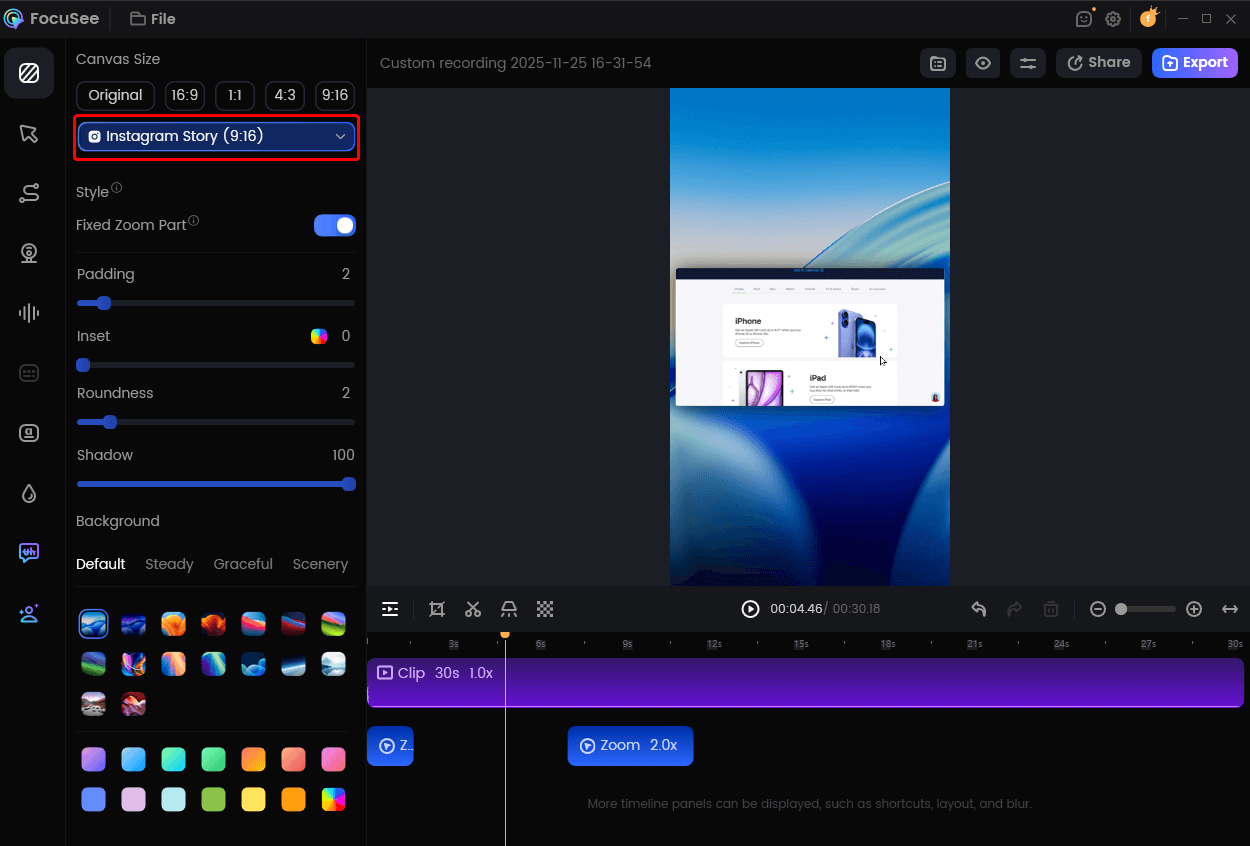
Change Video Size for Instagram
An aspect ratio is the proportional relationship between a video’s width and height. Here are the most common formats:
- 16:9 (Horizontal): The standard for YouTube and website embeds. It’s ideal for detailed, wide-screen presentations.
- 9:16 (Vertical): The dominant vertical video format for TikTok, Instagram Reels, and YouTube Shorts. It fills the entire mobile screen and is essential for mobile-first audiences.
- 1:1 (Square): A popular format for feeds on LinkedIn and Instagram, as it takes up significant screen real estate without requiring users to turn their phones.
Manually re-editing a single recording for each format is inefficient. An AI-assisted tool simplifies this. After your initial recording, you can use built-in presets to export the video in multiple formats instantly. The tool automatically reframes the shot and adjusts the zoom effects to fit the new dimensions, ensuring your main subject remains in focus.
Your screen is your studio. Before you hit record, take 30 seconds to prepare it. Close distracting apps like Slack or email to prevent pop-up notifications. Clean up your desktop by hiding messy files. If you’re using a browser, close unnecessary tabs. An AI editor is smart, but it can’t edit out a notification that pops up over the exact button you’re trying to showcase. This small step makes your final video look much more professional.
Promo Video Questions Answered
Here are direct answers to some of the most common questions about creating effective, low-budget promo videos.
What’s the best way to record a voiceover for my screen recording?
For the best quality, record your screen actions first and then record your audio separately as you watch the video playback. This allows you to focus on clear narration without having to perform tasks at the same time. Use a quality USB microphone and speak slowly and clearly. Most video editors, including FocuSee, allow you to easily import and sync this separate audio track.
How can I add background music without it being distracting?
Choose instrumental music that matches the energy of your video (e.g., upbeat for a feature launch, calm for a tutorial). When you add the music track to your editor, immediately lower its volume to 10-20% of the original level. The music should support the video, not compete with your voiceover or the on-screen action.
How do I keep viewers watching my product demo past the first 5 seconds?
The key is to create a strong visual hook. Do not start with a long intro or logo slide. Begin your video with a dynamic zoom or a rapid cursor movement that immediately demonstrates a key action in your software. An AI-assisted tool can automatically create this high-paced editing style, grabbing attention in the critical first few seconds.
How long should a promo video be for Instagram vs. LinkedIn?
Video length should match platform expectations. For platforms like Instagram Reels and TikTok, aim for 15-60 seconds to maintain engagement. For LinkedIn and YouTube, where users expect more detail, a 1-2 minute video is often effective for product demos and tutorials. Always prioritize delivering value quickly.
Final Thoughts
You no longer need a professional studio or camera to produce high-impact marketing videos. The creative block and production anxiety that hold many small businesses back can be overcome with the right method and a modern tool. By focusing on clear, screen-based storytelling, you can create engaging promos that look professional and are made in a fraction of the time. This approach turns a daunting task into an achievable, 10-minute workflow.
Ready to turn your ideas into a finished video? Download FocuSee for free and create your first professional-grade promo video today, no camera required.