FocuSee vs Tella: Which Screen Recorder Fits Your Workflow?

We tested both tools using the same tutorial-focused workflow and compared recording, editing, automation, sharing, and platform support. Because FocuSee is our own product, we’ve also included our testing criteria and environment so you can judge the comparison for yourself.
FocuSee vs Tella at a Glance
| FocuSee | Tella | |
| Best For | Tutorials & product demos | Async video & collaboration |
| App | Native desktop | Browser-based |
| Auto-Zoom | Yes | Yes |
| Cursor Effects | Yes | Yes |
| Clip-Based Recording | Limited | Yes |
| Team Collaboration | Limited | Yes |
| Windows & Mac | Yes | Yes |
| Annotations | Yes | No |
The better choice depends less on the number of features and more on how you create and share videos.
Core Workflow: Clip-Based vs. Automated Post-Production
Users often get confused because both platforms are marketed as modern screen recorders, but their fundamental recording and editing workflows are entirely different.
If you are looking for a powerful Tella alternative specifically because your product walkthroughs take too much manual editing time, understanding this workflow difference is critical.
Tella’s Clip-Based Workflow
Tella operates on a clip-based system. Users record their videos in short segments or “clips.” After recording a segment, you can trim it, adjust the camera layout, or change the background just for that specific clip. Because it is cloud-centric, all processing and storage happen online. This workflow is highly forgiving if you make mistakes while speaking, as you simply re-record the short clip rather than the whole presentation.
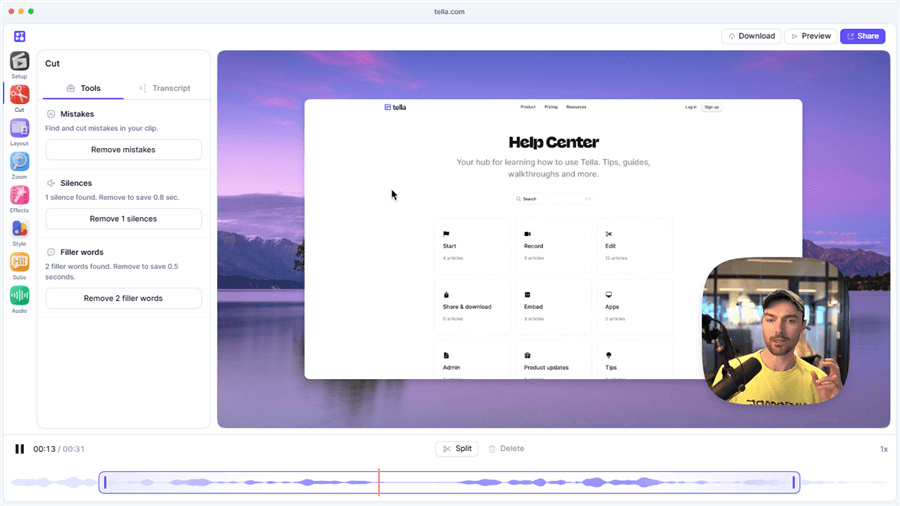
Tella Overview
FocuSee’s Automated Post-Production Workflow
FocuSee uses an automated post-production approach designed to save manual editing time. Users record their screen continuously. Once the recording stops, FocuSee’s software automatically processes the video, applying smart zooms, cursor highlights, and click animations based on your actual mouse movements. You can then review the timeline and easily adjust or delete these automated focus points.
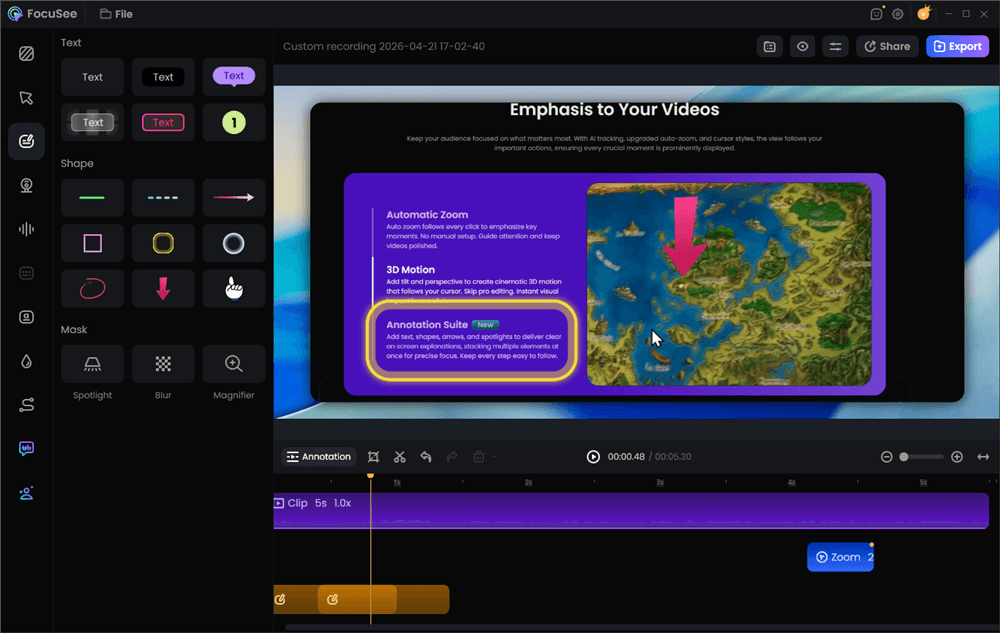
Add Annotations for Clarity
If you are creating a product demo, FocuSee’s workflow significantly reduces the manual post-production effort of adding keyframes and zoom effects, whereas Tella’s workflow requires you to manually adjust layouts clip by clip.
What We Found With FocuSee
In our tutorial test, FocuSee’s main advantage was automated post-production. After recording, it automatically applied zoom and cursor effects based on the on-screen actions, reducing the amount of manual adjustment needed.
To show exactly how simple the automated post-production process is, here is the standard 3-step workflow:
Step 1. Record your screen continuously: Capture your software tutorial or product walkthrough from start to finish.
Step 2. Let FocuSee automatically edit: Once you stop recording, the software automatically tracks your cursor, highlights your clicks, and applies smart zoom effects to key UI elements.
Step 3. Review and export: Review the timeline to adjust any focus points, add captions, and export your polished video in your preferred format.
Pros of FocuSee:
- Automated Visual Focus: Automatically adds smart zooms and dynamic cursor tracking, reducing the need to manually keyframe zooms in complex editing software.
- AI-Powered Enhancements: Generates AI subtitles, offers background removal, and includes audio enhancement features (like silence and filler-word removal) under supported conditions.
- Native Desktop Reliability: As a native desktop application for Windows and macOS, it leverages local system resources for smoother recording and editing of high-quality local videos.
- Interactive Annotations: Easily add text, arrows, spotlights, and blur effects to highlight key UI elements or hide sensitive information.
Cons of FocuSee:
- Not Built for Async Chatting: While great for tutorials, it is not designed around quick cloud-link sharing for casual team messaging.
- Hardware Dependent: High-resolution exports and intensive AI feature processing depend on your computer’s CPU, OS version, and available system resources.
Tella Strengths: Best for Async Video Communication
Tella shines when the goal is human connection, team collaboration, and fast communication. It positions itself as a sleek, modern alternative to traditional async video tools by offering highly customizable aesthetics.
Pros of Tella:
- Flexible Layouts: Excellent talking-head layouts, custom backgrounds, and borders make videos look highly branded and engaging.
- Cloud Hosting & Sharing: Videos are processed in the cloud, allowing you to instantly grab a sharing link to send via Slack, email, or Notion.
- Clip-Based Flexibility: Easy to record in chunks, meaning if you mess up a sentence, you only need to redo that specific short clip.
- Team Collaboration: Built-in team workspaces make it easy to organize and share video updates internally.
Cons of Tella:
- Manual Tutorial Editing: While Tella can record screen tutorials, it completely lacks specialized automated cursor tracking and smart zoom effects. You have to manually adjust what the viewer focuses on.
- Cloud-Dependent: Requires a strong, stable internet connection for processing and saving clips seamlessly.
AI Features and Editing Credits Compared
As both platforms integrate modern AI capabilities, understanding how they charge for these features is critical to avoiding unexpected limits.
| FocuSee Approach | Tella Approach | |
| Auto-Captions | AI subtitles with multilingual support. | Auto-generated captions. |
| Visual Automation | Auto zoom and cursor tracking. | Manual layouts; no auto-zoom. |
| Audio Cleanup | AI audio cleanup, silence and filler-word removal. | Basic noise reduction. |
| AI Credits | Only AI features use credits; auto-zoom is free. | Core features included; hosting limits may apply. |
Important Consideration: FocuSee uses a transparent AI credit system for its most intensive audio and speech processing features (like silence removal and AI voice enhancements) to ensure high-quality local processing. Importantly, FocuSee’s signature auto-zoom, cursor tracking, and click enhancement features do not consume any AI credits. This means you can create as many polished, auto-zoomed tutorials as you need without worrying about visual editing limits. With Tella, users should verify current cloud hosting and duration limits on their official pricing page to understand what is truly unlimited.
Platform Support, Pricing, and Alternatives
Both FocuSee and Tella fully support Windows and macOS, but their architectural approaches differ. FocuSee operates as a native desktop application, meaning it utilizes your local computer’s processing power (CPU/GPU) for smoother, high-resolution recording and rendering. Tella operates primarily on a cloud-centric model, meaning you record locally but rely heavily on cloud servers for rendering and sharing.
When evaluating pricing, avoid relying on third-party blogs, as SaaS pricing structures change frequently. Always check the official product pages for the most current subscription plans, lifetime options, and AI credit allotments.
If neither tool perfectly matches your needs, you might explore alternative market options. For instance, Screen Studio is a popular Mac-only tool that offers similar automated zoom features. If you are looking for a native Screen Studio alternative for PC, FocuSee is an ideal match. On the other hand, Loom is a widely used Loom alternative if you just want to explore purely async cloud communication options similar to Tella.
Which Tool Fits Your Workflow?
To make your decision easier, here is a breakdown of common video creation scenarios and the tool best equipped to handle them.
| If you mainly… | Better fit | Why |
| Step-by-step software tutorials | FocuSee | Auto zoom, cursor highlights, and visual focus. |
| Async team updates | Tella | Talking-head layouts and instant sharing. |
| Long-form product demos | FocuSee | Auto captions, smart editing, and smooth motion. |
| Social media clips (Talking-head) | Tella | Vertical layouts and fast clip editing. |
| Social media clips (UI walkthroughs) | FocuSee | Cursor tracking and multi-format exports. |
If your main bottleneck is the time spent manually zooming in on UI elements or adding click effects for a tutorial, FocuSee provides a guided workflow to automate that post-production effort. If your goal is to quickly record yourself explaining a new company policy or sending a video message to a client, Tella is the more natural fit.
Frequently Asked Questions
Does FocuSee or Tella have better auto-zoom effects?
FocuSee is significantly better for auto-zoom effects. It is designed specifically to track your cursor, highlight clicks, and automatically apply smart zooms during post-production. Tella does not have an automated cursor-tracking or auto-zoom feature; you must adjust camera and screen layouts manually.
Which tool is better for product demos and tutorials?
FocuSee is the superior choice for product demos and step-by-step tutorials. Its automated visual focus and cursor enhancements drastically reduce the manual editing time required to make a software walkthrough easy to follow.
Which screen recorder is better for Windows and Mac?
Both tools support Windows and Mac. However, FocuSee offers a robust native desktop application for both operating systems, which is ideal if you prefer local recording and rendering without relying on a constant internet connection.
Can I use these tools for social media clips?
Yes. Tella is excellent for creating aesthetic, talking-head social media clips (like vertical TikToks or LinkedIn updates). FocuSee is better if you want to export technical UI walkthroughs and tutorials into different social-ready aspect ratios while keeping the cursor and screen action in focus.
Final Verdict: Which Screen Recorder Should You Choose?
Choosing between FocuSee and Tella ultimately comes down to your core video creation workflow.
If your primary goal is to send quick, aesthetic async video messages to your team, or to record highly stylized talking-head updates where screen interaction is secondary, Tella is an excellent, cloud-friendly choice.
However, if you are a creator, educator, or product marketer focused on making step-by-step software tutorials, product demos, or training videos, FocuSee is the clear winner. Its ability to automatically track your cursor, apply smart zooms, and generate AI subtitles can save you hours of tedious manual post-production work, provided your system meets the supported conditions.
Ready to turn your plain screen recordings into polished, professional tutorials with significantly less editing effort? Check compatibility and try FocuSee today.