SaaS Demo Personalization: Strategy, Examples & Tools for B2B Growth

In the competitive landscape of B2B software, saas demo personalization has shifted from a luxury to a necessity. Consider Mark, a product marketing manager at a B2B SaaS company. Mark noticed a troubling pattern: founders, engineers, and operations leaders all attended the same demo—but left with very different levels of clarity. The engineer was bored by the high-level overview, while the founder got lost in the technical weeds. Mark realized that a “one-size-fits-all” asset was actually a “one-size-fits-none” liability.
Buyers no longer tolerate generic walkthroughs; they expect personalized saas product demos that speak directly to their pain points and workflows. If your prospects struggle to see how the product applies to their specific use case, or if you face low engagement despite high traffic, this guide provides the solution. We detail a technical and strategic approach to tailoring your product assets, moving beyond simple name-swapping to deep, relevance-based customization.
What Is SaaS Demo Personalization?
SaaS demo personalization is the practice of tailoring a product demo to a prospect’s role, industry, company context, and buying stage. Instead of showing the same generic walkthrough to everyone, the demo highlights the features, language, and outcomes that matter most to that specific audience.
Effective personalization goes beyond surface tweaks like name or logo swaps. It aligns the narrative and data with the buyer’s real workflows—for example, emphasizing security controls for admins or usability for end users.
Most teams personalize across three dimensions: buyer role, industry context, and funnel stage. Done well, this reduces cognitive load, increases engagement, and improves demo-to-opportunity conversion—without requiring teams to rebuild the core product demo each time.
The Strategic Framework: Deciding What to Personalize
Effective demo personalization for b2b saas requires a structured framework. Randomly changing logos or text strings is inefficient and often yields unclear ROI. Instead, you should categorize your personalization efforts into three distinct pillars. This method enables you to support product-led growth by delivering relevant content without building a new product for every prospect.
1. Role-Based Personalization (User vs. Admin)
Different stakeholders care about different features. A buyer persona focused on IT administration needs to see provisioning, security settings, and audit logs. Conversely, an end user wants to see workflow efficiency and a simple UI. Your demo must branch to address these distinct priorities.
- The Admin View: Focus on control, security, and integration capabilities.
- The User View: Focus on speed, ease of use, and daily task completion.
2. Industry-Specific Terminology
Vertical relevance builds immediate trust. If you are selling to healthcare, use terms like “Patient ID” rather than “Customer Record.” If selling to retail, use “SKU” instead of “Inventory Item.” This semantic alignment proves you understand their specific regulatory and operational environment.
3. Journey Stage Alignment
A prospect in the discovery phase needs a high-level overview emphasizing value and outcomes. However, a prospect in the technical validation phase requires a deep dive into API documentation and integrations. Tailoring the depth of the demo prevents overwhelming early-stage leads while satisfying the scrutiny of late-stage evaluators.
Scaling Dynamic Demo Personalization SaaS Efficiently with FocuSee
To execute dynamic demo personalization saas strategies effectively, you need a tool that balances production speed with visual impact. Many teams worry that “automation” means robotic, low-quality output, or that they are being sold a magic button that doesn’t exist.
FocuSee is designed to streamline B2B product demo video creation. Rather than using AI to rewrite your product or automate your entire workflow, it acts as a high-efficiency template engine for screen recordings. By treating your core demo as a master file that can be quickly customized and versioned, it helps teams scale personalized demos without increasing headcount.
Solving Engagement Issues with Smart Focus
A major issue is that generic demos fail to resonate because viewers miss small, critical details. FocuSee’s Smart Focus & Auto-Zoom automatically highlights the area you click. If you are creating a demo for a “Finance Admin,” the tool will instinctively zoom in on the specific audit logs or billing dashboards you interact with, ensuring the viewer’s eye is guided exactly where it needs to be.
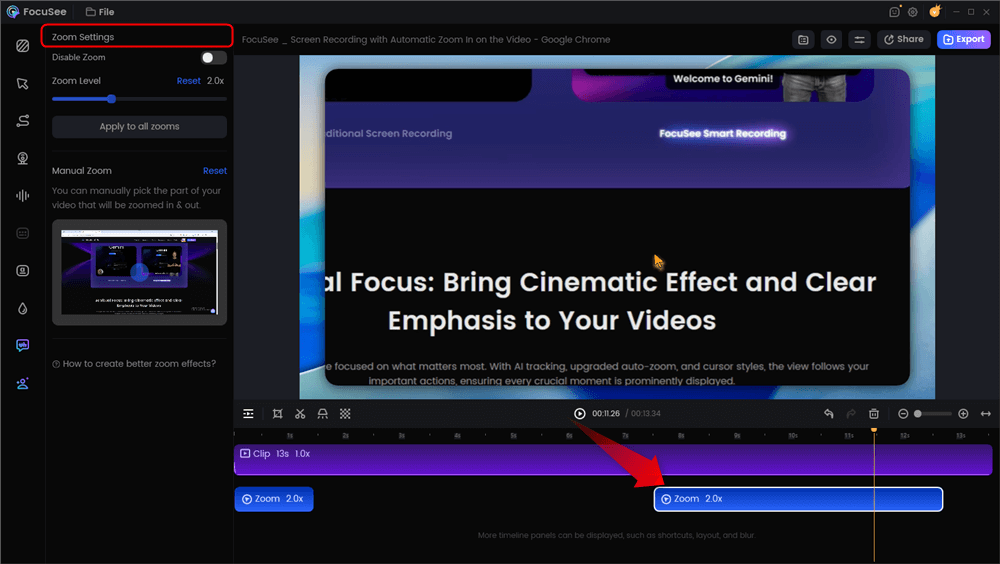
Automatic Zoom Effects
Enhancing Professionalism
To prevent the amateur feel of raw screen shares, FocuSee applies 3D Motionicon and Smart Cursor Effects. These features smooth out erratic mouse movements, giving your personalized self-serve demos saas a polished, studio-quality look that builds buyer confidence.
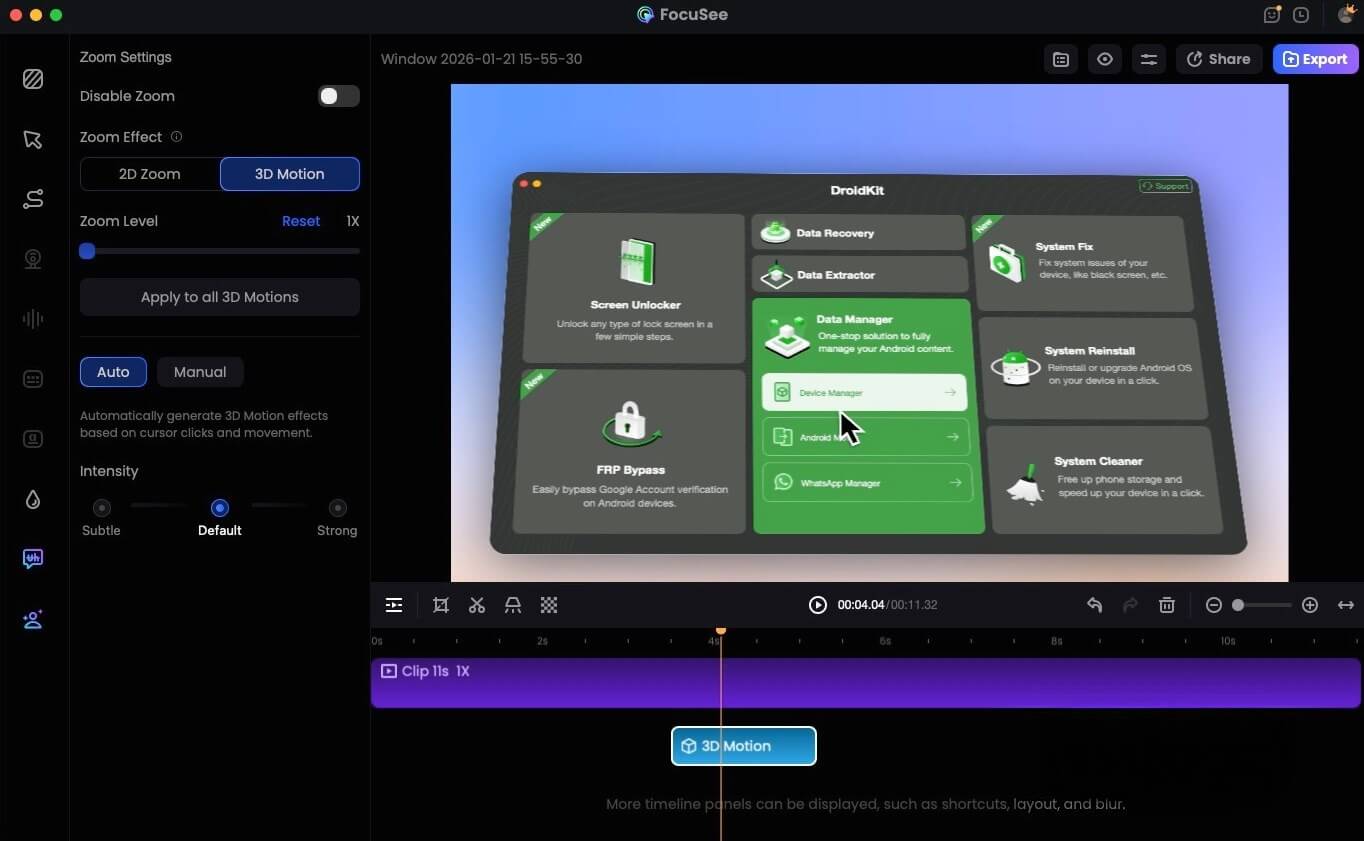
FocuSee 3D Motion
From “Manual Editing” to “Recording Presets”
Instead of rebuilding your recording setup every time, FocuSee’s Recording Presets let you save your preferred capture settings and reuse them instantly. Configure your screen area, audio sources, resolution, and effects once—then apply the preset whenever you start a new recording.
The Workflow: Set up your ideal recording configuration → Save it as a preset → Select the preset for future sessions → Start recording with consistent, ready-to-go settings in seconds.
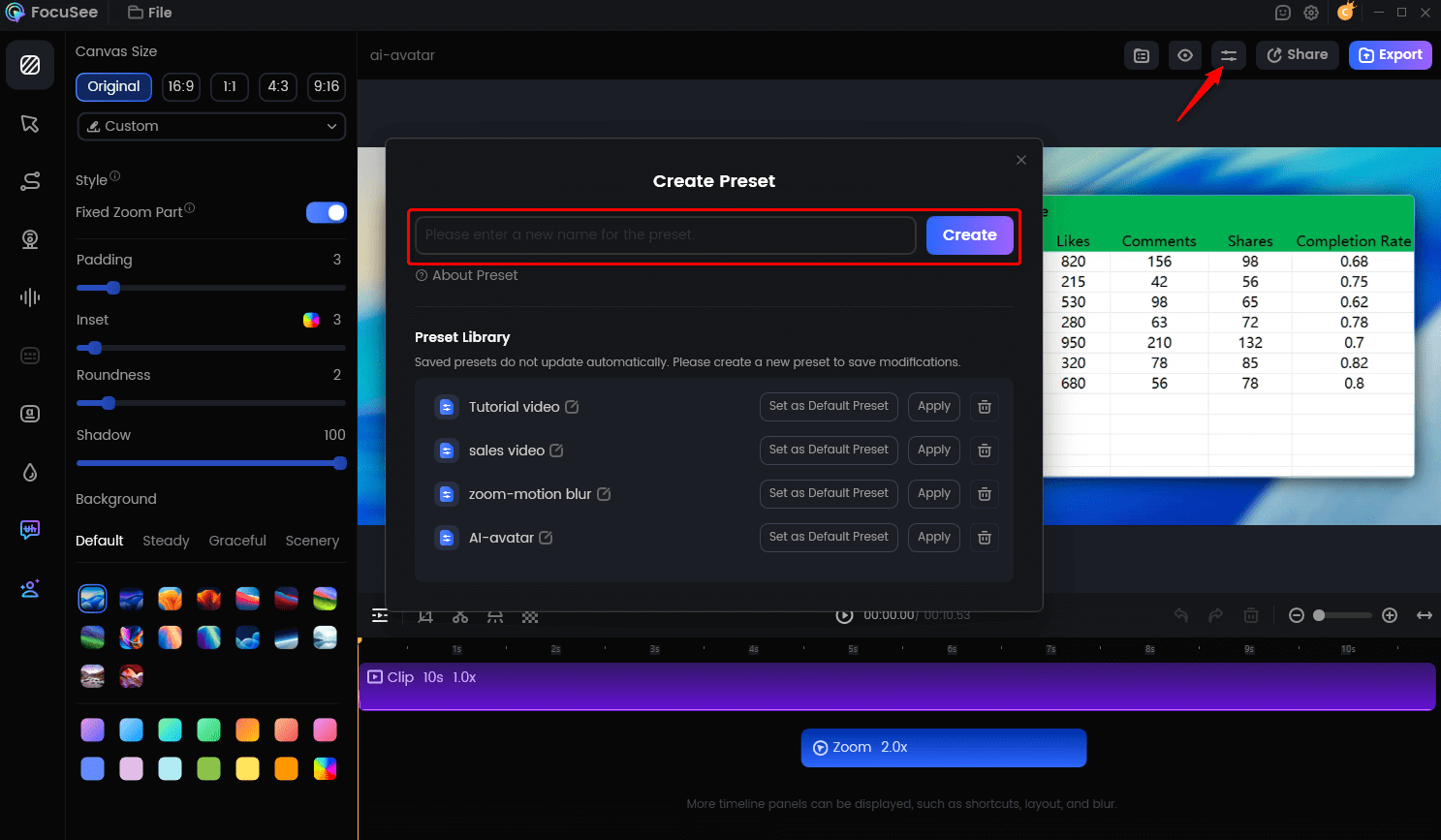
Create Your Presets
This eliminates repetitive setup work, ensures consistent output quality across videos, and helps you move from manual prep to fast, standardized production.
Distribution: Managing Your Personalization Library
A common oversight in personalization strategy is file management. If you create 20 personalized versions, how do you get them to the right prospects without chaos?
- Cloud Hosting: FocuSee hosts the videos directly, generating unique links for each version.
- Sales Enablement: You can embed these links directly into Highspot, Seismic, or HubSpot email templates.
- Embeds: Download the lightweight MP4s to embed on specific industry landing pages on your site.
This distribution flow ensures your sales team always pulls the correct asset without needing to download and re-upload heavy video files manually. Here is a demo video I made via FocuSee.
Also Read: 5 Best SaaS Product Demo Video Software >
Manual vs. Automated: The Case for Personalized Product Demos SaaS
When scaling personalized product demos saas teams often hit a bottleneck: human capacity. The traditional reliance on manual live demos creates inconsistency and operational risk. Comparing manual execution against asynchronous demo automation tools reveals distinct differences in efficiency and reliability.
Manual Live Demos (The Old Way)
- Time Cost: High. Sales engineers must prep data and environments for every call.
- Risk: High. Live software environments are prone to bugs, server latency, or unexpected data errors during the presentation.
- Consistency: Low. The quality of the demo depends entirely on the presenter’s energy and memory on that specific day.
Asynchronous Video Tools (The New Way)
- Time Cost: Low. Record once, edit, and distribute repeatedly.
- Risk: Near Zero. You control the narrative. The “happy path” is guaranteed, ensuring no technical glitches distract the prospect.
- Scalability: High. A single on-demand demo asset can be cloned and modified to serve thousands of prospects.
Moving to asynchronous video assets allows you to maintain the personal touch of a live walkthrough without the associated risks. It supports sales enablement by giving representatives a library of perfect, error-free demos tailored to specific industries, which they can send to prospects before or after calls.
| Live Manual Demos | Tool-Assisted Video Demos | |
| Setup Time | High | Low–Medium |
| Consistency | Low–Medium | High |
| Risk of Error | High | Low |
| Personalization Efficiency | Medium | High |
Expert Strategy: The ‘Outcome-First’ Method for Role-Based SaaS Demos
Based on extensive analysis of successful SaaS go-to-market strategies, the biggest mistake teams make with SaaS demo personalization is over-customization too early. Many product marketers believe they must rewrite code or radically alter features for every prospect. This is a resource-heavy error that leads to burnout.
High-performing teams personalize the framing and outcomes first (role, goal, industry), while keeping the core workflow consistent. This reduces cognitive load and operational complexity while still delivering a “this was built for me” experience.
How to Apply the Outcome-First Method
- The Wrapper Strategy: Keep the middle 80% of your demo (the actual product functionality) identical across segments.
- Personalize the Edges: Customize the introduction and the conclusion.
- Contextual Anchoring: Use interactive demos principles by adding text overlays that translate generic features into specific benefits.
Script Comparison: The Wrapper Strategy in Action
To visualize how this works without re-recording your screen, look at how the audio script and text overlays change while the visuals remain exactly the same.
| Generic Approach (Weak) | Personalized “Finance Admin” Approach (Strong) | |
| 0:00 – 0:10 Admin Dashboard Login | “Welcome to the Platform. Here is the main dashboard where you can see all your data widgets.” | “As a Finance Admin, you need visibility. Here is how you can instantly audit user spend the moment you log in.” |
| 0:11 – 0:30 Clicking ‘Export Report’ | “Click here to export your CSV file. You can save this to your desktop.” | “For month-end reconciliation, simply click here to pull the precise compliance report your auditors require.” |
| 0:31 – 0:45 Settings Menu | “This is the settings tab where you can change user permissions.” | “Security is your top priority. Here is where you enforce Role-Based Access Control to protect sensitive financial data.” |
This approach solves the issue where generic demos fail to resonate with different buyer roles, without forcing your engineering team to maintain dozens of custom demo environments.
Measuring Success: KPIs for Conversion Optimization
Implementing personalization requires effort, so you must validate the return on that investment. To achieve true conversion optimization, you need to move beyond vanity metrics like “views” and track indicators that reflect genuine buyer intent.
Essential KPIs for Personalized Demos
- Completion Rate by Persona: Do Finance leads finish the demo more often than Marketing leads? If one group drops off early, your personalization for that role may miss the mark. High completion rates indicate that the narrative resonates with the specific audience.
- Time on Demo: Track how long a user spends interacting with the asset. An increase in time spent typically correlates with higher interest. Compare the “Time on Demo” for your generic assets versus your role-based saas demos. You should see a measurable lift in the personalized versions.
- Demo-to-Opportunity Conversion: This is your bottom-line metric. Calculate the percentage of users who request a sales call or start a trial after viewing the demo. By tagging your demo assets (e.g., “Healthcare_Demo_v1”), you can directly attribute pipeline generation to specific account-based marketing tactics.
By monitoring these data points, you can refine your customer journey and double down on the segments that respond best to your tailored content.
Conclusion
The era of the generic, “feature-dump” demo is over. As outlined in this guide, saas demo personalization is the key to solving the persistent problems of low engagement and unclear ROI. By adopting a role-based framework and focusing on outcomes rather than just features, you can ensure every prospect feels understood.
You do not need to hire more staff or risk technical glitches in live environments to achieve this. With tools like FocuSee, you can automate the polish and scale your asset production efficiently. Regain control of your sales narrative today—download FocuSee and start creating personalized, high-conversion demo assets in minutes.
Frequently Asked Questions on Demo Personalization
What is SaaS demo personalization?
It is the process of tailoring a product demonstration—whether live or pre-recorded—to match the specific industry, role, and pain points of a prospect. The goal is to make the prospect feel the solution was built specifically for them.
How personalized should a product demo be?
Focus on the “Outcome-First” approach. You do not need to change the underlying code. Personalize the data shown (names, terminology) and the narrative framing (voiceover, intro/outro) to match the user’s vertical.
Does demo personalization really improve conversions?
Yes. By increasing relevance, you reduce cognitive load for the buyer. Prospects engage longer and understand the value proposition faster, leading to higher demo-to-opportunity rates.
What data should I use to personalize demos?
Use firmographic data (industry, company size) and technographic data (current tech stack). Also, consider the buyer persona (e.g., technical user vs. executive buyer) to adjust the complexity of the walkthrough.
Can demo personalization work for complex SaaS products?
Absolutely. For complex products, personalization is even more critical. It helps you hide irrelevant features and focus only on the specific workflows that matter to that specific buyer, preventing feature fatigue.
How do I scale personalized demos without overwhelming my team?
Use asynchronous video tools like FocuSee as a template engine. Record a core workflow once, then use the editing features to clone the project and tweak text overlays for different industries. This avoids the need for repetitive manual live demos while creating a library of vertical-specific assets.