Interactive SaaS Demo Guide: The Key to Scalable PLG (2026)

Imagine a lobby full of potential customers waiting to buy your software, but the door is locked until a salesperson arrives with a key. This is the reality for many B2B companies today. You have inbound traffic, but you force high-intent prospects to wait days for a “discovery call” just to see the user interface. By the time that meeting happens, their excitement has cooled, or they have moved on to a competitor who lets them see the product immediately.
Generic explainer videos often fail to solve this because they feel passive and distant. They do not allow the user to feel the workflow. The solution is the interactive SaaS walkthrough or demo. This asset bridges the gap between a passive website visitor and a qualified lead.
However, a critical distinction must be made early: “Interactive” does not always mean a complex, code-heavy HTML capture. For many teams, a simulated interactive tour—a high-fidelity video experience that mimics the flow of a live session—offers 80% of the value for 10% of the technical effort. This guide explores how to build, deploy, and optimize these assets to solve the specific pain point of unscalable live demos, ensuring your pipeline grows even when your sales team is offline.
The Strategic Shift: Why “Simulated” and “True” Demos Are Essential
In the modern B2B landscape, the interactive SaaS demo has emerged as the primary vehicle for Product-Led Growth (PLG). Buyers demand immediate access. By deploying an interactive product tour, revenue teams can automate the early stages of the buyer journey.
Reliability is non-negotiable. Whether you are implementing a self-serve tour for onboarding or a marketing asset for lead capture, technical glitches kill trust. Traditional HTML-based “sandbox” demos (such as those from Navattic or Arcade) are powerful but can be expensive and resource-intensive to maintain.
This is why many agile teams are shifting toward simulated interactive demos. These are highly polished, cursor-driven video assets that guide a user through a “perfect” workflow. They simulate the experience of using the software without risking a sandbox environment crash or a user getting lost in a complex UI.
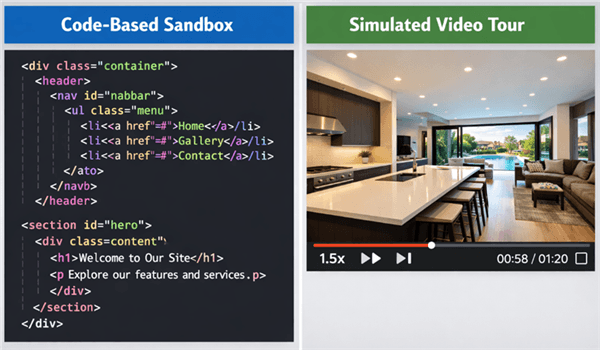
SaaS demo comparison: code-heavy vs. lightweight tours.
The Scale Problem: A Common Scenario
The fundamental limitation of traditional sales models is simple physics: live demos do not scale with inbound demand. Sales engineers and account executives have a finite number of hours. Using those hours for repetitive, top-of-funnel walkthroughs is an inefficient allocation of resources.
Consider the scenario of a Growth Lead at a mid-sized B2B SaaS company—let’s call her Sophia. She noticed a high volume of demo requests but low conversion to opportunities. Prospects wanted to “see the product” before committing time to a call, but her team was bottlenecked. Her sales team was repeating the same introductory script 20 times a week, while high-intent leads sat in the queue.
The Solution: Sophia deployed a self-serve product tour on her landing pages. This allowed prospects to explore the key workflows independently.
The Result: Companies that deploy these automated assets often see a distinct shift in metrics. In Sophia’s case, while the total volume of demo requests might dip slightly (filtering out low-intent lookie-loos), the quality skyrockets. Industry data suggests that providing an upfront product tour can increase lead qualification rates by up to 30%. Sales cycles shorten because the prospect arrives at the first call already familiar with the basics.
Decision Guide: Live Sales Calls vs. Interactive Product Tours
Choosing between manual walkthroughs and automated tours is not about replacing sales teams; it is about deploying resources effectively. To make the right decision for your funnel, you must analyze the trade-offs in scalability, consistency, and data.
Strategic Comparison Matrix
| Live Sales Demo | Interactive Product Tour (Simulated) | |
| Scalability | Low: Limited by staff headcount. | Infinite: Scales to thousands of simultaneous viewers. |
| Consistency | Variable: Dependent on rep fatigue and skill. | Perfect: Delivers the ideal product flow every time. |
| Buyer Pressure | High: Requires scheduling and social interaction. | Low: Self-paced, anxiety-free exploration. |
| Implementation | N/A: Requires human training. | Fast: Can be recorded and embedded in <1 day. |
| Best Use Case | Closing, Solutioning, Negotiation. | Discovery, Qualification, Onboarding. |
Recommendation: Use interactive demo software for the “Discovery” and “Qualification” stages. Reserve live manual demos for the “Solutioning” and “Closing” stages where tailored objection handling is required.
Recommended Tool: The Agile Alternative with FocuSee
Creating a full-code interactive product demo often requires engineering resources or expensive platforms ($500+/month). However, for teams that need to ship assets quickly and ensure they work across all devices, FocuSee offers a powerful alternative: Simulated Interactivity.
FocuSee is technically a screen recording editor, but it is designed specifically for SaaS product tours. It addresses the “uncanny valley” of standard video by automating the zoom and cursor movements to mimic a high-end interactive experience. It solves the core issue where generic demo videos feel low-effort by transforming raw recordings into polished assets without a video specialist.
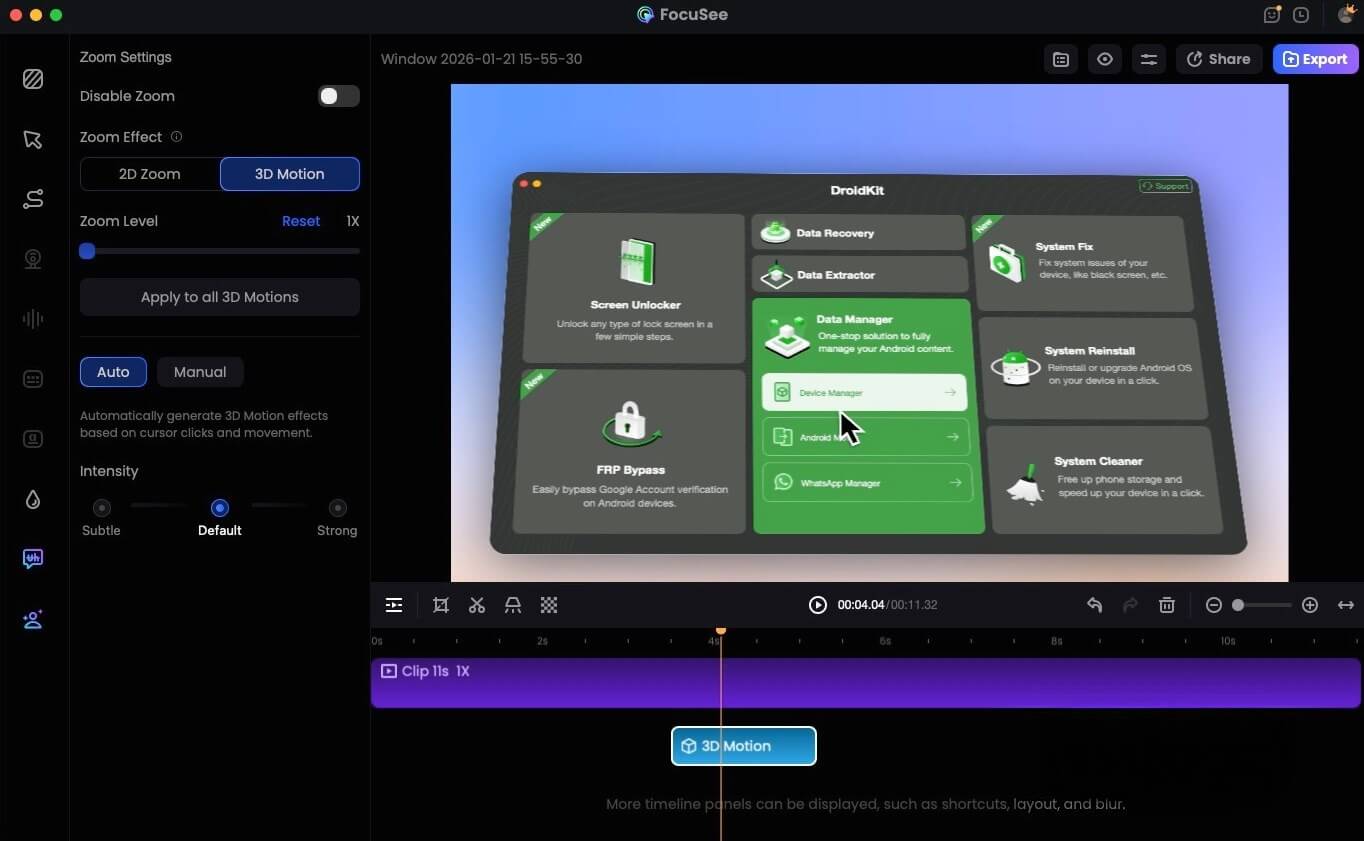
FocuSee 3D Motion
Why “Simulated” Interactivity Works
- 3D Motionicon (The Cursor Effect): FocuSee adds a 3D cursor effect that follows your mouse actions. This cinematic motion keeps the viewer engaged and directs their attention to the features that matter, preventing users from getting lost in complex dashboards.
- Automated Focus (Smart Zoom): Instead of static wide shots, the tool automatically zooms in on clicked areas. This ensures that when you highlight a specific configuration setting, the viewer sees exactly what you see, even on smaller laptop screens or mobile devices.
- Speed to Market: Unlike HTML capture tools that require you to “sanitize” your data and manually inspect code elements, FocuSee lets you record the “perfect take” in a single pass. The AI Smart Cut feature then removes silences and filler words, producing a concise asset ready for embedding.
A screen recording being edited in FocuSee:
Design Strategy: Scoping Your Demo Architecture
When building your interactive workflow, the impulse is often to show everything your platform can do. However, expert analysis reveals a critical insight: demos perform best when they are tightly scoped to a single buyer outcome. Teams that try to recreate the full product often overwhelm users.
The “Single Outcome” Architecture
Instead of a generic “Platform Overview,” design track-based demos. For example, create one tour specifically for “Automating Reports” and another for “User Provisioning.” This targeted approach serves SaaS onboarding and sales alike by addressing specific pain points.
Deployment: Integrating the Asset into Your Stack
A common frustration for marketers is understanding where these assets live. Since FocuSee generates high-fidelity video files (MP4) or hosted links, integration is flexible and robust:
- The Landing Page Embed: Use the standard
<video>tag or a lightweight player (like Wistia or Vimeo) to embed the tour directly on your “Features” page. This creates a seamless experience that loads faster than heavy HTML-capture iframes. - The “Cold” Email Asset: You cannot embed an interactive HTML demo in an email—security filters block scripts. However, you can embed a GIF preview of your FocuSee tour that links to the full video. This is a high-converting tactic for outbound sequences.
- CRM Integration: If you host the video on a platform like Wistia or Vidyard, you can push “Percentage Watched” data directly into HubSpot or Salesforce. This allows you to trigger workflows; for example, if a lead watches 75% of the “Enterprise Security” tour, alert the sales team immediately.
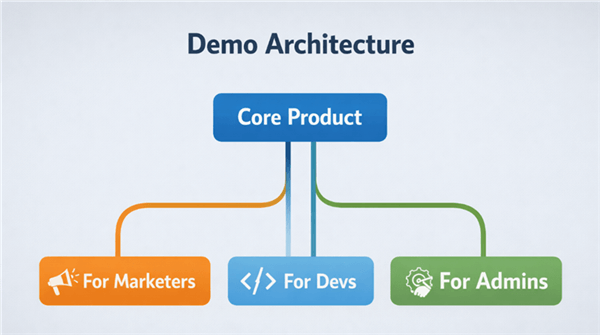
SaaS Demo Architecture
Measuring Success: Metrics That Matter
Deploying the asset is only the first step. To truly optimize your product-led growth strategy, you must measure how these demos impact the funnel. Because we are discussing simulated video tours, we look at video-centric engagement metrics rather than UI click-maps.
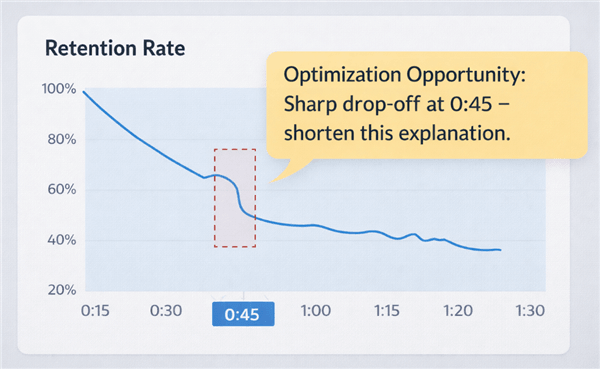
Retention Rates for a SaaS Product Tour
Key Metrics to Track
- Completion Rate: Does the user finish the workflow? A low completion rate often indicates the demo is too long or the narration is dragging.
- Time-on-Page vs. Video Duration: This is a subtle but powerful metric. If a user spends 5 minutes on a page with a 2-minute demo, they are likely re-watching specific segments. This behavior signals extremely high intent.
- CTA Click-Through Rate: Place a clear “Start Free Trial” or “Book Consultant” button immediately below or inside the video player. Tracking clicks here is the ultimate measure of the demo’s ability to persuade.
By treating your product tour as a data source, you can iterate on the content. For instance, if you notice drop-offs at the 30-second mark (the “Configuration” step), that specific part of your explanation is likely confusing. Use FocuSee to re-record just that segment with tighter editing or clearer Mouse Spotlight effects to guide the user.
Interactive SaaS Demo FAQs
What is the difference between an “interactive demo” and a “simulated tour”?
A “true” interactive demo captures the HTML/CSS of your app, allowing users to physically click buttons (tools like Navattic do this). A “simulated tour” (like FocuSee) is a video that mimics the flow. Simulated tours are often faster to build, load quicker on mobile, and are less prone to breaking when your UI code changes.
Do simulated tours work for complex SaaS products?
Yes, often better than full interactivity. For complex products, a user can easily get lost if given full freedom. A simulated tour keeps them on “rails,” ensuring they see the value proposition exactly as you intend, without confusion.
How do I embed these demos on my site?
If using FocuSee, you can export as MP4 and upload to your site’s video player, or use the hosted link. This makes them compatible with WordPress, Webflow, and any standard CMS without needing complex code injection.
Can these demos replace sales calls?
They replace introductory discovery calls. They do not replace the deep-dive, consultative demos required for closing enterprise deals. They serve to filter and educate leads so that when a live demo does happen, the conversation is advanced.
How do interactive demos qualify leads?
They act as a behavioral filter. Prospects who engage with the full tour and reach the CTA are statistically more informed and have higher intent than those who simply fill out a generic contact form.
Conclusion: Start Your Product-Led Journey
Shifting to a product-led strategy with interactive demos is more than a marketing tactic; it is an operational upgrade for your entire revenue team. The goal is not to eliminate human interaction but to optimize it. When you let the product sell itself early in the funnel, you remove the friction that kills deals.
Your prospects want to see the product immediately. They want to verify that your solution solves their specific problem without jumping through hoops. By providing a self-serve product tour, you respect their time and build trust before the first conversation ever happens.
Start small. You do not need a dedicated engineering team to build a custom sandbox. With tools like FocuSee, you can record, polish, and publish your first asset today using standard business hardware. Define a single buyer outcome, record the workflow, and empower your buyers to explore. The shift from friction to flow starts with that first automated demo.