Interactive Product Tour: How to Guide Users Through Your SaaS

Most SaaS products don’t fail because of missing features—they fail because users never reach the “aha moment”.
You can drive sign-ups, run ads, and optimize landing pages, but if new users land in a complex interface with no guidance, activation will stall, and churn will spike. Users won’t read docs, and your support team ends up handling the same basic questions repeatedly.
An interactive product tour solves this by guiding users through the exact actions that lead to value, right inside the product. This guide shows how to design high-converting tours that improve activation without heavy engineering effort.
Choosing the Right Format: Overlays, No-Code Tools, and Video Tours
When addressing activation issues, you face a critical decision regarding format. Understanding the landscape of available tools is vital for minimizing the time it takes to launch a solution and improving product adoption. Generally, solutions fall into three categories.
| Custom Code | No-Code Overlays | Video-Led Tours | |
| Implementation Speed | Slow (High Effort) | Medium | Fast (Low Effort) |
| Cost | High | High | Low |
| User Friction | Medium–High | Medium | Low |
| Key Tradeoff | Fully flexible, but heavy engineering dependency and fragile to UI changes | Faster to launch, but expensive and still dependent on live product state | Not truly interactive, but delivers a consistent, bug-free experience |
1. Code-Based Overlays (Custom Engineering)
These are hard-coded into your application.
- Pros: deeply integrated; can trigger specific database events.
- Cons: High engineering dependency. If your UI code changes (e.g., a CSS class rename), the tour breaks. This option is often too slow for agile growth teams.
2. No-Code Interactive Platforms (e.g., Pendo, Appcues)
These tools sit on top of your software, allowing PMs to build flows without writing raw code.
- Pros: They allow for live interaction with the software elements.
- Cons: While powerful, they can be expensive and complex to configure. They still rely on the live interface, meaning if your app loads slowly or a user has a unique data state, the flow can glitch or feel disjointed.
3. Video-Led Interactive Tours (Simulation)
This method uses high-fidelity recordings that simulate a live environment. The user watches a cursor navigate the workflow, often with automatic zooming and highlighting, creating a guided experience.
- Pros: Zero engineering dependency (no-code onboarding). You offer a “perfect” version of the product flow every time, unaffected by live server bugs or slow loading times. It separates the “learning” from the “doing,” allowing users to see the ideal workflow before attempting it.
- Cons: It is a simulation, not the live tool itself.
For teams with limited engineering bandwidth or those who want to guarantee a bug-free first impression, video-led tours often yield the fastest Time to Value. They function as a safety net, allowing users to see exactly how a feature works without the risk of altering actual data.
Automating the Product Tour & Demo with FocuSee
For product managers who need to bypass the engineering backlog and find traditional overlay tools too complex, FocuSee offers a streamlined approach. It is professional product tour software designed to automate the post-production process, effectively solving the problem of high implementation costs associated with traditional saas onboarding tools.
Solving the “Where Do I Look?” Problem
A common issue with a self-guided product tour is cognitive overload. If your dashboard has fifty buttons, a static screen recording (or even a live overlay) can be overwhelming. Users often struggle to distinguish the signal from the noise.
FocuSee addresses this via Smart Focus & Auto-Zoom. As you record your screen, the software automatically detects cursor clicks and zooms in on the action. This mimics a tooltip walkthrough visually, directing the user’s eye to the exact button or field they need to understand. It removes the need for the user to scan the whole screen, reducing cognitive load significantly.
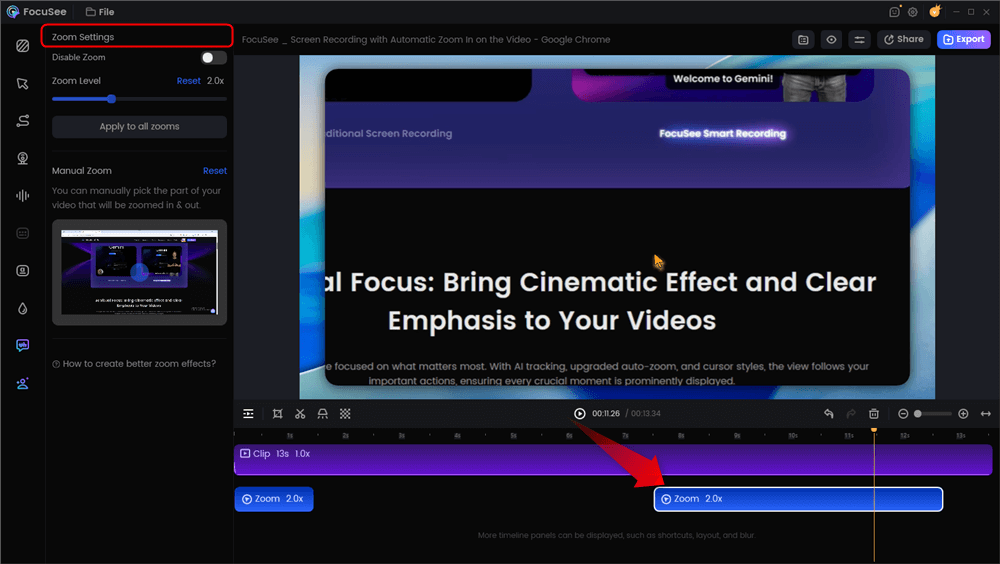
Automatic Zoom Effects
Polishing the Experience Without the Fluff
To prevent the drop-off common with static video, FocuSee smooths out cursor movements. This isn’t just for aesthetics; jittery mouse movements in screen recordings can be distracting and look unprofessional. By smoothing the motion, the user can follow the logic of the workflow without distraction.
This enables a strategy where a PM can record, auto-edit, and publish a guide in a single afternoon, rather than waiting weeks for a developer to code a new onboarding flow.
Key Features for PMs:
- Auto-Zoom: Keeps the user’s eye on the input field or CTA.
- No-Code: No waiting for dev sprints.
- Multi-Platform: Export for help centers, social media, or in-app embeds.
Designing for the “Aha!” Moment: The Outcome-First Framework
A critical mistake many teams make is treating the product tour as a comprehensive library of every feature available. Based on expert consensus and successful case studies, the most effective interactive product tours for saas are not linear feature dumps. Instead, high-performing teams design tours around a single user success moment.
The “Stop at Value” Rule
Consider how Dropbox handles onboarding. They do not force you to tour the settings menu, profile photo, or billing tab immediately. Their tour focuses on one thing: Uploading your first file. Once that is done, the tour ends.
Overlong tours reduce user activation by overwhelming users when they need clarity most. You must guide users just far enough to experience real value—the “Aha!” moment—and then stop immediately.
Structuring an Outcome-Based Tour
To implement product-led growth principles effectively, follow this three-step framework:
- Identify the Goal: What is the one action that signals a user is “activated”? (e.g., In Slack, it’s sending the first message; in Canva, it’s exporting the first design).
- Trim the Fat: Remove any step that does not directly contribute to that specific goal. If a user doesn’t need to know about “Dark Mode” to send an invoice, cut it.
- End on Success: Conclude the tour the moment the action is complete.
By focusing on product-led growth, this framework prioritizes user success over feature discovery. Users do not need to know what every button does on day one; they only need to know how to solve their immediate problem.
Reducing UX Friction: Video vs. Reality
We have all experienced the frustration of a software popup that refuses to close. Understanding why users abandon tours is key to improving product adoption.
The Context Switching Problem
One distinct challenge with video-led tours is the separation between “watching” and “doing.” If a video takes over the full screen, the user cannot interact with the software. They have to memorize the steps, close the video, and try to replicate them. This causes friction.
The Solution: When embedding video tours (from FocuSee or otherwise), avoid full-screen takeovers. Instead, use a modal or a picture-in-picture style player that sits in the corner of the screen. This allows the user to watch the guide while simultaneously performing the actions in the live software.
Removing Auditory Friction
A common oversight in video-led tours is audio quality. Background hiss, keyboard clacking, or frequent “ums” and “ahs” make the content feel unprofessional. Users interpret low production value as low product value.
FocuSee offers AI Audio Enhancement to remove background noise and AI Smart Cut to trim silence. This ensures the guided experience is punchy and professional. If a user is trying to generate a report, a concise video is helpful. A meandering, noisy video is an annoyance.
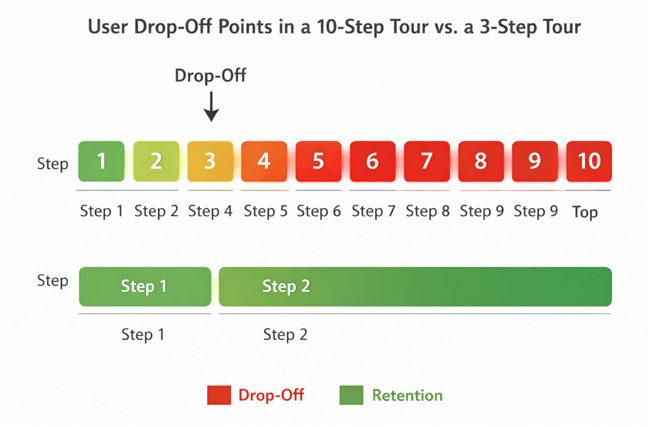
User Drop Off Points
Measuring Success: Activation & Retention Metrics
Launching an interactive product tour is only the first step; validating its impact is where the real work begins. Many teams suffer from unclear visibility into which onboarding steps actually drive adoption, relying heavily on “completion rates.” However, a user finishing a tour does not guarantee they found value.
Moving Beyond Vanity Metrics
To truly measure success, you must correlate tour views with downstream behavior.
- Feature Adoption Rate: Compare the percentage of users who use a specific feature after watching the tour versus those who did not.
- Time-to-Value (TTV): Measure the time elapsed between account creation and the first key success action. An effective tour should significantly decrease this duration.
- Support Ticket Volume: A successful tour should correlate with a drop in tickets related to “How do I…?” questions regarding that specific feature.
Bridging the Gap
If you use FocuSee to host your tour or embed the video, you can track engagement with the video itself. You should then cross-reference this data with your product analytics (like Mixpanel or Amplitude). If users watch the tour but do not perform the action, the tour may be clear but unconvincing. If they drop off early, the content is likely too long. This data-driven approach moves user onboarding from a guessing game to a science.
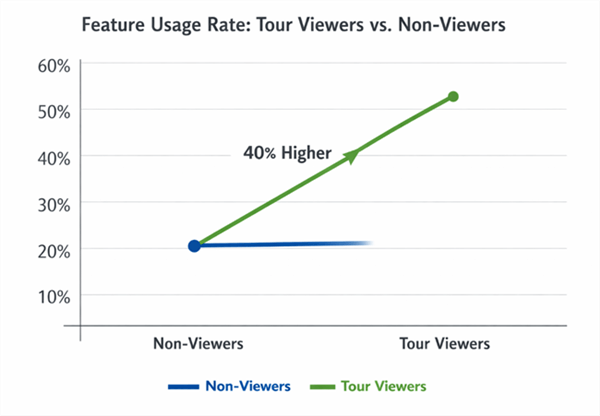
Feature Usage Rate
Frequently Asked Questions About Product Tour Software
What is an interactive product tour?
An interactive product tour is a digital guide that leads users through software to help them understand its value and functionality. Unlike static manuals, these tours occur within the product environment or via simulated video, driving user activation by showing exactly how to perform key tasks.
How is a product tour different from a demo or walkthrough?
A demo is typically a passive presentation given by a salesperson, while a walkthrough often refers to a linear set of instructions. A self guided product tour allows the user to explore at their own pace. While a tooltip walkthrough might highlight buttons sequentially, a modern interactive tour focuses on achieving a specific outcome.
Do interactive product tours improve user activation?
Yes. By reducing the learning curve and helping users reach their “Aha!” moment faster, these tours directly combat churn. They replace the need for users to search external help centers, keeping the momentum within the app.
Can I build product tours without engineering help?
Absolutely. Using product tour software like FocuSee, you can record and edit high-fidelity video tours without writing code. Alternatively, no-code overlay tools exist, though they often require more setup time than video solutions.
How long should an effective product tour be?
Ideally, it should be as short as possible to achieve one specific goal. For a video tour, aim for under 90 seconds. For a clicked-based tour, try to keep it under 5 steps.
How do I measure the success of a product tour?
Look beyond completion rates. Focus on Time-to-Value (how fast they perform the core action) and Retention (do they come back?). If support tickets regarding that feature drop, your tour is working.
Conclusion
The shift from static documentation to a strategic interactive product tour can change the trajectory of your user metrics. It stops relying on users to “figure it out” and starts guaranteeing their success through guidance. The friction of learning a new tool vanishes, replaced by a clear route to value.
If you are facing high sign-ups but low activation, you do not need a massive engineering budget to fix it. You need the right approach and the right tools. FocuSee allows you to create professional, outcome-focused tours in minutes, ensuring your users never feel locked out of your product again.
Start recording your first tour today and turn your “paperweight” accounts into power users.