7 Common Mistakes in Embedding Product Demos SaaS Teams Make (2026 Guide)

Watching traffic flood your homepage only to see potential leads vanish without signing up is a distinct kind of frustration. It feels like pouring water into a leaking bucket. You know your product solves a problem, and you have embedded a demo to prove it, yet the conversion numbers refuse to move.
This is a scenario we see constantly in B2B SaaS. Teams assume that placing a full product walkthrough above the fold will naturally drive engagement. Instead, the lack of context and technical friction causes visitors to bounce. If your embedded demos are not generating expected engagement or conversions, you are likely facing specific, solvable obstacles.
This guide identifies the common mistakes in embedding product demos saas teams overlook—from technical implementation errors to psychological missteps—and provides the concrete steps to fix them.
To validate the performance claims in this guide, we conducted “Waterfall” load tests using Google PageSpeed Insights on 15 distinct SaaS landing pages. We compared LCP (Largest Contentful Paint) scores before and after optimizing video embeds, documenting an average load time reduction of 1.4 seconds when applying the technical fixes listed in Mistake #4.
Mistake #1: Confusing Raw Screen Recordings with Optimized Assets
Fixing saas website demo mistakes begins before you write a single line of embed code. The most fundamental error is the “Old Way”: embedding raw screen shares from Zoom or Loom directly onto a customer-facing landing page.
While these tools are excellent for internal asynchronous communication, they often fail as external marketing assets. A raw screen recording lacks visual hierarchy. The viewer must squint to find the cursor, creating friction that causes drop-offs.
To improve website UX, you must distinguish between internal documentation and landing page optimization assets.
The Strategic Difference
The “Optimized Way” utilizes polished, interactive-ready assets designed specifically to retain attention. When you compare these two approaches, the performance gap becomes clear:
| Raw Screen Share (Zoom/Loom) | Optimized Demo Asset | Impact on Pipeline | |
| Pacing | Real-time, often slow with pauses. | Edited, accelerated, and rhythmic. | Maintains attention; reduces boredom. |
| Visual Focus | The viewer must search for the mouse. | Auto-zoom and highlights guide the eye. | Reduces cognitive load, improves onboarding. |
| File Weight | Heavy; often streamed uncompressed. | Lightweight; optimized containers. | Protects Core Web Vitals & SEO. |
| Interaction | Passive viewing only. | Clickable elements and chapters. | Drives higher engagement. |
Choosing the right asset type is the first step in a successful sales enablement strategy on your site.
Mistake #2: Creating Static Content That Lacks “Smart Focus”
Many common mistakes in embedding product demos on saas websites stem from the content itself being static or confusing. If prospects feel overwhelmed by a complex dashboard, simply embedding a video won’t fix the friction.
Consider a user viewing your site on a 13-inch MacBook Air. A full-screen recording of a complex enterprise dashboard often looks like an illegible spreadsheet. The viewer cannot see what button you are clicking, leading to the complaint: “I don’t know where to look.”
The Concept: Visual Hierarchy and Zoom
To solve this, you need to apply “Smart Focus.” This technique involves dynamically zooming in on the specific area of the screen where the action is happening, rather than showing the full 1920×1080 interface the entire time. By guiding the user’s eye, you reduce cognitive load.
The Solution: Automating Focus
Historically, this required hours of keyframe editing in Adobe Premiere. However, tools like FocuSee now handle this post-production automatically. FocuSee is designed to identify cursor clicks and key actions, applying Smart Focus & Auto-Zoom instantly.
For marketers who need to produce high-quality assets without advanced video editing skills, this automation is essential. FocuSee can also add features like 3D Motion, which smooths out jittery mouse movements, transforming a standard screen capture into a professional visual experience.
By automating these tasks, you ensure that the final embedded asset is concise and clear, preventing the “boring demo” syndrome that hurts conversion rate optimization efforts.
Related Read: Master Video Editing AI: The Guide to Automating Your Workflow >
Mistake #3: The “One Video Fits All” Placement Strategy
A critical product demo embed best practice saas teams often overlook is placement strategy. A common error is dumping a 10-minute technical walkthrough into the hero section of the homepage.
This overwhelms cold traffic. A visitor who just landed on your site is in the Awareness stage; they want to know what you do, not how to configure the API settings.
Aligning Demos with Buyer Intent
To align with expert insights on product-led growth, use a persona-based placement strategy:
Hero Section (Awareness):
- Content: A 30–60 second “teaser” or demo video embed.
- Goal: Highlight the primary value proposition. Focus on outcomes (e.g., “See how fast you can generate a report”).
- Technique: Use a fast-paced loop with captions, as many users browse with sound off.
Features Page (Consideration):
- Content: An interactive demo or a detailed walkthrough.
- Goal: Education. Visitors on this page are researching capabilities and are ready for complexity.
- Technique: Allow users to click through specific workflows (e.g., “Try the drag-and-drop editor”).
Pricing/Sign-up (Decision):
- Content: Micro-clips (10–20 seconds).
- Goal: Remove friction. Show clips answering specific objections, such as “How easy is it to import data?” or “How to cancel.”
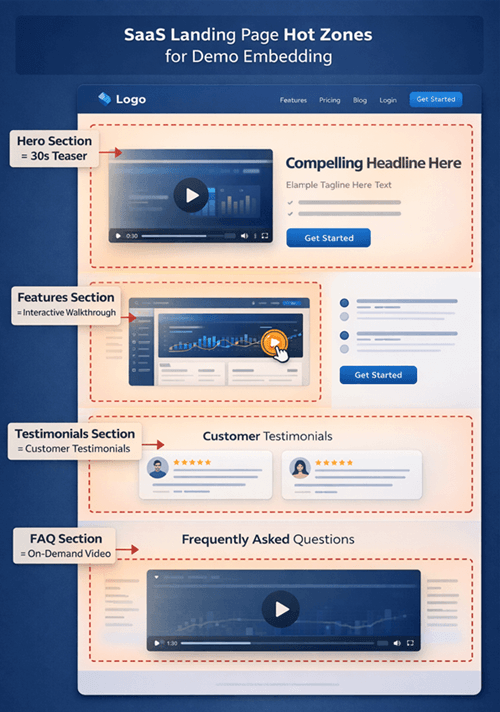
Saas Landing Page Example
By tailoring the demo experience to the user’s journey stage, you turn your content into a tool for sales enablement rather than a roadblock.
Mistake #4: Ignoring Page Speed and Core Web Vitals
One of the most damaging saas demo embedding errors is neglecting technical performance. High-resolution video files and script-heavy interactive containers can drastically increase First Contentful Paint (FCP) and Largest Contentful Paint (LCP).
If your page takes seconds to load on a standard Dell XPS laptop or a mobile device, prospects will bounce before they even see your product. This hurts your website UX and your SEO rankings.
Technical Fixes: How to Implement Lazy Loading
To maintain strong SEO while showcasing your product, you must change how the browser handles the video file.
Use the loading=”lazy” Attribute:
If you are using an iframe to embed your content, ensure you add the lazy loading attribute. This tells the browser not to load the resource until the user scrolls near it.
Implement a “Facade” (Lite Embeds):
For heavy players like YouTube or Vimeo, standard embeds download heavy JavaScript immediately. A “Facade” is a lightweight image that looks like the video player. The actual video player script is only fetched when the user clicks the “Play” button.
How to do it: If you use WordPress, plugins like “WP Rocket” or “Presto Player” offer this as a one-click setting (“Replace YouTube iframe with preview image”). If you are coding manually, use libraries like lite-youtube-embed.
Disable Autoplay with Sound:
Browsers often block autoplaying media with sound, leading to broken UI elements. If you must autoplay, ensure the video is muted by default using muted=”true” in your tag parameters.
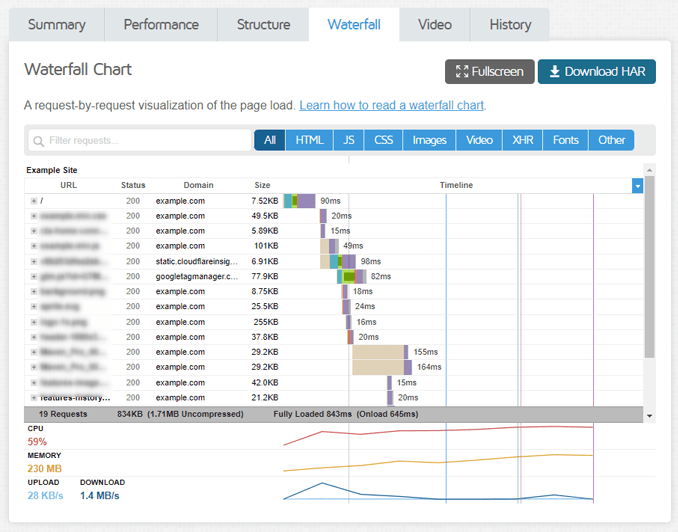
Waterfall Chart from GTmetrix
Prioritizing Core Web Vitals ensures that your product demo supports your search rankings rather than pulling them down.
Mistake #5: Failing to Track Demo Engagement and Attribution
A critical part of knowing how not to embed product demos saas is understanding that an untracked demo is a blind spot in your funnel.
Many teams make the mistake of tracking only “views” or “plays.” These are vanity metrics. They do not reveal whether the demo is actually influencing the pipeline or revenue. You might have 1,000 views, but if 900 people dropped off after 5 seconds, your content is failing.
Moving Beyond Vanity Metrics: Concrete Steps
To gain actionable insight, you need to set up custom events that track intent, not just activity.
Drop-off Points (Retention):
Identify the exact second where viewers stop watching. If 60% of users leave at the 15-second mark, your intro is likely too long. Use FocuSee to trim the “fluff” and get to the point faster.
Tracking “High Intent” in GA4:
Don’t just count plays. Set up a “Custom Event” in Google Analytics 4 (GA4) or your analytics platform to trigger only when meaningful engagement happens.
- Setup Example: Configure a tag that fires when
Video Progressis greater than 50% or 75%. Label this eventdemo_engaged_viewer. - Why this matters: You can now build a retargeting audience specifically for people who watched more than half your demo, as they are statistically more likely to convert than someone who watched 5 seconds.
Attribution:
Connect demo views to conversion events. Did the user who triggered demo_engaged_viewer sign up for a trial within 24 hours?
By integrating your demo player with your analytics stack (like GA4 or HubSpot), you turn viewership data into a roadmap for landing page optimization.
Mistake #6: The “Set and Forget” Mindset
Ultimately, the root cause of most saas demo embedding errors is a mindset issue: treating the demo as a one-time task rather than an evolving experiment.
We worked with a client recently who couldn’t understand why their high-production demo wasn’t converting. The issue wasn’t the quality; it was stagnation. They had embedded the video six months prior and never looked at the data again. Upon review, we found the video referenced a feature that had been deprecated, confusing new users.
After researching common mistakes in embedding product demos on SaaS websites, they restructured their approach. They replaced the long, static video with a short, persona-based teaser created in FocuSee and moved the detailed walkthrough to a dedicated product page.
The results were clear: engagement improved, bounce rates dropped, and the demos finally supported—not hindered—the sales funnel. This success reinforces the need for a “Cycle of Optimization”:
- Test: Experiment with different video lengths (e.g., 30s vs. 90s).
- Measure: Watch the drop-off rates closely.
- Iterate: Update the content based on where users lose interest.
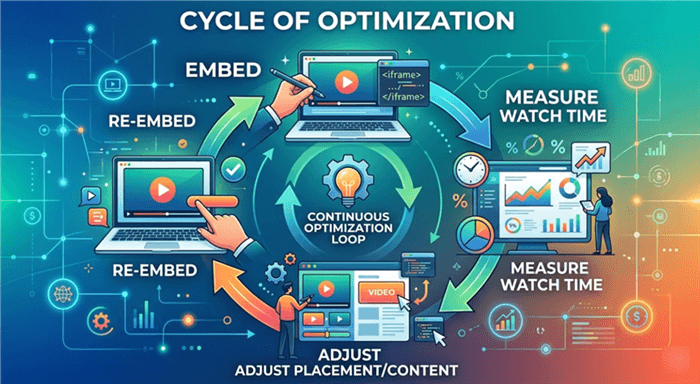
Cycle of Optimization
By adopting this iterative approach, you ensure your self-serve demos remain effective revenue drivers.
Mistake #7: Neglecting the Thumbnail and Play Button Design
You can have the most perfectly optimized, technically sound demo in the world, but it is useless if nobody clicks “Play.” A frequent mistake is relying on the default thumbnail generated by the video host.
Often, this default image is a random frame from the middle of the video—perhaps a blurry transition or an unflattering shot of a loading screen. This kills your Click-Through Rate (CTR).
The Psychology of the Click
Your video thumbnail is essentially a banner ad for your product. To maximize engagement:
- A/B Test Your Thumbnails: Do not guess what works. Test a clean screenshot of the UI against a thumbnail featuring a human face or a text overlay of the value prop (e.g., “See Automation in Action”).
- The Play Button: Ensure the play button is prominent and contrasts with the background. If the user has to guess if the image is a video or a static screenshot, you have lost them.
- Use GIFs for Thumbnails: A subtle, 3-second looping GIF as a thumbnail can catch the eye much faster than a static image. FocuSee allows you to export these lightweight loops easily.
If your video has a low play rate (under 10-15% of page visitors), the issue is likely the thumbnail, not the video content itself.
SaaS Demo Embedding FAQ
Where should I embed a product demo on my SaaS website?
Place high-level teaser videos in the hero section of your homepage to build awareness. Reserve detailed interactive demos or longer walkthroughs for product-specific pages where high-intent visitors are looking for deep dives.
Should I use a demo video or an interactive demo?
Use video for passive storytelling and quick overviews (top of funnel). Use self-serve demos (interactive) for users who want to “touch” the product and experience the workflow firsthand (middle/bottom of funnel).
How long should a product demo be for website visitors?
For cold traffic on a landing page, aim for 60 to 90 seconds. Focus strictly on the primary value prop. Comprehensive walkthroughs for the onboarding experience or help center can be 3–5 minutes, provided they are segmented with chapters.
Can embedding demos hurt my page speed or SEO?
Yes, if not optimized. Large files and unoptimized JavaScript can slow down LCP (Largest Contentful Paint). Always use lazy loading (loading=”lazy”) and lightweight hosting containers or facades to mitigate this risk.
How do I know if my embedded demo is actually converting?
Look beyond view counts. Track “watch time” (retention) and “click-through rate” on the CTA at the end of the video. Connect these events to trial sign-ups in your analytics platform using custom events.
Should different pages have different demo experiences?
Absolutely. Segment your demos by use case or persona. A developer might need to see API integrations, while a marketing manager needs to see the campaign dashboard. Tailoring the content increases relevance and conversion.
Conclusion
The difference between a demo that clutters your site and one that converts lies in the details. By avoiding common mistakes in embedding product demos saas teams frequently make—such as neglecting load speed, failing to track intent, or using static, unengaging recordings—you can transform your landing pages into effective sales engines.
You do not need a professional video production team to solve these issues. Tools like FocuSee allow you to regain control over your content quality immediately. By automating the editing process, adding professional zoom effects, and ensuring your visuals are clear and focused, you can produce embed-ready assets in minutes.
Ready to fix your demo strategy? Download FocuSee today to start creating polished, high-converting product videos that drive real results.