AI Software Demo Guide: Scaling Sales with Intelligent Automation

If you recently reached a breaking point familiar to many product leaders, you are not alone. You are likely drowning in requests for live walkthroughs, leaving you zero time for product strategy. The frustration of recording a perfect take, only to realize your product UI has changed the next week, is a specific kind of burnout.
This guide provides a tested solution to that struggle. We explore how an AI software demo strategy allows you to personalize flows and automate updates. By the end, you will understand how to regain control of your schedule and ensure prospects experience your product on demand.
The Scalability Crisis: Why Manual Demos Fail
The situation highlights a critical bottleneck in the growth phase of many software companies. You face an avalanche of demo requests. Every hour spent on a repetitive live walkthrough is an hour lost on coding or high-level strategy.
The core issues usually boil down to three friction points:
- The Time Sink: Live demos consume your calendar, preventing deep work.
- The Maintenance Trap: A backlog of recorded demos quickly becomes outdated as your UI evolves, requiring full re-recording.
- The Quality Gap: Rushing to record videos often results in poor audio or confusing mouse movements that lower brand perception.
The solution isn’t to hire more sales staff immediately, but to adopt an intelligent automation strategy. By implementing an AI-powered software demo workflow, you automate the initial product introduction. This ensures prospects experience the product on demand while you regain control of your calendar.
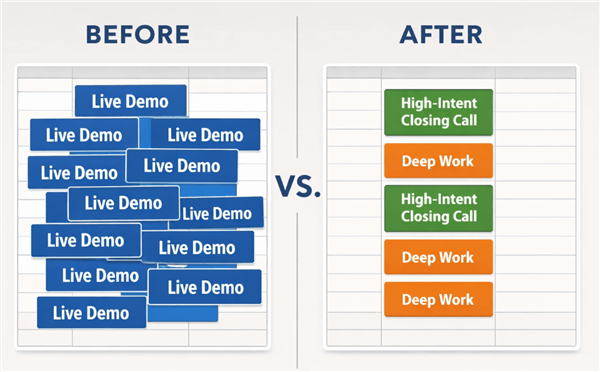
AI Software Demo Strategy
Manual Recording vs. AI Demo Software: A Strategic Decision Matrix
Before selecting a tool, it is critical to evaluate the trade-offs between traditional video production and modern AI demo software. Historically, creating a high-quality product demo meant using manual tools like OBS for capture and Adobe Premiere Pro for editing. While powerful, this workflow presents a significant barrier: the time cost is immense.
AI automation changes this equation by shifting the focus from manual editing to strategic content creation. When you use an AI demo tool for SaaS content marketing or solutions, the software automatically handles the technical polish—panning, zooming, and noise reduction—that usually requires a skilled editor.
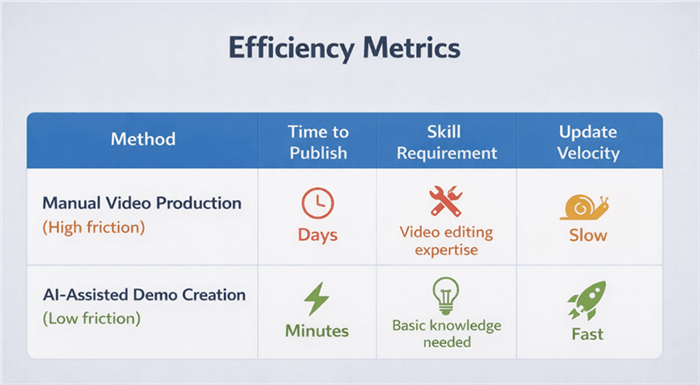
Efficiency Metrics
The Data-Driven Trade-Off Analysis
To help you decide, we have quantified the comparison across three core areas based on our testing:
Production Time:
- Manual: ~4 hours per 1 minute of finished video (recording, editing, audio mixing, rendering).
- AI-Assisted: ~15 minutes per 1 minute of finished video (record once, auto-edit, minor tweaks).
Technical Skill:
- Manual: Requires knowledge of keyframes, audio ducking, and timeline management.
- AI-Assisted: Accessible to anyone who can navigate a web browser; the “editing” is often drag-and-drop.
Scalability:
- Manual: Updating a video usually means starting from scratch.
- AI-Assisted: Platforms frequently allow for modular updates or “patching” specific scenes without re-recording the whole flow.
Related Article: How to Edit Video with AI: 2026 Guide to Faster Creation >
The Tool Landscape: Choosing the Right Solution
It is important to understand that “AI Demos” is a broad category. Before we dive into the workflow, you should know where different tools fit.
- Interactive Overlays (e.g., Navattic, Storylane): These capture HTML/CSS to create a “clickable” sandbox. Great for letting users play, but they lack the guided narrative of a video.
- AI Avatars (e.g., Synthesia, HeyGen): These generate a talking head to explain your product. Excellent for internationalization, but can sometimes feel impersonal if overused.
- Intelligent Screen Polish (e.g., FocuSee, Loom AI): These take a raw screen recording and automatically apply zooms, cursor smoothing, and pans to make it look professionally edited.
Why We Focus on “Intelligent Screen Polish”
For this guide, we are focusing on the third category—Intelligent Screen Polish—using FocuSee as our primary example. We chose this category because it solves the immediate pain point of “I need a professional video now without learning Premiere Pro.” While tools like Navattic are excellent for interactive tours, FocuSee bridges the gap between a casual Loom and a high-budget marketing trailer.
Key Features Solving Common Pain Points
- Smart Focus & Auto-Zoom: Instead of manually setting keyframes, the software detects your cursor action and zooms in.
- Cinema-Style Cursor: It transforms a jittery mouse movement into a smooth, 3D-tilted cursor path.
- Silence & Filler Removal: It automatically tightens the audio track, removing “ums” and awkward pauses.
The Reality of the Workflow: A “Day in the Life” Example
Marketing materials often claim these tools are “instant,” but reality involves a few more steps. To give you a transparent look at the effort required, here is the exact workflow used during our testing of FocuSee.
Step 1: The Raw Recording (2 Minutes)
You open the software and select the window you want to capture. You perform the walkthrough naturally.
Tip: Do not worry about zooming or pausing. Just speak clearly and click through your SaaS platform.
Step 2: AI Processing (Wait Time: ~1-2 Minutes)
Once you hit stop, the AI analyzes the footage. It identifies where you clicked, where you scrolled, and where you spoke. It generates a baseline edit with auto-zooms applied to every click interaction.
Step 3: The Human Polish (5-10 Minutes)
This is the most critical step. The AI is smart, but not perfect.
- The “Wart”: During our testing, we found that if you click rapidly between tabs, the “Smart Focus” can get dizzy, creating a whipping motion that might confuse viewers.
- The Fix: You will spend about 5 to 10 minutes adjusting the zoom levels. You might need to manually delete a Zoom where the AI focused on a popup you intended to ignore. This is drag-and-drop work, but it requires manual intervention.
Step 4: Export and Embed (1 Minute)
Once the path is smoothed out, you export the video. The result is a polished asset that looks like it took hours to edit, produced in under 20 minutes.
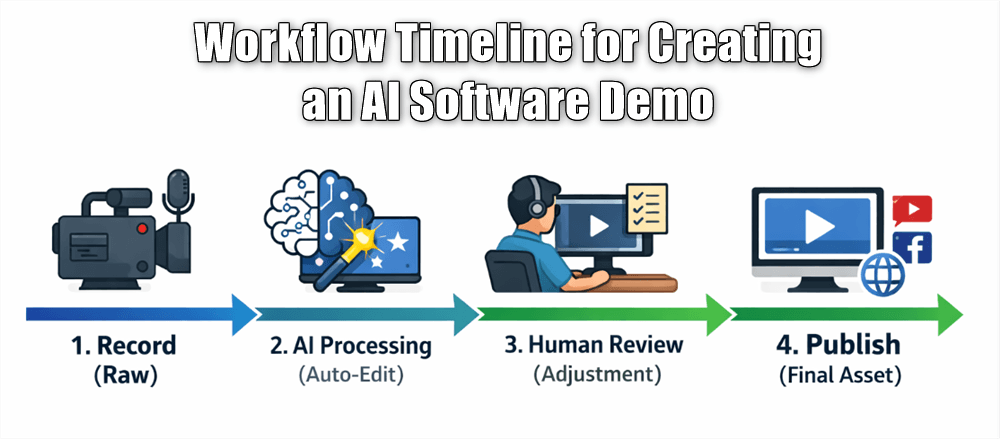
Workflow Timeline for Creating an AI Software Demo
Balancing Automation and Authenticity: The Expert Strategy
Here is a critical piece of advice that differentiates high-converting demos from generic ones: AI software demos deliver the most value when applied selectively. A common fear among founders is that AI demos may look artificial or reduce trust. If the audience feels the interface is a simulation rather than the actual software, credibility drops.
The Hybrid Approach
The expert strategy is to use AI-driven software demo tools to automate the presentation layer—the zooming, the pacing, and the audio clarity—while keeping the interaction layer 100% authentic. You should record the actual workflow on your machine to demonstrate real latency and logic.
Tools in this category allow you to maintain this balance. You can use features like cinematic cursor motion to add high-production value, making the video feel premium, while the underlying recording remains a faithful capture of your SaaS product. This approach uses artificial intelligence to remove the friction of watching a video (like bad audio or small text) without fabricating the product’s capabilities. This method ensures you are practicing ethical product-led growth, where the product sells itself because the demo is both beautiful and honest.
Transparency Note: Where AI Struggles
To ensure you have realistic expectations, we must address the limitations we encountered during testing.
- Erratic Mouse Movements: If you tend to “doodle” with your mouse while talking—circling elements or shaking the cursor—the AI may interpret this as important action and zoom in, creating a nauseating effect. You must train yourself to keep your mouse still when not clicking.
- Complex Dashboards: On screens with high data density (like a trading terminal), the auto-zoom might focus too tightly on a button, cutting off the context of the surrounding data. In these cases, you will need to manually widen the zoom capability in the editor.
- Voice Modulation: While AI audio enhancement is excellent at noise reduction, it cannot fix a monotone delivery. You still need to bring energy to the recording; the AI cleans the sound, but it doesn’t add charisma.
Implementing AI Demos in the B2B SaaS Funnel
Once you have created your assets, the next step is strategic distribution. An AI-based product demo software is not just for your homepage; it is a versatile asset across the funnel.
Top of Funnel: Interactive Teasers
Embed short, high-level demos on your landing pages. These should be fast-paced and focused on the “Aha!” moment. Because generic demos fail to adapt to different buyer roles, use AI tools to quickly cut different versions—one focusing on ROI for executives, and another on feature sets for technical users.
Middle of Funnel: Sales Enablement
In your outreach, replace long text emails with a link to a targeted interactive demo. This cuts through the hesitation prospects feel about booking a 30-minute call. You can create modular recordings for specific use cases. If a prospect asks about integrations, send a pre-recorded, AI-polished clip of that specific workflow. This provides instant gratification and qualifies the lead before you ever speak to them.
Bottom of Funnel: Onboarding Experience
Finally, use these tools for the onboarding experience. Instead of delivering a live training session for every new user, build a library of always-available tutorials. AI editing allows you to update these videos effortlessly as your UI changes, solving the problem of outdated documentation.
Measuring the Impact and ROI of Your AI Demos
Implementing the software is only half the battle; measuring its efficacy is what drives growth. When evaluating your AI software demo strategy, you should track two distinct categories of metrics: efficiency and effectiveness.
Efficiency Metrics
First, measure Time-to-Publish. During our testing, the shift to AI tools reduced the time required to produce a feature update video from days to hours. This velocity enables marketing to keep pace with engineering.
Effectiveness Metrics
Second, focus on Engagement and Conversion. Unlike a live demo where you can read the room, recorded demos require data. Look at average watch time and drop-off rates. If viewers consistently stop watching at the 30-second mark, your intro is likely too slow.
More importantly, track the conversion to a booked meeting. We found that while the total number of demo calls may decrease, the quality of those calls skyrockets. Prospects who had already watched the AI-enhanced demo arrived at the sales call with specific questions, turning a basic discovery call into a high-intent negotiation. This is the ultimate ROI: spending your time closing deals rather than explaining basic features.
Conclusion
Transitioning to an automated workflow addresses the core scalability issue that plagues growing SaaS teams. You no longer need to choose between product development and sales calls. By adopting AI software demo tools—whether you choose FocuSee for polished video or alternatives like Navattic for interactive tours—you eliminate the tedious manual editing that slows you down.
This approach ensures your demos remain current as your product evolves, without requiring a full video team. Regain control of your calendar today. Start by mapping out your most repetitive “Intro to Product” call, and run a test recording to see how quickly you can move from a raw capture to a polished, conversion-ready asset.
Frequently Asked Questions About AI Software Demos
What is an AI software demo?
An AI software demo uses artificial intelligence to automate the creation, editing, or personalization of product walkthroughs. Unlike fully synthetic video, these tools typically enhance real screen recordings by automatically adding zooms, pans, voiceovers, and smooth cursor movements to create a professional look without manual editing.
How does an AI demo differ from a traditional product demo?
The main difference is the production workflow. A traditional software demo relies on manual screen capture and labor-intensive editing in software like Premiere Pro. An AI-powered software demo automates the tedious parts of post-production—like syncing audio, removing background noise, and focusing on clicked elements—drastically reducing the time and skill required to publish.
Can AI software demos replace live sales demos?
Not entirely, but they replace the first demo. They are best used to qualify leads and answer standard questions. This ensures that when you do perform a live demo, you are speaking with a high-intent prospect who already understands the basics, making the conversation more strategic.
What parts of a demo can AI automate effectively?
AI is highly effective at automating the “polish” of a video. This includes Smart Focus (zooming in on actions), audio enhancement (removing noise and filler words), and cursor effects (smoothing jittery mouse movements). It can also automate transcription and subtitle generation, ensuring your content is accessible and SEO-friendly immediately upon export.
Are AI demos suitable for complex SaaS products?
Yes, particularly for modular explanations. For complex products, break the demo into specific feature highlights (e.g., “Reporting Module,” “User Management”). AI tools enable you to produce these segments quickly, creating a comprehensive library without overwhelming viewers with a single long video.
How do I measure the success of an AI software demo?
Success is measured by engagement (watch time), efficiency (time saved in production), and conversion (clicks to “Book a Meeting” or “Start Free Trial”). High success means you spend less time recording and more time closing deals with qualified prospects.