FocuSee 2.0 Keeps Evolving: New Features, Better Editing, and More Possibilities

Since the release of FocuSee 2.0 last September, we haven’t stopped improving. Over the past few months, we’ve been continuously listening to user feedback, refining the experience, and rolling out new features that expand FocuSee beyond automated editing into richer visual expression and more versatile recording scenarios.
In the latest updates, we’re introducing Annotations, 3D Motion, and Mobile Device Recording to your workflow, making your videos clearer, more dynamic, and more versatile than ever.
Annotations: Bring Clarity to Every Step
Annotations have been one of the most requested features from our users, and they’re finally here.
With annotations, you can directly add numbered step labels, highlight key elements with circles, arrows, spotlights, or magnification effects, and include text annotations after recording, allowing you to visually explain your content instead of relying purely on narration. This makes it much easier to highlight key actions, guide attention, and ensure your audience never misses important details.
This is especially useful for tutorials, walkthroughs, and online courses, where clarity matters most. By highlighting key steps and visually reinforcing each action, you can help viewers understand faster and stay engaged throughout the video.
We’ve also made the timeline much more flexible than before. In earlier versions, effects like Spotlight and Blur were limited to one at a time. Now, you can combine multiple annotations and effects in a single scene, allowing you to highlight different areas, actions, and flows simultaneously.
This makes your videos feel more structured and intentional, and gives you the freedom to explain things the way you actually think about them. The result is a more expressive editing experience.
3D Motion: From Flat Zoom to Spatial Storytelling
Automatic zoom made it simple to bring focus to important parts of a screen recording. But many users told us they wanted more movement, more dimensionality, and a way to make their videos feel more alive. In response, we developed the new 3D Motion feature to expand the visual language.
As a more advanced form of camera movement, 3D Motion simulates movement through space by introducing depth and perspective changes. Where traditional zoom feels like moving closer to a static point, 3D Motion gives your video a sense of cinematic flow. By adjusting tilt and perspective, the camera transitions can create a deliberate sense and an immersive viewing experience.
In practice, spatial storytelling helps enhance understanding and immersion. Tutorials and demos become more interactive, while informational content feels less like a static lecture and more like a guided experience.
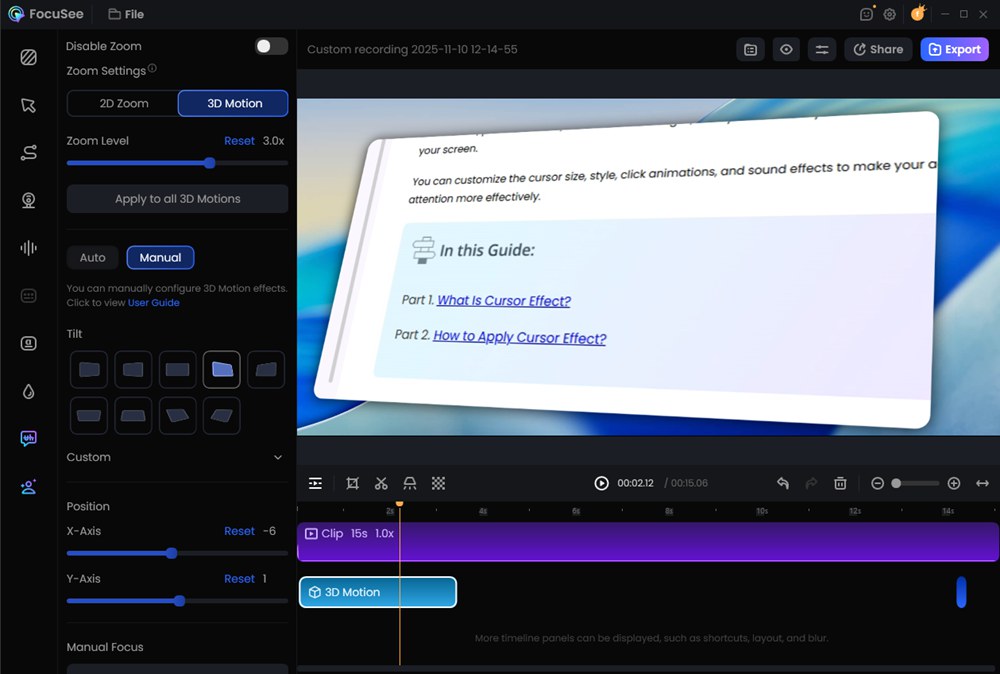
Perhaps most importantly, achieving this three‑dimensional look doesn’t require any additional animation expertise. You don’t have to learn complex editing techniques or spend hours on keyframe adjustments. The 3D Motion effect is generated automatically and efficiently within FocuSee, making it accessible to users who want a more professional visual style without added complexity.
Mobile Capture: Record iOS and Android Screens in FocuSee Workflow
As mobile devices play an increasingly central role in both everyday tasks and professional workflows, the ability to capture what happens on a phone screen has become more essential. FocuSee now supports mobile screen recording for both iOS and Android devices by connecting your phone or tablet via USB.
This enables you to record app workflows, tutorials, and mobile app demos within the familiar FocuSee workflow instead of using separate tools or manually importing clips from mobile to desk.
Same as desktop recordings, mobile recordings are generated with automatic background enhancement and visual polishing, so you are able to start with footage that already looks professional rather than a raw clip waiting to be refined. In addition, FocuSee enhances the presentation of mobile recordings by allowing you to embed them within device frames such as iPhone, iPad, or Android devices.
Expanded Language Support and Experience Improvements
What’s more, we’ve expanded FocuSee’s global reach by adding Portuguese language support. At the same time, we’ve enhanced the overall experience with improvements such as:
- More customizable keyboard shortcuts
- Improved recording stability
- A more responsive timeline editor
- Playback speed control in the preview
- And more
These updates reflect our balanced focus on both expanding functionality and enhancing quality for a better overall experience, and these latest enhancements help reduce friction in your workflow.
What’s Next
In the next wave of updates, you’ll see revamped subtitle styling options, the ability to add and import background audio to shape the mood of your videos, and new beauty and filter effects for webcam recordings so you always look your best on screen. These enhancements are part of our ongoing commitment to helping you craft videos that look polished and professional with minimal effort.
Final
Turn your screen recordings into polished videos in one step. Download the latest version of FocuSee now and explore these new features today. Let’s keep making video creation effortless.