SaaS Marketing Video Strategy: The “Moment of Truth” Blueprint

If you are a product marketer at a B2B SaaS company, you likely face a specific paradox: your homepage generates significant traffic, but trial starts remain flat. The sales team reports that prospects simply “don’t get it” until they see a live demo.
Your challenge is to bridge this gap using a SaaS marketing video that does more than just look good—it needs to convert.
Most marketers in this position feel stuck. You know you need video, but agency quotes are too high ($10k+), and DIY screen recordings often look amateur. In this guide, we will dismantle the traditional, expensive approach to production. Instead of focusing on high-concept brand assets, we will build “pipeline-moving” assets that demonstrate value immediately. We will move away from generic feature lists and toward a strategy that proves your product’s worth in seconds.
This guide is based on hands-on testing of video production workflows using standard marketing hardware (MacBook Pro M2 / Windows 11 Laptops). We analyzed high-performing SaaS funnels to determine which video assets actually influence pipeline generation, rather than just vanity metrics.
The Strategy: Mapping Video Types to Funnel Stages
Engineering the Moment of Truth
Most SaaS marketing videos underperform because they attempt to explain the entire platform in one go. This dilutes the message and bores the viewer. A higher-converting approach is to engineer the video around a single “Moment of Truth”—a specific workflow that proves value fast.
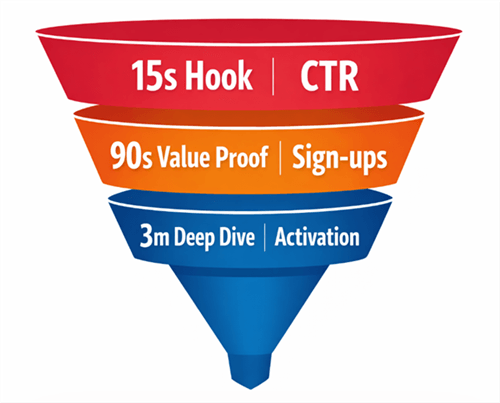
To do this effectively, you must map your video assets to the three stages of the funnel (TOFU/MOFU/BOFU), ensuring each asset has a distinct purpose.
SaaS Marketing Video
1. The Teaser (TOFU): Retargeting & Social
This is a 15-30 second clip designed for social media and retargeting video ads. It does not explain how the product works; it highlights the result. Think of this as the “hook” that drives traffic to your landing page.
- Goal: Click-Through Rate (CTR).
- Content: High-energy cuts, focusing on the pain point and the final output (e.g., a completed report).
2. The Value Proof (MOFU): The Landing Page Asset
This is your core landing page video, typically 60-90 seconds long. Unlike a generic saas explainer video, this asset focuses on a primary workflow outcome (e.g., “go from raw data to a report in 2 minutes”). It shows the UI end-to-end to build trust, followed immediately by proof points like metrics or integration logos.
- Goal: Trial Starts / Sign-ups.
- Content: The “Moment of Truth” workflow. Real UI, no fluff.
3. The Deep Dive (BOFU): Sales Enablement
This is a 3-5 minute saas product demo video used for sales enablement or knowledge bases. It covers edge cases, settings, and detailed configurations that would bore a first-time visitor but are critical for a lead ready to buy.
- Goal: Activation / Deal Velocity.
- Content: Detailed walkthroughs answering specific technical questions.
Strategy Check: PLG vs. Sales-Led
Your video strategy must adapt to your go-to-market motion. The content might look similar, but the Call to Action (CTA) and placement differ significantly.
| Product-Led Growth (Self-Serve) | Sales-Led (Enterprise) | |
| Primary Goal | Get them into the app immediately. | Get them to book a meeting. |
| Video Tone | “Look how easy this is to do yourself.” | “Look how powerful this will be for your team.” |
| The “Proof” | Show speed of setup (e.g., “Setup in 2 mins”). | Show security, integrations, and ROI. |
| The CTA | “Start Free Trial” | “Book a Personalized Demo” |
By distinguishing between these types—explainer vs demo vs testimonial—and aligning them with your sales motion, you ensure you answer the prospect’s questions at the right time.
Related Article: SaaS Content Marketing Strategy: A Revenue-First Framework >
Production Method Comparison: The Real-World Budget & Capacity Plan
Before selecting a tool, you must evaluate three primary production methods against your team’s resources. A common question from leads is, “Can we actually pull this off in two weeks?”
Here is the realistic breakdown of time and cost for a standard 60-second product video:
| Creative Agency | DIY (Raw Screen Record) | Professional Automation | |
| Estimated Cost | $5,000 – $15,000+ | $0 | $50 – $200 (Software) |
| Time to Ship | 4 – 8 Weeks | 2 – 4 Hours | 2 – 3 Days |
| Best For | High-concept brand awareness; Super Bowl ads; complex 3D animation. | Internal async comms; quick support tickets. Not for external marketing. | High-converting homepage demos; product launch videos; help centers. |
1. Outsourced Agency
- Pros: High production value, custom animation, strong brand alignment.
- Cons: Extremely high cost and slow turnaround.
- Risk: ⚠️ Obsolescence. When your SaaS UI updates two weeks after launch, the video becomes obsolete. You cannot easily patch an agency-produced video; you often have to pay for a revision or a new project.
2. Standard DIY Screen Recording (Loom/Quicktime)
- Pros: Zero cost, instant speed.
- Cons: Low polish. Raw screen captures often include mistakes, messy desktops, and lack visual cues.
- Risk: ⚠️ Brand Damage. Using raw footage for a saas video marketing strategy suggests a lack of resources or attention to detail.
3. Professional Automation Tools
- Pros: Uses software to automatically apply post-production effects (zooms, cursor smoothing) to screen recordings. Balances speed with polish.
- Cons: Requires a paid license and a small learning curve.
- Benefit: This is the most viable option for lean teams. It allows you to ship a professional-grade saas product marketing video in days rather than months.
Accelerating Production with FocuSee: The Lean Team’s Advantage
For marketers, the barrier to video isn’t recording; it’s editing. This is where FocuSee serves as a specialized automation engine for SaaS creators. It addresses the primary technical obstacles that prevent lean teams from shipping high-fidelity content.
Solving the “No Editing Skills” Obstacle
Most marketers struggle to make a screen recording look professional. You might record a great take, but the mouse movements look jittery, or you forget to zoom in on the button you are clicking.
FocuSee uses Smart Focus & Auto-Zoom to automatically track your cursor and zoom in on key actions. This directs the viewer’s eye to the “Moment of Truth” without you needing to manually set keyframes in complex editing software like Premiere or After Effects. Furthermore, the Smart & Customizable Cursor Effects smooth out jittery mouse movements, giving your saas launch video the polished look of a high-budget production.

Show Mouse Cursor
Solving the “UI Changes Fast” Obstacle
A major pain point in any saas video marketing strategy is that videos expire the moment the product updates. If your engineering team ships a new navigation bar, your $10,000 agency video is now inaccurate.
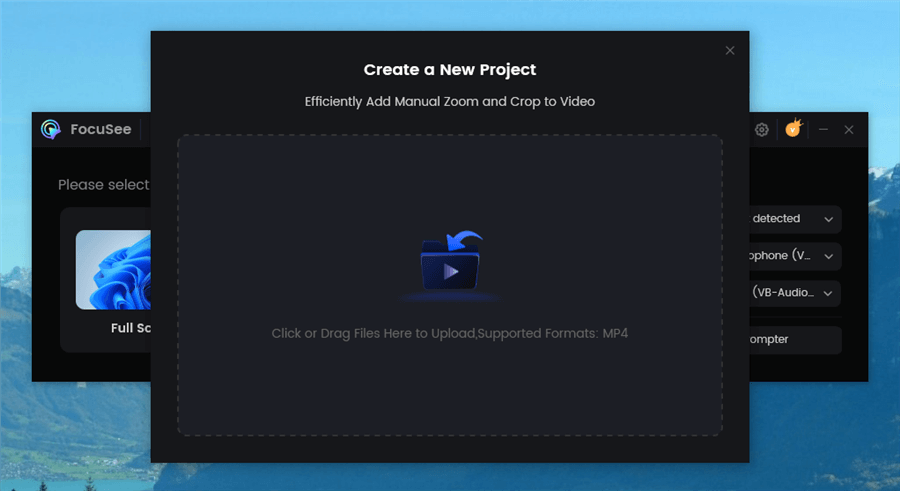
FocuSee allows you to import and re-edit local videos or project files. When a feature changes, you can quickly record a new clip for that specific segment and swap it in. This modular approach ensures your saas onboarding video or homepage asset remains current with minimal effort.
Upload Your Footage
Reality Check: When NOT to Use FocuSee
While FocuSee is powerful for product-led content, it is not a replacement for everything.
- Do not use it for: High-concept commercials involving live actors, complex 3D character animation, or abstract brand storytelling that doesn’t involve your software interface.
- Do use it for: Demos, tutorials, launch videos, and changelogs where the product is the star.
The Copy-Paste Script Vault: From “Feature Dump” to “Value Proof”
When you sit down to write a script, avoid the trap of listing every feature in the navigation bar. Instead, use these proven frameworks designed to prove value quickly.
1. The “Value Proof” Framework (Homepage / Explainer)
Best for: Converting traffic into trials.
| Section | Audio Script Guide | Visual Action | |
| 0:00-0:15 | The Hook | “Stop spending [X hours] on [Task]. Here is how [Product] automates it in 2 minutes.” | Face-to-camera or Title Card. |
| 0:15-0:45 | Moment of Truth | “First, click [Action]. Watch how the data automatically transforms…” (Focus on the outcome). | Screen recording. Auto-zoom on the specific button click and result. |
| 0:45-1:00 | The Proof | “This isn’t just fast; it’s accurate. Trusted by [Company] to handle [Metric].” | Overlay Trust Badges or Customer Logos over the UI. |
| 1:00-1:15 | CTA | “Start your free trial today. No credit card required.” | End Card with button. |
2. The “Quick Win” Framework (Onboarding Video)
Best for: Activation inside the app.
| Section | Audio Script Guide | Visual Action | |
| 0:00-0:10 | Welcome | “Welcome to [Product]. Let’s get your first [Project] set up in 30 seconds.” | Friendly face bubble in corner. |
| 0:10-0:40 | The Walkthrough | “Step 1, hit ‘Import’. Step 2, select your source. That’s it—you’re done.” | Fast-paced screen recording. Highlight key buttons only. |
| 0:40-0:50 | Next Step | “Now that you have your data, try sharing it with a teammate.” | Arrow pointing to the ‘Share’ button. |
3. The “Problem-Solution” Framework (Testimonial/Case Study)
Best for: Sales Enablement / BOFU.
| Section | Audio Script Guide | Visual Action | |
| 0:00-0:20 | The Pain | (Customer Voice) “Before [Product], we were drowning in spreadsheets. It took days to close month-end.” | B-Roll of frustrated team or messy spreadsheets. |
| 0:20-0:50 | The Solution | “Then we switched to [Product]. The integration was instant, and now we close in 2 hours.” | Screen recording showing the specific feature they love. |
| 0:50-1:00 | The Result | “It saved us 40 hours a week.” | Large text on screen: “SAVED 40 HOURS/WEEK”. |
This structure prevents the “feature dump” and keeps the viewer focused on the value proposition. By treating UI footage as modular clips within this framework, you can easily swap out the “Workflow” section when your product updates.
Hosting, Placement, and Measuring ROI
Once your video is produced, where you place it determines its success.
Where to Embed (Placement Patterns)
- The Hero Header: Place your “Value Proof” video above the fold on your homepage. Use a high-quality thumbnail with a “Play” button overlay.
- The “How it Works” Modal: If you don’t want the video taking up space, use a “Watch Demo” button that triggers a pop-up modal. This keeps the page clean while offering a deep dive.
- The Empty State: Place your “Onboarding” video inside your app when a user visits a page with no data (e.g., an empty dashboard). This encourages them to take the first step.
Attribution: Tracking Trials, Not Just Views
Do not just measure “views.” You need to know if the video is driving business.
- UTM Parameters: If your video player allows buttons (like Wistia or Vimeo), add UTM parameters to the link (e.g., ?utm_source=video&utm_content=homepage_demo). This allows you to track conversions in Google Analytics or HubSpot.
- Marketing Automation: Integrate your video host with your CRM (HubSpot/Salesforce). You can set up workflows where watching 75% of a pricing video triggers a notification to the sales team to reach out.
Using Drop-off as a Diagnostic Tool
Here is a critical expert insight: use the audience retention graph (drop-off rate) to diagnose specific funnel problems.
- Drop-off before 10%: Your hook is weak. The viewer feels misled by the thumbnail or the page copy.
- Drop-off at the “Moment of Truth”: Your product demo is too slow or confusing. You likely showed too much configuration and not enough value.
- Drop-off at the End: Your CTA overlay is weak. If they watched the whole video but didn’t click, you didn’t tell them clearly what to do next.
Best SaaS Video Examples Deconstructed
To apply these strategies, we need to look closer at how the best companies execute this. It’s not just about “clean design”—it’s about pacing.
1. Slack: The “Show, Don’t Tell” Hook
Slack’s product videos are masterclasses in economy.
- The Scene: At 0:04, instead of explaining “we have channels,” the video cuts instantly to a cursor clicking a channel named
#marketing. The screen populates with messages immediately. - Why it works: There is no loading screen. There is no login screen. They assume intelligence and skip straight to the utility.
- Takeaway: Edit out every millisecond of “loading” or “typing.”
2. Linear: The Speed-Run Demo
Linear positions itself as a tool for high-performance teams, and its video reflects that.
- The Scene: At 0:12, the cursor moves rapidly across the Kanban board, dragging tasks. The movement is smoothed (simulated), not raw.
- Why it works: The video speed matches the brand promise (speed). They use keyboard shortcuts in the video to show power-user features.
- Takeaway: Match your video pacing to your brand voice. If you sell efficiency, your video cannot be slow.
3. Loom: The Personal Connection
Loom uses its own product to sell the product.
- The Scene: The video starts not with UI, but with a human face in a bubble at 0:01.
- Why it works: It immediately humanizes the software. It handles the objection (“Is this impersonal?”) within the first second.
- Takeaway: If your product relies on human connection, get a face on screen instantly.
Conclusion
Creating a high-converting SaaS marketing video does not require a Hollywood budget or a six-week timeline. The key is to shift from a “feature dump” mindset to a “Moment of Truth” strategy. By mapping your videos to the funnel, using the script templates provided above, and keeping your assets modular, you can turn video into a reliable growth lever.
Don’t let the fear of technical editing slow you down. Tools like FocuSee allow you to regain control of your video strategy, enabling you to ship polished, professional assets in minutes rather than months. Start by recording your product’s most valuable workflow today—your pipeline is waiting.
Frequently Asked Questions on SaaS Video Production
How long should a SaaS product demo video be?
For a homepage or landing page, aim for 60 to 90 seconds. For a saas video ads campaign (retargeting), keep it under 30 seconds. For a deep-dive sales asset or knowledge base article, 3 to 5 minutes is acceptable, provided the content is dense with value.
What CTA should I use in the video—trial, demo, or pricing?
Align the Call to Action with the funnel stage.
- PLG / Self-Serve: “Get Started Free” or “Start Trial.”
- Sales-Led: “Book a Demo” or “See Enterprise Pricing.”
- Retention: “Try this Feature” (linking directly to the app page).
We can’t show everything—what should the video focus on?
Focus strictly on your value proposition and the single most impressive workflow (the “Moment of Truth”). If your product has 50 features, pick the one that solves the most expensive problem for your user. You can always create separate videos for secondary features later.
How do I keep SaaS videos from getting outdated as the product changes?
Avoid long, continuous takes. Record your video in modular segments (Intro, Feature A, Feature B, Outro). When the UI for Feature A changes, you only need to re-record that specific 15-second clip and swap it out in your editor. Tools like FocuSee make this process significantly faster by automating the cursor effects and zooms on the new footage.