How to Make an Event Promo Video in 2025: A Battle-Tested Guide

With only six weeks until your event, the pressure to drive registrations is intense. Every moment counts, but you’re facing a familiar set of obstacles: how to craft a compelling event promo video that grabs attention in three seconds, clearly communicates logistics without looking cluttered, and maintains a professional polish that reflects your brand. Trying to manage inconsistent branding, source licensed music, and prove the video’s ROI can feel like an impossible task on a tight deadline.
This guide provides a direct, actionable solution. We will walk through a strategic framework that moves beyond generic ideas to help you produce high-converting videos efficiently.
A 5-Step Framework for a High-Converting Event Teaser
A high-performing event teaser follows a deliberate structure—not a random sequence of clips. This five-step framework takes you from concept to final cut. We’ll use Carmen, an event manager boosting registrations for her tech conference, as the example.
Step 1: Define Your Core Message and Goal
Decide the one action you want viewers to take—register, RSVP, or buy tickets. Carmen’s objective was simple: drive sign-ups on her ticketing page. Every creative choice supported that goal.
Step 2: Script the “Money Moment”
Your first three seconds must capture attention. Effective hooks include:
• A high-energy crowd shot
• A dramatic venue reveal
• A close-up of a keynote speaker
Carmen’s 20-second script template:
0–3s The Hook
- Visual: Fast crowd/venue montage
- Audio: Upbeat music hits
3–5s Logistics
- Visual: Lower third
- Text: AUSTIN • MAY 9–10 • PALMER EVENTS CENTER
5–12s Value (Social Proof)
- Visual: Three animated speaker headshots
- Text: Speaker name + title
12–20s CTA
- Visual: Full-screen brand graphic + QR code
- Text: Register Now & Save 20%
Step 3: Use Lower Thirds to Deliver Key Info
Once you hook the viewer, present essential details—date, time, location—through clean animated lower thirds. Carmen used: “Austin • May 9–10 • Palmer Events Center.”
Step 4: Showcase Value with Social Proof
Build credibility through speaker headshots, UGC highlights, or sponsor logos. Carmen featured three keynote speakers with animated headshots.
Pro Tip: Design your speaker lineup as a flexible template (2–4 slots) to handle last-minute additions or dropouts without re-editing the entire video.
Step 5: End with a Clear CTA
Avoid vague phrasing. Use a direct, conversion-oriented CTA. Carmen closed with: “Register Now & Save 20%” plus a QR code and short URL—making it effortless for viewers to act immediately.
Fast-Track Your Promo with FocuSee, an AI Video Maker
For event marketers who need to produce professional videos quickly, an AI-powered tool is an effective solution. While general tools like InVideo or Animoto work well for basic social media clips, our testing found FocuSee to be the superior choice for event marketers specifically because of features that directly address common event-related pain points.
Ensure Brand Consistency: The brand kit import feature lets you upload your event’s logos. Ensuring every video is perfectly on-brand.
Streamline Multi-Language Localization: Manually transcribing and translating captions is a slow, error-prone process. FocuSee’s Auto Subtitles feature generates dynamic subtitles and supports translation into over 50 languages. This allows you to meet the needs of bilingual audiences without adding hours of post-production work.
Achieve Professional Polish: To avoid the amateur look of raw footage, FocuSee includes features like AI Noise Removal and Smart Cut. These tools automatically clean up background noise and remove awkward pauses from interviews or presentations, elevating the perceived quality of your event.
Instant Social Media Format Presets (New): FocuSee makes it effortless to tailor your event promo for every major platform. With built-in aspect ratio presets—such as 16:9 for YouTube, 1:1 for Instagram Feed, 9:16 for TikTok & Reels, and 4:5 for Facebook Ads—your video automatically reflows and crops to match the target platform’s requirements. No manual resizing, reframing, or re-exporting needed.
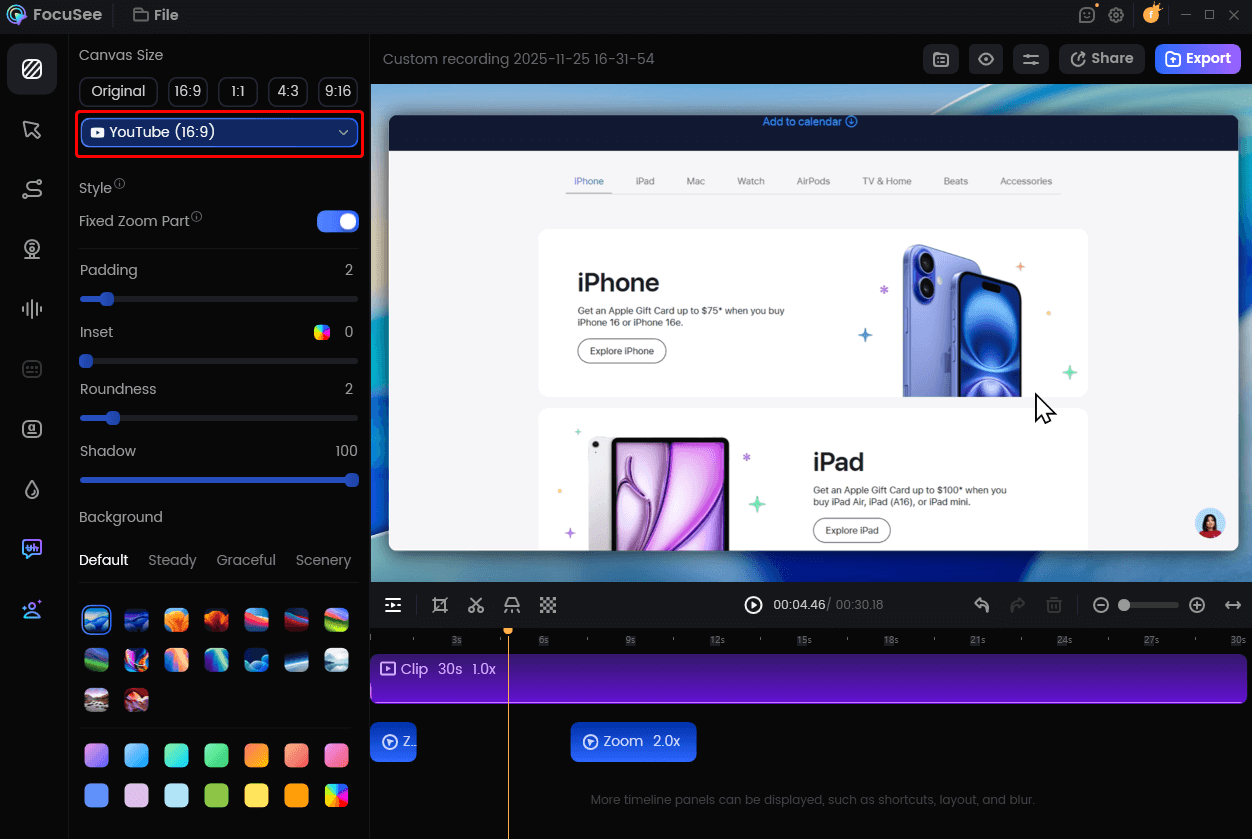
Change Video Size for YouTube
The Post-Launch Playbook: Tracking, Compliance, and A/B Testing
Producing the video is only half the work. A strategic post-launch plan ensures your efforts generate measurable results and protects you from legal risks.
Tying Video Views to Registrations
To solve attribution gaps, you must track performance with precision. Use unique `UTM links` in your video descriptions and calls-to-action for each platform. For video ads on platforms like Instagram Stories, embed a trackable link or use a QR code in the video itself. Carmen encoded UTMs for each video variant (e.g., `source=instagram&content=crowd-hook`) to see exactly which creative drove registrations in her analytics dashboard.
Managing Compliance and Music Licensing
Compliance is non-negotiable. For `music licensing for ads`, you cannot use popular, copyrighted songs without securing expensive synchronization licenses. Stick to royalty-free music libraries, which are often included with a subscription to an `event promo video maker`. If your video includes footage of past attendees, ensure you have signed `model or property releases` that permit their likeness to be used in promotional materials.
Optimizing with A/B Testing
Never assume your first creative is the best one. The most effective way to improve performance is to `A/B test thumbnails and hooks`. Carmen created two versions of her promo: one opening with a keynote speaker and another with the crowd shot. By tracking her UTM data, she discovered the crowd-shot version resulted in a 31% lift in 3-second `hook and retention` and lowered her cost-per-registration by 22%.
To contextualize your own results, here are some typical video ad performance benchmarks for the events industry:
| Metric | Instagram / Facebook | What It Means | |
| 3-Second Hook Rate | 65-75% | 50-60% | The percentage of viewers who watch at least 3 seconds. |
| View-Through Rate (VTR) | 25-35% | 20-30% | The percentage of viewers who watch the entire video. |
| Click-Through Rate (CTR) | 0.8-1.5% | 0.4-0.8% | The percentage of viewers who click your link/CTA. |
Mastering the Tech: Video Formats, Settings, and Filming
Technical precision ensures your festival or trade show promo video looks professional across every platform. This section provides a clear, budget-friendly guide to the essential formats, settings, and gear you need.
Channel-Specific Aspect Ratios and Safe Zones
Plan your video for its destination from the start. Choosing the correct aspect ratio—9:16, 1:1, or 16:9—is the foundation of platform-ready content. For vertical videos, keep text and logos inside the safe zone so they aren’t covered by app interfaces.
- 9:16 (Vertical): Ideal for Instagram Reels, TikTok, and YouTube Shorts. Keep text and logos away from the top and bottom 15% of the frame.
- 1:1 (Square): Perfect for Instagram and LinkedIn feeds, offering strong visibility on mobile.
- 16:9 (Horizontal): Best for YouTube, website embeds, and event screens.
Expert Export and Audio Settings
For crisp playback, export using the H.264 codec with High Profile and a target bitrate of 10–16 Mbps for 1080p. Normalize your audio to -14 LUFS for consistent volume across platforms. If your video includes narration, lower the background music by 8–12 dB to keep the voiceover clear.
The Low-Budget, High-Impact Filming Kit
You can capture excellent B-roll and interviews with a modern smartphone. For a professional boost, use this simple kit:
- Smartphone Gimbal: Creates smooth, cinematic movement.
- LED Light Panel: Ensures clean, flattering lighting for interviews, especially in dim venues.
- Lavalier Microphone: Captures clear voice audio. Pro tip: in noisy halls, position the speaker with their back to a wall or corner to reduce echo.
- Tripod with Phone Mount: Keeps static shots stable and polished.
Frequently Asked Questions
What’s the fastest way to make an event promo video?
The fastest method is to use an AI video maker with a pre-built `event promotional video template`. Following the 5-step framework—hook, logistics, proof, CTA—ensures your message is structured for conversion from the start.
Which AI video maker has the best templates for events?
Tools like FocuSee are designed specifically for professional marketing use cases and offer event-specific templates without adding a watermark. These are typically premium, subscription-based services.
How do I highlight date, time, and location without cluttering the screen?
Use animated lower-thirds immediately after your initial hook. Display the core logistics for 2-3 seconds to inform the viewer quickly, then have them animate off-screen.
What should the opening 3 seconds of a promo video show?
Your opening should be a high-energy “money moment.” The most effective hooks for events are a cheering crowd, a dynamic drone shot of the venue, or a recognizable keynote speaker to establish immediate value and excitement.
Which aspect ratios and export settings do I need?
Use 9:16 for TikTok/Reels, 1:1 for Instagram/LinkedIn feeds, and 16:9 for YouTube/websites. For optimal quality, export 1080p videos using the H.264 codec at 10-16 Mbps.
Can I legally use a popular song in my event promo ads?
No, not without securing a specific, often expensive, license for advertising use. To remain compliant, always use music from a royalty-free library provided by your video maker or a third-party service.
Conclusion
Creating a high-impact event promo video under pressure no longer requires a massive budget or a professional editing suite. The key is to replace guesswork with a structured, conversion-focused framework. By defining your message, structuring your information, and choosing the right tools, you can solve the core challenges of speed and quality.
An AI-powered tool like FocuSee removes technical barriers, automating everything from applying your brand kit import to generating multi-language subtitles. This allows you to focus on strategy and produce professional, on-brand videos in minutes, giving you back the time you need to manage everything else. Take control of your event promotion and start creating videos that sell tickets today.