How to Showcase Product Features in Video: A 2026 Step-by-Step Method

If you are a SaaS founder or product marketer, you know the frustration of watching landing page conversions flatline. You have an incredible product with over 50 different capabilities—powerful dashboards, complex integrations, and deep analytics. But when it comes time to record an interactive demo, you hit a wall: you lack dedicated editing resources, you don’t know which features to show first, and consequently, your videos end up looking like overwhelming, cluttered technical manuals. The result? A confused viewer and lost sales.
Figuring out exactly how to showcase product features in a video can seem like a daunting obstacle. Buyers have multiple pain points, and deciding what makes the final cut requires actual workflow context, not just pointing and clicking at random. Fortunately, this guide provides a verified, tactical procedure to create engaging, high-converting explainer videos without a dedicated production team.
Why Most Product Feature Explainer Videos Fail
Before looking at specific creation methods, it is vital to understand why so many teams struggle with video retention. I wish I had known this before I ruined my first 10 SaaS demos: buyers don’t care about your backend settings or your exhaustive feature list. They care about their own workflows.
When SaaS marketers like Sarah first begin producing content, they often notice a steep drop-off in viewership within the first twenty seconds. This disengagement usually stems from two critical errors:
First, relying on a completely static screen recording guarantees viewer fatigue. When a buyer has to squint to see a tiny cursor moving across a complex analytics dashboard, they quickly bounce. Without dynamic UI zoom effects to guide the eye, the video becomes a chore to watch.
Second, there is a total lack of feature triage. Trying to show the main navigation, the settings gear, the user profile, and the core feature all at once creates cognitive overload.
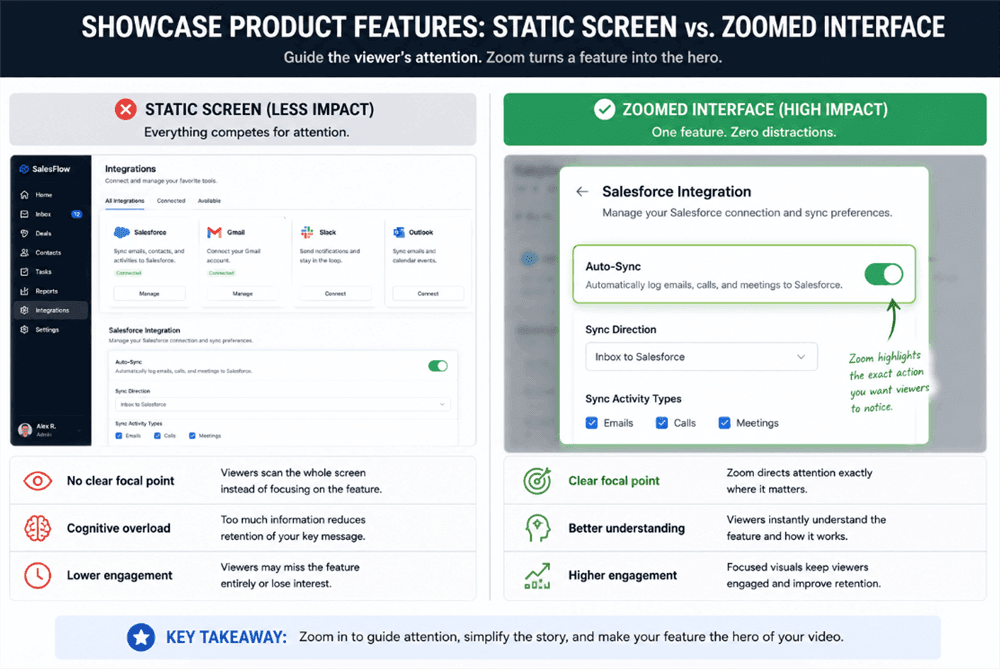
A Static Screen versus A Zoomed Interface
Never show your main navigation bar or peripheral menus if they do not serve the specific feature you are highlighting. Crop them out or zoom past them. Every pixel on the screen should justify its existence.
The “Feature Triage” Matrix: Deciding What to Show
The most frequent obstacle for growth teams is the triage process. When your software solves multiple problems, how do you decide which features make the cut for a 90-second video?
Instead of guessing, evaluate your software’s capabilities using a simple matrix before you ever hit the record button:
- High Visual Impact + High User Value: Show this first. These are the features that look great on screen and solve a major headache. (e.g., A drag-and-drop workflow builder or a one-click auto-sync toggle).
- Low Visual Impact + High User Value: Tell, then show the result. Complex backend integrations or security protocols are boring to look at. Mention them in the voiceover, but visually focus on the clean dashboard that results from that integration.
- High Visual Impact + Low User Value: Skip it. Don’t waste precious seconds on vanity features, like changing UI color themes, just because they look nice.
How to Showcase Product Features in Video: Software Product Demo Video Strategy
Even with your features successfully triaged, a product demonstration video will fail if the script lacks focus. High-converting videos follow a strict Pain → Feature → Outcome framework.
This is not about recording every click; it is about providing workflow context. Let’s break down exactly how to execute this visually and audibly, using a real B2B SaaS example: highlighting a CRM integration.
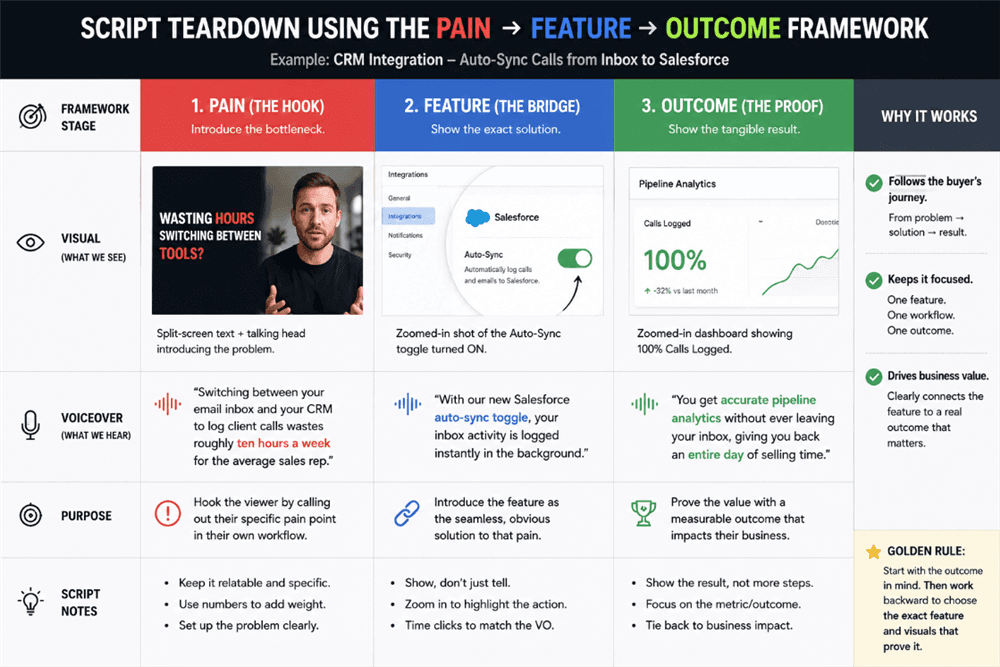
How to Showcase Product Features in Video
Step 1. The Pain (The Hook)
Do not use generic infomercial scripts. Speak directly to the workflow bottleneck.
- The Visual: Start with a split-screen text overlay, or a brief talking-head intro of you stating the problem directly to the camera.
- The Voiceover (VO): “Switching between your email inbox and your CRM to log client calls wastes roughly ten hours a week for the average sales rep.”
Step 2. The Feature (The Bridge)
Introduce your product feature as the exact, frictionless solution. This is where pacing is critical. Synchronize your visual clicks with the audio pace—do not click before you describe the action.
- The Visual: Cut to your software. Automatically zoom in specifically on the ‘Auto-Sync’ toggle switch inside the integrations tab. Blur out the rest of the dashboard so the eye goes straight to the green toggle.
- The VO: “With our new Salesforce auto-sync toggle, your inbox activity is logged instantly in the background.”
3. The Outcome (The Proof)
Conclude by showing the final, tangible result.
- The Visual: Cut to a clean, populated analytics dashboard. Zoom in on a metric showing “100% Calls Logged.”
- The VO: “You get accurate pipeline analytics without ever leaving your inbox, giving you back an entire day of selling time.”
Golden Rule: When planning your voiceover scripting, always write the “Outcome” first. Knowing the exact business benefit (e.g., accurate pipeline analytics) makes it much easier to work backward and select the exact feature clicks you need to demonstrate.
Tool Comparison: Finding the Right Demo Recorder
Before you record your UI, you must choose the right tool. The market is filled with options, ranging from traditional manual editors to modern, automated UI capture tools. Understanding the trade-offs is critical to matching your team’s technical skills with your desired output.
| Price | Learning Curve | Zoom & Effects | Best For | |
| Loom | Low | Very Low | None | Quick team updates |
| Camtasia | High | High | Manual | Advanced tutorials |
| Descript | Medium | Medium | Basic | Text-based editing |
| Screen Studio | Medium | Low | Auto Tracking | Polished Mac demos |
| FocuSee | Medium | Low | Auto 3D Zoom | SaaS demos & tutorials |
For a busy founder or marketer aiming for rapid, professional SaaS video creation without spending hours keyframing, choosing an automated tool (like Screen Studio or FocuSee) is often the most strategic step.
Streamlining Your Production Process
To directly solve the bottleneck of a lack of editing resources, tools like FocuSee have revolutionized how marketers record screens. Their core value lies in automating the most tedious aspects of post-production, allowing you to focus on the messaging rather than software mechanics.

Show Mouse Cursor
When Sarah shifted her strategy away from manual editors, her entire workflow changed. Creating a high-quality product demo video for SaaS applications no longer requires timeline frustration. Here are the automated techniques you should look for in modern recording software to elevate your demos:
- Smart Focus & Auto-Zoom: The software automatically applies spotlights to key cursor clicks. When you click that ‘Auto-Sync’ toggle, the camera dynamically pushes in, ensuring the viewer understands the workflow context instantly.
- Instant 3D Motion: Adding a cinematic tilt and perspective that follows the cursor creates visual impact and elevates the perceived value of your SaaS interface.
- AI Smart Cut: Automatically trim out filler words, heavy breathing, and long pauses while the software loads. This ensures your script’s pacing remains tight and professional.
- Automatic Subtitles: A vast majority of B2B buyers watch videos on mute while at the office or commuting. Tools that generate highly accurate automatic subtitles in minutes ensure your feature walkthrough remains accessible and engaging.
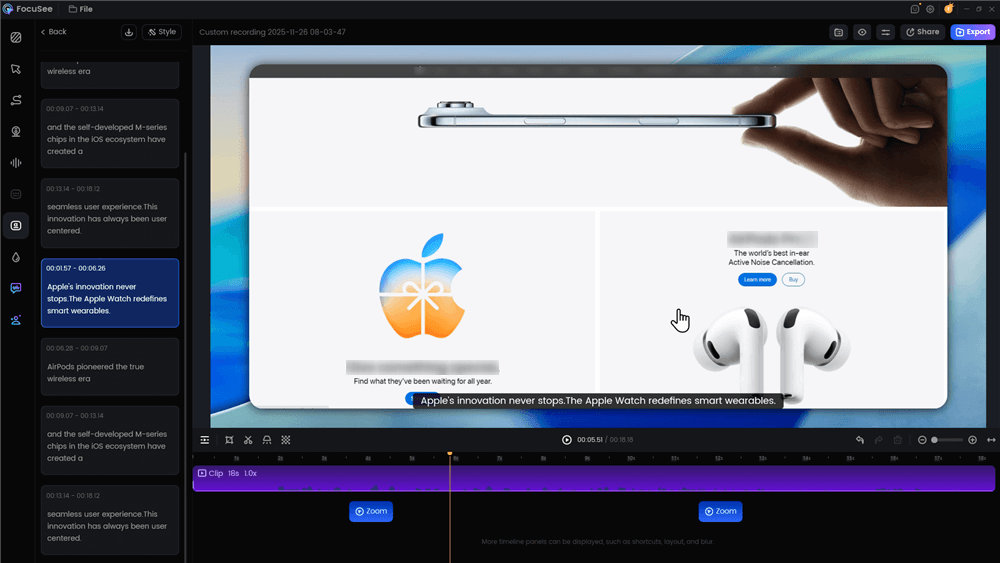
Automatic Subtitle Generation
Repurposing Strategy: Condensing a Demo for Video Ads
Creating a 90-second explainer is only the first step. To maximize your ROI, you must adapt your content for short-form platforms like LinkedIn, YouTube Shorts, or TikTok.
Many tools will let you functionally export to different aspect ratios (like 16:9 and 9:16), but you also need a strategic approach to editing. You cannot simply compress a three-minute demo into thirty seconds.
A 15-Second Short-Form Script Breakdown
When cutting down a master recording, focus on isolating one single feature and one clear outcome. Here is a real-world timeline for turning your demo into a high-converting short:
- 0:00 – 0:03 (The Hook): Start with immediate motion. Show a dramatic UI zoom on the exact pain point (e.g., a messy inbox) with a fast, punchy text overlay: “Still logging CRM calls manually?”
- 0:03 – 0:10 (The Micro-Demo): Show the single, highest-visual-impact click. The cursor smoothly swoops to the ‘Auto-Sync’ toggle. The voiceover is snappy: “Flip this toggle, and our app syncs every call to your pipeline in the background.”
- 0:10 – 0:15 (The CTA & Outcome): Flash the final analytics dashboard showing the successful result. End with strict CTA optimization: “Get your Friday afternoons back. Start a 14-day free trial at the link below.”
Frequently Asked Questions About Video Creation
Navigating the nuances of SaaS product videos prompts several strategic questions. Below are the most common inquiries to help refine your approach.
How long should feature videos be?
For a standard explainer video on your homepage, aim for 60 to 90 seconds. If you are creating short-form video ads for social media, aggressively edit them down to under 30 seconds. A detailed, post-signup product onboarding video can run up to three minutes, provided the pacing is fast and it directly guides the user through complex workflows.
Should I focus on the software’s features or the buyer’s benefits?
Always lead with the benefit (the “Outcome” in our framework). Viewers care strictly about how a tool improves their daily work or bottom line. Introduce the benefit first to capture attention, and then use the specific UI click as visual proof that you can deliver on that promise.
What tools are best if I have zero video editing experience?
If you lack technical editing resources, automated screen capture tools like FocuSee or Screen Studio are your best options. They streamline the process by generating zoom effects algorithmically, automatically removing background noise, and adding captions, making it simple to produce a polished asset in minutes rather than hours.
Solve Your Video Creation Bottlenecks Today
You no longer have to struggle with the frustration of knowing you have a great software platform but failing to communicate its value effectively. By adopting the “Feature Triage” matrix and the Pain → Feature → Outcome framework, you instantly solve the problem of not knowing what to show first, guaranteeing your buyers are never overwhelmed by an overcrowded UI.
Regain control of your product marketing. Evaluate your software’s capabilities, draft a script that leads with the outcome, and leverage modern, automated recording tools to handle the heavy lifting of zoom effects and pacing. Start building high-converting, workflow-driven product showcase videos today, and watch your user engagement soar.