Software Demo Video Examples: The 2026 Strategy Guide for High-Converting SaaS Assets

I know the feeling of staring at a retention graph that looks like a steep ski slope. You pour weeks of work into a product launch, publish a detailed 4-minute video, and the analytics reveal a brutal truth: 60% of viewers drop off before they even see the software interface.
This isn’t just bad luck; it’s a structural failure. Recently, a B2B SaaS client of ours faced this exact scenario. Their demo was a “feature dump” that started with a slow company logo fade and a generic explanation of their mission. Potential buyers bailed immediately because they didn’t see the solution to their problem.
If you are looking for software demo video examples because your current assets aren’t converting, this guide is for you. We aren’t just listing cool videos; we are analyzing the specific mechanics—from the “Moment of Truth” hook to cursor movement—that make them work.
Software Demo Video Examples: A Strategic Analysis
The primary reason most SaaS demo video examples fail is a misalignment of intent. Viewers do not want a history lesson; they want to know if you can solve their problem in the next 30 seconds.
To build this guide, we audited high-performing demos from industry leaders like Linear, Gong, Notion, and Slack. We found that the winners didn’t just have higher production budgets; they had better structure. They adhered to a specific pacing model that respected the viewer’s intelligence.
When our client pivoted their strategy, they stopped asking, “What features should we show?” and started asking, “What is the ‘Moment of Truth’ for this user?”
The Moment of Truth is the single screen or action where the user realizes the value of the tool.
- For a payroll app, it isn’t the login screen; it’s the “Transfer Complete” notification.
- For an analytics tool, it isn’t the data import wizard; it’s the dashboard visualization.
The best software product demo video assets move this moment to the very beginning.
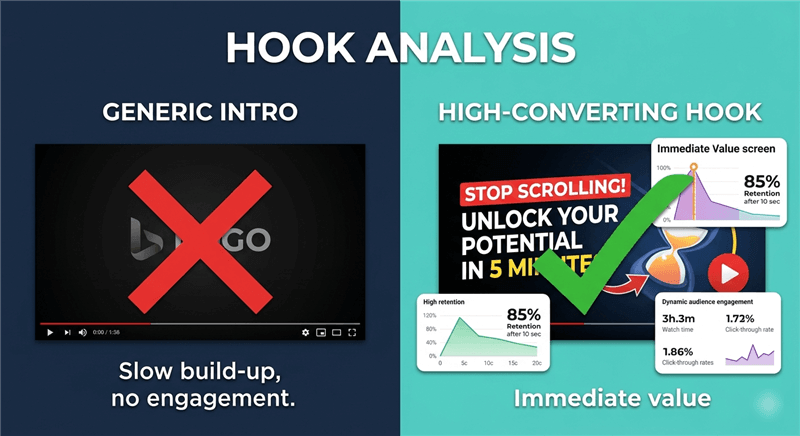
Software Product Demo Video Hook Analysis
5 Best Software Demo Video Examples (Categorized by Intent)
To fix your drop-off rate, you must stop looking for “cinematic” inspiration and start looking for conversion mechanics. Below are five archetypes of best software demo video examples, categorized by where they fit in the funnel and the specific mechanics that make them work.
1. The ‘Hook-First’ Landing Page Demo (Linear)
This format is critical for paid traffic and top-of-funnel landing pages. Instead of an introduction, it opens immediately on the solution screen. Linear (the project management tool) famously uses this style.
- The Example: Linear’s homepage videos often start mid-action. You don’t see a login; you see a task being dragged to “Done” and the resulting animation.
- The Tactic: The “0:05 Second Rule.” The outcome is shown within the first five seconds.
- Why It Converts: It confirms the user’s desired outcome before explaining the method to get there.
- Ideal Length: 30–60 seconds.
2. The Comprehensive Product Walkthrough (Gong)
While short clips work for ads, buyers deep in the consideration phase need detail. Gong excels here by breaking down complex AI features into digestible narratives.
- The Example: Gong’s product tours use clear chapter markers. They don’t just show the software; they show the context of the software.
- The Tactic: “Smart Cuts.” Professional editors remove loading screens, mouse fumbling, and typing pauses. Notice how the cursor movement leads your eye intentionally from point A to point B without wandering.
- Why It Converts: It removes the friction of real-time software lag.
- Ideal Length: 2–5 minutes.
3. The Testimonial-Led Demo (Slack)
This hybrid format overlays a user’s face (social proof), narrating the screen recording walkthrough. Slack often uses customer stories where the voiceover is a real user explaining their workflow, matched perfectly to the screen.
- The Example: A split-screen video where a team lead explains, “It saved us hours on reporting,” and simultaneously, the video shows the ‘Export Report’ button being clicked.
- The Tactic: Audio-Visual Sync. The testimonial audio drives the visual cuts.
- Why It Converts: It builds trust faster than a generic professional voiceover.
- Ideal Length: 60–90 seconds.
4. The Interactive/Click-Through Demo (Navattic Style)
Sometimes a video isn’t enough. Interactive software demo examples allow users to click through a guided UI simulation.
- The Example: Companies using tools like Navattic or Arcade embed these directly on product pages.
- The Tactic: The “Guided Rail.” The user feels like they are using the software, but they are clicking through a pre-determined set of screenshots.
- Why It Converts: It provides the tactile “feeling” of the workflow without the risk of a live sandbox environment breaking.
- Ideal Length: 5–10 clicks.
5. The Micro-Feature Clip (Notion)
These are 15-second loops used for email follow-ups, changelogs, or feature release notes. Notion dominates this space with their “What’s New” clips.
- The Example: A silent, looping video of a specific new drag-and-drop feature. No voiceover, just a clear visual demonstration.
- The Tactic: The “Single Loop.” Focus on one interaction and loop it continuously.
- Why It Converts: It proves usability without overwhelming the viewer with context.
- Ideal Length: 10–20 seconds.
The Unsung Hero: High-Converting Thumbnails
Before anyone sees your “Moment of Truth,” they have to click play. In our testing, the thumbnail is responsible for 80% of the play rate success.
Do not use a default frame. Most video platforms default to the first frame (often black) or the middle frame (often a blurry transition).
The High-Converting Formula:
- Human Element: If possible, include a person’s face (even if small). We are hardwired to look at faces.
- Clear UI Promise: Show a crisp screenshot of the result (e.g., the finished dashboard), not the setup.
- The “Play” Cue: Ensure a high-contrast play button is visible so users know this isn’t just a static image.
Production Decision Framework: Manual Editing vs. Automated Tools
Once you have selected a format, the next hurdle is production. Marketing teams often face a trade-off between quality and speed.
Option 1: Manual Recording & Editing
This approach offers maximum control but requires significant technical skill. You record raw footage using OBS or QuickTime and edit in Adobe Premiere.
- The “Gritty” Reality: A true expert knows the pain of clock consistency. If you cut two takes together—one recorded at 9:00 AM and one at 4:00 PM—the clock in the corner of your screen jumps. You have to mask this out in post-production. You also have to manually blur sensitive data frame-by-frame.
- Cons: High time cost. A 2-minute software demo video can take days to edit. If your UI changes (a common occurrence in SaaS), you often must re-record the entire sequence.
Option 2: Automated Demo Software (e.g., FocuSee)
Tools in this category are designed to solve the “outdated UI” problem. They record the screen data and automatically apply zooms, cursor smoothing, and background polish.
- Pros: Drastically reduces how to make a software demo video time. The software handles the tedious work of following the mouse and zooming in on key actions.
- Cons: Less flexibility for complex motion graphics outside of the standard template.
The Bottom Line: If you have a dedicated video team, manual editing yields cinema-quality results. If you are a product marketer who needs to update demos every time the engineering team ships a UI change, automated tools are the only way to scale.
The High-Converting Script Template (Hook → Value → Proof)
Here is a critical tip that most other guides miss: The fastest way to improve software demo video performance is to engineer an early “Moment of Truth” and then reverse-engineer the explanation.
Use this software demo video script example to structure your narrative.
Phase 1: The Outcome / Hook (0:00–0:20)
Show the result immediately. If your software creates reports, start with the finished report. This validates the user’s intent instantly.
- Script Cue: “Here is the [Result] you get with [Product Name].”
Phase 2: The Rewind (0:20–0:25)
This is the transition point. You have shown the destination; now you need to show the map.
- Visual Tactic: Use a “Rewind” visual effect (like a VHS tape rewinding or a quick whip-pan transition). This signals to the brain: Okay, we saw the end, now let’s see how easy it is to get there.
- Script Cue: “Now, let’s see how we got there in just three clicks.”
Phase 3: The Workflow (0:25–1:00)
Walk through the use case in chronological order, focusing only on the essential steps. Avoid explaining settings or configurations unless they are the primary differentiator.
Phase 4: Proof & Integration (1:00–1:15)
Immediately after the workflow, inject social proof. This could be a visible integration logo (e.g., “Syncs instantly with Slack”) or a metric overlay.
Phase 5: The CTA (1:15+)
Don’t just fade to black. Place a clear CTA (e.g., “Start Free Trial”) as a persistent button or end card.
How to Build Modular Demos (Without a Hollywood Budget)
For our SaaS client, the bottleneck wasn’t creativity; it was maintenance. They didn’t have the budget to hire an agency every time a button moved 10 pixels to the left.
This is where a tool like FocuSee fits into the workflow. It isn’t a replacement for a creative director, but it is a force multiplier for a product marketer.
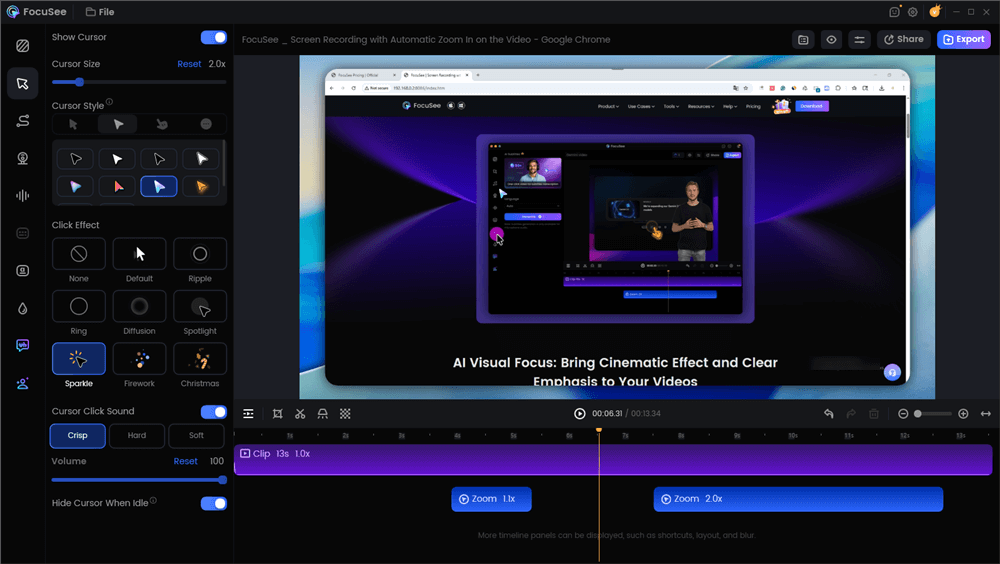
Edit the Video with Auto Zoom Effects
1. Solving the “Jittery Mouse” Problem
Nothing screams “amateur” like a mouse cursor that wanders across the screen or shakes while you talk. FocuSee’s Smart Cursor Effects automatically smooth out these movements. It mimics the “bezier curve” mouse movements you see in high-end Linear or Stripe demos, without you needing to practice your mouse-handling skills.
2. Modular Updates for Evergreen Content
This is the most strategic feature. Because the software handles the post-production processing, you can record segments modularly.
- The Strategy: Record your demo in 15-second “blocks” (e.g., “Login Block,” “Dashboard Block,” “Export Block”).
- The Benefit: If the “Dashboard” UI changes, you only re-record that one block. You don’t have to re-do the whole video. FocuSee allows you to stitch these new clips in while maintaining consistent zoom and pan levels.
3. Automating the Visual Engagement
Manually keyframing zooms in Premiere Pro (e.g., zooming in on a specific button click) takes hours. FocuSee uses Auto-Zoom to track your mouse actions. When you click, the video zooms. This creates that dynamic, “Gong-style” walkthrough feel instantly.
Measuring Success: Beyond View Counts
My breakthrough moment wasn’t just publishing the video; it was changing how I measured it. Previously, I reported on “views,” a vanity metric that told us nothing about intent. To truly evaluate software demo video examples within your own library, you must track video analytics that map to the funnel.
Play Rate
This measures the percentage of page visitors who actually click play. If your play rate is low, your video isn’t the problem—your thumbnail or page placement is.
Audience Retention & Drop-off
Look for the “Drop-off Cliff.” In the client example mentioned earlier, 60% of viewers left at the 0:15 mark. This signaled that the intro was too slow. By moving the “Moment of Truth” to the start, they pushed that drop-off point to the 1:10 mark—right when the CTA appeared.
Attributed Pipeline
The ultimate metric is the CTA click-through rate. Did the viewer take the next step? By tracking “Trial Starts” attributed to the demo video source, you can prove that the new, shorter format is actually generating revenue.
Frequently Asked Questions on Demo Video Strategy
How long should a software demo video be for a landing page?
For a top-of-funnel landing page, the optimal demo length is between 60 and 90 seconds. This provides enough time to cover the problem, solution, and proof without losing the viewer’s attention. Comprehensive walkthroughs for deeper in the funnel can range from 2 to 5 minutes.
Should I use an interactive demo instead of a video?
It depends on the complexity. Interactive demos (click-through) are excellent for product-led growth strategies where the user wants to “try before they buy.” However, a linear video is often better for passive consumption or mobile users who may not want to click through a simulation on a small screen.
Where should I host the demo (Wistia vs. Vimeo vs. YouTube)?
For your website, use professional hosting like Wistia or Vimeo. These platforms offer cleaner players without third-party ads and provide detailed video analytics like heatmaps. YouTube is valuable for SEO and discovery, but its player can distract users with recommended videos from competitors.
How do I add proof without bloating the video?
Overlay social proof visually rather than explaining it verbally. Place logos of current customers or certification badges in the corner of the screen during the walkthrough. This allows you to build credibility simultaneously with the product demonstration.
Conclusion
Creating software demo video examples that convert isn’t about having the biggest budget; it’s about respecting the user’s time. By shifting your script to a “Hook-First” structure and utilizing tools like FocuSee to automate the heavy lifting of editing, you can escape the cycle of generic feature dumps.
You now have the pattern library, the script template, and the metrics to track. The next step is to regain control of your production workflow. Instead of waiting weeks for an agency or struggling with complex editing software, you can produce a polished, professional demo today.
Ready to create your “Moment of Truth” demo? Download FocuSee for free and start turning your screen recordings into high-converting assets in minutes.