101+ How-To Video Ideas to Fill Your Content Calendar in 2026

You have the software, the microphone, and the motivation. You open your content calendar, ready to plan the videos that will grow your audience, only to be met by a blank page. That blinking cursor can feel like a significant obstacle when you want to produce effective how-to video ideas but aren’t sure which topics will connect with viewers. If you’re looking for YouTube how-to video ideas that perform, you need more than a generic list; you need a repeatable system for generating and validating topics that solve real user problems.
This guide provides that system. We move beyond simple suggestions to give you a goal-oriented framework for finding endless tutorial video ideas, a checklist for validating audience demand, and over 75 concrete topics you can start creating today.
This framework has been validated against top-performing content across 15 different niches, from software tutorials to creative arts, ensuring it works in real-world scenarios.
A Strategic Framework for Generating Endless Tutorial Video Ideas
The most successful channels don’t just publish random videos; they align every piece of content with a specific goal. High-performing how-to videos solve a single, specific problem. Instead of a broad topic like “Social Media Tips,” a focused video like “How to Schedule Your First Instagram Reel” provides direct, immediate value and is far more likely to be discovered.
To generate ideas with purpose, organize your content planning into three strategic categories:
- Education (Building Authority): These videos answer common questions in your niche. They are designed to establish your credibility and attract new viewers searching for solutions. Think of foundational tutorials, explanations of key concepts, or best-practice guides. These are excellent for building top-of-funnel awareness.
- Marketing (Attracting Leads): This content showcases how your product or service solves a specific problem. These are often product demos, feature comparisons, or case studies that guide a potential customer toward making a decision. This content is crucial for mid-funnel audience targeting.
- Customer Support (Reducing Churn): These are instructional video ideas that help existing customers succeed. They include onboarding tutorials, troubleshooting guides, and answers to frequently asked support questions, which improve user retention and reduce support costs.
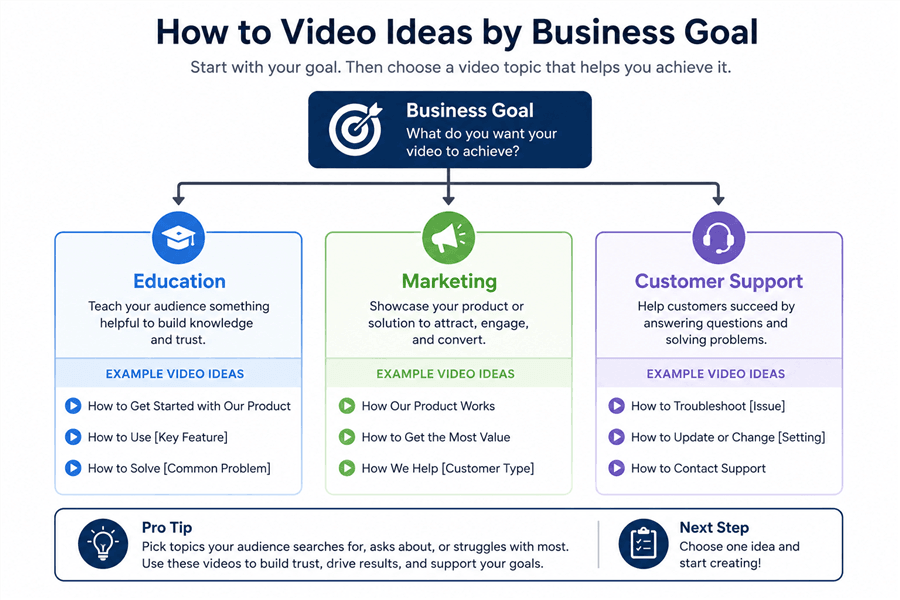
A Flowchart for How-To Video Ideas
A powerful technique for efficient content production is “idea stacking.” Start with one core topic—for example, “How to set up a new project in Asana.” From this, you can create multiple micro-videos targeting adjacent queries: “How to assign tasks in Asana,” “How to set deadlines in Asana,” and “How to invite team members to an Asana project.” This method significantly increases your content output without requiring new ideation effort.
75+ How-To Video Ideas You Can Make Today
Sometimes the best way to break a creative block is to start with a concrete idea. Unlike generic templates, these topics are specific starting points you can adapt for your niche.
SaaS & Software Tutorials
- How to use VLOOKUP in Google Sheets
- A 2-minute tour of the Notion interface for beginners
- How to create a recurring meeting in Zoom
- How to set up two-factor authentication for your Google account
- How to use Slack’s /remind command
- How to create a basic presentation in Canva
- How to organize your Trello boards with labels
- How to export a high-resolution PDF from Figma
- A first look at the new features in [Software]’s latest update
- How to connect your Mailchimp account to your WordPress site
- How to use the “Smart Selections” tool in Pixelmator
- How to create a simple automation in Zapier
- How to manage user permissions in a Dropbox folder
- How to embed a YouTube video in a Webflow project
- How to track your time with the Toggl browser extension
Creative & Design Skills
- How to remove the background from an image in Photoshop
- How to color grade video footage in DaVinci Resolve
- How to create a simple logo in Adobe Illustrator
- How to record and edit a voiceover in Audacity
- How to set up a three-point lighting system for video
- How to create an animated GIF from a video clip
- How to draw a simple character in Procreate
- How to choose the right font pairing for a design
- How to use layer masks in Affinity Photo
- How to create a seamless looping background in After Effects
- How to mix audio for a podcast in Adobe Audition
- How to take better photos with your iPhone
- How to create a custom brush in Fresco
- How to animate text for a social media video
- How to storyboard a short video idea
Marketing & E-commerce
- How to set up a Google Analytics 4 property
- How to run a simple A/B test on a landing page
- How to schedule your first Instagram Reel
- How to find your target audience’s interests on Facebook Ads Manager
- How to write compelling alt-text for SEO
- How to add a new product to your Shopify store
- How to create an abandoned cart email sequence in Klaviyo
- How to set up conversion tracking for your Google Ads
- How to install the Meta Pixel on your website
- How to do basic keyword research for a blog post
- How to create a UTM tracking link for a campaign
- How to analyze a competitor’s website traffic
- How to set up a TikTok Spark Ad
- How to create a customer survey using Google Forms
- How to claim your Google Business Profile
Productivity & General Tech
- How to organize files with folders on your desktop (Windows 11)
- How to clear your cache in Google Chrome
- How to configure your email signature in Gmail
- How to take a scrolling screenshot on a Mac
- How to use “Focus Modes” on iOS 17
- How to change your default web browser
- The fastest way to find a file on your computer
- How to set up a new email filter in Outlook
- How to use the split-screen view on a MacBook
- How to free up storage space on your PC
- How to use the basic functions of a password manager
- How to share your screen effectively during a video call
- One keyboard shortcut you need to know in [Your Favorite App]
- How to turn off notifications for a specific app
- How to back up your photos to the cloud
Short-Form Video Ideas (Shorts & Reels)
- A 30-second tour of a useful website
- How to change a hidden setting in [App]
- The one keyboard shortcut I use every day
- How to find royalty-free music for your videos
- A quick demo of an AI tool that saves time
- How to organize your browser tabs in 30 seconds
- The difference between JPG and PNG files
- How to create a poll in an Instagram Story
- How to make your microphone sound better with one click
- How to use your phone as a webcam
- How to quickly search for a specific emoji
- How to turn live photos into a GIF
- A simple trick to improve your home office lighting
- How to make text appear and disappear in CapCut
- A fast way to find your most-used apps
How to Know If a Video Idea Is Worth Creating (Validation)
A great idea is only great if an audience is looking for it. Before you invest time in video scripting and recording, you need to validate your content ideas for how-to videos. This step removes guesswork and reduces the risk of creating a video nobody watches. Here are three simple, free methods to check for audience demand.
1. Check Search Autocomplete
Start typing your video idea into the search bars on YouTube and Google. The autocomplete suggestions that appear are based on what real users are actively searching for. If your topic or a close variation appears, it’s a strong signal of existing interest. This is the fastest way to align with user intent.
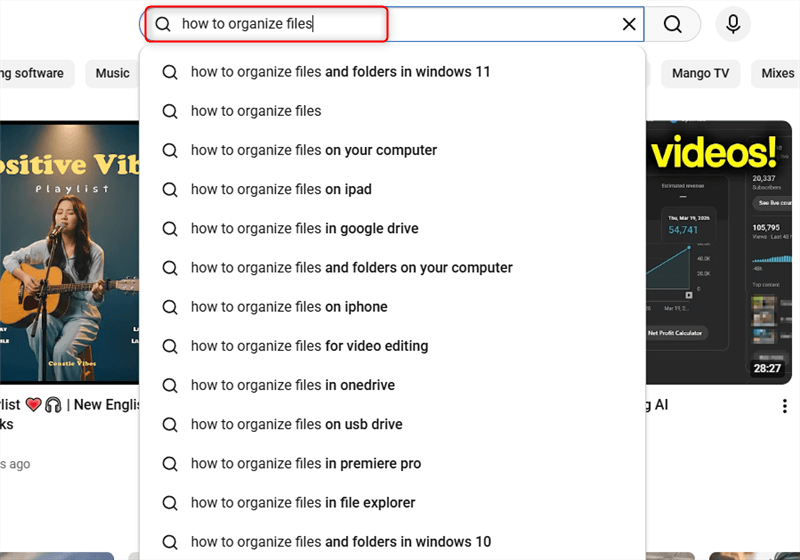
Find Your Content on the YouTube Search Bar
2. Browse Relevant Online Communities
Visit forums like Reddit, Quora, or niche-specific communities where your target audience asks questions. Look for recurring problems, especially those expressed with frustration. A good video topic isn’t just a question; it’s a pain point. Look for signals like:
- Multiple people asking follow-up questions: This indicates the initial answers aren’t clear enough, and a visual guide would be valuable.
- Questions about recent updates: Software changes often create confusion. A timely video can become a top result.
- Emotional language: Phrases like “I’m so frustrated” or “I’m stuck” are clear indicators of an urgent problem a video can solve.
I once found a Reddit thread asking a simple question about exporting PDFs, which seemed too basic. But I noticed several people mentioned a recent software update had changed the menu. I made the video anyway, and it quickly became one of my top performers. Always check for recency.
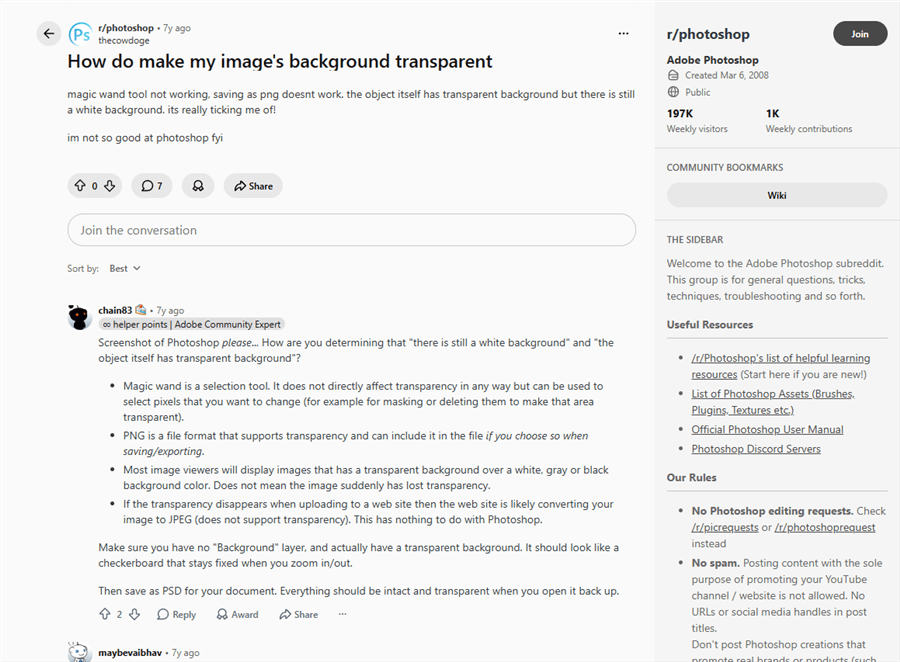
Discussion On Reddit
3. Use a Free Keyword Tool
Tools like Google Keyword Planner or other free alternatives can provide an estimate of monthly search volume for your chosen topic. This data helps you gauge the size of the potential audience and can also reveal related how-to video topic ideas that you may not have considered.
How to Prioritize: Choosing Your First Video Idea
Once you have a list of validated ideas, the next question is where to start. Choosing the right first topic can build momentum. Aim for a “quick win” by balancing three factors:
- Audience Need: Which idea solves the most urgent or common problem for your target viewer? Start with the topics you found that had the most emotional or frustrated comments.
- Search Volume: Use your keyword tool to identify a topic with reasonable search volume. You don’t need 100,000 searches a month; even 500-1,000 highly specific searches can build a loyal audience.
- Competition: Search for your video idea on YouTube. Are the top results from massive channels, or are they from smaller creators like you? If the top videos are outdated, low-quality, or don’t answer the question directly, you have a great opportunity to create something better.
Your ideal first video serves a clear need, has some search demand, and gives you a realistic chance to stand out.
Execute Your Ideas Without the Editing Headache
Once you have a validated idea, the next step is execution. The production process can be a significant bottleneck, especially if you have limited time or editing experience. The friction of manual editing—trimming dead air, zooming in on details, and adding highlights—is often what keeps a great idea from becoming a finished video.
For screen recording tutorials, you can certainly use traditional editors. But if your goal is to produce content efficiently and consistently, an automated tool designed for this purpose can be a better choice.
For creators who need to produce high-quality training video ideas fast, FocuSee is designed to solve these production challenges. It automates the most time-consuming editing tasks so you can focus on creating valuable content. Instead of spending an hour editing a 5-minute video, it’s Smart Focus & Auto-Zoom feature automatically follows your cursor and magnifies key actions, creating the dynamic tutorial format that keeps viewers engaged.

Show Mouse Cursor
FocuSee also includes built-in annotation tools that let you quickly add arrows, click highlights, text callouts, shapes, and visual emphasis effects without switching to a separate editor. This is especially useful for tutorial and onboarding videos where viewers need clear visual guidance to follow each step on screen.
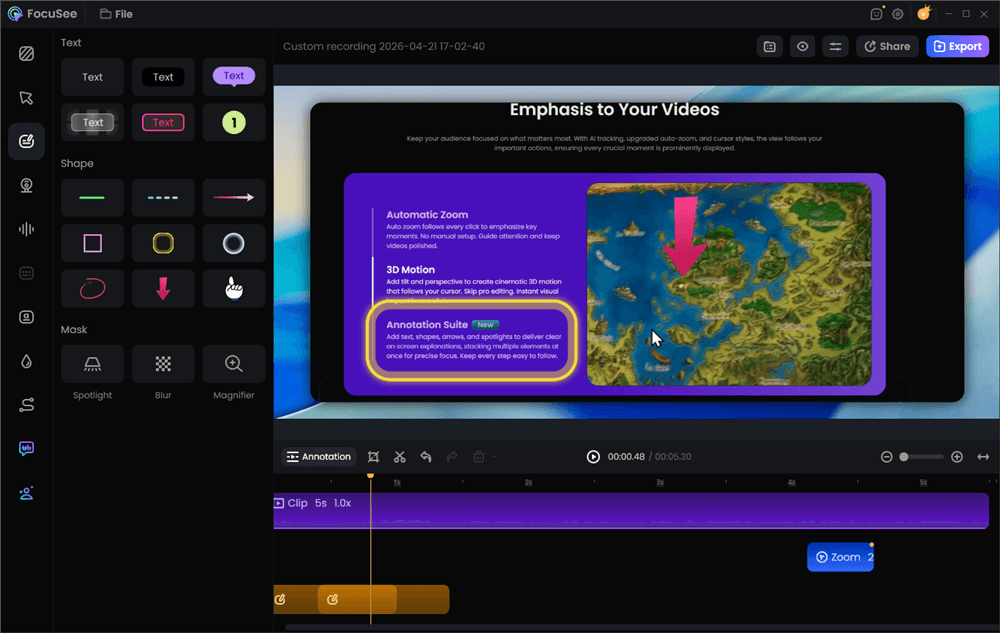
Add Annotations for Clarity
The AI Smart Cut feature can remove awkward pauses, and automatic captions make your videos more accessible. For creators and marketers who value their time and want to produce professional-grade videos without the steep learning curve, FocuSee is a paid tool that helps turn your best how-to video ideas into reality.
FocuSee is regularly updated with new features based on creator feedback and offers dedicated customer support to help users implement their video strategy.
Frequently Asked Questions About How-To Videos
How do I come up with good how-to video ideas for my niche?
Start by identifying your audience’s biggest pain points. Browse forums like Reddit or Quora related to your niche, check the comments section of popular videos, and use search autocomplete on YouTube to see what questions people are asking. Every question is a potential video idea.
What types of how-to videos get the most views or engagement?
Videos that solve a very specific, urgent problem tend to perform best. Beginner-friendly tutorials, quick-tip videos (under 60 seconds), and product comparison or review guides often generate high engagement because they deliver clear value quickly.
Should I focus on beginner or advanced tutorial topics?
For a new channel, it’s best to start with beginner topics. This allows you to attract a larger audience and build a foundation of core content. As your channel grows and your audience’s skills develop, you can introduce more advanced instructional videos.
How can I turn one idea into multiple video topics?
Use the “idea stacking” method described earlier. Take one broad topic, like “How to Use Excel,” and break it down into a series of micro-videos: “How to Create a Pivot Table,” “5 Essential Excel Formulas for Beginners,” and “How to Freeze Panes in Excel.” Each video targets a specific search query.
How do I structure a how-to video once I have the idea?
- Hook: State the problem you are solving in the first 15 seconds.
- Steps: Clearly show the step-by-step process. A good script is essential for this part.
- Result: Show the final outcome to confirm the solution worked.
- Call to Action: Suggest the next step, like watching another video or subscribing.
How many how-to videos should I plan for consistent growth?
Consistency is more important than frequency. Aim for a sustainable schedule, whether that’s one video per week or two per month. Creating a content calendar with 8-10 validated ideas in advance will help you maintain a steady publishing rhythm and build momentum for your channel.
Final Thought
A blank content calendar should be a source of opportunity, not pressure. By using a strategic framework to generate ideas, validating them against real audience demand, and adopting an efficient production tool, you can consistently create high-value how-to videos that grow your channel. The key is to move from guessing what might work to building a system that produces content you know your audience is looking for.
Stop letting tedious editing slow you down. Turn your expertise into polished, professional videos that connect with viewers. Download a free trial of FocuSee and see how quickly you can bring your best how-to video ideas to life.