How to Create an AI Generated Promo Video That Converts in 2026

Creating a professional promo video often feels like an impossible choice: hire a costly agency with long lead times or spend weeks wrestling with complex editing software. For marketers and brand owners, this friction means lost opportunities. The good news is that promo video creation with AI has fundamentally changed the game. This is not another theoretical list of tools. It’s a practical, tested method to create a promo video using AI that looks polished and is engineered to drive conversions.
Create an AI-generated Promo Video
This guide provides a complete blueprint for producing effective promo videos efficiently, moving beyond basic text-to-video prompts to build a production-quality asset complete with a brand kit, AI-generated script, and performance measurement.
Choosing Your AI Promo Video Generator: Integrated vs. Manual
Before you begin, you need to decide on your production method. There are two primary approaches: manually stitching together multiple specialized tools or using a single, integrated platform. The choice impacts speed, quality, and brand consistency.
The Manual Tool-Stacking Method
This approach involves using separate AI tools for each part of the process. For example, you might use an AI writer for the script, ElevenLabs for voice cloning, a text-to-video generator for B-roll, and a separate video editor to combine everything. This method offers flexibility but comes with tradeoffs.
Pros: Allows you to use the “best-in-class” tool for each specific task. It can be more cost-effective if you rely on free tiers.
Cons: Time-consuming due to constant exporting and importing. Maintaining brand consistency across different interfaces can be challenging. Prone to technical glitches and formatting issues.
Further Reading: How Much Does It Cost to Make a Promo Video?
The Integrated AI Suite Method
This approach uses a single platform that handles the entire workflow, from scripting to editing. Promo video maker tools like Descript, Synthesia, or FocuSee are designed for this exact workflow, combining scripting, editing, and layout automation into a single system for faster production. These platforms combine scripting, B-roll creation, editing, subtitles, and exports in one place, eliminating the need for constant back-and-forth between interfaces.
FocuSee is particularly useful if your workflow includes product demos, screen recordings, or creator-style reaction layouts. Its AI Smart Editing, auto-layout templates, and built-in brand kit help maintain consistency while drastically reducing editing time.
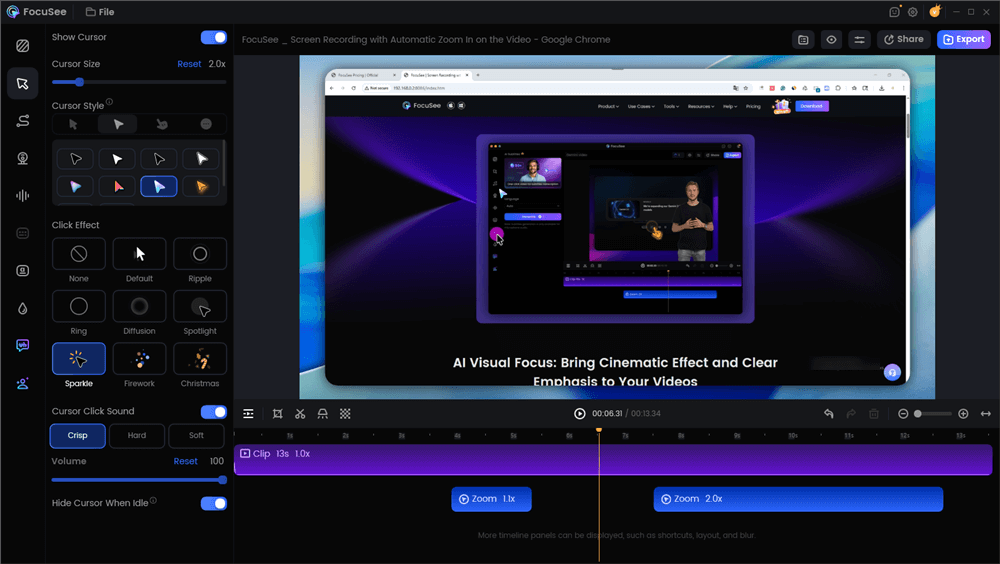
Edit the Promo Video with Auto Effects
Pros: Extremely fast, on-brand results, minimal technical setup
Cons: Less modular if you prefer standalone tools
How to Make a Promo Video with AI: A Step-by-Step Tutorial
This walkthrough uses an integrated AI suite to show the process. We’ll follow Maya, a DTC skincare brand owner who needs to create a product promo video with AI for a weekend sale.
In real-world campaigns, structured AI workflows consistently outperform ad-hoc video creation by improving speed, consistency, and conversion tracking.
Step 1: Lock in Your Brand Kit
Before writing a single line, Maya’s first action is to solve the problem of brand inconsistency. She uploads her brand’s hex colors, logo file, and custom fonts into her video suite’s Brand Kit section.
Pro-Tip: Treat your AI tools as assistants that report to a central brand manager. By establishing your brand kit in the final editing tool first, you ensure every element, from AI-generated captions to call-to-action overlays, automatically conforms to your visual identity.
Lock in Your Brand Kit
Step 2: Generate the Script and Storyboard
Next, Maya uses the AI Script Generator. Instead of a vague prompt, she provides a structured brief. This is the key to avoiding generic, robotic-sounding scripts.
Example AI Scripting Brief:
- Product: “Glow Serum,” a hydrating serum for sensitive skin.
- Target Audience: Millennials interested in clean beauty, who feel their skin is dull and irritated.
- Key Value Props: Reduces redness, provides all-day hydration, made with natural ingredients.
- Goal: Drive traffic to a weekend sale page.
- Tone: Reassuring, empathetic, and knowledgeable.
The AI then produces a three-part script and a matching shot list, giving her a clear plan.
Example AI-Generated Script:
Scene 1 (Hook): [Visual: Close-up of irritated, dry skin] *Tired of sensitive skin that just won’t cooperate?*
Scene 2 (Payoff): [Visual: Product texture shot, then someone applying the serum] *Our Glow Serum soothes redness and locks in hydration with clean, natural ingredients.*
Scene 3 (CTA): [Visual: Person smiling with healthy skin] *Get your glow back. Shop our weekend sale and save 20%.*
Step 3: Create Your Core Assets
This is the most creative—and challenging—part of the process. Here, Maya generates the voiceover, B-roll, and music.
1. Create the Voiceover with Voice Cloning
To avoid a robotic narration, Maya records a 2-3 minute clean audio sample of her own voice and uploads it to the Voice Cloning feature. The AI creates a synthetic version she can use to narrate any script.
Pro-Tip from Experience: AI voices often mispronounce brand names or jargon. To fix this, spell them phonetically in your script. For her brand “Auria,” Maya had to write “Aw-ree-uh” to get the pronunciation right. Keep script lines short (6-12 words) to align with dynamic subtitles and ensure natural pacing.
2. Generate On-Brand B-Roll
Maya already has iPhone footage of her product, but she needs a compelling hook shot of “irritated skin.” This is where AI B-roll comes in. The key is specific, style-guided prompting.
Bad Prompt (Too Vague): `A person with red skin.`
This will likely produce an uncanny or overly dramatic image.
Good Prompt (Specific & Styled): `Macro shot of skin texture showing mild redness and dryness on a cheek. Photorealistic, soft, natural lighting. Use style reference image [BrandImage1.jpg]. Color palette: muted earth tones.`
“I Wish I’d Known” Tip: AI visual generators notoriously struggle with certain details. Avoid prompts that require realistic human hands, complex text on objects, or people interacting with each other. For B-roll, stick to abstract concepts, textures, landscapes, or product-focused shots where the AI is less likely to make an error.
3. Source Royalty-Free Music
Finally, Maya uses the editor’s integrated stock library to find an upbeat, royalty-free track that fits her brand’s vibe. Using a rights-safe library is critical for paid ads to avoid copyright strikes.
Step 4: Assemble and Edit with AI Assistance
With her assets ready, Maya uploads her iPhone footage. She uses Smart Cut to automatically remove pauses. Then, she adds Dynamic Subtitles with a single click, which appear in her brand’s font and color. The Auto-Resize feature instantly creates 9:16, 1:1, and 16:9 versions, saving her from re-editing for each platform.
If you want even faster editing with fewer manual adjustments, tools like FocuSee streamline this entire stage. FocuSee’s AI Smart Editing automatically removes silence, enhances pacing, applies zoom-and-highlight animations, and generates on-brand subtitles—all without requiring timeline-based editing. Its built-in brand kit and auto-layout engine also make it easy to produce picture-in-picture or reaction-style promo videos, giving marketers a polished, professional look in minutes.
Beyond Creation: Mastering Social Media Distribution & Compliance
Creating the video is only half the work. Proper distribution ensures your content is seen, understood, and compliant with platform rules. This checklist covers the final steps for any AI promo video for YouTube ads, TikTok, or Reels.
Channel-Specific Export Specifications
TikTok, Instagram Reels, YouTube Shorts: Use a 9:16 aspect ratio. Keep critical text and logos inside the ‘safe zone’ and away from the top and bottom 15% of the screen, which is often covered by platform UI.
Instagram Feed, Facebook Feed: A 4:5 aspect ratio is optimal for visibility.
YouTube (standard), LinkedIn: The standard 16:9 aspect ratio is best.
Audio Normalization and Compliance
- Audio Loudness: Normalize your final audio mix to -14 LUFS (Loudness Units Full Scale). This is the standard for most web platforms and ensures your audio is not too quiet or jarringly loud.
- Music Licensing: Always use music from a rights-safe library for paid ads to prevent your video from being muted or taken down.
- Voice Cloning Consent: If using an AI voice clone, ensure you have documented consent. Reputable tools often include consent logs to help with compliance.
Captioning and Localization
For broader reach, use AI tools that support localized captions. This allows you to export versions in Spanish, French, or German by automatically translating the script and subtitles without re-editing the entire video.
From Views to Revenue: Measuring Your AI Promo Video’s Impact
A successful promo video is measured by its impact on business goals. To connect your video to conversions, you must implement a system for attribution and testing.
Tracking Conversions with UTM Parameters
UTM parameters are tags added to your URL that tell your analytics software where a visitor came from. Before publishing, create unique links for each call-to-action (CTA) you want to test. Maya created two video variants: one with “Shop Now” and another with “Learn More.”
By tracking these links, Maya could see in her analytics which CTA generated more clicks and sales, addressing the common problem of not being able to tie video performance to revenue.
Key Metrics for A/B Testing Creatives
Focus on metrics that reflect audience action. While results vary by industry, these benchmarks can provide a starting point.
Hook Rate: The percentage of viewers who watch the first 3 seconds. A good hook rate on platforms like TikTok is often above 35%. Maya A/B tested two opening frames; the one with a close-up product texture lifted the hook rate by 32%.
- View-Through Rate (VTR): The percentage of viewers who watch your entire video. This indicates if your message is compelling.
- Click-Through Rate (CTR): The percentage of viewers who click your CTA link. A strong CTR for a sales campaign is often in the 1-3% range. By testing her CTAs, Maya found that “Shop Now” produced an 18% higher CTR for her flash sale.
FAQs about AI Promo Video Creation
Here are answers to common questions about creating promo videos with AI.
How do I write prompts for on-brand AI visuals?
Be highly specific and use style references. Instead of “person using a laptop,” write: “A minimalist office with natural light, a woman with brown hair types on a sleek laptop. Medium shot. Color palette: muted earth tones.” Most importantly, use tools that allow style reference prompts, where you can upload your own brand images to guide the AI’s aesthetic.
Can I make a high-quality promo with just my phone and AI?
Yes. Modern smartphones record in 4K, which is more than enough for social media. The key is combining authentic footage from your phone with an integrated AI video editor for marketing. The phone provides the core visuals, and the AI provides the professional editing, smart cutting, and auto captions.
How do I localize a promo for multiple languages?
The solution is an AI video tool with built-in localization features. A good system will let you generate a script and voiceover in one language, then automatically translate the script, generate a new voiceover, and create translated subtitles for target languages like Spanish or German.
What’s the fastest workflow from idea to finished video?
The 3-hour sprint in this guide is the fastest repeatable procedure. By following the five stages—Brand Kit Setup, AI Scripting, Asset Generation, AI Editing, and Export—you create a structured process that avoids wasted time and ensures all critical elements are covered.
How do I measure success beyond views?
Measure success with conversion-focused metrics. Use UTM tracking to attribute clicks and sales to your videos. A/B test elements like your hook and CTA, and monitor metrics like Hook Rate and Click-Through Rate (CTR) to understand what drives action.
Conclusion
The challenge of promo video creation with AI is no longer about finding a single tool, but about finding a repeatable workflow that guarantees brand consistency and measures business impact. The struggle with mismatched branding, robotic voiceovers, and an inability to track results can be solved by adopting an integrated approach. A unified platform provides the structure needed to move from an idea to a high-converting social media asset in a single afternoon. You can take control of your video marketing by starting with a clear, proven method.