The Ultimate Guide: How to Run a High-Converting Sales Demo

Picture the sinking feeling. You are twenty minutes into a detailed product walkthrough, and you suddenly realize your prospect has completely checked out. You are not alone in this experience. Many account executives struggle to convert meetings into deals because their presentations feel generic. Presenters focus intensely on features instead of customer value, leaving buyers unsure of the actual benefits.
If you want to know how to give a presentation that holds attention from start to finish, you need a proven strategy. This guide offers a clear, repeatable framework that transforms dry feature lists into engaging decision-making tools, ensuring you confidently guide prospects toward a successful purchase.
War Story: Rescuing a $30,000 Deal
Early in my career, I was pitching a mid-market SaaS platform to a buying committee. About ten minutes into my screen share, I noticed the VP of Sales looking down at his phone. He had completely checked out. Instead of talking louder, I stopped sharing my screen. I looked directly into the camera and asked, “John, it looks like this specific reporting module might not align with how your team tracks KPIs today. How are you currently pulling these weekly metrics?” That single pause and direct question snapped his attention back. We spent the next ten minutes discussing his exact bottleneck, I tailored the rest of the presentation to that single issue, and we closed the $30k deal two weeks later.
Testing primarily on standard Windows 10/11 PCs and macOS (Monterey+) laptop setups, Alex developed the ‘Problem -> Impact -> Solution’ framework to rescue deals from feature-dumping, proving that successful demos rely entirely on presentation strategy, regardless of your operating system.
Understanding the Problem: Sales Demo Best Practices to Save Deals
Understanding why standard procedures fail is crucial for establishing effective sales demo best practices. If your demonstrations feel too generic and not tailored to the customer, you run the risk of losing their attention entirely.
The most common error in software sales is the “feature dump.” This happens when the presenter systematically shows every button and menu in the application, regardless of its relevance to the viewer. When you focus excessively on features instead of value, you create cognitive overload for your buyer. The human brain cannot process a forty-five-minute monologue about software navigation.
Instead, high conversion rates depend on clarity, relevance, and two-way dialogue. Industry data from platforms like Gong consistently shows that successful demonstrations maintain a talk-to-listen ratio of roughly 46:54. If you are talking for more than sixty percent of the meeting, your buyer is likely disengaged.
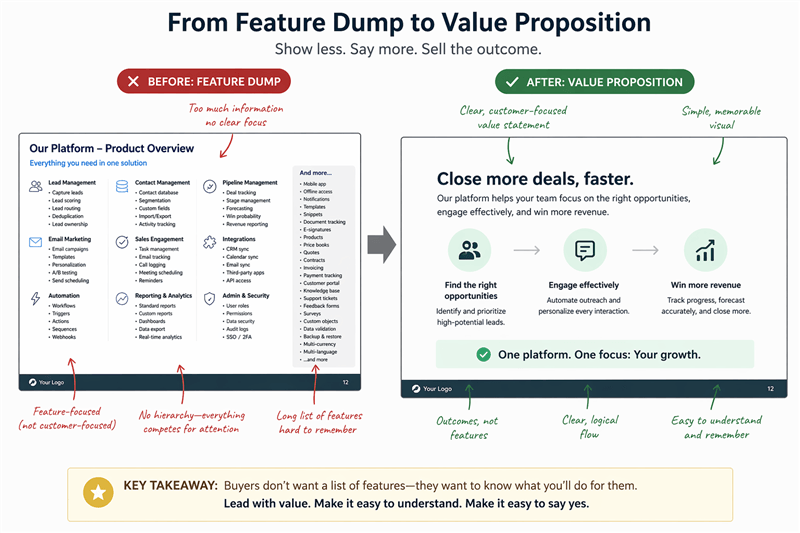
Before and After Slide Redesign Comparison
To fix a failing presentation, you must apply targeted, proven strategies.
Essential Best Practices
Never save your best feature for last. Begin the presentation by showing the ultimate result—the generated report, the completed automation, or the clean dashboard. Once the prospect sees the core value proposition, briefly show them the steps required to achieve it.
- Audit Your Agenda for Mixed Rooms: One of the hardest challenges is presenting to a room with mixed priorities. You might have an end-user who cares entirely about daily workflow, sitting next to a CFO who only cares about ROI. Structure your presentation to address the executive’s high-level business goal first, then show the end-user exactly how easy the daily workflow is to achieve that goal.
- Monitor Success Signals: Track prospect engagement closely. If the prospect asks technical questions about implementation or invites a secondary decision-maker to the call, these are strong buying signals.
- Use Constant Trial Closes: Do not wait until minute twenty-nine to ask for the business. Every few minutes, take the prospect’s temperature by asking a trial close: “How does this workflow compare to what your team is doing manually today?”
A Repeatable Framework: How to Do a Product Demo
Learning how to do a product demo requires a fundamental shift in strategy. Here is a critical expert insight that separates average pitches from top-tier conversions: high-performing presentations are decision-making tools, not feature walkthroughs.
You are not there to show everything. You are there to guide the prospect to a confident ‘yes’ by focusing solely on the mechanics that directly solve their specific problems.
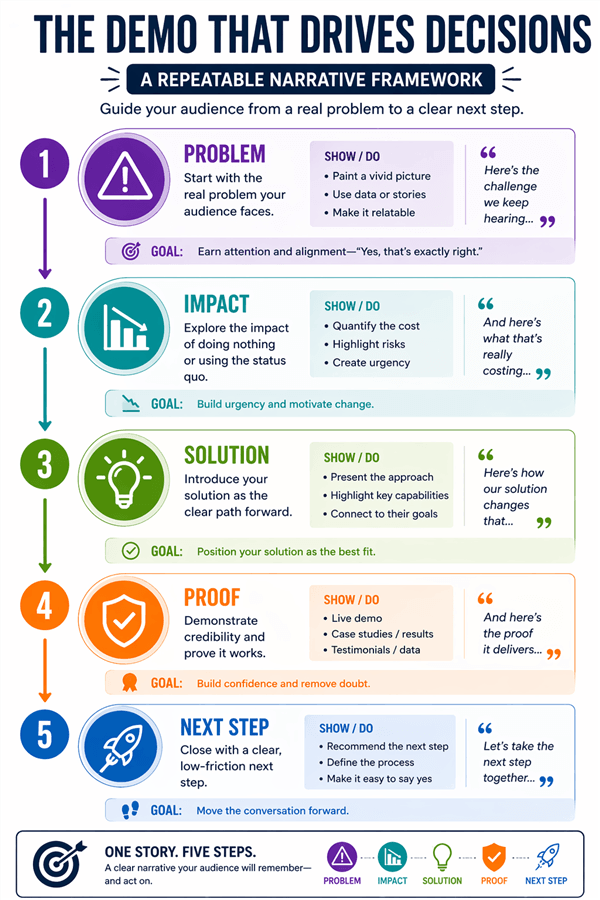
How to Do a Product Demo
The most effective presentations follow a strict narrative structure. Adhering to this five-step sequence guarantees a logical flow that drives action:
- Problem: Clearly state the specific issue the client is facing (uncovered during your discovery call).
- Impact: Quantify the cost, time, or operational drag caused by this problem.
- Solution: Show the exact feature in your software that resolves the issue.
- Proof: Provide a brief case study or metric showing how this worked for a similar client.
- Next Step: Propose a direct action to move forward in the sales funnel.
Actionable Sales Demo Scripts by Industry
To operationalize this structure, adapt these templates for your next meeting. Notice how they seamlessly integrate trial closes and the five-step framework:
1. B2B SaaS (Reporting & Analytics)
“You mentioned earlier that your team spends hours manually formatting reports [Problem], costing your department roughly $2,000 a week in lost productivity [Impact]. Let me show you our automated reporting engine [Solution]. By clicking here, the final report will generate in exactly five seconds. A similar client in your industry used this specific feature to reclaim fifteen hours a week for their analytics team [Proof]. Before we look at the pricing tiers, how does this automated process compare to your current Friday afternoon workflow? [Trial Close]”
2. eCommerce (Cart Abandonment Tool)
“During our discovery call, you noted that cart abandonment spikes on mobile devices [Problem], which you estimated is leaving about $15,000 in uncaptured revenue on the table each month [Impact]. I want to show you our one-click SMS recovery sequence [Solution]. As you can see on the screen, a personalized text triggers three minutes after they leave the site. A boutique retailer similar to your brand implemented this and recovered 12% of abandoned carts in their first month [Proof]. Does this recovery sequence look like something your marketing team could implement this quarter? [Next Step]”
3. Service Businesses (Client Portal)
“You shared that your agency struggles with disorganized client communication [Problem], causing project delays that lead to a 10% annual client churn rate [Impact]. Take a look at the unified client portal [Solution]. Every file, approval, and message lives in this single dashboard. A competing agency adopted this portal and cut its project turnaround time by four full days [Proof]. Based on what we just reviewed, does it make sense to set up a pilot account for your account managers tomorrow? [Next Step]”
Handling Objections and Mastering Closing Techniques
Transitioning from the main presentation to the final decision requires specific closing techniques. Many account executives struggle to handle objections, fearing that a sudden question will disrupt their momentum. Managing customer concerns in real time is a core component of effective solution selling.
When a prospect interrupts with a serious objection, immediately stop sharing your screen. This forces the focus off the software and back onto the human-to-human conversation. It shows you take their concern seriously and prevents your cursor from becoming a nervous distraction.
When you face an objection, do not rush to defend the product. Apply a methodical approach to keep the buyer engaged:
- Acknowledge and Clarify: Repeat the objection back to the prospect to ensure you understand it completely. Ask clarifying questions to uncover the root cause.
- Isolate the Concern: Ask the prospect if this is the only obstacle preventing them from moving forward. This prevents the buyer from stacking multiple unrelated objections.
- Address with Value: Realign the conversation with your core value proposition. If the objection is price, remind them of the quantifiable time or money your solution saves, directly offsetting the initial cost.
By executing these steps, you transform an objection from a roadblock into an opportunity to reinforce trust. This steady pacing makes the eventual transition to closing feel natural and inevitable.
Live Demo vs. Follow-Up Video: Knowing Your Motion
Let us be completely clear: as an Account Executive, you do not close a high-stakes, $50,000 B2B deal by sending a pre-recorded video with a teleprompter. High-value sales require live, interactive conversations where you can read the room, handle objections, and pivot your strategy in real time.
However, what happens after you log off Zoom?
Your prospect often has to sell your software internally to a broader buying committee that did not attend the live meeting. This is the moment where many deals stall. Equipping your internal champion with the right follow-up materials is crucial. This introduces the strategic difference between your live presentation and your asynchronous follow-up motion.
| Live Interactive Meeting | Asynchronous Follow-Up Video | |
| Primary Use Case | Discovery, objection handling, executive alignment, closing | SDR outreach, post-meeting recaps, and internal champion building |
| Impact on the Buyer Journey | Builds trust, enables customization, helps secure agreements | Delivers clear, targeted summaries for broader stakeholders |
The Best Tool for Post-Demo Champion Building
Delivering a flawless sales demo presentation live on a call is your job. Equipping your champion to sell for you offline requires specialized software.
Instead of sending an unedited, hour-long Zoom recording where executives have to skip through small talk and basic navigation, top performers send crisp, personalized micro-demos. To create these assets quickly, automated tools offer a massive structural advantage.
FocuSee is explicitly designed for this post-demo motion. When you need to send a targeted recap to a busy CFO, FocuSee allows you to record a polished walkthrough in a fraction of the time. It includes a Built-in Teleprompter Guidance system, helping you record confident, stutter-free recaps without needing constant retakes.
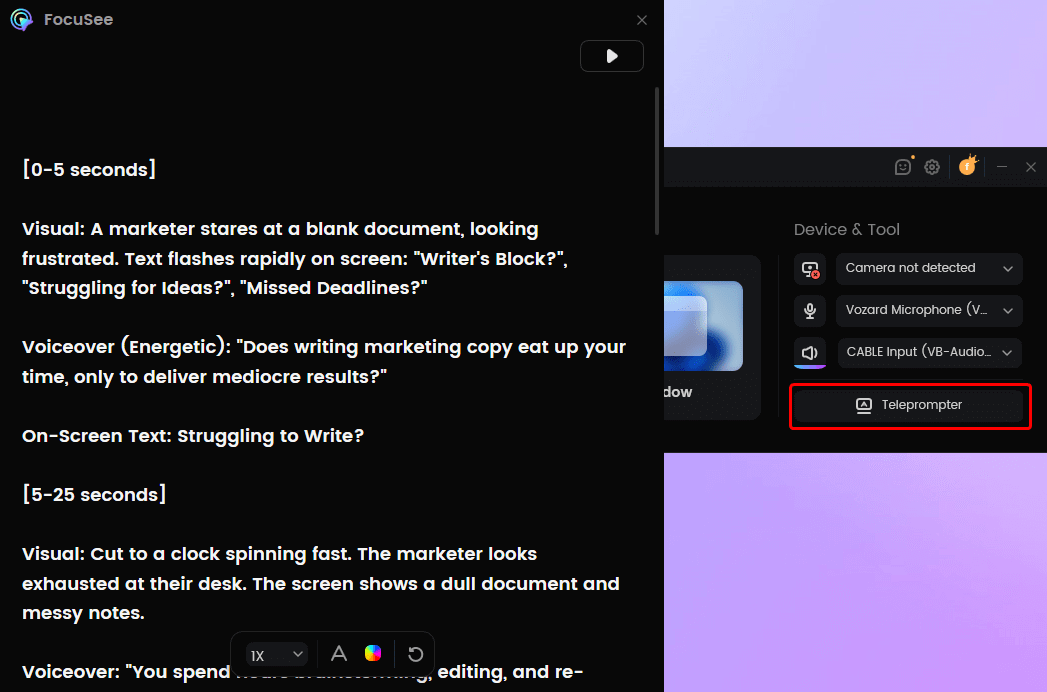
FocuSee Teleprompter
For internal stakeholders who missed the live meeting, viewer fatigue is a real risk. FocuSee solves this with Smart Focus and Auto-Zoom. The software automatically zooms in or highlights the clicked area to emphasize key actions, ensuring executives remain focused on the most critical ROI steps.
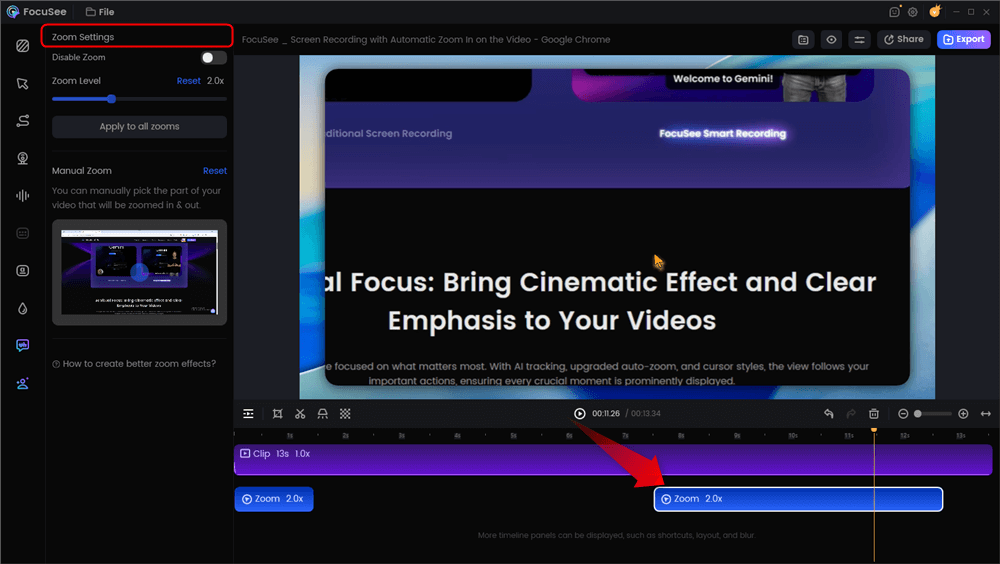
Automatic Zoom Effects
To maintain a professional appearance, the software offers Background Removal and Blur, helping you present a clean setup without a physical green screen. It also includes AI Smart Cut, which automatically removes filler words and long pauses, producing smoother videos and significantly reducing editing time for busy sales reps.
A key feature for tutorial effectiveness is Annotations—allowing you to add arrows, highlights, and text labels directly on the screen. This makes it easier to guide learners through each step and emphasize critical actions in complex workflows like CRM onboarding.
Using a premium recording tool like FocuSee automates the most time-consuming editing tasks. With Multi-Platform Export, you can quickly create and share tailored, high-quality demo videos—helping you deliver the right message to the right audience and move deals forward faster.
Conclusion
Mastering your presentation means you no longer have to worry about prospects losing interest or struggling to handle unexpected objections. By adopting the ‘Problem -> Impact -> Solution’ framework and aggressively utilizing trial closes, you shift your focus from generic feature lists directly to customer value. Real conversations replace rigid monologues, and transitioning smoothly from your pitch to a confident close becomes a natural process.
Once the live meeting ends, empower your champion’s internal selling strategy with FocuSee. By automating the demanding parts of video creation, you can quickly send flawless, auto-zoomed follow-up videos that keep absent stakeholders focused on your core value. Regain control of your entire buyer journey today by refining your live pitch, and trust tools like FocuSee to handle your crucial follow-up motion.