The True Benefits of Video Marketing for Small Business in 2026

Watching larger corporate chains dominate paid advertising while your local business struggles to be seen is intensely frustrating. If you have a limited marketing budget, spending heavily on traditional static ads that generate zero social media engagement feels like throwing money into a void. You are not alone in feeling overwhelmed by the shift to video, but ignoring it is no longer an option if you want to acquire customers effectively.
Take Maria, the owner of Glow Local Aesthetics, a neighborhood skincare clinic. For years, she struggled to compete with larger chains that dominated paid advertising in her city. Traditional static ads were becoming too expensive, and her social media engagement was stagnant. After seeing competitors grow rapidly through educational Reels, TikTok videos, and customer testimonial clips, Maria realized she needed to understand how video marketing could help her attract more customers without dramatically increasing her budget.
This guide provides a clear, tested workflow to solve these exact problems. By exploring the core benefits of video marketing for small businesses, you will learn how to build a production process that actually makes sense for your specific industry, protects your budget, and delivers measurable marketing ROI.
Why Small Businesses Need Video Marketing to Compete Today
Understanding how video marketing helps small businesses grow starts with accepting a harsh reality: traditional static ads are failing to capture attention. Social media algorithms now aggressively prioritize dynamic, short-form video engagement over static imagery. If you are frustrated by low social media reach, this algorithmic shift is almost certainly the root cause.
What Is a Marketing Video
This shift actually leveled the playing field for Maria. She stopped paying for expensive, low-yield static ads and pivoted to authentic video content. Armed with just an iPhone 15 Pro and an $18 Amazon ring light, she began filming straightforward behind-the-scenes clips and educational skincare routines.
The results were entirely measurable. Her organic reach jumped by over 400%, and her Customer Acquisition Cost (CAC) dropped from $45 on static ads to just $12 on video. She didn’t need to outspend larger corporate chains; she simply had to out-connect them.
Many small businesses assume video marketing requires expensive production, but modern consumer behavior increasingly rewards authenticity over polish. Short-form videos filmed on smartphones often outperform expensive commercials because they feel more trustworthy and platform-native. Small businesses that combine educational videos, customer testimonials, and behind-the-scenes content frequently outperform competitors relying only on static ads.
Manual Editing vs. Automated Tools: Affordable Video Marketing
When assessing affordable video marketing for small businesses, the primary obstacle is the production process itself. Many owners incorrectly assume they need professional equipment, expensive agencies, or advanced technical skills.
If you are worried you lack the editing skills to pull this off, or you fear the process will drain your limited time, the solution lies in leveraging modern automated tools rather than getting bogged down in manual editing.
Manual video editing software often appears cost-effective initially. However, the hidden costs include wasted hours navigating complex timelines, syncing audio, and cutting out mistakes. This manual method leads directly to burnout. Alternatively, automated and AI-assisted tools handle the tedious tasks for you, allowing you to maintain a consistent output.
| Manual Video Editing | Automated / AI-Assisted Tools | |
| Learning Curve | Steep | Minimal |
| Time Investment | Hours per video | Minutes per video |
| Cost | High (software or freelancers) | Affordable software |
| Best For | Films & complex projects | Business videos & social media |
Choosing the Right Workflow for Your Business Model
A massive mistake many marketing guides make is recommending the exact same software for a local plumber as they do for a digital software founder. The tool you choose must align logically with the type of video you are creating.
1. The Mobile-First Workflow (For Local Service Businesses)
If you run a local service business—like a skincare clinic, a bakery, or a plumbing service—your best content is going to be filmed on the go. A desktop screen-recording tool will not help you edit a video of a drain unclogging or a storefront tour.
For local businesses, you need a mobile-first editing app like CapCut or InShot. Here is the exact, step-by-step workflow Maria used to get her videos from her phone to her audience:
- Shoot Raw Footage: Prop your smartphone on a cheap tripod or ring light. Film your process (e.g., mixing a skincare mask) in short 10-to-15-second bursts.
- Import to CapCut: Open the CapCut app on your phone and select your clips.
- Trim the Fat: Use the app’s basic split tool to cut out the moments you were reaching for the camera or setting up.
- Auto-Captions: Click the “Auto-Captions” button. Because 70% of users watch videos on mute, captions are non-negotiable for customer acquisition.
- Export and Post: Export the video directly to your camera roll and upload it to TikTok or Instagram Reels.
Warning: Avoid AI Avatars for Local Services
If you run a local business, do not use AI virtual avatars to replace yourself on camera. Your local customers are buying your expertise and building a relationship with you. Using an AI avatar to explain a local service will instantly destroy the trust you are trying to build. Show your real face, even if it feels unpolished.
2. The Desktop Workflow (For SaaS, Freelancers, and Consultants)
However, if you are a SaaS founder, a digital marketing freelancer, or an online consultant doing screen-based tutorials, your workflow is entirely different. You aren’t filming storefronts; you are sharing your screen to demonstrate software, review client analytics, or walk through a digital pitch deck.
This is where desktop screen-recording software like FocuSee becomes an incredibly powerful tool. FocuSee (available for Windows and macOS) automates the most time-consuming post-production tasks for screen-based videos.
If you are a solo consultant without a dedicated marketing team, FocuSee’s AI Smart Cut instantly trims out filler words (“uh,” “um”) and long pauses from your screen recordings. Furthermore, its Smart Focus and Auto-Zoom features automatically highlight your mouse clicks and zoom in on important on-screen actions. While auto-zoom is useless for a plumber, it is a game-changer for a SaaS founder trying to show a user how to navigate a complex software dashboard, driving faster website conversions through highly accessible, professional tutorials.
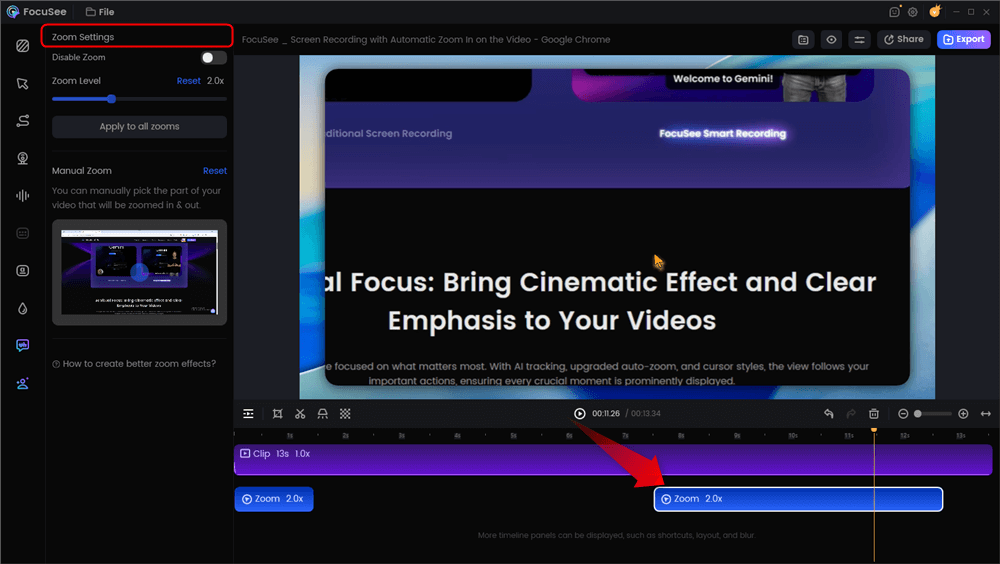
Automatic Zoom Effects
What Type of Small Business Promotional Videos Should You Create?
Local service businesses and digital startups alike often hit a creative wall when planning content. To overcome this, focus on high-value, easy-to-produce formats that highlight your actual expertise rather than relying on elaborate scripts.
- Educational Demos (Service & Digital): Show exactly how a product or service works. If you are a plumber, film a one-minute mobile video explaining how to safely reset a garbage disposal. If you are a SaaS founder, use FocuSee to record a one-minute walk-through of your newest software feature.
- Customer Stories (Local Retail & Service): Record short, authentic reactions from satisfied clients on your phone. Hearing a local neighbor praise your work builds massive community trust.
- Process Walkthroughs (E-commerce & Retail): Document the daily operations of your shop to build brand awareness. Show how you package a large order or prepare your storefront for the morning rush.
Tracking the ROI of Video Marketing for Small Businesses
To justify the time spent creating content, you must move from a “creator” mindset to a “business owner” mindset. High organic reach is only valuable if it translates into tangible marketing success. You need a precise method for tracking success beyond simple vanity metrics like view counts.
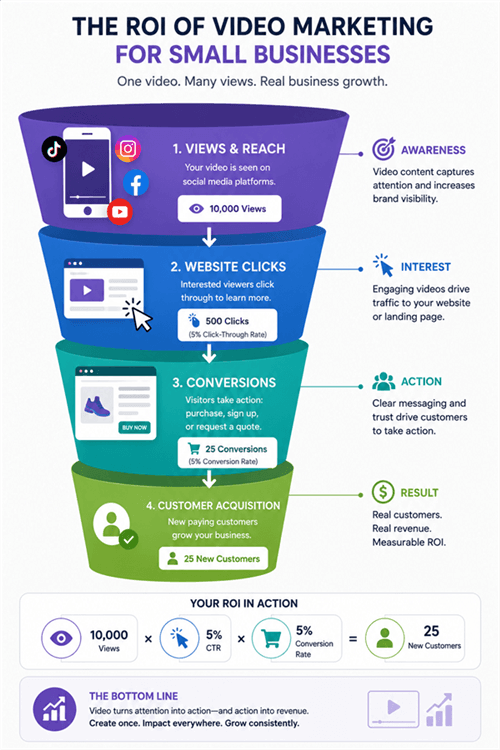
The ROI of Video Marketing for Small Businesses
Platform-Specific Tracking Techniques
- TikTok and YouTube Shorts: These platforms are highly effective for rapid brand awareness and reaching new audiences. Track your success by setting up distinct UTM links in your bio, or by mentioning specific promo codes (e.g., “Use code TIKTOK10”) in the video to measure direct conversions.
- Instagram (IG) Reels: Excellent for customer retention and engaging your existing local audience. Monitor your Direct Messages (DMs). Many local businesses find that their primary ROI from Instagram comes from viewers replying to a Reel to book an appointment.
- Social Media Ads: When you put a financial budget behind a video, track the Cost Per Click (CPC) and the resulting website conversions. Compare this directly to your historical CPC for static image ads.
Frequently Asked Questions About Small Business Video Marketing
Why is video marketing important for small businesses?
Video helps small businesses capture attention, build trust, and explain products or services more effectively than text or images. It also performs well on social media platforms, making it easier to reach new customers organically.
Can small businesses afford video marketing?
Yes. Modern smartphones and affordable editing tools make video marketing accessible for businesses of any size. You can create professional-looking videos without hiring an agency or investing in expensive equipment.
What type of videos should small businesses create?
Educational tutorials, behind-the-scenes content, customer testimonials, product demonstrations, and quick tips are some of the most effective video formats for attracting and engaging potential customers.
Does video marketing actually increase sales?
It can. Videos help customers understand your products, reduce uncertainty, and build confidence before making a purchase, often leading to higher conversion rates.
Which platforms are best for small business videos?
TikTok and YouTube Shorts are excellent for reaching new audiences, while Instagram Reels works well for building relationships with existing followers and local communities.
Do I need professional equipment?
No. A modern smartphone, good lighting, and clear audio are enough to create high-quality marketing videos that perform well online.
How often should I post videos?
Posting two or three videos per week is a good starting point. Consistency is generally more important than publishing every day.
What is the ROI of video marketing?
Video marketing ROI can be measured through metrics such as website traffic, leads, conversions, and customer acquisition costs. Tracking these metrics over time helps you understand which videos generate the best results.
Conclusion
You no longer need to accept low social media engagement or feel overshadowed by corporate competitors with massive budgets. By shifting to an authentic, video-first strategy, you can bypass the high costs of traditional static ads and connect directly with your target audience.
The key to long-term success is matching your tools to your business type to prevent burnout. If you are a local service provider like Maria, grab your smartphone, download a mobile editor, and start documenting your daily expertise. If you are a digital consultant or SaaS founder looking to create high-converting software tutorials, automated tools are your best friend.
Stop letting technical friction hold your marketing back. If you rely on screen-based tutorials, download FocuSee today to automate your desktop editing. If you are a local shop, set up your ring light and hit record. Share your authentic process with the world, and start turning local viewers into loyal customers.