Master B2B Enterprise Software Demo Videos for Executives in 2026

Your product demo might be costing you enterprise deals—and you may not even realize it.
Many B2B software teams build demos the same way they train new users: feature by feature, screen by screen, click by click. The problem is that executives don’t buy software because a button works. They buy outcomes.
A CEO wants to know how your product drives growth. A CFO cares about ROI and cost savings. A COO wants operational efficiency, not a five-minute walkthrough of your settings page.
If your executive demos feel too technical, too long, or fail to answer the question “Why should we invest in this?”, decision-makers will quickly lose interest—even if your product is objectively the better solution.
In this guide, you’ll learn how to create B2B enterprise software demo videos that executives actually watch. We’ll cover how to tailor your message for different stakeholders, structure a compelling narrative, and present business value before product features—helping you turn demos into conversations that move deals forward.
Why Traditional Feature-Heavy Enterprise Software Demos Fail
To refine your presentation technique, you must first understand why traditional enterprise software demos fail. The issue stems from a critical misalignment of priorities. Most teams build demos designed to train end users rather than persuade executive buyers.
When a product walkthrough focuses heavily on navigation menus, settings toggles, and detailed user interfaces, it immediately alienates the C-suite. Executives evaluate digital transformation initiatives based on high-level outcomes: time-to-value, risk reduction, and competitive advantage.
If you spend five minutes demonstrating a routine data entry procedure, you communicate that your software is merely an operational chore, not a driver of strategic differentiation.
This misalignment causes viewer retention to drop sharply. Executive decision-making relies heavily on evaluating the implementation timeline. If your video does not quickly address how fast they will see a return on investment, the buying committee will close the presentation and look for an alternative.
Treat every recorded presentation as a strategic business conversation. Ensure your chosen maps align with executive priorities.
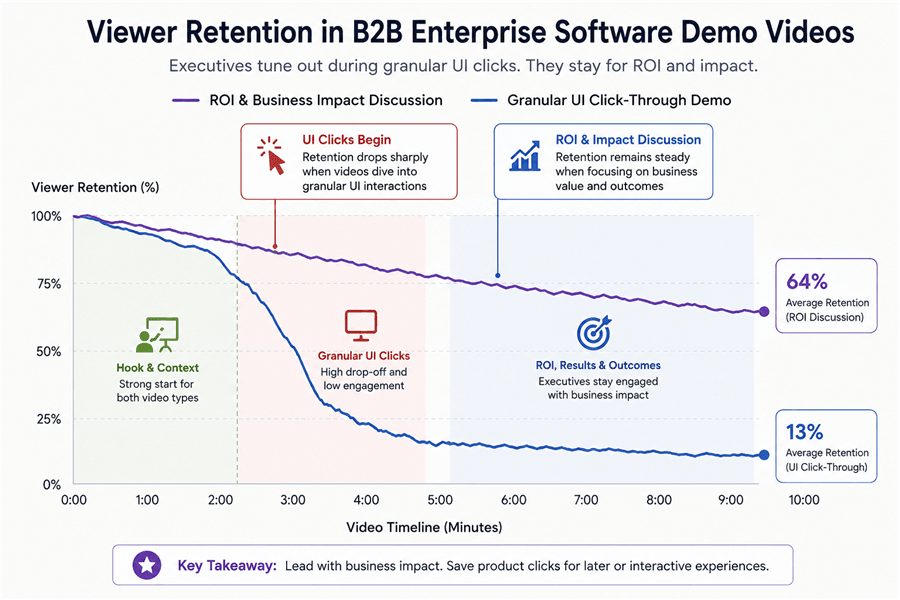
B2B Demo Video Retention Chart
The 4-Step Layered Blueprint for B2B Product Demos for CIOs
High-performing enterprise demos abandon the linear feature dump. Instead, they present an inverted pyramid of information. This “Layered Enterprise Demo” framework is exactly how we restructured our sales process to stop losing deals to executive boredom.
To apply this method and transition smoothly from business problems to software solutions, follow these four steps:
1. Executive Summary (The Hook)
Start your presentation by stating the core business problem and the expected outcome. Do not show the software interface yet. Use a single, clean title slide highlighting the exact metric you are going to improve. Frame the narrative around the specific pain points the enterprise is facing today.
2. Business Impact (The ROI)
Transition directly from your title slide to the visual proof. Skip the login screen entirely. Cut straight to a customized dashboard or an ROI calculator within your platform. Show exactly how the software drives revenue growth or reduces operational costs.
3. Product Proof (The ‘Why’, Not The ‘How’)
Display the specific features that enable the business impact you just promised. Keep this brief. Do not explain how to click through the software; explain why the software’s design achieves the stated business outcomes faster than competitors.
4. Technical Deep Dives (The Appendix)
Reserve complex configuration procedures, SSO setups, and API documentation for a separate, modular follow-up video. Only send this technical content if the buying committee specifically requests it during procurement.
Bad Feature-Led Script vs. Good ROI-Led Script
Here is what this framework looks like in practice when writing your voiceover script:
| ❌ Feature-Led Script | ✅ ROI-Led Script | |
| Navigation | “Click Settings, then Revenue Hub to generate a report.” | “This dashboard automatically eliminates manual billing work.” |
| Features | “You can add up to 50 custom tags.” | “Automation saves your team around 15 hours every week.” |
| Technical Details | “Let’s configure SSO with Microsoft Entra ID.” | “Security integrations are ready from day one. Technical setup is covered separately.” |
Personalizing C-Suite Presentations: The Modular Workflow
A major challenge in B2B sales is that the CFO, CIO, and COO care about entirely different outcomes. You cannot send the exact same 15-minute video to the entire buying committee. You must personalize your software demo videos.
However, trying to take a single, rambling master recording and “chop it up” for different personas creates disjointed, confusing voiceovers. Instead, you need to use a Modular Recording Workflow.
Write your script in discrete 60-second to 90-second chapters (e.g., Chapter 1: Financial Impact, Chapter 2: Security & Compliance, Chapter 3: Operational Rollout). Record the voiceover for each chapter as a standalone thought. This allows you to seamlessly stitch these video snippets together based on who is watching:
- The CFO (Chief Financial Officer): The CFO requires absolute clarity on the financial impact. Stitch together the Executive Summary and the Financial Impact chapters. Use screen annotations to highlight the specific dashboard metrics that prove cost savings. When you , you eliminate their primary hesitation.
- The CIO (Chief Information Officer): CIOs demand system scalability and strict . Send them the Security & Compliance chapter. Practical Tip: When we salvaged that lost healthcare deal, we used a video tool with a Privacy Blur feature to automatically mask dummy patient PII on the screen. Showing the CIO that we take data protection seriously in our own sales materials instantly rebuilt trust.
- The COO (Chief Operating Officer): Operations leaders prioritize efficiency and a smooth onboarding experience. Send them the Operational Rollout chapter, focusing on automated workflows and clear implementation steps to prove operational simplicity.
Scaling Your Process: Manual Editing vs. Dedicated Demo Tools
When your sales team needs , you must evaluate the most realistic way to create them. Many revenue teams default to recording raw Zoom calls and attempting to manually edit them in complex software like Premiere Pro.
This manual process is painful. Syncing audio, keyframing zooms to highlight specific metrics, and cutting out long pauses takes hours of highly skilled work. To optimize your B2B executive presentations, evaluate how you are building these assets based on four criteria:
- Time Cost: Manually editing software demos drains your team’s schedule. Professional tools automate standard formatting, allowing your enablement team to scale their output rapidly.
- Visual Polish: Raw Zoom recordings rarely capture executive attention. You need smooth, automated cursor tracking and professional zooming to guide the viewer’s eye directly to the ROI metrics on your dashboard.
- Technical Skill: Standard video software requires specialized editing knowledge. Purpose-built presentation tools simplify the procedure, making high-quality video creation accessible for Account Executives and Marketers.
- Data Security: A manual method requires meticulous, frame-by-frame editing to hide sensitive client data—miss one frame, and you have a compliance breach. Dedicated tools offer secure, automated masking features.
Recommended Tools for Executive Software Demo Videos
To effectively execute the layered framework and the modular workflow discussed above without spending days in post-production, we highly recommend utilizing a purpose-built screen recording tool like FocuSee.
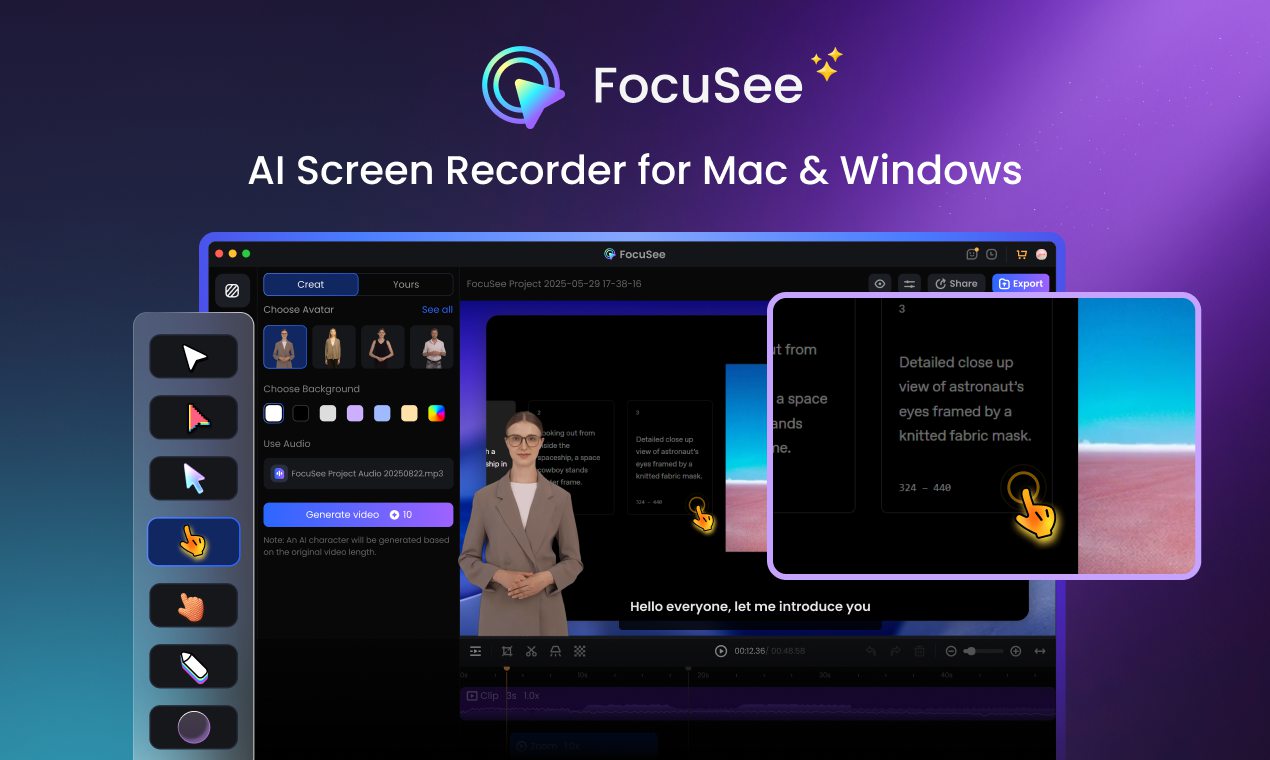
Marketing Video Production – FocuSee
Available for both Windows and macOS, FocuSee automates the heavy lifting of post-production, allowing you to focus on your ROI storytelling. It solves several specific bottlenecks in the demo creation process:
- Guiding the Executive’s Eye: Remember the need to transition smoothly from a business problem to the visual proof? FocuSee’s Smart Focus & Auto-Zoom automatically zooms in on clicked areas and key metrics. This keeps the CFO’s attention strictly on the data that matters, rather than letting their eyes wander around your complex interface.
- Pacing the Voiceover: When recording modular chapters, sales reps often use filler words (“uh,” “um”) or leave dead air while a page loads. FocuSee’s AI Smart Cut automatically removes these long pauses and filler sounds, ensuring your script’s pacing sounds confident and polished.
- Securing the Visuals: To satisfy strict CIO requirements during the procurement process, you can easily deploy Privacy Blur to hide sensitive company data on the screen dynamically, ensuring your demos are always compliance-ready.
- Ensuring Consistency: By utilizing reusable video templates, your entire sales engineering team can save their preferred recording settings, producing a high volume of consistent, branded assets for the C-suite.
Frequently Asked Questions About Enterprise SaaS Executive Presentations
To solidify your approach to creating B2B enterprise software demo videos for executives, here are clear, actionable answers to the most common strategic questions.
How should software demos be different for executives?
Executive demos must prioritize business outcomes and time-to-value over standard feature functionality. They focus on strategic differentiation and risk reduction rather than granular user interfaces and daily operations.
What do CIOs and CFOs care about in product demos?
CIOs prioritize security compliance, system architecture, data privacy, and scalability. CFOs focus strictly on the financial impact, specifically looking at operational cost reduction metrics and overall revenue growth.
How long should executive demo videos be?
Keep high-level SaaS demo videos highly concise. Aim for two to three minutes for an initial executive summary. You can provide longer, modular videos for technical deep dives later in the sales cycle if requested.
Should I avoid feature-heavy walkthroughs?
Yes. Reserve detailed feature walkthroughs for the actual end-users during the onboarding stage. Executives need to see the proof of value, not the daily operational clicks.
How do I present ROI clearly?
Start your video with a single title slide stating the specific financial or operational problem. Then, cut directly to the dashboard, utilizing auto-zoom features to highlight the exact metrics that prove measurable cost savings or revenue gains.
What role should security and compliance play in demos?
Security is a primary concern for the C-suite. Your videos must visually prove compliance by automatically blurring sensitive data and briefly highlighting administrative security settings to reassure the CIO.
Can I personalize demos for enterprise accounts?
Absolutely. Write and record your demo script in discrete, standalone modules. This allows you to mix and match specific video snippets tailored to the unique priorities of the CFO, CIO, and COO without the voiceover sounding disjointed.
What metrics matter most to executives?
Executives focus on implementation speed (time-to-value), operational efficiency, percentage of revenue growth, and security compliance standards.
How do demo videos shorten enterprise sales cycles?
By directly addressing executive pain points with highly polished, easily shareable video assets, you allow the buying committee to review the proof of value asynchronously. This prevents scheduling delays and accelerates consensus.
Take Control of Your Executive Demos
Your enterprise sales cycle involves multiple stakeholders, but it no longer has to stall because your product demos are too technical for executive buyers.
By abandoning standard feature walkthroughs and adopting a layered, modular storytelling technique, you can effectively communicate ROI and hold the C-suite’s attention. You now have a proven method to simplify complex workflows, build targeted assets for different decision-makers, and focus your narrative on undeniable business impact.
Stop losing deals to complex UI walkthroughs. Rethink your script, leverage smart tools like FocuSee to automate your production value, and start delivering high-impact executive demos that accelerate your sales cycle and close larger deals with confidence.