The Expert Guide to AI Tools for Generating Marketing Videos in 2026

Running growth marketing for a fast-scaling ecommerce brand often feels like an uphill battle. If you launch dozens of campaigns across TikTok, Meta, and YouTube, you know the exact frustration: your creative team simply cannot keep up with the demand for new ad variations.
Traditional video production is too slow, and hiring external editors is prohibitively expensive. You need more ad creatives for testing, but when you search for a solution, you are hit with an overwhelming avalanche of AI tools. Worse, out-of-the-box AI-generated videos sometimes look low quality or unnatural, directly threatening brand trust and your Return on Ad Spend (ROAS).
The secret to fixing this bottleneck isn’t finding one magic software. This guide provides a battle-tested method using a specific stack of AI tools for generating marketing videos. We will show you exactly how to build a layered workflow that scales short-form content, reduces costs, and guarantees faster turnaround for campaigns.
Traditional Editing vs. AI Marketing Video Creation Tools: A Decision Guide
Before adopting new software, it is crucial to understand how automated methods compare to traditional, agency-driven video production. Relying solely on manual editors often creates a severe bottleneck, while trusting a generic, single-click AI tool can result in low-converting social media ads.
To build a reliable procedure for creative testing, evaluate these four critical factors when considering AI software for creating ads :
- Time Cost: Traditional editing requires manual cutting, keyframing, and rendering, taking days to finalize ad creatives. AI automation drastically reduces this by handling repetitive tasks, outputting short-form content in minutes.
- Success Rate in Creative Testing: Performance marketing requires high-volume testing to find winning formats. AI video automation allows marketers to test dozens of hooks, scripts, and visuals simultaneously, significantly increasing your chances of finding a winning campaign.
- Technical Skill Required: Manual video production requires specialized expertise in motion graphics. Professional AI tools provide an accessible interface, enabling growth marketers to assemble high-quality videos without an editing background.
- Safety Risk (Brand Safety & Quality Control): Fully automated text-to-video tools sometimes produce visual artifacts that harm brand trust. A hybrid method—where AI accelerates specific steps while human operators review the final asset—minimizes this safety risk.
Never let AI publish directly to your ad accounts without a human review. Use AI for 90% of the heavy lifting (editing, asset generation, zooming) and save human brainpower for the final 10% (strategy, hook selection, and quality control).
Tackling Demos and SaaS Walkthroughs: Automating with FocuSee
When creating product demo videos, software tutorials, or screen-recorded UGC (User-Generated Content), manual keyframing and audio syncing will absolutely drain your time. For teams prioritizing speed without sacrificing quality on these specific assets, FocuSee operates as a highly reliable AI product video generator.
Why We Use FocuSee for Screen-Based Assets
Instead of spending hours manually chopping up a screen recording, FocuSee’s AI Smart Cut feature instantly trims out “uhs,” “ums,” and long pauses from your raw recordings.
When you need to highlight a specific feature in a UI, the Smart Focus (Auto-Zoom) automatically tracks your cursor and emphasizes key actions on the screen. No more setting manual keyframes in post-production. It also applies 3D Motion and Smart Cursor Effects automatically, delivering an instant visual polish that looks professionally crafted.
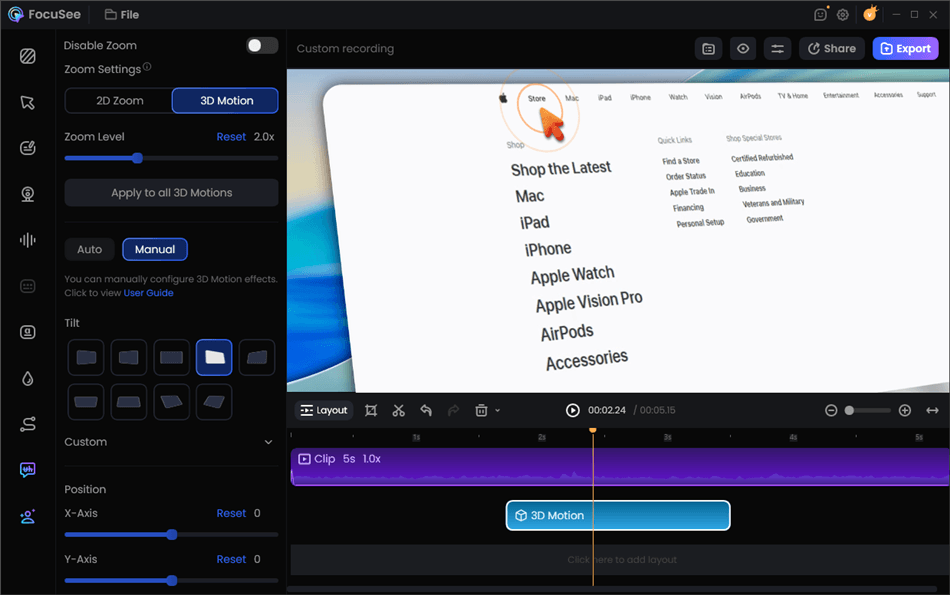
Screen Studio Alternative for Windows – FocuSee
Keeping it Balanced: Limitations to Consider
While we rely on FocuSee for screen recordings and post-production assembly, it is not an all-in-one generator. It will not generate cinematic B-roll from a text prompt or create an AI avatar. Furthermore, if your team is exclusively operating on macOS, you might also consider tools like Screen Studio. However, we prefer FocuSee because it offers superior cross-platform flexibility for teams using a mix of Windows and Mac hardware.
Segmenting AI Tools for Video Ads: The Layered Ecommerce Workflow
When marketers first attempt to scale their ad creatives, the primary mistake is trying to force a single piece of software to output every type of creative asset. The real challenge is not just generating videos—it is building a repeatable workflow.
Here is the strategy that changed everything for our ad accounts: high-performing teams build layered workflows. Segmenting your AI tools by their specific objective is the most effective method for scaling a high-converting pipeline for platforms like TikTok and Meta.
The Four-Layer Creative Pipeline
Stop looking for an “all-in-one” AI tool. Instead, build a stack that handles each stage of production perfectly:
1. High-Fidelity Assembly & Demos (The Base Layer)
- The Tools: FocuSee (cross-platform) or Screen Studio (Mac only).
- The Goal: Capture product walkthroughs, software UIs, or UGC clips, allowing the AI to handle automated editing, cursor tracking, and smart zooming. This serves as the structural foundation of your ad.
2. Spokesperson Generation (The Hook Layer)
- The Tools: HeyGen (for high-end avatars) and ElevenLabs (for hyper-realistic voiceovers).
- The Goal: Instead of coordinating live shoots, synthesize a spokesperson for the “hook” phase of your short-form content. You can quickly test 10 different scripts and AI voiceovers to see which opening grabs the most attention.
3. Cinematic B-Roll (The Engagement Layer)
- The Tools: Runway Gen-2 or Midjourney (paired with Luma Dream Machine).
- The Goal: For lifestyle shots or background sequences, use text-to-video models to generate supplemental footage. This breaks up the visual monotony of a standard ad and retains viewer attention.
4. Final Stitching (The Assembly Layer)
- The Tools: CapCut Desktop or Adobe Premiere Pro.
- The Goal: This is the missing piece for most teams. You cannot just leave these assets floating around. Export your layered assets (your FocuSee UI demo, your HeyGen avatar hook, and your Runway B-roll) and drop them into a timeline like CapCut. Here, you add your final trending audio, stitch the clips together smoothly, and export your variations.
🚨 WARNING: The Meta Algorithm & AI Avatars
I learned the hard way that Meta’s algorithm actively penalizes AI avatars if the lip-sync is off by even a fraction of a second—viewers immediately scroll past, tanking your engagement rate. Always export your Layer 2 spokesperson at exactly 60fps to match your timeline. Once we implemented this frame-rate fix in our workflow, we saw a 28% improvement in Return on Ad Spend (ROAS) and a massive drop in Cost Per Click (CPC) on our Meta campaigns.
Scaling Globally: AI Tools for Multilingual Marketing Content
Once you establish a consistent pipeline for your primary market, the next logical step is international expansion. However, localizing social media ads usually introduces severe workflow bottlenecks .
To solve the challenge of needing multilingual marketing content without hiring specialized translation agencies, rely on the localization features built into your AI stack. Here is how to execute it efficiently:
- Automated Translation & Captioning: Tools like FocuSee include Automatic Subtitles & Speech Recognition capable of processing over 50 languages with 98% accuracy. This saves hours of manual transcription.
- Audio Swapping: Pair your localized subtitles with translated AI voiceovers from ElevenLabs. You can swap out the audio track and regenerate the captions in minutes, creating highly targeted video personalization for different geographic regions.
- Flexible Platform Formatting: Expanding globally means adapting to diverse platform requirements. Export a single recorded asset in 4K/60fps or format it specifically for 9:16 vertical delivery. This ensures your content repurposing efforts remain seamless, making your stack incredibly effective for platforms like TikTok.
Frequently Asked Questions About Automated Marketing Video Creation Tools
What are the best AI tools for creating marketing videos?
The optimal tools depend on your objective. Use Runway Gen-2 for cinematic B-roll, HeyGen for AI avatars, ElevenLabs for voiceovers, and an AI editor like FocuSee for fast post-production assembly and UI demos. Finally, stitch everything together in CapCut.
Can AI create video ads automatically?
Yes, but fully automated, single-click videos often lack high-converting hooks. The most successful procedure involves using a layered stack of AI tools to automate specific, time-consuming parts of the process, while humans guide the marketing strategy and final assembly.
What’s the difference between AI video generators and AI editors?
AI video generators (like Runway or Midjourney) create entirely new pixels or footage from text prompts. AI editors (like FocuSee) take your existing footage or screen recordings and automate the post-production work, such as applying smart cuts, tracking cursors, and enhancing audio.
Can AI generate product demo videos?
Absolutely. AI editors can capture your UI, automatically zoom in on mouse clicks, remove background noise, and apply 3D motion tracking without requiring manual keyframing.
Are AI video tools good enough for professional marketing?
Yes, provided you build a layered workflow. Relying entirely on raw AI output can sometimes result in videos that look low quality. Blending high-fidelity screen captures with polished AI voiceovers and proper formatting ensures a professional standard.
What tools are best for TikTok ads?
For TikTok, you need tools that excel at vertical 9:16 formatting, fast-paced editing, and clear captions. Tools that automate zoom-ins and instantly remove filler words are highly effective for maintaining viewer retention.
Conclusion
If your team struggles to scale content production, continuing to rely on manual editing will only drain your budget and stall growth. Traditional video production is simply too slow when your ad accounts demand daily refreshes to combat ad fatigue.
By adopting a layered procedure—combining avatar generators, text-to-video B-roll, and dedicated UI editors—you regain control over your ad output. Instead of wondering which single AI video tool fits your use case, start by automating your most time-consuming tasks first. FocuSee provides a robust foundation for screen recordings, UGC ads, and product demos, complete with continuous software updates to support new social media aspect ratios and responsive customer support for teams transitioning away from traditional editing suites.
Stop letting creative bottlenecks dictate your ad performance. Build your layered AI stack today, assemble your assets smarter, and launch high-converting ad variations faster than ever.