10 SaaS Demo Mistakes Killing Your Conversions and How to Fix Them

There is a sinking feeling every sales professional knows well: The polite nod. You have just spent 45 minutes walking a prospect through your software. You covered every feature, answered every technical question, and the screen share went perfectly. Yet, when you ask for the next step, the energy in the room—or on the Zoom call—is flat. “We’ll get back to you,” they say. But they never do.
Consider Jason, a sales lead at a growing B2B SaaS company. His team had strong inbound interest, but their pipeline was leaking. Deals were stalling immediately after the presentation. Jason’s frustration wasn’t unique; his team was working hard, but they were inadvertently sabotaging their own efforts by overloading prospects with information and running the same generic flow for every user.
If you are seeing prospects disengage early or struggle to understand your product’s value, you are likely falling into similar traps. This guide identifies the top 10 SaaS demo mistakes that drain revenue and offers actionable corrections for each. Whether you are conducting live walkthroughs or sending recorded clips, avoiding these SaaS product demo mistakes is essential for maintaining deal velocity.
The strategies below are based on an analysis of over 50 hours of B2B sales calls, conversion data, and direct feedback from account executives.
Why SaaS Demos Fail: Misalignment with Buyer Intent (And How to Fix It)
Before we list the specific tactical errors, we must address the strategic foundation. Based on extensive analysis of sales cycles, the most damaging SaaS demo mistake is a fundamental misalignment with buyer intent. Teams often optimize demos for internal product pride—showing off what they built—rather than buyer decision-making.
High-performing SaaS companies use a different method. They design demos backward from the buyer’s success moment. This means identifying the specific problem the buyer needs to solve and removing any feature that does not directly support that outcome.
The shift from “Internal Pride” to “Buyer Success” looks like this:
- Internal Pride Approach: “Look at our complex settings panel; we spent six months building this.” (Result: Buyer confusion).
- Buyer Success Approach: “Here is how you solve your payroll issue in three clicks.” (Result: Buyer relief).
Why Linear SaaS Product Demos Fail (And What to Do Instead)
A standard “feature-first” demo usually follows the navigation menu of the software:
- Dashboard overview
- Settings configuration
- Feature A, Feature B, Feature C
This forces the prospect to wait for relevance. By the time you reach the feature that solves their pain point, their attention has waned. A “Buyer-Backwards” approach starts with the resolution (the success moment) and only shows the necessary steps to get there. This method aligns with the buyer journey and ensures the demo feels like a consultation rather than a lecture.
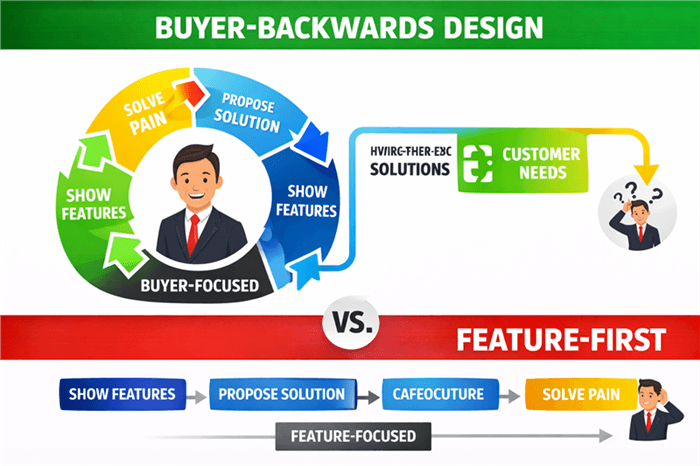
Buyer-Backwards Design vs Feature-First linear line
5 Strategic SaaS Demo Mistakes That Kill Conversions Early
The first five mistakes are not technical; they are narrative. These common SaaS demo mistakes occur before you even share your screen.
1. Feature Dumping (The “Show Up and Throw Up”)
This is the most prevalent error in B2B SaaS sales. Jason, the sales lead mentioned earlier, realized this was his primary obstacle. He was overloading demos with features, assuming more functionality equaled more value. In reality, showing every toggle and setting overwhelms the prospect.
The Fix:
Adopt the “Less is More” rule. If a feature does not directly address a pain point discovered during the initial qualification call, leave it out. Prospects do not buy features; they buy solutions to specific problems.
2. Using a Generic Script
Using a “one-size-fits-all” script for a CEO, a marketing manager, and an IT director is a critical failure in conversion optimization. Each stakeholder has different success metrics:
- The CEO cares about ROI, reporting, and high-level trends.
- The End-User cares about ease of use and time-saving.
- The IT Director cares about security, integrations, and compliance.
Failing to tailor the narrative leads to disengagement. If you show an API configuration screen to a Marketing VP, you have likely lost the deal.
3. Ignoring the Buyer’s Role
Related to the generic script, this mistake involves showing workflows irrelevant to the person on the call. SaaS demo errors to avoid include forcing a creative director to watch a 15-minute technical setup.
The Fix:
Map your demo flow to the user persona. Use the first 5 minutes of the call to re-confirm their role and top priorities, then pivot your presentation to match.
4. Poor Pacing and Length
Among the top biggest mistakes in SaaS product demos is failing to manage time. A demo that drags on without clear milestones causes cognitive fatigue. If you have not shown value within the first 10 minutes, recovery is difficult.
The Fix:
Break your demo into “chapters.” Pause after each major section to check for understanding.
Example: The “3-Act” Demo Structure
Instead of wandering through tabs, structure your demo like a story:
- Chapter 1: The Villain. (2 minutes) Show the “before” state. “You mentioned you currently spend 4 hours manually importing CSV files.”
- Chapter 2: The Hero. (3 minutes) Show the solution immediately. “Watch how our ‘One-Click Import’ does that work in 30 seconds.”
- Chapter 3: The New Reality. (5 minutes) Show the downstream benefit. “Now that the data is in, here is the automated report you get every Monday.”
5. No Storytelling Arc
Data without context is forgettable. A demo needs a narrative structure: a problem (the villain), a struggle (current inefficiency), and a resolution (your product). Without this arc, the software is just a collection of buttons.
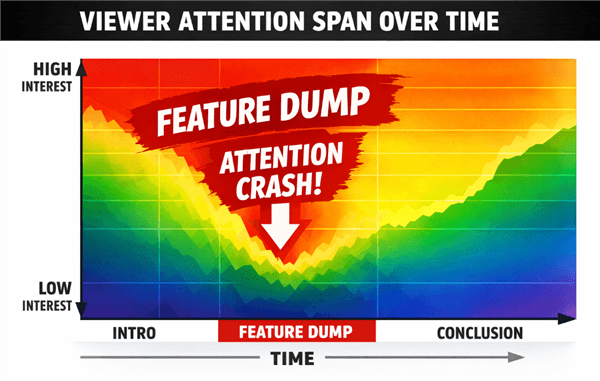
Viewer Attention Spans Dropping
Live vs Recorded SaaS Demos: Which Converts Better in 2026?
Avoiding mistakes often starts with selecting the right format. Sales teams frequently debate between strictly manual live demos and incorporating demo automation or pre-recorded assets. Both have distinct advantages and risks.
| Manual Live Demos | Asynchronous / Recorded Demos | |
| Success Rate | High for closing stages; dynamic objection handling. | High for top-of-funnel engagement and qualification. |
| Personalization | Maximum flexibility to pivot based on questions. | Lower during recording, but allows prospects to self-serve. |
| Technical Risk | High (“Demo Effect,” bugs, internet outages). | Near zero. You control the environment and the edit. |
| Scalability | Low. Requires significant time from Sales Engineers. | High. A single asset serves thousands of leads. |
A balanced strategy often uses recorded demos for early-stage discovery to filter leads, reserving high-touch live demos for qualified opportunities. This hybrid approach mitigates technical risk while preserving human connection where it counts most.
Why Relying Only on Live SaaS Demos Hurts Scalability (And What to Do Instead)
A common SaaS product demo mistake is forcing every single prospect, regardless of deal size or qualification, into a live Zoom call. This leads to sales engineer burnout and prevents teams from focusing on high-value accounts. It also introduces inconsistency—some reps give great demos, while others might stumble.
To solve this scaling issue, modern teams are adopting a “Hybrid Demo” strategy. This involves sending a polished, interactive recording for the initial walkthrough and saving the live meeting for deep-dive Q&A.
Tools like FocuSee are designed specifically to facilitate this hybrid workflow. It is a screen-recording and video creation tool that automates the production of sales demos, ensuring your “first impression” asset is always perfect.
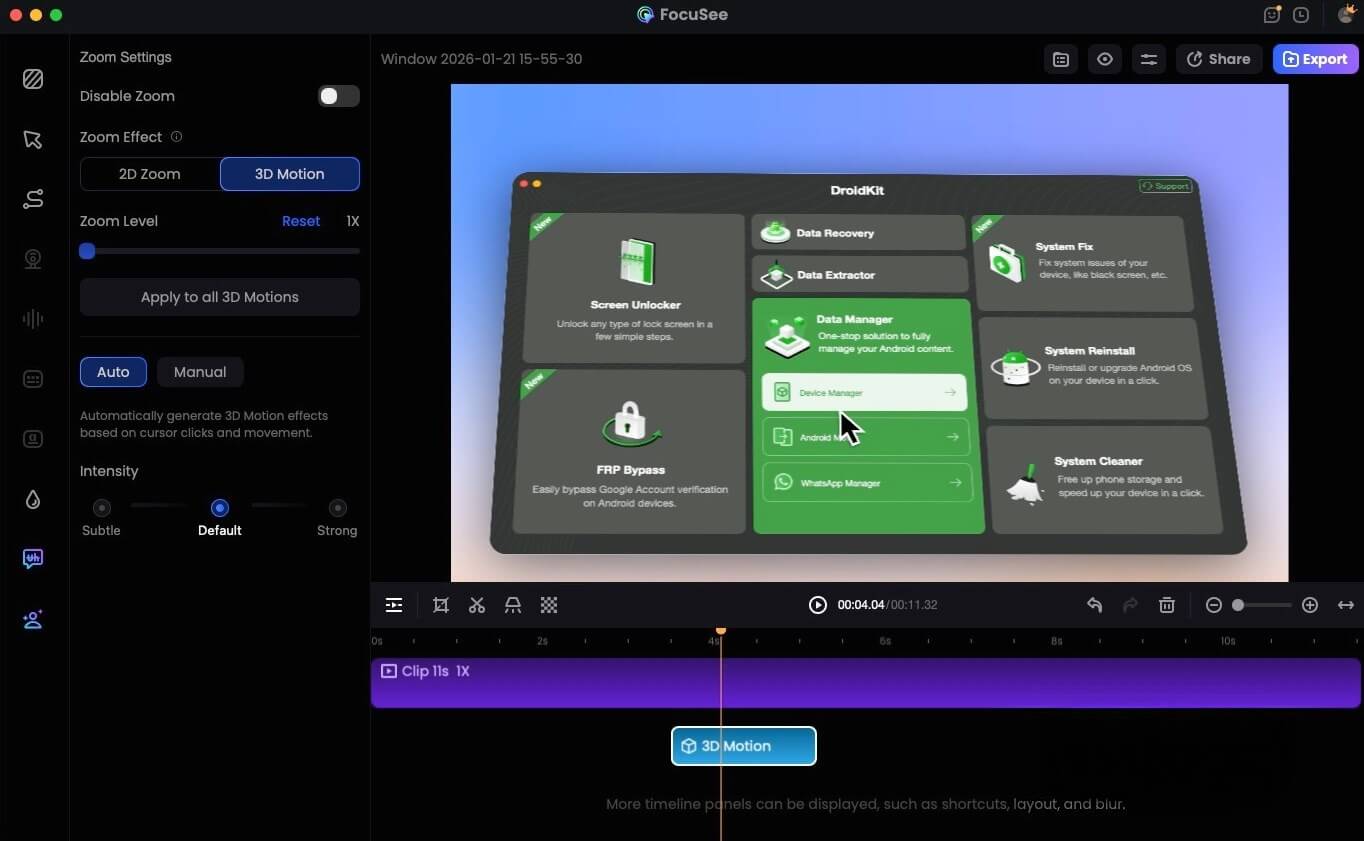
FocuSee 3D Motion
How Guided Automation Solves Demo Fatigue:
- Smart Focus & Auto-Zoom: One reason recordings fail is that they look static. FocuSee automatically follows your cursor and zooms in on key actions. This directs viewer attention to exactly where the critical action occurs, ensuring prospects don’t miss important UI elements.
- Polished Delivery: FocuSee’s AI automatically removes filler words like “um” and “uh” and trims long pauses. This solves the mistake of sending raw, messy recordings that degrade brand authority.
- Consistency: By creating a library of tailored assets (e.g., one for CEOs, one for IT), you ensure every prospect sees the best version of your pitch, regardless of which sales rep sends the email.
5 Execution Mistakes in SaaS Product Demos (Visual & Technical Errors)
Even with a great story, poor execution can sink the ship. The following items are often overlooked SaaS demo best practices mistakes related to the visual and technical presentation layer.
7. Cluttered Desktop and Distractions
Nothing undermines authority faster than a Slack notification popping up during a critical pricing discussion. A messy desktop or visible personal bookmarks signals a lack of preparation.
The Fix:
Sanitize your digital environment. Close all unrelated tabs. Turn off notifications. Professional tools like FocuSee help mitigate this by offering features like Privacy Blur, which can obscure sensitive data automatically, but the discipline of “Do Not Disturb” mode is mandatory.
8. Monotone Delivery and Bad Audio
Audio quality is more important than video quality. If a prospect has to strain to hear you over static or background noise, they will tune out. Additionally, a monotone delivery implies you are bored with your own product.
The Fix:
Invest in a decent USB microphone. Use intonation to emphasize key benefits. If recording, use AI Audio Enhancement tools to strip background noise.
9. Focusing on “How” Instead of “Why”
Sales engineers often fall into the trap of explaining how to configure a setting (technical training) rather than why that setting matters (business value). Save the training for onboarding; the demo is for selling the outcome.
The Fix:
Frame every feature with a benefit statement. Instead of saying, “Click here to generate a report,” say, “This button instantly gives you the data you need for your Monday morning meeting.”
10. Lack of Clear Next Steps
Ending a demo with “So, what do you think?” is a weak close. This lack of direction stalls the deal.
The Fix:
Always define the next step before the call ends. Whether it is a technical audit, a pricing review, or a trial start date, guide the prospect clearly to the next stage of the product-led growth funnel.
How to Measure SaaS Demo Performance (Metrics That Actually Matter)
Many teams struggle because it is unclear whether demos actually influence conversions or revenue. To fix this, you must track specific metrics and audit your performance.
The 5-Minute Demo Audit Scorecard
Do not rely on guesswork. Print this scorecard and use it to grade your team’s last three recorded demos. If you answer “No” to more than three questions, your process needs revision.
- Relevance: Did we mention the prospect’s specific pain point in the first 2 minutes? (Yes/No)
- Visuals: Was the desktop clean of unrelated icons and tabs? (Yes/No)
- Pacing: Did we pause to check for understanding at least once every 10 minutes? (Yes/No)
- Audio: Was the speaker’s voice clear, energetic, and free of background noise? (Yes/No)
- Focus: Did we skip features that the prospect did not ask about? (Yes/No)
- Navigation: Did we use a logical “Story Arc” rather than clicking through menu tabs? (Yes/No)
- Terminology: Did we explain why a feature matters, not just how it works? (Yes/No)
- Technical: Did the software perform without lag or bugs? (Yes/No)
- Next Steps: Did the call end with a scheduled calendar event? (Yes/No)
- Length: Did the actual screen-sharing portion stay under 20 minutes? (Yes/No)
Measuring Improvement (Benchmarks)
How do you know if these changes are working? Look for these baselines:
- Demo-to-Close Rate: The percentage of demos that result in a closed deal. A healthy B2B SaaS benchmark is 20% to 30%. If you are below 20%, your demo is likely not addressing the “Why.”
- Sales Cycle Length: Does a better demo shorten the time from discovery to contract? Efficient demos should reduce cycle time by eliminating the need for follow-up “clarification” calls.
- Second Call Rate: For introductory demos, success is often simply securing the next, deeper conversation. Aim for a >50% conversion from the first demo to the technical deep dive.
SaaS Demo Mistakes FAQ: Common Questions Answered
What are the most common SaaS demo mistakes?
The most frequent errors include feature dumping (showing too much), misalignment with buyer intent (showing the wrong things), and poor technical execution (bad audio or cluttered screens). These mistakes shift focus away from the buyer’s problem.
Why do prospects lose interest during product demos?
Prospects disengage when the content feels irrelevant to their specific role or pain points. If a presentation feels like a generic script rather than a tailored solution, the viewer’s attention span drops rapidly.
How long should a SaaS demo be?
For an initial discovery demo, aim for 30 minutes, with only 10-15 minutes dedicated to the actual screen share. The rest should be discovery and discussion. Comprehensive technical demos may run 45-60 minutes but should be strictly reserved for later in the cycle.
Should I use the same demo for all prospects?
No. You should have different demo flows for different personas (e.g., Executive vs. User vs. Technical Admin). Tailoring the narrative is essential for high conversion rates.
Can demo automation help reduce demo mistakes?
Yes. Tools like FocuSee allow you to record a “perfect” version of your walkthrough. This eliminates variables like internet lag, forgetting talking points, or stumbling over words, ensuring a consistent, high-quality experience for every viewer.
How do I know if my demo is actually effective?
Track your conversion rates from the “Demo” stage to the “Proposal” stage in your CRM. If fewer than 20% of prospects move forward after a demo, you likely have a narrative or execution problem.
Conclusion
The difference between a stalled pipeline and a closed deal often comes down to the quality of the product demo. By eliminating these 10 SaaS demo mistakes—from the strategic error of feature dumping to the technical failure of poor audio—you can regain control of your sales process.
You do not need to rely on luck or a prospect’s imagination to sell your product. Start by using the Audit Scorecard above to check your current flow. If you find your team is spending too much time on repetitive, unpolished intros, consider adopting a hybrid approach with tools like FocuSee. This allows you to create professional, automated assets in minutes, ensuring your first impression is always your best one.