The 2026 Expert Guide to Short Product Demo Videos for TikTok

Getting views but no sales from your TikTok product videos?
You’re not alone. Many brands struggle because they treat TikTok like a traditional advertising platform. Polished commercials, feature-heavy product videos, and long software walkthroughs often fail to hold attention on the For You Page.
Successful TikTok product demos are different. They quickly show a problem, demonstrate a solution, and deliver proof within seconds—all in a format that feels native to the platform.
This guide breaks down the exact framework top-performing brands use to create short product demo videos for TikTok, including hooks, demo structures, SaaS examples, and editing workflows that help turn viewers into customers.
Testing Environment: The workflows and recommendations in this guide were tested across iPhone and Android devices, Mac and Windows computers, and common creator setups using smartphone cameras, screen recordings, external microphones, and vertical video editing tools. We evaluated both physical product demos and SaaS screen-recording workflows to identify the formats, hooks, and editing techniques that consistently perform best for short-form platforms like TikTok.
Also Read: TikTok vs YouTube Shorts: Maximizing ROI in 2026 >
Why Traditional Ads Fail: UGC vs. Polished TikTok Product Marketing Videos
If your product videos look like traditional ads, you are experiencing a significant platform mismatch. High-budget commercials consistently fail on TikTok because the audience is highly attuned to skipping anything that looks like a pitch. They crave authenticity, pacing, and immediate relevance.
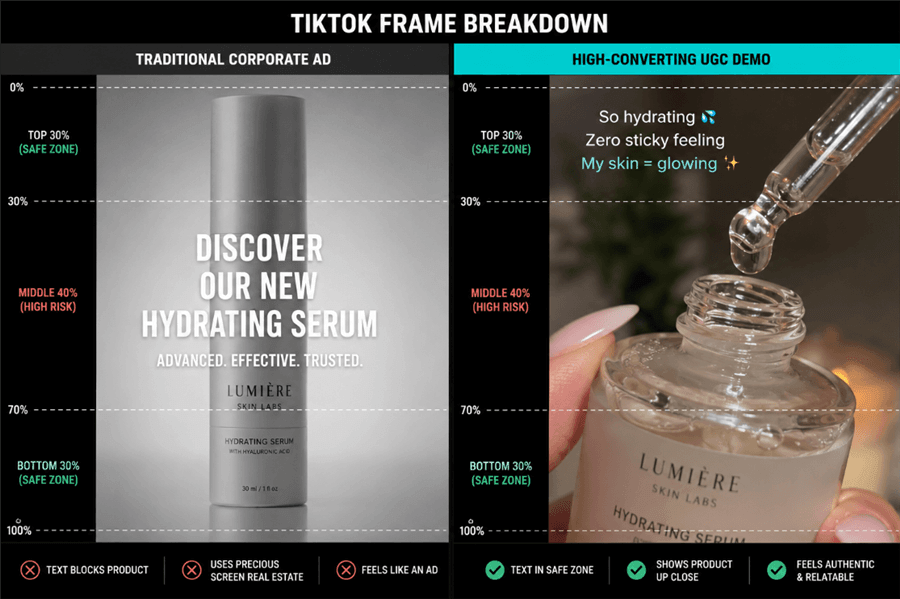
TikTok Layout Comparison
The Power of Authentic Product Storytelling
On short-form video platforms, product storytelling drives social commerce far more effectively than professional lighting or cinema-grade camera gear. User-Generated Content (UGC) marketing feels like a genuine, rapid-fire recommendation from a friend.
For software companies wondering if SaaS brands can create TikTok demos, the answer is an absolute yes—but you must abandon the standard 5-minute software walkthrough. A SaaS demonstration should feel like a quick “workflow hack” shared by a colleague. Moving away from traditional production values toward authentic, immediate problem-solving is the most effective way to align your brand with modern audiences.
Pro-Tip: Do not over-produce your audio. While clear sound is necessary, recording voice-overs using your smartphone’s built-in mic (or a basic lapel mic) in a quiet room often sounds much more natural and relatable than with a professional studio condenser microphone.
The 5-Step TikTok Demo Video Strategy for High Conversions
A common complaint among brand owners is, “My videos get views, but my conversions are flat.” The root cause of this issue is almost always structural. Brands try to compress a 60-second commercial into a 15-second format. Instead, you need a native-first storytelling funnel.
The highest-performing TikTok ecommerce product demos follow a strict, repeatable procedure: Hook → Problem → Demo → Proof → CTA.
The Native-First Framework Breakdown:
1. The Hook (Seconds 0-3)
You must address the viewer’s core pain point immediately while visually disrupting their scroll. Stop using your logo, and never use a slow establishing shot. Start with a bold visual (like a messy application of a product) or a highly specific relatable text hook.
2. The Problem (Seconds 3-6)
Agitate the issue briefly to build tension. Use native TikTok text overlays to highlight exactly what is wrong with the viewer’s current situation.
Execution Note: Keep your problem text on screen for exactly 2 to 3 seconds. Any longer, and the viewer loses interest; any shorter, and they cannot read it.
3. The Demo (Seconds 6-15)
This is where most brands fail. You cannot just show the product; you must present the exact, satisfying moment of resolution. How you execute this depends heavily on your industry:
- For Physical DTC Products: Ditch the wide shots. Use extreme macro (close-up) shots of the product in action. If it is a skincare product, show the physical texture being rubbed into the skin. If it’s an organizational tool, show the satisfying “click” of it snapping into place. Keep the pacing fast, cutting every 1.5 to 2 seconds.
- For Digital SaaS Products: Do not show your entire user interface—mobile viewers cannot read it. Instead, use extreme, dynamic zooming on the specific UI toggle or button that solves the problem. Cut out all loading screens and mouse travel time. The video should jump instantly from clicking the feature to the final, generated result.
4. The Proof (Seconds 15-20)
Provide immediate trust signals. For SaaS, this is the dashboard populating with green “success” metrics. For DTC, it is a split-screen before-and-after shot or a quick, one-sentence verbal testimonial (“This saved me 4 hours this week”).
5. The CTA (Seconds 20+)
Direct the user to the precise next step. Strong CTA optimization tells the viewer exactly what to do and where it is located: “Click the yellow basket right above my username to get yours.”
10 High-Converting Hook Scripts for Product Demos
If you are struggling to transition from the “Problem” to the “Demo,” the secret lies in a highly specific script. Below are 10 exact, fill-in-the-blank scripts you can use to immediately hook viewers.
5 Hooks for SaaS & Digital Products
- “If you are still tracking [Task] manually, you are wasting at least 5 hours a week. Watch this.”
- “Stop using [Large Competitor Name] if you actually want to [Specific Goal]. Do this instead.”
- “The ultimate workflow hack for [Target Audience] who are tired of [Specific Pain Point].”
- “I finally found a tool that automates my [Task] in under 10 seconds.”
- “If your [Type of Software] dashboard looks like this, you need to change this one setting immediately.”
5 Hooks for DTC & Physical Products
- “Stop doing your [Routine/Task] like this. Try this 2-step method instead.”
- “I tested 4 different [Product Categories] so you don’t have to, and here is the clear winner.”
- “TikTok finally made me buy the viral [Product Name], and here is my brutally honest review.”
- “If you struggle with [Specific Physical Pain Point], this [Product] is literally a cheat code.”
- “Watch how I completely transformed my [Area/Appearance] using just this one [Product].”
Manual Vertical Video Editing vs. Automated Demo Tools
Before recording, you must determine your primary editing workflow. Many marketers fall into the trap of thinking they need complex desktop software to edit vertical video, which leads to severe budget drain.
Evaluating Your Workflow Options
Let’s address a common misconception: manual mobile editing does not necessarily take hours anymore. Free mobile apps like CapCut feature powerful AI tools, including one-tap filler word removal that takes seconds. The real bottleneck lies in formatting digital interfaces and screen recordings for a 9:16 vertical screen.
| Mobile Apps (e.g., CapCut) | Desktop Screen Automation (e.g., FocuSee) | |
| Best Used For | DTC products, UGC, trend edits | SaaS demos, dashboards, tutorials |
| Filler Word Removal | Excellent | Excellent |
| Mobile Formatting | Poor (manual zooms) | Exceptional (auto-zoom & tracking) |
| Resolution Quality | Variable | High |
If you are selling a physical product, native mobile editors are your best friend. However, if you are building short-form product demo ads for a SaaS platform, trying to manually keyframe a 16:9 desktop screen recording into a 9:16 mobile format will quickly lead to creator burnout.
How to Automate TikTok SaaS Demo Videos with FocuSee
When your primary frustration is making a boring software UI look engaging and native to TikTok, traditional video editors often fall short. FocuSee provides a specific, tailored technique for digital product marketers to bridge this gap.
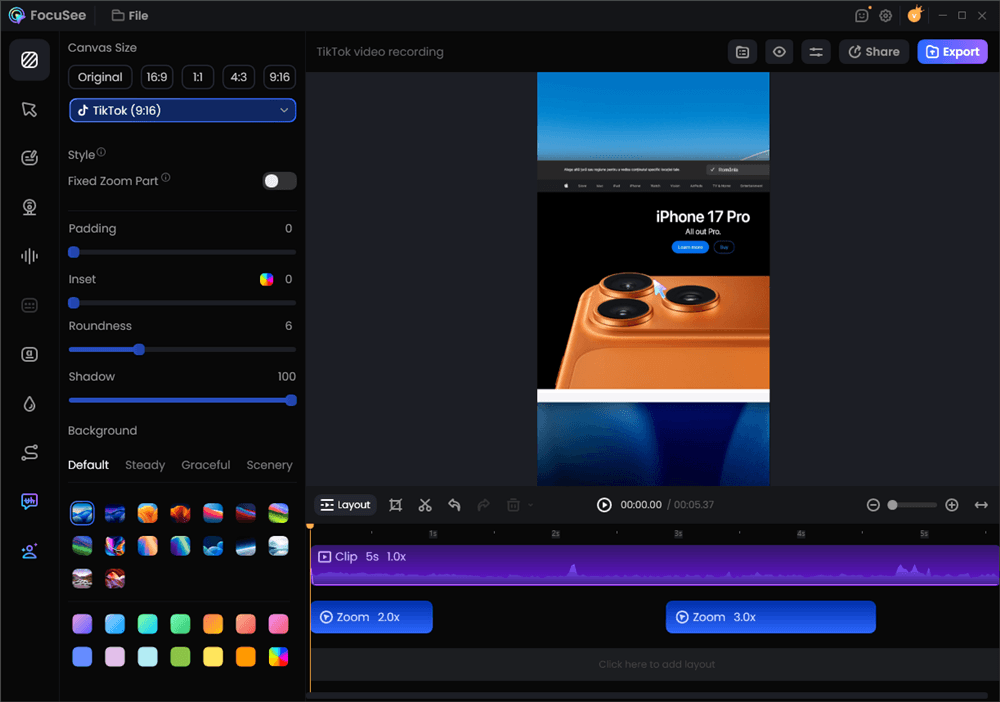
Create the TikTok Video with FocuSee
Solving the Digital Formatting Bottleneck
FocuSee is not just about cutting out silent pauses; it is built specifically to make digital screen recordings perform well on social media.
- Smart Focus & Auto-Zoom: Mobile viewers watch content on a 6-inch screen. If you show a full desktop view, your text is unreadable, and they will scroll. FocuSee automatically detects where your mouse clicks and dynamically zooms into that exact area, keeping the viewer focused on the action without manual keyframing.
- 3D Cursor Motion: Static software walkthroughs are dry. FocuSee adds a cinematic tilt and perspective that follows your cursor, transforming a flat screen recording into an engaging visual experience.
- AI Virtual Avatar: For founders who want to scale content but cannot be on camera every day, replacing live appearances with a highly customizable virtual character maintains brand presence while streamlining your daily production.
Applying a specialized tool for SaaS content removes the technical friction of formatting, allowing you to focus on writing great hooks and pacing your story correctly.
Scaling Your Strategy: Repurposing Short-Form Video
Creating short demo videos for social media requires strategic distribution. Once you record a high-converting 15-second asset, you must extend its lifespan.
When exporting your 9:16 vertical video, you must respect the platform’s user interface. Keep all text overlays, faces, and critical product demonstrations out of the bottom 20% of the screen (where the caption and username live) and the right margin’s 15% (where the like, comment, and share buttons live). If your UI or text is covered by TikTok’s buttons, the video will feel instantly unpolished and hard to read.
The Multi-Platform Syndication Procedure
Instead of editing your videos from scratch for every specific app, export a clean, watermark-free 9:16 file in 4K or 1080p/60fps.
- Export for TikTok: Keep text centered and brisk. Rely on the platform’s native trending audio library to boost discoverability.
- Adapt for Instagram Reels: Use the exact same file. Instagram’s algorithm favors slightly more polished aesthetics, so ensure your cover image is visually appealing and fits well on your profile grid.
- Syndicate to YouTube Shorts: YouTube operates heavily as a search engine. Use the same vertical video, but invest time in writing a highly search-friendly title and description (e.g., “How to Automate Email Marketing in 2024” rather than a vague trend-based caption).
Frequently Asked Questions About TikTok Product Demos
When learning how to make viral product demo videos, technical execution is everything. Below are the definitive answers to the most common in-the-trenches obstacles.
How long should TikTok product demo videos be?
Data shows the sweet spot is 15 to 34 seconds. This duration forces you to be concise, execute the 5-step framework rapidly, and naturally boosts your average watch time percentage.
What makes a product demo go viral on TikTok?
Virality stems from disruptive visual hooks, brisk pacing (changing the shot or zoom every 2-3 seconds), and solving a deeply relatable problem.
Should product demos feel polished or user-generated?
The data strongly favors UGC. Authentic, user-generated styles (messy desks, slight camera movement, natural lighting) build more trust and look native to the platform, routinely outperforming highly polished studio ads.
Can SaaS companies actually succeed with TikTok demos?
Yes. SaaS brands succeed by framing their software as quick “workflow hacks.” Do not explain every feature; show one specific button that saves the user 5 hours of work.
How do I improve conversions from TikTok demos?
Ensure your CTA is entirely idiot-proof. Do not just say “link in bio.” Say, “Tap my profile picture on the right, then click the first link to get your free trial.”
Should I use voiceovers or captions?
You must use both. Roughly 30% of users scroll with their sound off. Large, punchy, auto-generated subtitles keep silent viewers engaged, while an energetic voiceover captures the attention of everyone else.
What hooks work best?
Negative hooks (“Stop doing X”) and curiosity hooks (“I tested 5 tools so you don’t have to”) consistently perform best because they immediately disrupt the viewer’s scrolling pattern.
How often should brands post product demos?
Consistency triggers algorithm discovery. Aiming for 3 to 5 posts per week helps the platform categorize your content accurately and builds steady momentum.
Final Thoughts
If your ad spend is bleeding out on content that gets minimal engagement, the solution is adopting a native, high-paced approach. Creating short product demo videos for TikTok does not require a Hollywood budget; it requires an understanding of platform psychology. By replacing traditional commercials with the 5-step native framework, relying on extreme macro shots or dynamic UI zooms, and utilizing strong text hooks, you can regain control over your social commerce pipeline. Whether you are using CapCut to tighten up a physical product demonstration or leveraging FocuSee’s automated cursor tracking for a SaaS walkthrough, the goal remains the same: solve the viewer’s problem natively, quickly, and authentically.