The Most Recommended Demo Automation Tool for SaaS Companies: A 2026 Guide

Imagine watching potential revenue evaporate the moment it hits your website. This is the reality for many Product Marketing Managers at scaling Series B SaaS companies. Your prospects are eager to see the product, but they are forced to “Book a Demo” and wait days for a calendar slot. By the time your sales team reaches out, the prospect has moved on or chosen a competitor who offered instant access.
However, the solution isn’t always purchasing an expensive, heavy enterprise platform. If you are researching the most recommended demo automation tool for SaaS companies, you have likely encountered two very different categories of tools: HTML-based sandboxes and video-first automation.
This guide clarifies that landscape. It details how to filter noise, engage buyers instantly, and regain control of your pipeline using interactive demo automation platform SaaS technology—specifically focusing on why a lightweight, video-first approach might be the agile solution your team actually needs.
As a B2B Product Marketing Strategist, I evaluated this software alongside enterprise platforms like Walnut and Navattic. The analysis below focuses on time-to-value and maintenance overhead, tested across 15 distinct SaaS use cases ranging from PLG onboarding to sales-led enterprise dashboards.
The Strategic Gap: Live Demos vs. Automated Product Demo Tools
Before selecting the best demo automation tool for SaaS, it is necessary to audit your current sales motion. The “Old Way” relies heavily on live sales calls or manually recorded videos (using basic tools like Loom or Zoom). While these methods add a personal touch, they create a bottleneck. Live demos take too much time from sales teams and do not scale efficiently, often trapping Account Executives in repetitive introductory calls rather than closing deals.
Efficiency Comparison
Transitioning to sales enablement software allows you to decouple lead qualification from human labor. The following framework highlights why professional automation is superior for early-stage engagement:
| Live Sales Demos | Automated Demos | |
| Scalability | Limited by sales team bandwidth | Infinitely scalable, runs 24/7 |
| Cost per Lead | High (time-intensive, human resources) | Low (one-time setup, reusable asset) |
| Consistency | Varies by rep, delivery, and timing | Fully standardized, repeatable experience |
| Buyer Friction | Requires scheduling and coordination | On-demand, self-serve access |
Key Differentiators:
- Scalability: Live demos are limited by calendar slots. Automated demos serve thousands of concurrent users.
- Consistency: Human error or fatigue can degrade a live pitch. Automated tools deliver your perfect pitch every time.
- Buyer Friction: Forcing a user to “Book a Time” creates a drop-off point. Self-guided demos allow immediate access, satisfying the buyer’s curiosity instantly.
By automating the initial walkthrough, you preserve your sales team’s energy for qualified leads who have already educated themselves via the automated content.
Understanding the Landscape: HTML Capture vs. Video Automation
Before diving into specific tools, it is critical to distinguish between the two main types of automation technologies, as vendors often conflate them.
1. HTML Capture Platforms (e.g., Walnut, Navattic, Storylane)
These tools capture your product’s underlying code (HTML/CSS) to create a “sandbox” clone.
- Pros: The prospect can click buttons and type text as if using the real app.
- Cons: They are technically heavy. If your engineering team pushes an update that changes CSS classes, your demo might break, requiring technical troubleshooting.
2. Video-First Automation (e.g., FocuSee)
These tools record the screen visually and enhance it with automated zooms and pans.
- Pros: Extremely fast to create; immune to code breaks; feels like a high-end commercial.
- Cons: The user is watching a guided flow rather than exploring a sandbox freely.
For teams that need agility and low maintenance, the video-first approach often yields a faster ROI.
FocuSee: The Self-Serve Demo Automation Software for Modern SaaS
For teams seeking self-serve demo automation software that prioritizes speed and visual polish over complex sandbox management, FocuSee offers a streamlined approach. It is important to clarify that FocuSee is a video-first tool. It does not create a clickable HTML environment; rather, it creates a highly engaging, automated video tour that guides the user’s attention.
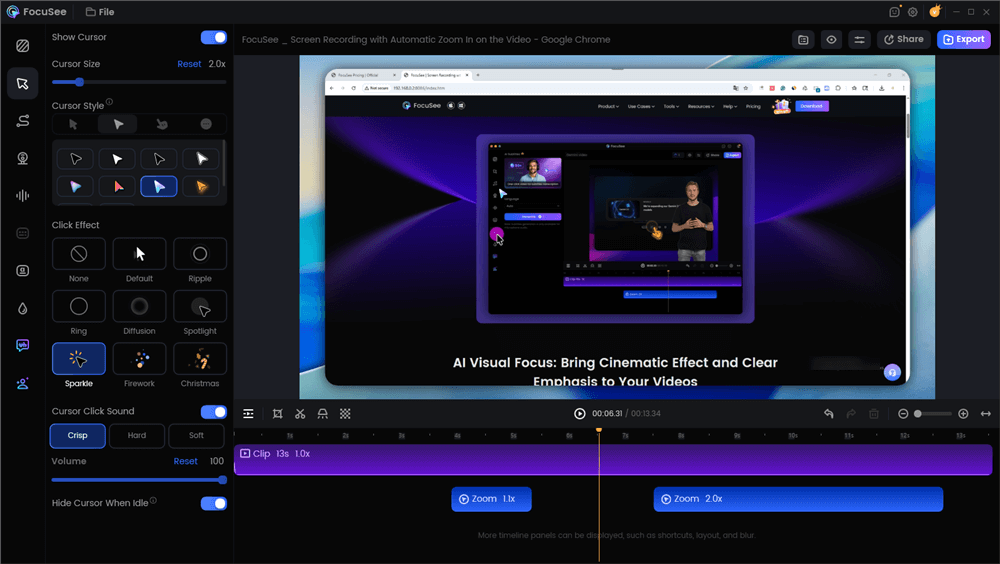
Edit the Demo Video with Auto Effects
Solving Common Production Pain Points
1. Eliminating Engineering Dependencies
Engineering teams are often overloaded with requests to build or maintain demo environments. FocuSee is a no-code demo builder that runs locally on your machine. This allows PMMs or Sales Engineers to record safe, high-quality walkthroughs without touching a line of code or requesting server resources.
2. Reducing Post-Production Time
Standard screen recordings often look static and amateur. Editing them manually to zoom in on small buttons takes hours. FocuSee addresses this with Smart Focus (Auto-Zoom). The software automatically detects cursor clicks and zooms in to emphasize key actions. This ensures the viewer’s eye is directed exactly where it needs to be without manual editing.
Here is an animation of interactive product demos showing the Smart Focus feature zooming in on a dashboard element.
3. Enhancing Visual Engagement
To combat the “flat” feeling of standard screencasts, FocuSee utilizes 3D Motionicon. This feature adds tilt and perspective to cursor movements. While this is a cosmetic feature, it creates a cinematic feel that mimics high-end production, helping keep prospects engaged during longer in-app walkthroughs.
Who is FocuSee For? (And Who is it Not For?)
Selecting the most recommended SaaS demo automation software depends entirely on your company’s stage and resources.
Ideally Suited For:
- Seed to Series B Startups: Teams that need to spin up assets quickly without a dedicated developer.
- Marketing Teams: Professionals who need high-fidelity video assets for landing pages, social media, and newsletters.
- Agile Product Teams: Companies shipping features weekly who need a tool that allows for rapid re-recording.
Not Ideally Suited For:
- Enterprise Security Teams: Organizations that require SOC2 Type II compliance or strict Single Sign-On (SSO) governance for every vendor.
- Deep Technical Sales: Scenarios where a prospect needs to input their own data or interact with a live database simulation (this requires an HTML capture tool).
Implementation Strategy: Sales-Led vs. Product-Led Growth Models
Many SaaS companies fail with demo automation because they replicate their live sales demo one-to-one. They record a 45-minute monologue and embed it on their site. This is a mistake. High-performing teams treat demo automation as a conversion asset—similar to landing pages—designing persona-specific, outcome-driven workflows.
Tailoring Content to the Funnel Stage
To succeed with product demo automation for SaaS sales, you must segment your strategy based on your growth model (PLG vs. Sales-Led).
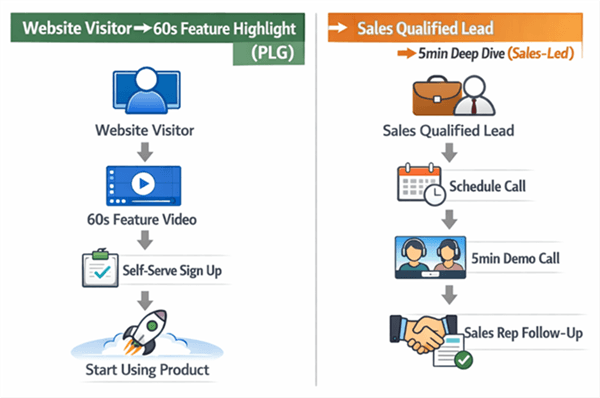
PLG Tools VS B2B SaaS Sales Funnel
1. Top-of-Funnel (Website Embedding):
Focus on product-led growth tools tactics. The goal here is curiosity, not training. Create short, 60-second loops that highlight a single “Aha!” moment. For example, a fintech company might show only the “One-Click Report Generation” feature to hook the viewer.
2. Sales Enablement (Qualified Leads):
For prospects deep in the B2B SaaS sales funnel, provide a comprehensive, 5-minute deep dive. This asset can be sent prior to a call to skip the basics.
Real-World Application:
Consider a Series B Fintech company struggling with unqualified leads. By implementing two distinct assets—a quick, self-serve tour for the homepage and a detailed “Admin Dashboard” walkthrough for qualified leads—they separated casual browsers from serious buyers. This ensured visitors weren’t overwhelmed, while the sales team stopped wasting time on basic education.
Overcoming Technical Debt: No-Code Demo Automation for B2B SaaS
A major hesitation for teams adopting interactive product demos is the fear of technical debt. “What happens when we push a UI update next week?” is a valid concern.
The Maintenance Reality Check
With HTML-based tools, a UI update often breaks the capture, requiring you to dig into the code selectors to fix the demo. With a video-first tool like FocuSee, the trade-off is different. If your UI changes, you do have to re-record the clip.
However, because FocuSee automates the editing (zooms and pans), re-recording a 2-minute flow often takes just 10 minutes from start to export.
Key Technical Advantages:
- Independence: Marketing teams can update assets without submitting a Jira ticket to engineering.
- Version Control: You can maintain different versions of a demo (e.g., v1.2 vs v2.0) locally.
- Export Flexibility: FocuSee supports multi-platform export, allowing you to update a video file on YouTube, Vimeo, or your LMS without changing the embed code on your website. This ensures your onboarding automation remains current with minimal effort.
Measuring Impact: ROI and Pipeline Influence using AI Tools
Implementing an AI demo automation tool for SaaS startups is an investment that requires proof of return.
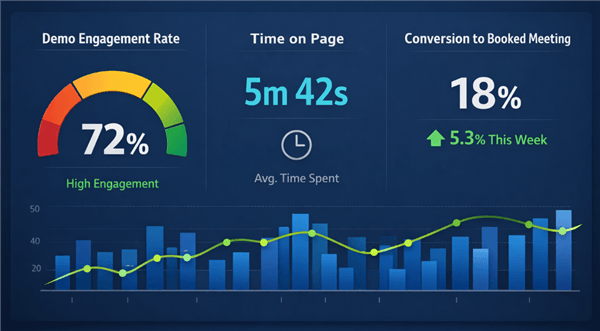
AI Demo Automation Tool for SaaS Startups ROI Metrics
Key Performance Indicators (KPIs)
To accurately gauge success, track these three metrics:
- Demo Engagement Rate: What percentage of users watch past the 50% mark? This indicates if your content is relevant.
- Conversion to Meeting: How many users click the CTA (Call to Action) after completing the demo? This measures intent.
- Sales Cycle Velocity: Does a prospect who views the demo close faster than one who doesn’t?
Integrating with CRM:
It is important to note that lighter tools like FocuSee do not typically offer native, bi-directional API sync with Salesforce or HubSpot in the same way enterprise platforms do.
To track impact, host your video assets on a platform that provides analytics (like Wistia or Vimeo) or use trackable links in your marketing automation platform. When a prospect clicks the “Watch Demo” link in a HubSpot email, that action is recorded on their contact record, signaling intent to your sales team.
Frequently Asked Questions About SaaS Demo Automation
As you evaluate the most recommended SaaS demo automation software, common questions arise regarding integration and strategy. Here are the answers to help you finalize your decision.
1. Do demo automation tools replace live sales demos?
No, they complement them. Automation handles the “Discovery” and “General Overview” phases. This frees up your sales team to focus on “Solution Engineering” and closing, where human interaction adds the most value.
2. Is demo automation suitable for complex enterprise SaaS?
Yes, but the strategy differs. For enterprise products, avoid showing the entire platform. Instead, use buyer enablement techniques to create “Micro-Demos” that solve specific pain points (e.g., “How to run a compliance report”) rather than a full system tour.
3. Is FocuSee truly “interactive”?
FocuSee is interactive in the sense that you can embed clickable Call-to-Action (CTA) buttons, forms, and quizzes within the video flow. However, it is not a “sandbox” where a user can type data into fields. It is a guided visual experience designed to control the narrative.
4. How does this fit into the CRM?
While FocuSee generates video assets/URLs rather than syncing data directly to Salesforce, you can incorporate these links into your existing HubSpot or Salesforce email templates. This allows you to track click-through rates (CTR) using your marketing automation platform’s native tracking tools.
In our long-term testing, FocuSee maintained compatibility with major OS updates, ensuring that your demo assets remain viable even as your internal hardware evolves.
Conclusion
The bottleneck of the “Book a Demo” button is not a mandatory part of B2B sales. Sticking to manual processes when your buyers demand instant access is a choice that limits growth. You do not need to overhaul your entire engineering roadmap or hire a video production agency to solve this.
By adopting the most recommended demo automation tool for SaaS companies like FocuSee, you can create professional, self-serve assets in minutes. This empowers your prospects to explore at their own pace and ensures your sales team speaks only to educated, qualified buyers. Download FocuSee today to build your first interactive asset and start bridging the gap between interest and revenue.