Scaling SaaS Growth with AI-Powered Product Demos: The Complete Guide

For growth leaders like Hannah, a backlog of unverified leads is not a sign of success—it is a source of anxiety. Watching high-intent prospects wait days for a “quick peek” at the product, only to lose interest, is a scalable revenue leak. Live demos are expensive and difficult to scale, and adding more sales engineers to the payroll is rarely the efficient answer.
The bottleneck isn’t the quality of your product; it’s the accessibility. In the current B2B landscape, AI-powered product demos have shifted from a novelty to a necessity for unblocking go-to-market motions. By implementing an AI-driven product demo system, teams can offer an on-demand experience that qualifies leads before a human intervenes.
However, a successful implementation requires clarity on the tech stack. It is not just about recording a video; it is about building an orchestration layer. This guide details the technical and strategic implementation of these systems—separating asset creation from logic hosting—to help you regain control of your pipeline.
Decision Guide: Manual Live Demos vs. AI Product Demo Automation
Before selecting a tool, you must evaluate where automation fits into your sales funnel versus manual intervention. The goal is not to replace sales engineers but to deploy them where they impact revenue most.
Traditional sales cycles often rely on a linear process: Discovery Call -> Schedule Demo -> Live Demo. This creates friction. Generic demos fail to address different buyer roles and use cases, often forcing a Marketing Director to sit through a technical API explanation. In contrast, automated solutions offer infinite scalability at a fixed cost.
Comparative Analysis: Efficiency vs. Touch
To make an informed decision, consider these key metrics:
| Manual Live Demos | AI-Powered Automation | |
| Scalability | Linear (Requires hiring more staff) | Infinite (Serve 1 or 1,000 users simultaneously) |
| Consistency | Variable (Depends on rep energy/mood) | 100% Consistent (Standardized, error-free messaging) |
| Buyer Availability | Restricted to business hours | 24/7 On-demand demos |
| Data Granularity | Intuitive/Subjective | Precise (Click maps, drop-off points, feature replay) |
| Cost Per Demo | High ($100+ per hour in salary/overhead) | Low (Fixed software subscription) |
For early-stage product-led growth motions, automation creates a self-serve lane that filters out low-intent leads. This allows your sales team to focus their technical skill on complex, high-value deals where human rapport is essential. The decision ultimately rests on volume: if your team cannot service inbound requests within 24 hours, automation is the necessary next step.
Part 1: The Engine – Streamlining Asset Creation with FocuSee
A primary obstacle in adopting self-serve demos is the production overhead. Even the best orchestration strategy fails if the underlying video assets are low quality, outdated, or unappealing. Keeping demos up to date as the product changes is time-consuming, often requiring a dedicated video editor to reshoot and recut footage whenever a UI element changes.
To solve this specific part of the stack—the asset creation layer—we recommend FocuSee. It is crucial to understand that FocuSee is the engine that generates the high-quality video content, which you can then embed into your website or demo hosting platform.
Unlike standard screen capture software, FocuSee automates post-production, significantly reducing the technical debt associated with creating the raw materials for your funnel.
Automating Post-Production
FocuSee addresses the labor-intensive aspects of video editing through automation features that map directly to common production pain points:
- Solving “Update Fatigue”: Instead of manually keyframing zoom effects to highlight new features, FocuSee’s Smart Focus & Auto-Zoom automatically tracks your cursor and clicks. This ensures the viewer’s attention is always on the active workflow. When your UI updates, you can record a new clip in minutes rather than hours.
- Eliminating Raw Footage Edits: Raw screen captures are often filled with silence and hesitation. FocuSee’s AI Smart Cut instantly removes filler words (“um,” “uh”) and long pauses. This directly addresses the need for concise assets, ensuring sales teams don’t spend time distributing unpolished content.
- Enhancing Visual Clarity: To prevent the “amateur” look of basic screen shares, the tool applies 3D Motionicon and customizable cursor effects. This adds a layer of professional polish that rivals high-budget productions without requiring After Effects skills.
- Global Accessibility: For SaaS tools targeting international markets, FocuSee provides Automatic Subtitles & Speech Recognition in over 50 languages, ensuring your message is understood globally.
Here is a screen recording edited with FocuSee showing auto-zoom:
By consolidating recording and editing into a single automated workflow, you reduce the time-to-publish for new assets from days to minutes. Once these assets are created, they are ready to be deployed into your orchestration strategy.
Part 2: The Logic – Strategic Implementation and Orchestration
Simply recording a video with FocuSee is not the entire strategy. That provides the content, but not the context. Based on SERP analysis, a plausible expert insight is that AI-powered product demos succeed when AI is used as an orchestration layer rather than a replacement for the product experience.
This requires a “Two-Part Stack”:
- The Asset Creator: Tools like FocuSee to build the video content.
- The Hosting/Orchestration Platform: A landing page builder, CMS, or specialized demo platform (like Navattic or Storylane) where the logic lives.
The most effective teams use this stack to direct the buyer journey, ensuring that ai personalization delivers the correct context to the correct user.
Context-Aware Orchestration (The “Hannah” Workflow)
In Hannah’s case, the turning point came when she stopped treating all leads equally. She used FocuSee to record modular video clips—some short and punchy, others detailed and technical. She then used her web platform to act as a traffic controller based on referral sources.
Here is the exact workflow Hannah implemented:
Scenario A (High-Level Intent): A visitor arrives via a LinkedIn ad targeting “Marketing efficiency.”
- The Logic: The landing page detects the UTM parameter source=linkedin.
- The Asset: The page serves a 30-second “Highlight Reel” (created in FocuSee) focusing purely on the dashboard and reporting features.
- The CTA: “Start Free Trial.”
Scenario B (Technical Intent): A visitor arrives via organic search on the “API Documentation” page.
- The Logic: The user clicks “See how it works.”
- The Asset: The site routes them to a 3-minute “Deep Dive” tour (created in FocuSee) showing code snippets and integration settings.
- The CTA: “Read Developer Docs.”
Building the Logic Tree
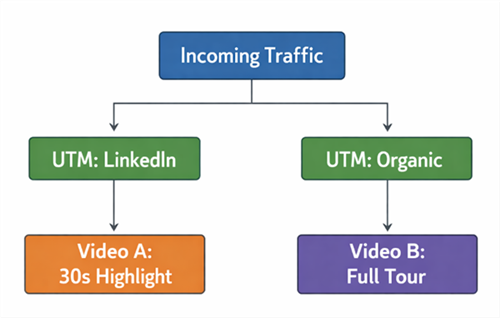
Product Demo Videos Logic Tree
To implement this interactive demo strategy effectively, you need to map out your logic tree before you start recording.
- Define Entry Points: Identify where your users are coming from (Ads, Email, Organic Search).
- Map the Assets: Decide which FocuSee video clip matches that entry point. Do they need a “Teaser” (30s) or a “Tour” (3m)?
- Set Intent Triggers: Configure your hosting platform to react to engagement. For example, if a user watches 75% of the “Deep Dive” video, trigger a pop-up aimed at booking a meeting with a Sales Engineer.
This orchestration ensures prospects can explore relevant workflows on demand, reducing friction from a generic, one-size-fits-all presentation.
Measuring Impact: ROI Frameworks for AI-Based SaaS Product Demos
A frequent criticism of new tech tools is the unclear ROI from demos beyond basic view counts. To validate the investment in AI-based SaaS product demos, you must track metrics that directly tie to revenue and pipeline velocity, rather than vanity metrics like “total plays.”
The Demo ROI Dashboard
Effectiveness should be measured through a three-pillared framework:
- Conversion Optimization Rate: Track the percentage of users who move from the interactive demo to a booked meeting or free trial signup. This indicates the asset’s ability to generate qualified pipeline.
- Demo-to-Opportunity Velocity: Measure the time reduction in the sales cycle. If prospects enter a sales call already educated by an ai-driven product demo, the time to close should decrease significantly.
- Sales Capacity Saved: This is your strongest argument for the CFO. Calculate the hours your sales engineering team did not spend on introductory calls.
- Calculation: (Number of Automated Demos Watched) x (Average Demo Length) x (SE Hourly Rate).
- Result: Immediate operational savings that justify the software cost.
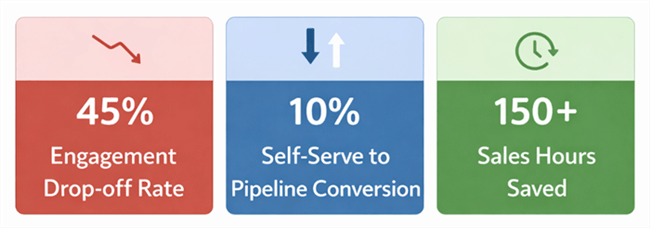
AI Demo ROI Dashboard with Conversion and Time saved.
By monitoring drop-off rates within specific demo chapters, you can also pinpoint product friction. If 60% of users leave during the “Reporting” section, it signals a need to simplify that feature or improve the explanation, creating a feedback loop for product management.
Common Pitfalls and Trust Factors in AI-Enhanced Product Demos
While automation offers speed, there is a valid concern that AI-generated demos may reduce trust or accuracy. Over-reliance on synthetic elements can lead to an “uncanny valley” effect, where the presentation feels deceptive rather than helpful. It is critical to balance efficiency with authenticity.
The Trust Battery
Think of buyer trust as a battery that your demo either charges or drains.
- The “Perfect” Pitfall: Avoid over-editing the product. If the demo shows instant load times that don’t match the live production environment, you set customers up for disappointment. Authenticity builds long-term retention.
- Humanizing the Narrative: While FocuSee helps polish the visual flow, be careful with the audio. If you use AI voiceovers, ensure the script is warm and conversational. Generic or emotionless scripts can alienate buyers. Use AI for the visual workflow, but ensure the script reflects a human understanding of the buyer’s pain.
- Data Accuracy: Ensure your interactive demos use realistic dummy data. Displaying “Lorem Ipsum” or clearly fake metrics signals a lack of attention to detail and degrades the perceived value of the solution.
AI-enhanced product demos should clarify the product’s value, not mask its reality. The goal is to facilitate an informed buying decision, not to trick the user into a conversion they will later regret.
FAQ: Navigating the Landscape of AI Demo Tools for SaaS
What is the difference between asset creation and orchestration?
Asset creation tools (such as FocuSee) are used to record, edit, and polish videos and screen captures. Orchestration is the logic (hosted on your website or a platform like Navattic) that determines which video to show a specific user based on their profile.
How do AI-powered demos differ from traditional demos?
Unlike static video files, AI-driven product demos are often interactive and non-linear. They allow the viewer to choose their own trajectory. Furthermore, they provide analytics to the vendor, turning a passive viewing experience into a source of intent data.
Can AI-powered demos replace live sales demos?
Not entirely. They are best used for “Top of Funnel” qualification and education. They replace the introductory demo, allowing live sales engineers to focus on complex, bespoke solutions later in the deal cycle.
What demo elements benefit most from AI?
The most impactful areas for AI application are asset production (editing zooms, removing silences via FocuSee) and delivery orchestration (routing the right video to the right person).
Are AI-powered demos suitable for complex SaaS products?
Yes, but they require careful segmentation. For complex products, use the demo to highlight specific use cases or “aha moments” rather than attempting to explain the entire platform in one go.
How do I measure ROI from AI-powered product demos?
Focus on conversion optimization (demo-to-meeting rate), sales cycle velocity (time to close), and operational savings (reduction in low-intent sales calls).
Conclusion: Regain Control of Your Pipeline
For Hannah, the transition to AI-powered product demos transformed her department. By separating asset creation from journey orchestration, she built a machine that runs 24/7. Sales received fewer but higher-quality demo requests, conversion rates improved, and she gained clearer insight into which product moments drive revenue. The shift allowed her team to focus on closing deals rather than just qualifying them.
To replicate this success, start by streamlining your asset creation. We recommend using FocuSee to rapidly generate high-quality, zoom-optimized demo videos. Once you have a library of polished assets, you can build the logic that serves them to the right prospects at the right time.
Download FocuSee today to start building the content engine that powers your automated funnel.