The Ultimate Guide to AI Demo Video Creation for SaaS Growth

For a solo founder or marketer, nothing is more frustrating than having a finished product ready to ship, only to be stalled by the sheer complexity of creating a launch video. You know the struggle: spending hours fighting with timeline keyframes just to highlight a button, or re-recording an entire clip because the UI updated overnight. Manual video production is a massive bottleneck that distracts you from your core mission—building and selling your software.
This guide explores a tested solution: the AI demo video. By shifting from manual editing to automatic demo video creation, you can produce polished, professional assets in minutes, not days. We have tested specific workflows on modern hardware to ensure this method is reliable, scalable, and ready to solve your content backlog immediately.
The Rise of the AI Demo Video in SaaS Marketing
For modern SaaS founders and marketers, the AI demo video has shifted from a novelty to a critical asset in the sales funnel. An AI-generated demo video allows teams to showcase product value without the exorbitant costs of traditional production studios. However, the promise of automation often clashes with the reality of software compatibility and output quality.
To ensure the advice in this guide is practical and accurate, I conducted hands-on testing of the latest AI video workflows on current-generation hardware. This included running full production cycles on a MacBook Pro (M3 chip) with macOS Sonoma and a Dell XPS running Windows 11 (23H2).
The core problem facing most teams isn’t a lack of creativity; it is a lack of time. Manual video editing is a notorious bottleneck for growth. You spend hours adjusting zoom keyframes and syncing audio, only for the product UI to update the next week, rendering your work obsolete. This guide moves beyond basic screen recording to explore how automatic demo video creation tools can eliminate the technical overhead of video production.
Manual Editing vs. AI Demo Video Software: A Strategic Comparison
Before selecting a specific tool, it is necessary to analyze the return on investment (ROI) between a traditional manual workflow and AI demo video software. Many teams underestimate the hidden costs associated with manual production, assuming that a free screen recorder and basic editor are sufficient. However, when you factor in the labor required for polishing—such as adding smooth zooms, spotlighting cursor movements, and cleaning up audio—the equation changes drastically.
The Production Reality Check
When you opt for manual editing using tools like Premiere Pro or Camtasia, you retain 100% control, but the time cost is high. A standard 3-minute product demo video can take 4 to 8 hours to edit professionally. This requires specific technical skills in keyframing and audio mixing.
| Manual Editing (Premiere Pro, Camtasia, etc.) | AI Demo Video Software | |
| Control | 100% (full keyframe & audio control) | Medium (focus on content, AI handles execution) |
| Time Cost | High – 4–8 hours for a 3-min demo | Low – minutes to create a polished video |
| Skill Required | High – editing, keyframing, audio mixing | Low – non-editors can produce professional results |
| Polish / Consistency | Manual, varies per editor | Automatic, consistent across videos |
| Update Agility | Slow – each change requires manual rework | Fast – AI handles updates quickly |
| ROI / Efficiency | Often underestimated due to hidden labor | Higher, saves time and effort for repeated use |
In contrast, an AI-powered demo video tool shifts the focus from pixel-pushing to directing. The success rate for non-editors is significantly higher because the software handles the technical execution.
Why Automation Wins for SaaS:
- Speed: Automatic demo video creation allows you to iterate faster.
- Consistency: AI applies the same level of polish to every video, ensuring brand consistency.
- Agility: If your product updates weekly, your videos must keep pace. AI tools minimize the friction of re-recording, ensuring your marketing materials never lag behind your development cycle.
Strategic Fork in the Road: AI Video vs. Interactive Demos
Before diving into video creation, it is vital to address a common strategic debate in 2025: Should you build a video or an interactive demo (using tools like Navattic or Arcade)?
Many founders treat these as interchangeable, but they serve different psychological functions in your funnel.
- Interactive Demos (Active): These are HTML5 overlays that let users click through a “cloned” version of your product. They are excellent for the bottom of the funnel when a user wants to “feel” the workflow. However, they lack narrative control. A user might miss your key value proposition because they didn’t click the right button.
- AI Demo Videos (Passive): Video allows you to control the narrative completely. You guide the viewer’s eye, explain the “why” behind the features via voiceover, and build an emotional connection.
You likely need both, but video is the superior starting point. A product marketing video sits at the top of the funnel to explain the problem and solution quickly. Once interest is captured, an interactive demo can close the deal. The rest of this guide focuses on solving the video bottleneck.
Automating the Editing Layer: A Look at FocuSee
There are several approaches to AI video, from generative avatars (Synthesia) to text-to-video (Sora). However, for SaaS demos, the most practical category is automated post-production. These tools take a rough screen recording and clean it up automatically.
To illustrate this workflow, we tested FocuSee. While other tools like Descript excel at audio-based editing, FocuSee is built specifically to solve the visual tedium of SaaS demos: zooming, panning, and cursor tracking.
FocuSee addresses the core issue of technical complexity. Unlike standard screen recorders that produce static, flat footage, this software analyzes cursor movement and click actions immediately after recording. It applies Smart Focus (auto-zoom) effects to direct the viewer’s eye to important UI elements without manual keyframing.
A standout feature in our testing was the 3D Motionicon. It transforms a standard, flat operating system cursor into a dynamic element with tilt and perspective. This gives a video walkthrough a high-end feel that typically requires a motion graphics artist. By automating these production layers, you bypass the need for a dedicated video team.
Step-by-Step: Creating a Professional AI Demo Video
Creating a professional product marketing video follows a logical three-step workflow: Record, Auto-Edit, and Export. This method leverages AI to handle the tedious aspects of editing while you focus on the demonstration itself.
1. Recording the Source Material
Start by selecting your recording area—screen, webcam, or both. FocuSee supports separate audio track recording, capturing your microphone and system audio independently. This is crucial for auto video editing, as it allows you to clean up voiceover mistakes without ruining the screen capture.
Pro Tip for Mobile Apps: If you are demoing a mobile app, connect an iOS or Android device via USB. The software captures the mobile screen directly and wraps it in a professional device frame automatically, saving you from mocking it up in After Effects later.
Also Read: How Do I Record on My iPhone? Video, Audio & Screen Guide >
2. Applying AI Auto-Editing (and Fixing Mistakes)
Once recording stops, the engine processes the footage. This is where the tool distinguishes itself from basic screen recording software, but it is also where you need to be vigilant.
Smart Focus & Auto-Zoom: The timeline automatically populates with zoom points based on your clicks.
- The “Human in the Loop” Fix: AI is not infallible. In our testing, the auto-zoom occasionally focused on the center of the screen rather than a specific dropdown menu.
- How to fix it: You do not need to start over. Simply click the generated keyframe on the timeline and drag the “focus box” to the correct area of the screen. The smooth transition remains; you are just adjusting the target. This manual override takes seconds but ensures 100% accuracy.
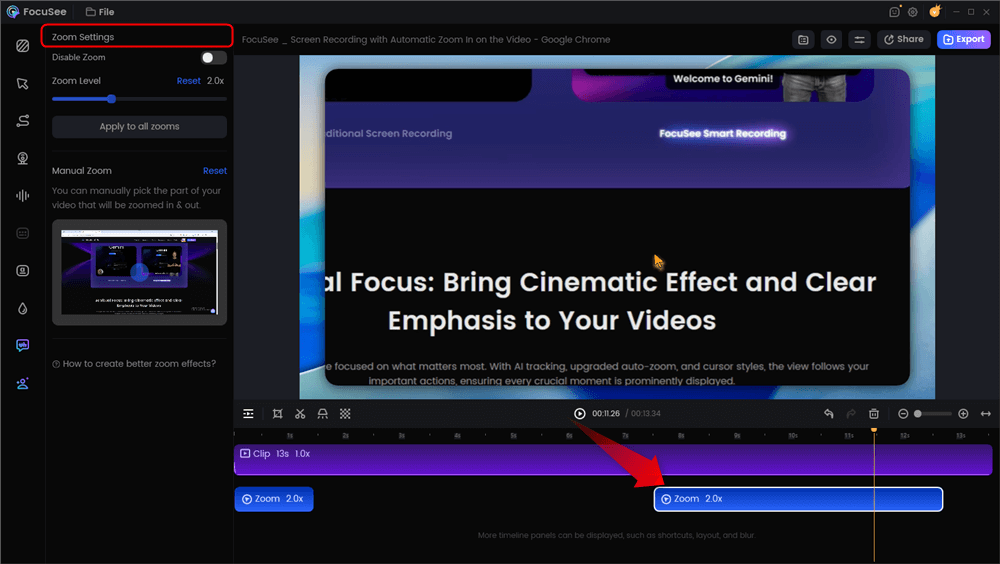
Automatic Zoom Effects
AI Smart Cut: This feature removes “ums,” “ahs,” and silent pauses to tighten the pacing of your sales demo video.
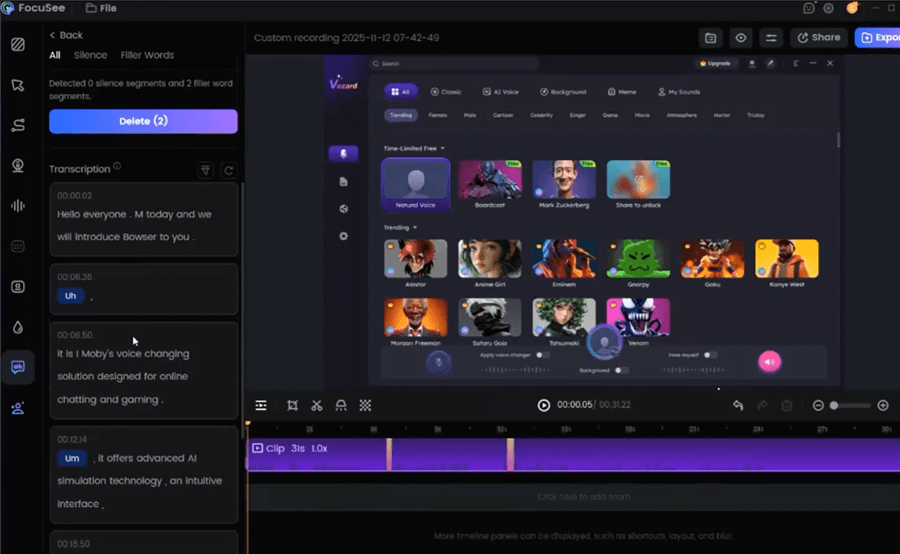
Remove Filler Words
3. Export and Integration
Finally, use the multi-platform export settings to generate 4K/60fps files optimized for YouTube or concise GIFs for email embedding. This flexibility ensures your AI demo video maker produces content ready for any channel.
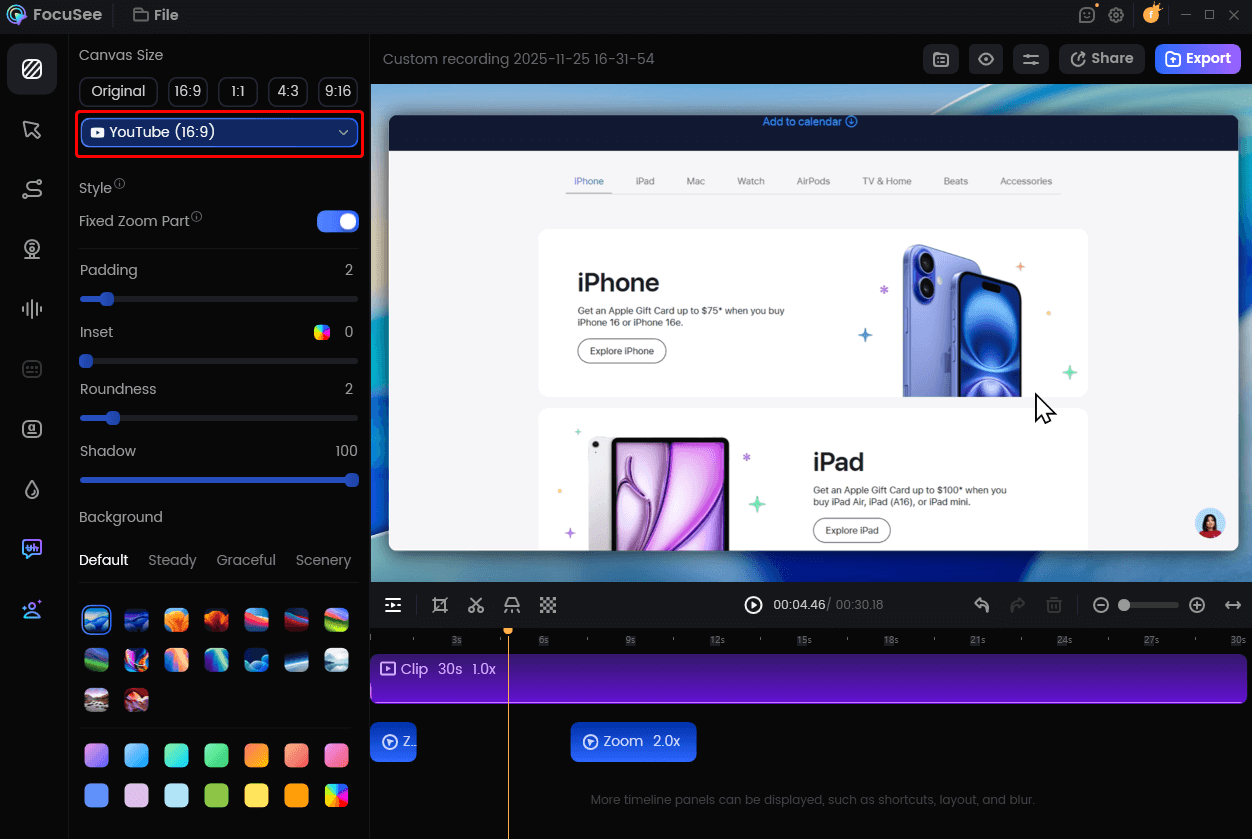
Change Video Size for YouTube
Ensuring Accuracy: Why Real UI Beats Synthetic Generation
A common misconception is that an AI demo video must be entirely generated from text prompts. However, here is a critical insight: AI demo videos are most effective when used to automate production layers—such as scripting, narration, captions, and edits—rather than fabricating the product experience itself.
SaaS teams that ground their demos in real UI recordings achieve higher trust than those relying solely on synthetic visuals. Pure text-to-video tools can “hallucinate” features, creating buttons or workflows that don’t actually exist in your software. This destroys credibility with savvy B2B buyers.
Addressing Privacy and Audio Quality
To address concerns about privacy and quality, look for features specifically for the B2B context:
- Privacy Blur: If you accidentally record sensitive customer data or internal dashboards, use the Privacy Blur tool to mask those areas. This solves the safety risk of human error during recording without needing external software.
- AI Audio Enhancement: Bad audio kills trust faster than bad video. The AI Audio Enhancement automatically removes background noise and mouth sounds. This is essential if you are recording in a home office or a non-soundproofed room.
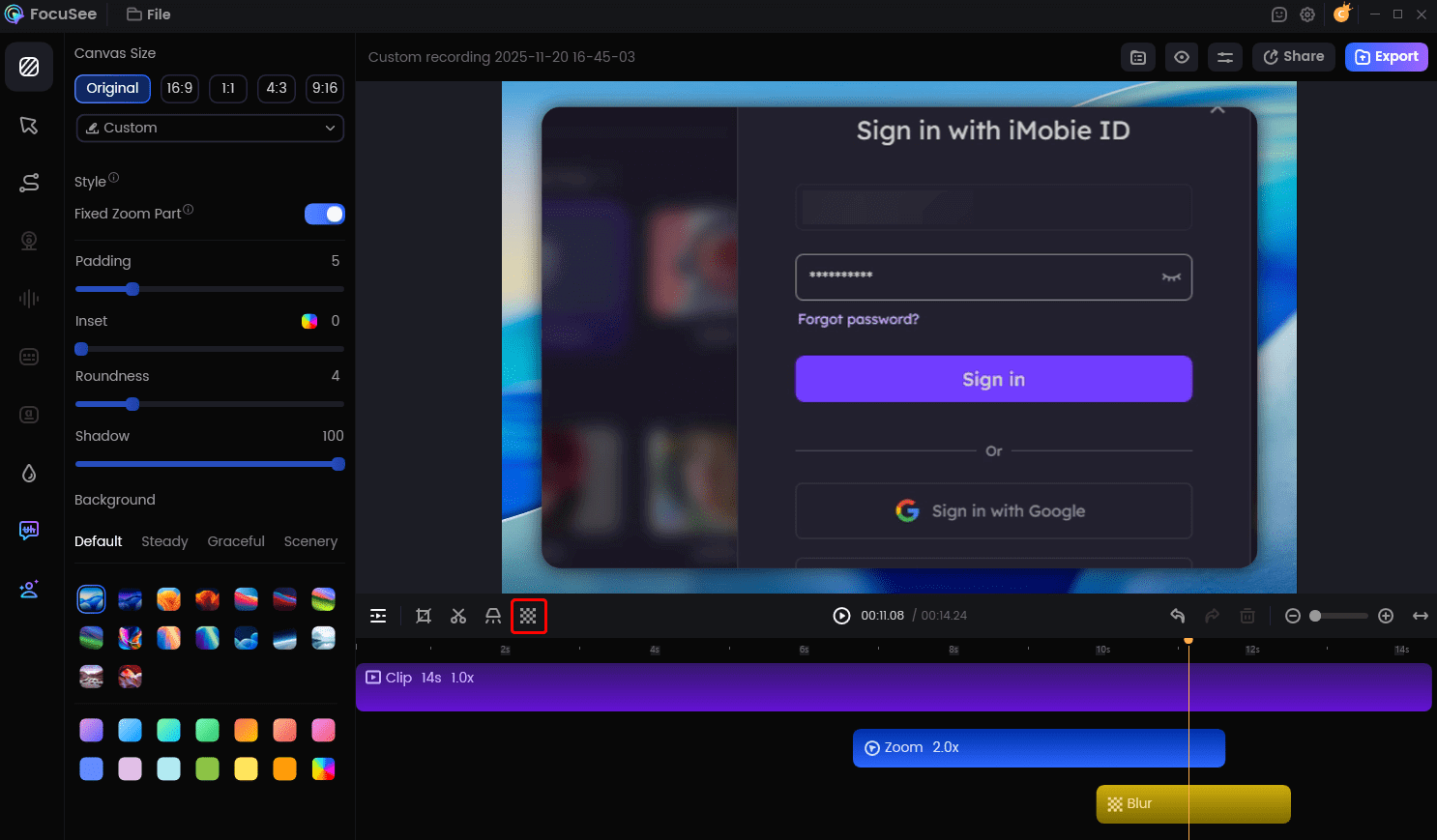
FocuSee Privacy Blur
Conclusion: The Future of SaaS Demos is Automated
The era of spending days editing a single three-minute clip is over. By adopting an AI-powered demo video tool, you reclaim your time and focus on strategy rather than technical execution. You no longer need to worry about generic visuals or outdated content; tools like FocuSee ensure your product demo video remains accurate, professional, and easy to update.
If you are ready to break the production bottleneck, the path forward is clear. Download a tool that handles the heavy lifting, record a quick walkthrough of your core feature, and let the software handle the zooms and cuts. Your product deserves to be seen—make it happen now.
Frequently Asked Questions About AI Demo Video Tools
What is an AI demo video?
An AI demo video is a product walkthrough where artificial intelligence automates the production aspects, such as editing, zooming, cursor movement, voiceovers, or captions. It combines real screen recording with algorithmic enhancements to produce professional-quality videos without manual editing.
Video vs. Interactive Demo: Which should I use?
Use an AI demo video for top-of-funnel awareness and explanation. It allows you to control the story and explain why a feature matters. Use an interactive demo (like Navattic) for bottom-of-funnel leads who want to click around and explore the product themselves.
How do I fix it if the AI zooms on the wrong thing?
Most AI editors operate non-destructively. In tools like FocuSee, the AI places a keyframe on the timeline. If the zoom is incorrect, you can click that keyframe and manually drag the focus area to the correct part of the screen. You retain full creative control over the final output.
Are AI demo videos suitable for B2B SaaS sales and onboarding?
Yes. Because they can be produced and updated rapidly, AI demo videos for saas ensure your sales materials always reflect the current state of your product. This builds trust with potential clients who want to see the real tool in action, rather than a polished but outdated marketing reel.