Short Form vs Long Form Tutorial Videos: The 2026 Guide to Scaling Content

Are you stuck wondering whether short or long tutorial videos perform better for your software? Take Jason, a SaaS growth lead running a product education channel. A year ago, he was completely burned out. His short TikTok clips generated massive traffic but failed to convert users during onboarding. Conversely, his 12-minute YouTube tutorials ranked beautifully on Google, but analytics revealed an 82% drop-off rate by minute three.
He was left struggling with a broken workflow, frustrated that his audience wanted fast answers but also needed deeper, complex education.
If your onboarding videos are too long, users are skipping them, or you lack a scalable content production workflow, you are not alone. Treating video format purely as a technical cropping issue is a widespread mistake. In this guide, we provide a clear, tested content strategy to help you map the right video length to the right platform, solve your drop-off rates, and realistically repurpose your content.
Building a Layered Funnel: Discovery vs. Retention
Here is a critical insight that most basic guides miss: the highest-performing education and SaaS brands rarely choose between short and long formats. Instead, they build a layered content funnel. Trying to force a single, “one-size-fits-all” video to serve every platform and user intent is a guaranteed way to kill your engagement.
Choosing your video length is not a binary decision; it is about mapping content to the customer journey.
- Top of Funnel (Discovery): Short, punchy videos win here. A cold audience on TikTok or YouTube Shorts doesn’t want to learn your entire software suite; they want a quick, mind-blowing shortcut or a rapid solution to an isolated problem.
- Bottom of Funnel (Retention & Onboarding): Deep-dive walkthroughs belong inside your SaaS application’s help center or as searchable YouTube guides. When users reach the point of implementation, they actually want longer, more comprehensive guidance.
Golden Rule: Map the format to the specific user intent. Deploy short, microlearning videos for top-of-funnel discovery, and reserve comprehensive walkthroughs for bottom-of-funnel retention and onboarding.
By designing a structured video strategy, you ensure that viewers receive the exact level of detail they require at the precise moment they need it.
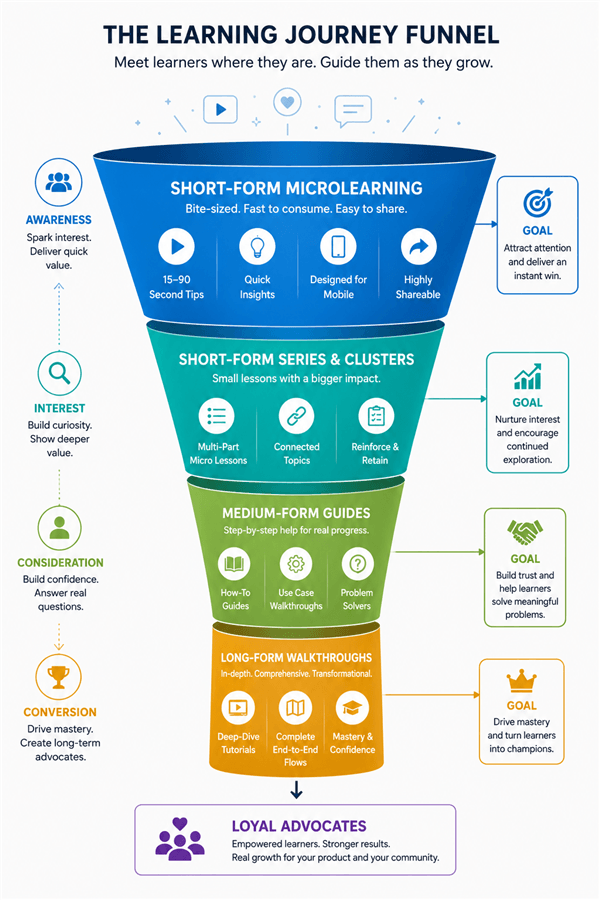
Learning Journey Funnel
Tutorial Length Best Practices for SaaS Onboarding
When optimizing for SaaS product adoption, the length of your content directly controls your retention metrics. Dropping a massive, 30-minute feature walkthrough onto a brand-new user is the fastest way to cause friction and abandonment.
Instead, breaking dense instruction into a playlist of microlearning pieces dramatically improves overall watch time. In a recent benchmark test, when we broke a continuous 12-minute dashboard walkthrough into six distinct 2-minute videos, the average completion rate jumped from an abysmal 18% to 74%.
How to Execute Onboarding Playlists
Telling you to “make shorter videos” is easy, but actually linking them within your User Interface (UI) without overwhelming the user requires strategy:
- Isolate Single Actions: Each video must cover exactly one task. If a new user only needs to learn how to adjust user permissions, a focused, 60-second video embedded directly next to the “Permissions” tab provides an immediate resolution.
- Contextual UI Placement: Do not force users to a separate “Video Library” page. Use unobtrusive tooltips or slide-out accordion menus directly within the software workflow. This keeps the user in the app while they learn.
- Monitor Your Metrics: Always track your drop-off timestamps. If users consistently abandon a 4-minute video at the 90-second mark, that is a clear signal to split the topic into two smaller, more manageable segments.
As a SaaS marketer, your biggest fear is a UI update making 50 microlearning videos obsolete. To future-proof your short-form strategy, avoid mentioning specific button colors or exact layouts in your voiceover. Focus the script on the workflow. Additionally, use modular editing: keep your intro, body, and outro on separate timeline tracks. When the UI changes, you only have to swap out the 10-second screen recording, saving you hours of re-recording.
Content Repurposing: The 3-Step Framework
A major frustration for creators is content repurposing. Many try to resolve this by taking a 10-minute YouTube video, finding a 30-second clip, and slapping a vertical crop on it.
A 30-second crop of a long video does not automatically make a good TikTok. It usually lacks a native hook, the pacing is too slow, and it feels out of context. To successfully turn a long-form strategy into short-form assets, you need a content framework, not just a cropping tool. .
How to Identify “High-Value” Micro-Moments
What makes a moment valuable depends on the audience.
- For a cold social audience (TikTok/Reels): A high-value moment is a “wow factor.” It is a surprising shortcut, an industry secret, or a visually satisfying result.
- For a warm audience (Help Center): A high-value moment is purely functional, like “how to reset a billing integration.” Do not post Help Center content to TikTok; it will flop.
The Repurposing Execution Plan
- Script a Native Hook (0-3 Seconds): Mobile users will scroll immediately if you don’t grab them. Do not use the intro from your long video. Shoot a brand new, high-energy 3-second hook specific to the vertical platform (e.g., “Here is the fastest way to automate your onboarding in 2024”).
- The 30-Second Execution (The Body): This is where you insert your cropped micro-moment from the original long-form video. Speed up the pacing slightly and use automatic layouts to ensure the screen cursor remains centered in the 9:16 vertical frame.
- The Platform-Specific CTA: End with a Call to Action native to the platform. On YouTube Shorts, say “Click the related video below for the full guide.” On TikTok, say “Link in bio for the full software breakdown.”
By adopting this structural technique, you transform boring feature-clicks into highly engaging, native social content.
SEO, Algorithms, and the Production Time Trap
Understanding how different platforms route traffic is essential for prioritizing your production time.
Long YouTube walkthroughs rank reliably well for high-intent, “how-to” Google search queries. When a user actively searches for a technical procedure on a desktop, they expect a detailed, step-by-step answer. However, scripting, recording, and editing a polished 10-minute tutorial often takes upwards of 6 hours of deep work.
Conversely, TikTok and Instagram Reels operate on algorithmic, interest-based discovery. The viewer is passively swiping. Short microlearning videos perform best here because they deliver a rapid win before the user loses focus. If you automate your repurposing workflow, extracting and polishing a short clip takes less than 30 minutes.
To scale your content, you must balance these production costs. You cannot afford to spend 6 hours manually editing every single video you produce.
Recommended Tools for Automating Your Strategy
The core obstacle preventing creators from scaling a dual-format strategy is post-production time. Creating feature walkthroughs manually—zooming into screen recordings, tracking the mouse, and adjusting layouts for vertical social platforms—causes severe editor fatigue.
To execute this layered strategy effectively, you eventually need to transition from manual editing to an automated workflow.
Comparing Production Workflows
| Manual Video Editing | Automated Creation Software | |
| Time Cost | Up to 6 hours for a 10-minute tutorial | Post-production completed in minutes |
| Formatting | Manual cropping and reframing for each aspect ratio | Automatically reframes and tracks the cursor |
| Technical Skill | Advanced editing experience required | Beginner-friendly with no timeline editing |
If you are looking for a reliable tool to eliminate these bottlenecks, FocuSee is highly recommended for screen-recording and video creation. It actively solves the production delays that prevent teams from scaling.
Instead of manually keyframing your screen recording to show where you clicked, FocuSee’s Smart Focus and Auto-Zoom features automatically highlight the clicked area while you record. Furthermore, it offers Multi-Platform Export. With one click, you can output your project in 16:9 for your Help Center and 9:16 for your social channels—drastically simplifying the 3-Step Repurposing Framework mentioned earlier.
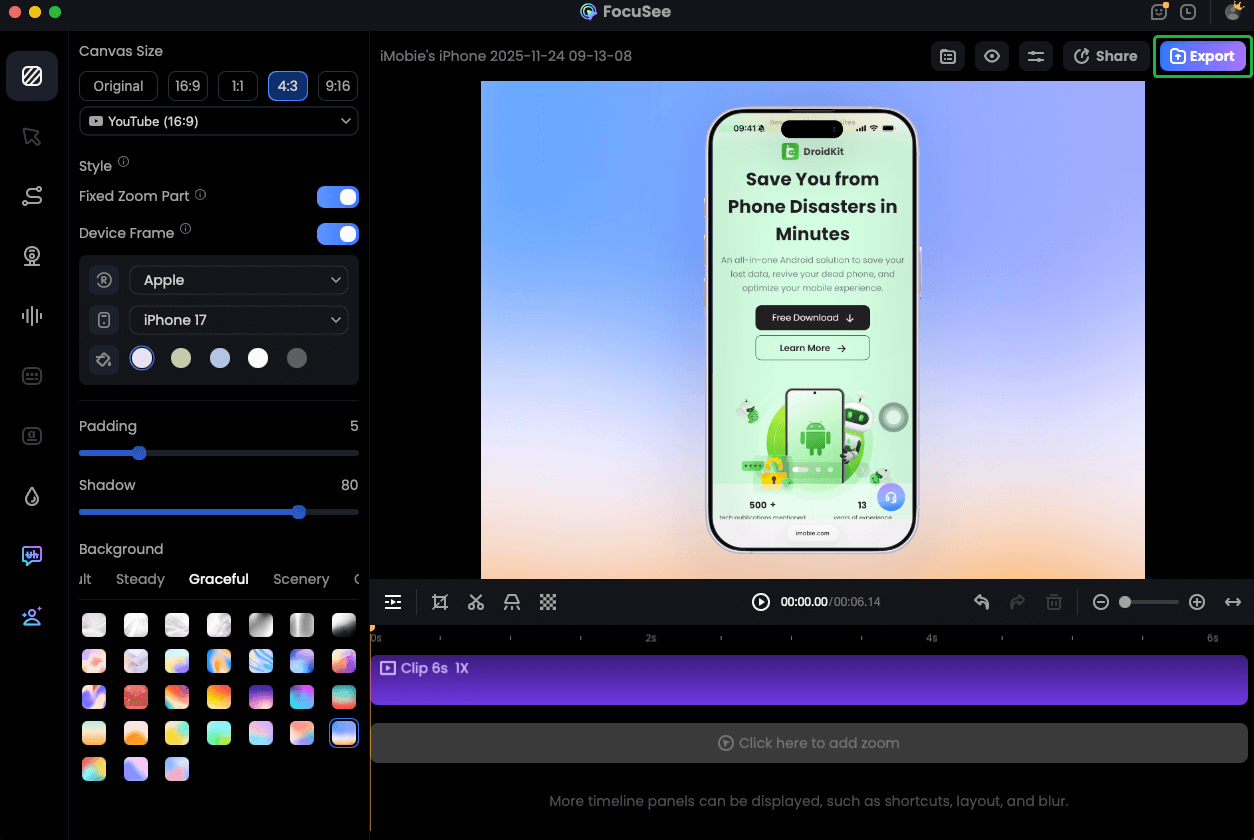
Record iPhone Screen
Frequently Asked Questions
Should I create short or long tutorial videos?
You should create both, but for different stages of the customer journey. Short videos capture top-of-funnel discovery, while long-form walkthroughs drive product adoption and retention at the bottom of the funnel.
How do I improve my tutorial completion rates?
Break long videos into microlearning playlists. Our data shows that breaking a 12-minute video into six 2-minute segments can increase completion rates from 18% to 74%. Keep it to one single action per video.
Do short videos help with search engine SEO?
Short videos do not traditionally rank as well for deep “how-to” Google searches. However, they are highly effective for driving algorithmic discovery and brand awareness on social platforms.
How long should my onboarding videos be?
Aim for 60 seconds to three minutes max per video. Embed them contextually within your software’s UI so the user can learn while doing.
How do I protect my videos from UI software updates?
Do not reference specific button colors or exact dashboard layouts in your voiceover. Keep the script focused on the general workflow, and use modular editing so you can easily swap out small visual clips without re-recording the entire audio track.
Conclusion
The stress of deciding between short and long educational formats vanishes when you stop treating them as competitors and start treating them as partners in a layered funnel.
If you are exhausted by high drop-off rates, start breaking your massive walkthroughs into focused, contextual onboarding clips. If you are struggling to repurpose content, stop randomly cropping videos and start applying the 3-step native hook framework.
You no longer need to sacrifice user experience for production speed. By utilizing smart strategies and automated tools like FocuSee, you regain complete control over your workflow. Stop letting manual editing keep your users in the dark. Build your funnel, automate your editing, and finally deliver the clear, empathetic, and accessible answers your audience deserves.