Low Budget Marketing Video Ideas for Startups: A 2026 Guide to Building Trust

You don’t have a video budget, a team, or time to learn editing. But you still need marketing videos that build trust and bring users.
The problem isn’t video marketing itself—it’s the fear that “low-budget means low-quality,” so most startups either do nothing or waste money on agencies.
There’s a simpler way.
A “proof-first” workflow lets you turn real product demos into credible marketing videos in hours, using just a laptop, a phone, and basic tools like FocuSee or Loom.
No studio. No editing skills. Just a repeatable system that works.
Choosing the Right Production Method
Before selecting specific video formats, you must decide how you will actually produce the content. Startups generally face three options, each with different friction levels.
| Manual DIY | Agency Production | Automated Tools (FocuSee) | |
| Cost | Low | High | Low–Medium |
| Time Effort | High | Low | Low |
| Scalability | Medium | Low | High |
| Output Quality | Medium (skill-dependent) | Very High | High (product-focused) |
| Best For | Founders with time & editing skills | Funded startups & brand campaigns | SaaS, apps, fast-moving startups |
5 Affordable Video Marketing Ideas for Startups
Founders often waste time wondering what to create first. To succeed, you need a clear progression of videos matched directly to your current business stage.
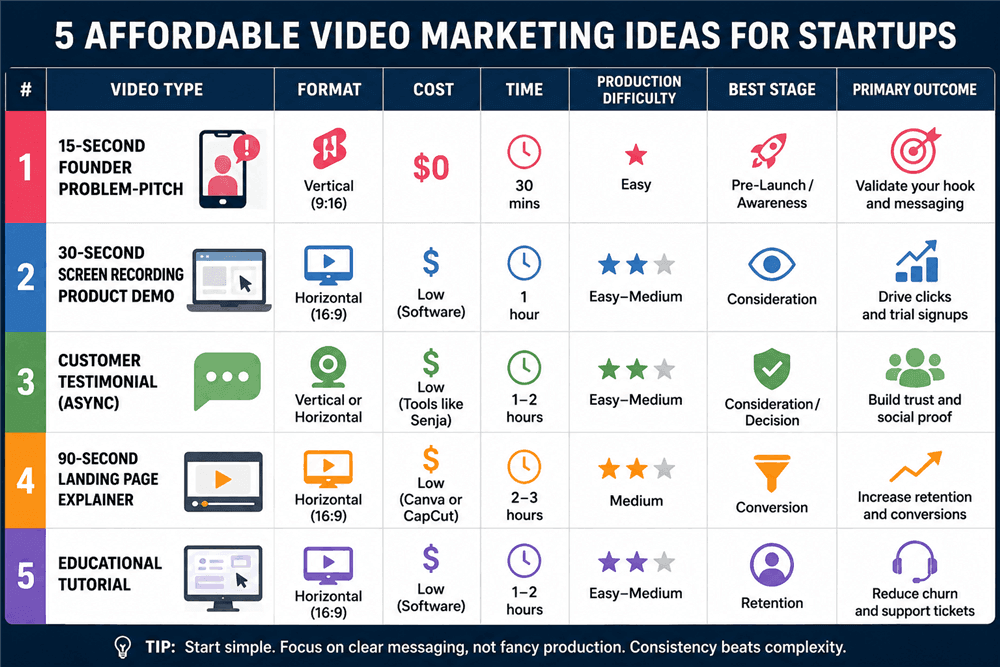
5 Affordable Video Marketing Ideas for Startups
1. The 15-Second Founder Problem-Pitch (Pre-Launch /Awareness)
Speak directly into your smartphone camera about a specific industry problem you are solving. Focus entirely on the pain point.
- Format: Vertical video (9:16) for YouTube Shorts, Instagram Reels, and TikTok.
- Cost: $0
- Time: 30 minutes
- Outcome: Validates your hook and messaging before you spend money on product marketing.
2. The 30-Second Screen Recording Product Demo (Consideration)
Record your digital product actively solving the problem you highlighted in your founder pitch.
- Format: Desktop or horizontal (16:9) for LinkedIn video and Twitter.
- Cost: Low (Software subscription like FocuSee or Loom)
- Time: 1 hour
- Outcome: Drives high-intent clicks and trial signups by providing visual proof.
3. The Customer Testimonial (Social Proof)
You do not need a film crew, but you do need a system. Don’t rely on recording clunky Zoom gallery views where audio cuts out.
The “How-To”: Use asynchronous video collection tools like Senja or VideoAsk. Send a link to your best users, and the software guides them to record a high-quality video on their own phone or webcam, uploading it directly to your dashboard.
Outcome: Builds immediate credibility and trust with prospective buyers.
Never use a customer’s image, voice, or company logo without explicit, written permission. Always include a digital release form or use the built-in consent checkboxes in tools like Senja to ensure you have the legal right to use the footage in your marketing.
4. The 90-Second Landing Page Explainer (Conversion)
Combine your founder-led intro, your screen recording demo, and a quick customer quote. To prevent a massive editing headache, keep it incredibly simple: use hard cuts, avoid fancy transitions, and stick to a single audio track.
- Format: Horizontal (16:9) embedded directly on your website homepage.
- Cost: Low (Use Canva or CapCut desktop)
- Time: 2–3 hours
- Outcome: Increases landing page retention and conversion rates.
5. The Educational Tutorial (Retention)
Create a step-by-step product walkthrough specifically for existing users, showing them advanced features or shortcuts.
- Format: Screen recording with voiceover.
- Outcome: Reduces customer churn and lowers support ticket volume.
The Bootstrapped Video Workflow: Script, Record, and Repurpose
Ideas are useless without execution. Follow this strict “proof-before-polish” workflow to get videos published this week.
Step 1: The 45-Second Concrete Script
Do not improvise. Here is a real-world, word-for-word script breakdown used by a startup targeting e-commerce store owners:
- The Hook (0-5 seconds): “Are you tired of manually exporting your Shopify data into endless spreadsheets every Friday?”
- The Agitation (5-15 seconds): “Every hour you spend copy-pasting is an hour you aren’t spending growing your store. And when a single formula breaks, your whole day is ruined.”
- The Value Prop (15-35 seconds): (Visual: Screen recording zooming in on a single-click export feature) “With our app, you connect your store once, click ‘Sync,’ and your customized financial dashboard populates automatically in under three seconds.”
- The CTA (35-45 seconds): “Stop doing robot work. Click the link below to start your 14-day free trial right now.”
Step 2: Recording
Use the right environment. For your founder pitch, sit facing a window for natural light and plug in your $20 external mic. For the software demo, use FocuSee or Loom to capture your screen cleanly.
Step 3: Content Batching and Repurposing (The “How-To”)
Never shoot a video to use it just once. You want to extract the 5-second hook for TikTok, and the 10-second customer quote for an Instagram Reel.
How do you actually do this without it looking terrible?
Do not try to manually crop a horizontal 16:9 video into a vertical 9:16 frame yourself—you will inevitably cut off half your face. Instead, use AI repurposing tools like Opus Clip, Veed.io, or the auto-reframe feature in CapCut. You simply upload your horizontal explainer, and the AI automatically tracks your face, keeping you perfectly centered in a vertical format while adding large, platform-native captions.
How We Built Our Demo: FocuSee vs. Loom vs. OBS
If you choose the automated method, a “screen-recording-first” strategy is the highest ROI technique for founders. You don’t need expensive B-roll; your product is the star. But which tool should you use?
- OBS Studio: Free and incredibly powerful, but the learning curve is steep. You will spend hours configuring scenes and sources.
- Loom: The undisputed king of quick, internal communication. However, for outward-facing marketing, Loom videos can look a bit static and informal.
- FocuSee: This is our preferred tool for external marketing assets. It costs a few dollars a month and requires a brief learning curve to master the auto-zoom features, but the payoff is worth it. FocuSee tracks your cursor clicks and automatically applies 3D tilts and smooth zoom-ins. It turns a static dashboard—whether it’s a complex B2B SaaS tool or a simple e-commerce inventory app—into dynamic, visually engaging content without manual keyframing.

Show Mouse Cursor
How to Measure Video Marketing ROI with Minimal Data
Tracking ROI does not require expensive analytics software. The core principle of the “proof-before-polish” framework is that data dictates your budget.
- Awareness Videos (Founder Pitches): Judge these strictly by retention rate and shares. If your analytics dashboard shows a massive drop-off in the first 3 seconds, do not spend money on better lighting—rewrite your hook.
- Consideration Videos (Product Demos): Focus entirely on clicks and trial signups. A raw video with 150 views that generates three demo bookings is infinitely more valuable than a viral, highly edited video with 50,000 views and zero conversions.
- Retention Videos (Educational Tutorials): Track saves, bookmarks, and a reduction in support emails.
Measure your customer acquisition cost (CAC) against these early indicators. Once a raw, low-budget video proves it can generate signups organically, then you can safely spend money to polish it with a professional voiceover or agency editing.
Frequently Asked Questions
Can I make a professional-looking startup video with just my phone?
Yes. Modern smartphones capture incredible video. The secret is ignoring the camera quality and prioritizing clean audio (using a cheap external microphone) and recording facing a window for natural light.
How do I make a product demo video if my product is just a website, app, or prototype?
Use screen recording software like FocuSee that offers auto-zoom and cursor highlighting. This adds dynamic movement to an otherwise static screen, making even a basic prototype look functional and engaging.
What videos work best for TikTok vs. LinkedIn?
Short-form platforms (TikTok, Reels, Shorts) require vertical video (9:16), fast-paced editing, strong hooks, and large captions. LinkedIn and landing pages perform better with horizontal (16:9) formats featuring in-depth use cases, deep-dive tutorials, and professional pacing.
Conclusion
The fear that a cheap video will damage your brand is completely valid, but it shouldn’t stall your growth. By adopting a “proof-before-polish” method, you can stop guessing what to create first and start generating leads today.
You don’t need an agency, actors, or a studio space. Start with a simple founder pitch to test your messaging. Follow it up with a clear screen recording to show visual proof of your product. Automate the friction of editing using tools like FocuSee, CapCut, and Opus Clip. Grab your mic, face a window, and hit record on your first 45-second script today.