How to Make a Product Promo Video That Converts

Creating an effective product promo video can feel like a high-stakes puzzle, especially when a launch deadline is looming. You know a video is essential, but uncertainty about the right length, style, and production process can be a significant obstacle. Many marketing managers find themselves searching for a practical playbook, only to find galleries of high-budget examples that don’t address the core challenge: how to make a promo video for a physical or digital product that actually performs on mobile platforms like YouTube and Instagram.
This guide provides that playbook. It’s a step-by-step procedure for producing a high-converting video, designed specifically for managers who need to deliver professional results efficiently. We will move beyond abstract inspiration and into an actionable workflow that addresses your specific concerns, from looking amateur to measuring success.
Step 1: The Pre-Production Blueprint for Mobile-First Success
Success in video marketing is determined before you ever press record. A solid plan is the foundation for a video that holds attention and persuades viewers. Instead of simply listing features, a high-converting video follows a proven narrative structure. Use a promo video storyboard to map out your video according to this five-part framework.
- The Hook (0-3 seconds): State the core benefit or show the product in action immediately. Your goal is to stop the scroll.
- The Problem (4-10 seconds): Articulate the specific pain point your target audience experiences. Make it relatable.
- The Solution (11-15 seconds): Introduce your product as the clear, simple solution to that problem.
- The Benefits (16-50 seconds): Demonstrate 2-3 key benefits, focusing on how the product improves the user’s situation. Show, don’t just tell.
- The Call to Action (51-60 seconds): Tell the viewer exactly what to do next (e.g., “Pre-order now,” “Sign up for early access”).
Adopt a Modular Versioning Strategy
A critical planning principle in video content marketing that many overlook is the modular versioning strategy. Don’t just create a single 60-second video and hope it works everywhere. Instead, plan from the start to produce multiple versions tailored to different platforms. Your content plan should include a main 60-second video for your website, a 15-second version for mobile feeds, and a 6-second vertical hook for Stories and Shorts. This mobile-first approach ensures your video content is native to each platform, dramatically increasing engagement and effectiveness.
Step 2: Choosing Your Production Path and Tools
Once your storyboard is ready, the next step is production. The path you take depends entirely on your product type and resources. Instead of viewing this as a complex technical decision, think of it as choosing the right tool for a specific job. Your goal is to capture clean, professional-looking footage efficiently.
Here’s a breakdown of common production paths and the tools that support them:
| Recommended Path | Example Tools | Best For | |
| Digital / SaaS / App | Screen & Camera Recording | FocuSee, Loom, Descript | Demonstrating software features, walkthroughs, and tutorials with a personal touch. |
| Physical Product | DIY Live-Action Shooting | Smartphone Camera, CapCut, Premiere Rush | Showing a product in use, unboxings, and highlighting physical design and quality. |
| Conceptual Service | Animation & Motion Graphics | Powtoon, Vyond, After Effects | Explaining abstract concepts or processes where live-action is not feasible. |
This guide will focus on the two most common scenarios for marketing managers: creating a promo for a digital product and shooting a physical product on a budget.
Step 3: The Production Workflow: From Storyboard to Footage
This is where your plan becomes a reality. We’ve broken this step into two distinct workflows based on your product type.
Workflow A: For Digital & SaaS Products
For software or app demos, your goal is to create a clear and dynamic screen recording. Tools with AI features can dramatically speed up this process by automating tedious editing tasks.
Step 1. Record Your Screen and Camera:
Use a tool that captures your screen and camera simultaneously. This creates a more engaging demo by showing both your product and your genuine reactions.
Step 2. Automate the Rough Cut:
After recording, use automated features to handle the initial edit. For example, AI-powered tools like FocuSee can automatically detect and remove silent pauses or filler words (“ums,” “ahs”), saving you hours of manual editing.
Step 3. Add Dynamic Effects:
To keep viewers engaged, good software automatically adds effects like smart zoom, which follows your cursor and highlights key actions and clicks. This directs viewer attention without you needing to create complex animations.
Step 4. Apply Brand Templates:
To maintain consistency and look professional, use a tool that allows you to save brand kits. Apply your logo, watermark, and brand colors with a single click instead of adding them manually each time.
Workflow B: For Physical Products (The DIY Guide)
You don’t need an expensive studio to get a professional shot of your product. A clean, well-lit video shot on your smartphone can be incredibly effective. The key is to control your environment.
Step 1. Set Up Your “Studio”:
Find a room with good natural light. Place a table against a plain wall. For a clean, seamless background, get a large piece of white poster board and curve it from the table up the wall. This simple setup eliminates distracting backgrounds.
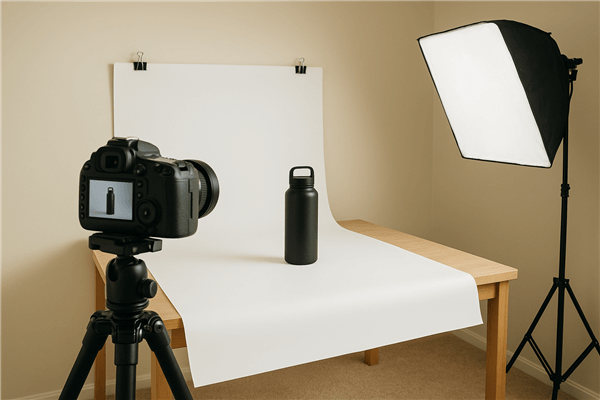
DIY Product Photography Setup
Step 2. Get Stable, Clear Shots:
Use a small tripod for your smartphone to avoid shaky footage—a primary sign of an amateur video. Film in 4K if your phone supports it, which gives you the flexibility to crop in later without losing quality.
Step 3. Master Simple Lighting:
The “amateur” look often comes down to poor lighting. Use a simple three-point lighting setup. Place two lamps at 45-degree angles to your product to fill in shadows. If you have a third light (or can use a window), have it provide some soft light from the side or back to make the product “pop” from the background.
Step 4. Capture Clean Audio:
If you have a narrator, record audio separately in a quiet space using a lavalier mic or even the voice memo app on a second phone held close to the speaker. This is far better than relying on the camera’s built-in microphone from a distance.
Step 5. Edit for Impact:
Import your footage into a user-friendly editor like FocuSee. Cut your clips to match your storyboard, add simple text overlays to highlight benefits, and find royalty-free background music to set the tone.
Step 4: Adapting Your Video for Maximum Impact on Every Platform
With your core video edited, it’s time to execute the modular versioning strategy you planned. This tactical step is crucial for an effective promo video for product marketing because it adapts your content to user behavior on each platform.
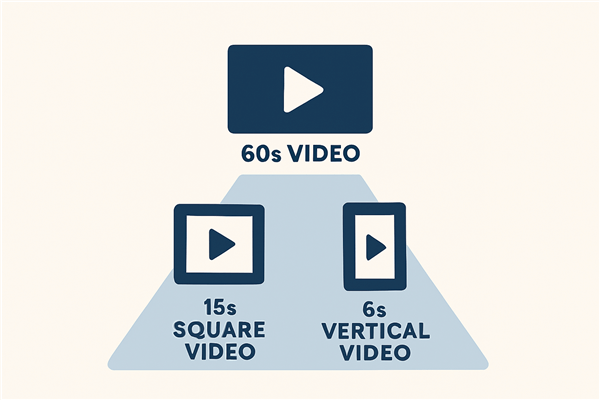
A Video Content Pyramid
The 60-Second Full Version
This is your main video asset. It contains the full narrative: Hook, Problem, Solution, Benefits, and a clear call to action video element. This version is best for your website’s product page, landing pages, and platforms like YouTube or LinkedIn. Ensure it has professionally transcribed, burned-in captions for accessibility and sound-off viewing.
The 15-Second Mobile Feed Version
This version is cut from your main video and formatted in a 1:1 (square) or 4:5 (vertical) aspect ratio for Instagram and Facebook feeds. Focus on the most compelling visuals. The key is to deliver the core message—Problem, Solution, Benefit—quickly. Use large, bold text overlays, as many users will watch without sound.
The 6-Second Vertical Hook
Created for Instagram Reels, YouTube Shorts, and TikTok, this 9:16 vertical video is designed to stop the scroll. Isolate the single most impactful moment from your product demo. This isn’t a full story; it’s a powerful visual punchline designed to create curiosity and build brand awareness, video views.
Step 5: Measuring Success: The Product Marketing Metrics That Matter
Launching your videos is not the final step. To measure success and prove return on investment (ROI), you must track the right performance metrics. For a product launch, focus on these three key indicators:
1. Audience Retention:
This metric shows the percentage of viewers who watch your video at each point. A sharp drop-off in the first 3-5 seconds indicates a weak hook. High retention suggests your video structure is engaging.
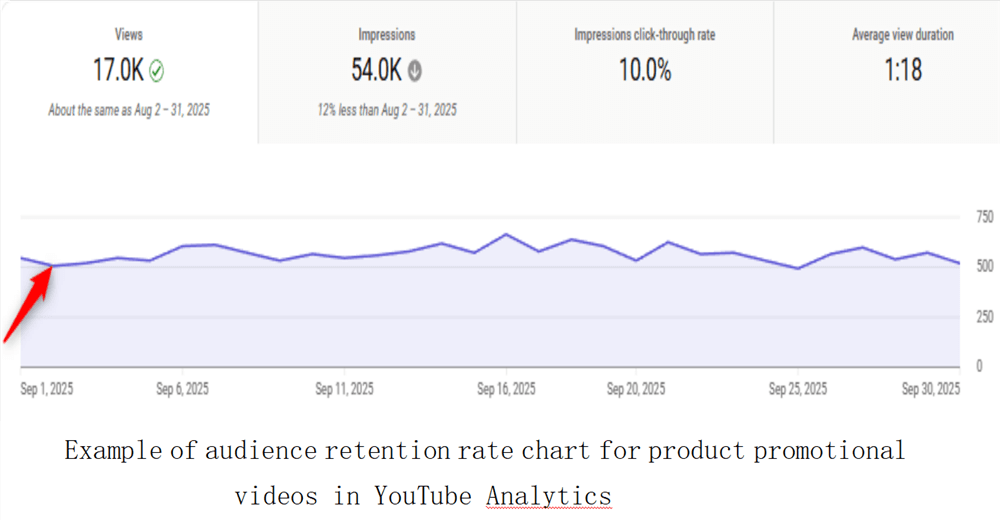
YouTube Analytics Audience Retention Graph
2. Click-Through Rate (CTR):
This measures the percentage of viewers who click on your call-to-action (CTA). A high CTR is a strong signal that your video has successfully created interest and motivated the viewer to act.
3. Conversion Lift:
This is the ultimate measure of success. It tracks how many viewers complete a desired action (such as a pre-order) after watching the video. For example, one SaaS company we worked with re-edited their promo’s first 5 seconds to better align with the “Hook-Problem” framework. Their audience retention at the 10-second mark jumped from 35% to 60%, and their sign-up CTR increased by 15% over the next month. The most reliable way to measure this is by using UTM-tagged links in your video descriptions and CTAs to attribute conversions directly to your video campaigns.
Testing Methodology
To ensure the recommendations in this guide are practical and reliable, we performed hands-on testing across multiple devices and platforms. All tools and workflows mentioned were tested on:
- MacBook Pro (macOS Monterey)
- Windows 11 laptop
After producing the 60-second, 15-second, and 6-second video versions, we optimized and tested them on mobile devices to assess visual quality and platform compatibility:
- iPhone running iOS 17
- Android phone running Android 14
This cross-platform evaluation confirms that the suggested content formats and workflows hold up in real-world use, giving marketing managers the confidence to publish high-performing promo videos across channels.
Frequently Asked Questions
How long should my product promo video be for the best engagement?
Use a ‘modular versioning strategy’: a full 60-second video for your website or YouTube, a 15-second cutdown for social media feeds, and a 6-second vertical hook for Stories, Reels, and Shorts.
What is the ideal structure for a promo video?
A proven structure is: Hook (0-3s), Problem (4-10s), Solution (11-15s), Benefits (16-50s), and a clear Call-to-Action (CTA) at the end.
How much budget do I need to produce a high-quality promotional video for my product?
Budgets can be tailored to your resources. For example:
- DIY (<$100): Use your smartphone and a user-friendly editing app or a subscription to an AI-powered screen recording tool.
- Freelancer ($500 – $1,500): Hire a freelance editor on a platform like Upwork to edit your self-shot footage.
- Small Agency ($3,000 – $8,000): A local production company can handle the entire process, from shooting to final edits.
How do I optimize my promo video for viewers who watch without sound?
Design for sound-off viewing from the start. Use large, bold text overlays to convey key messages and ensure your visuals are self-explanatory. Always include burned-in captions for accessibility and comprehension.
What metrics should I track to measure success?
Focus on three key metrics: Audience Retention (how long people watch), Click-Through Rate (CTR) on your call-to-action, and Conversion Lift (how many viewers complete your goal).
Conclusion
You no longer need to worry about your video looking amateur or getting lost on mobile platforms. By following a structured planning process, choosing the right production workflow for your specific product, and adopting a modular versioning strategy, you can create a good product promotional video that drives measurable results. The uncertainty is replaced by a clear, repeatable procedure.
Take control of your product video production. You can now focus on your message and launch with the confidence that you have a complete playbook, whether you’re marketing software or a brand-new physical product.