How to Make a Marketing Video in 2025 (A Beginner’s Guide)

You know you need video, but the frustration is real. You spend hours on a promo, only to end up with amateurish audio and generic edits. That feeling of being stuck—without a big budget or a dedicated team—is a common obstacle.
This guide provides a clear, repeatable blueprint for creating a marketing video from scratch. We followed Sarah, an e-commerce brand owner, as she used this exact method to create a 90-second promo video for her spring sale. We’ll show you how she transformed her ideas into a polished video that got results, directly addressing the core challenges of time, cost, and technical skill. Our goal is to give you a structured process that removes the guesswork from first concept to final upload.
To prove this guide works, we documented a real user’s journey. Sarah, an e-commerce founder, used an iPhone 13, a MacBook Air (macOS Ventura), and the AI editing tool FocuSee to create a 90-second promo video. This guide is built on her actual workflow and results, ensuring every step is practical and repeatable for beginners.
What Makes a Good Marketing Video? (3 Beginner-Friendly Ideas)
Before you start filming, you need a concept. The feeling that your ideas are “flat or uninspired” often comes from trying to do too much. For your first video, focus on clarity and value. Here are three simple formats that work:
1. The Product Demo:
Show, don’t just tell. Unbox your product, demonstrate its key features, and show it in action. This builds trust by providing customers with a clear view of what they’re buying.
2. The “How-To” or Tip:
Solve a small problem for your audience that relates to your product. If you sell coffee beans, create a 60-second video on “How to Make the Perfect Pour-Over.” This positions you as an expert and provides genuine value.
3. The Q&A:
Answer the single most common question you get from customers. This is an efficient way to create relevant content, overcome buying objections, and show you’re listening to your community.
Create a Marketing Video Step by Step: The 5-Phase Production Blueprint
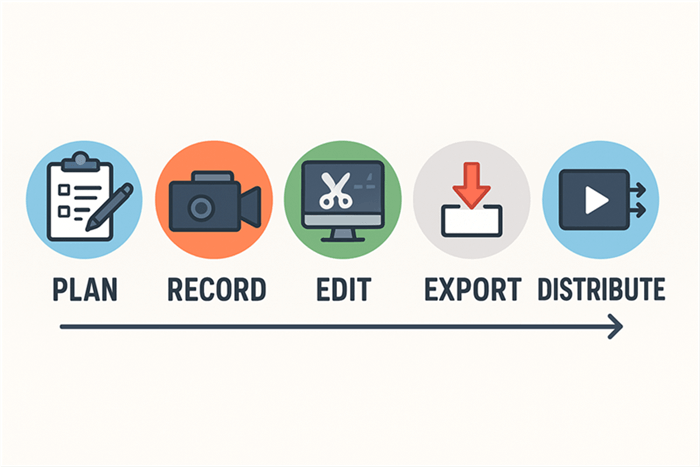
A structured process prevents missed steps and ensures quality. This 5-phase framework organizes the production workflow into manageable stages, taking you from initial idea to measurable results.
How to Create a Marketing Video
Phase 1: Plan & Script
This is the foundation. Before touching a camera, define your primary goal (e.g., drive sales), identify your audience, and distill your key message into one sentence. A script is non-negotiable for keeping your video concise. For her 90-second promo, our test subject Sarah used a script template to structure her narrative, ensuring a strong hook (“Tired of generic spring decor?”), a clear value proposition, and a compelling call-to-action (“Shop the limited collection now”).
Phase 2: Setup & Record
Prepare your recording environment. Choose a quiet location to minimize background noise. Good lighting is crucial; soft, natural light from a window is ideal. Set up your camera—a modern smartphone is perfectly adequate—for stable footage. We’ll cover specific, no-budget techniques for lighting and audio below.
Phase 3: Edit & Enhance
This is where your story comes together. Import your raw footage into editing software. You will trim unnecessary parts, arrange clips in a logical sequence, add background music, and insert text or graphics. The goal is a polished video that communicates your message effectively.
Phase 4: Format & Export
Once your edit is complete, you must export the video in the correct format for your intended platforms. This involves selecting the right resolution (e.g., 1080p), aspect ratio (e.g., 16:9 for YouTube, 9:16 for TikTok), and file type (usually MP4). Getting this right is critical for performance.
Phase 5: Distribute & Measure
Upload your finished video to your target platforms. After publishing, monitor key performance metrics like view count, average watch time, and click-through rate (CTR). These analytics provide insight into what resonates with your audience and will help you measure the video’s success and inform future content.
To help you with the most critical phase, you can download our free, time-coded script template that Sarah used.
Manual Editing vs. AI-Powered Tools
Your choice of editing software has the largest impact on your time and final video quality. This isn’t just about features; it’s about a workflow that aligns with your skills and schedule.
Manual editing software like DaVinci Resolve or CapCut offers granular control. You are responsible for every cut, transition, and color grade. This provides maximum creative freedom but demands a significant time commitment. It is best for users with prior editing experience or those who have ample time for post-production.
AI-powered tools are designed for efficiency. Software like FocuSee, Descript, or Veed automates repetitive tasks such as removing silent pauses, enhancing audio, generating subtitles, and adding dynamic zoom effects. This approach dramatically reduces editing time and lowers the technical barrier, making it an excellent choice for business owners and creators who need to produce high-quality content quickly.
To help you decide, here is a comparison for editing a standard 5-minute marketing video:
| Manual Editing (e.g., CapCut) | AI-Powered Tool (e.g., FocuSee) | |
| Time to Edit | 2–4 hours | 15–30 minutes |
| Skill Level Needed | Intermediate | Beginner |
| Audio Quality | Dependent on manual skill & plugins | Automated noise removal & enhancement |
| Brand Consistency | Requires manual setup each time | High (uses reusable templates & presets) |
The Efficient Solution: Make a Promotional Video for Business with AI
For professionals who need polished results without the complexity, an AI-powered workflow is the most direct solution. We’ll use FocuSee as our primary example because it’s what Sarah used in our test case to solve the most common obstacles in promo video production. Note that FocuSee is a paid software tool.
If You Lack Video Editing Skills…
The technical learning curve is a major barrier. FocuSee’s AI-Powered Editing removes this burden. Its Smart Cut feature automatically identifies and deletes awkward pauses and filler words (“ums” and “ahs”). This creates a smooth narrative from your raw recording without you needing to learn about manual timeline editing.
If Your Video Footage Sounds Bad…
Distracting background noise is a hallmark of amateur video. The AI Noise Removal feature is a one-click solution. It instantly cleans up your audio, filtering out hums or fans to ensure your message is clear. This eliminates the need for complex audio post-production.
If Your Visuals Aren’t Consistent…
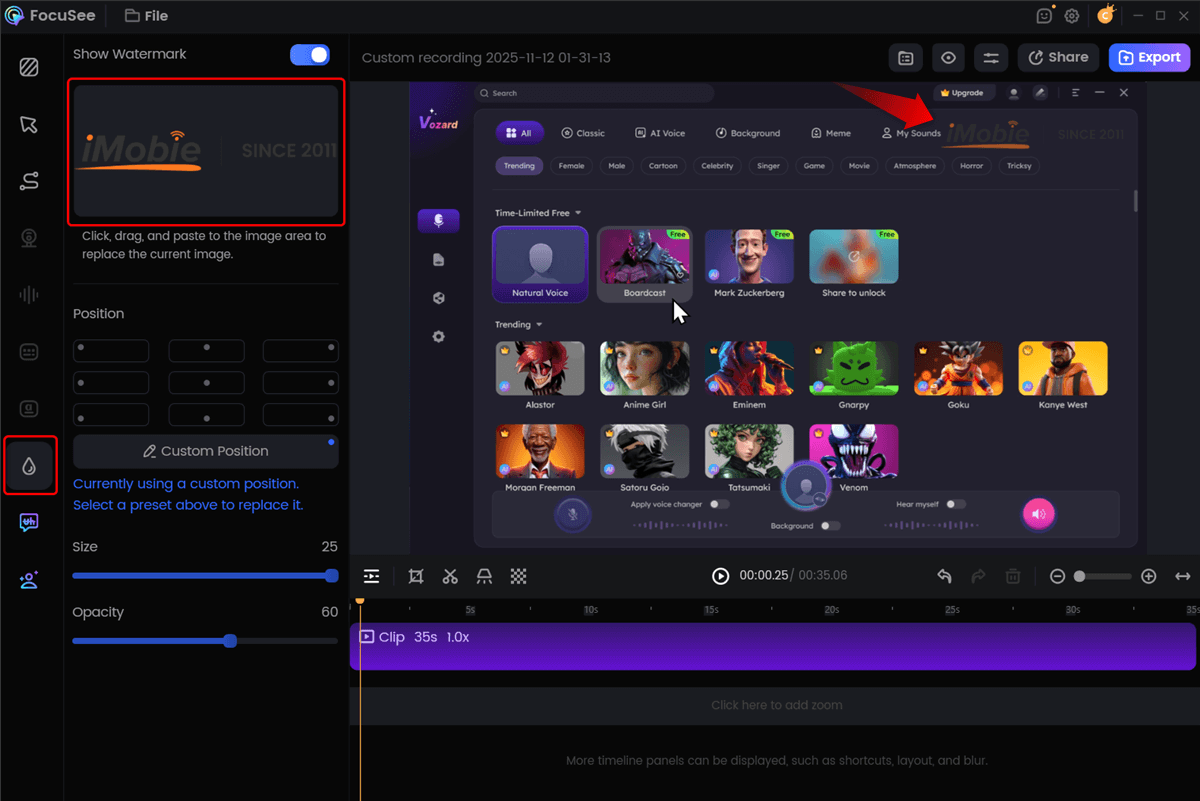
Maintaining a consistent brand identity is critical. FocuSee offers Reusable Templates to solve this. You can set your brand’s colors, logos, and style once and apply it to all future videos with a single click, ensuring every piece of content reinforces your brand identity.
Add Custom Watermark
A Practical Marketing Video Production Guide for Beginners
High production value isn’t about expensive equipment; it’s about controlling lighting and audio. These two factors separate an amateur recording from a professional one.
Lighting on a Budget: The Diffuser Technique
Harsh, direct light creates unflattering shadows. To get the soft, even lighting seen in professional videos, you need to diffuse your light source. Sarah achieved this for her promo video with a desk lamp and a white bedsheet.
- Position the Lamp: Place a lamp about three feet away, angled slightly down toward your face.
- Diffuse the Light: Drape a white sheet over the lamp. Important: Ensure the sheet does not touch the hot bulb. Use a lamp shade to create space.
- Check the Result: The sheet acts as a large diffuser, softening the light and eliminating harsh shadows.
Expert Tip: Avoid the Jaundice Look
My first time using this trick, my lamp had a yellow-tinted “warm” bulb, and my face looked jaundiced on camera. Always use a white or “daylight” LED bulb (5000K-6500K) to get clean, natural-looking light.
Achieving Clear Audio: The Pre-Production Check
Here’s a critical tip many beginners overlook: always perform a pre-production audio check.
- Record a Test: Capture a 30-second test segment in your exact recording location. Speak normally.
- Listen Carefully: Play back the audio using headphones. Listen for echo, background hum, or other distractions.
- Adjust and Re-test: If you hear problems, move closer to the microphone, turn off fans, or hang blankets on the walls to dampen echo. Repeat the test until the audio is clean.
- Boost in Post-Production: In your edit, amplify your main audio track by approximately 3 decibels (dB). This small boost helps your video’s sound compete on a loud social media feed.
[Image: An annotated screenshot of the FocuSee (or CapCut) audio settings panel. An arrow points directly to the “Volume” or “Gain” slider, which is set to “+3.0 dB”. Alt-text: A screenshot showing where to find the audio gain setting in video editing software to increase volume by 3 decibels.]
Optimizing for Reach: A Guide to Social Media Video Formats
Posting one video everywhere is not an effective strategy. Each platform has its own technical requirements. A successful approach involves repurposing your primary video for each channel.
The Repurposing Workflow
Start by creating your primary video in a standard 16:9 horizontal format, ideal for YouTube and websites. Once that version is final, create copies and reframe them. For a 9:16 vertical format (Instagram Reels, TikTok), you will crop the sides of your horizontal video. The key is to ensure the main subject remains centered. Most modern video editors, including FocuSee, let you set a 9:16 project dimension and easily reposition your footage within it.
Expert Tip: Watch Your Hands (and Graphics!)
When reframing for vertical video, be careful you don’t accidentally crop out important visual information. I once reframed a product demo and didn’t realize I had cut my hands out of the shot, making the demonstration confusing. Always scrub through the entire vertical video to check for awkwardly cropped text, graphics, or gestures.
A crucial tip for engagement: avoid using a single subtitle file across all platforms. Instead, upload your video and use each platform’s built-in subtitle generator. Adding these native subtitles can increase your reach because platform algorithms favor content that uses their features.
| Aspect Ratio | Resolution (Pixels) | Recommended Length | |
| YouTube | 16:9 | 1920 x 1080 | 2–5 minutes |
| Instagram Reels / TikTok | 9:16 | 1080 x 1920 | 15–90 seconds |
| LinkedIn Feed | 1:1 or 4:5 | 1080 x 1080 or 1080 x 1350 | 30–90 seconds |
Frequently Asked Questions About Marketing Video Creation
How can I make a marketing video if I have zero editing skills?
For those without technical experience, an AI-powered video tool like FocuSee is the most effective solution. These applications automate difficult tasks like removing pauses and cleaning up audio, allowing you to create a professional video with a minimal learning curve.
How do I write a script for a marketing video that engages and converts?
A strong script follows a clear structure: an attention-grabbing hook in the first 3-5 seconds, a statement of the problem you solve, a demonstration of your solution, and a compelling call-to-action (CTA). To get started, use our downloadable 90-second script template provided earlier. For a deeper dive, check out our [Internal Link Suggestion: Link the preceding phrase to ‘/how-to-write-a-video-script’] article.
What equipment do I truly need to create a professional-looking marketing video on a budget?
You can create a high-quality video with minimal equipment. The essentials are a modern smartphone, a stable surface or tripod, a quiet room, and a simple light source like a window or a lamp with a diffuser (like the sheet method described above).
How do I include a strong call-to-action and keep viewers watching?
To keep viewers watching, your opening hook must immediately address their pain point or create curiosity. A strong call-to-action is specific and clear. Instead of a generic “learn more,” use an action-oriented phrase like “Download the free guide now” or “Shop the spring sale today.”
How can I measure whether my marketing video is successful?
Success depends on your goal. For brand awareness, track views, reach, and shares. For leads or sales, track the click-through rate (CTR) to your website and the conversion rate on your landing page. Most platforms provide built-in analytics to monitor these key performance indicators.
Your Next Step to Professional Video
Creating a marketing video doesn’t have to be an expensive or time-consuming obstacle. By following a structured blueprint and using the right tools, you can confidently create videos that look professional and get results. An AI-powered tool like FocuSee is designed to solve the exact pain points of poor audio, tedious editing, and inconsistent branding. It provides a direct method to regain control over your video marketing.
Explore how FocuSee can streamline your workflow and start creating polished, effective marketing videos in minutes, not hours.