How to Create Sales Videos That Actually Book Meetings in 2025

If your cold outreach emails are met with silence, you’re not just facing a common problem—you’re up against a major pipeline obstacle. I was in the same position, watching my text-only messages blend into crowded inboxes. The solution was a systematic shift to sales videos, a technique that re-humanized my outreach and proved I could offer value in under a minute.
This guide provides the frameworks and video selling techniques you need to replicate that success. We will cover a 30-minute blueprint for your first video, a strategic playbook for every funnel stage, and best practices for proving your ROI. These methods are based on hands-on testing with standard sales equipment, including MacBook Pro (M2) and Windows 11 laptops, Shure MV7 mics, and the latest OS versions.
From Jordan Smith, VP of Sales: “For prospecting videos, the first three seconds are everything. Start with a ‘personalization artifact’—like the prospect’s website—on your screen and say their name immediately. This instantly signals the video is a one-to-one message, not a mass broadcast, dramatically increasing the chance they’ll keep watching.”
Your 30-Minute Blueprint for a High-Impact Prospecting Video
Creating your first sales video doesn’t require a major production. By treating it as a focused 30-minute sprint, you can produce a high-quality, personalized video efficiently. This blueprint addresses two key concerns for beginners: what gear you need and what to say. For most, a laptop webcam and a simple USB microphone are more than enough.
Follow these three checklists to produce a video that feels authentic and professional.
1. Gear & Setup (10 minutes)
- Webcam: Position your webcam at eye level. A simple fix is to place your laptop on a stack of books. I used to look at my screen instead of the camera, which prospects said felt disconnected. A small sticky note with a smiley face next to my webcam lens reminded me where to look and helped my delivery feel more genuine.
- Microphone: Use a USB mic or even the microphone on your earbuds. This simple step provides far clearer audio than your computer’s built-in mic, which is crucial for clarity.
- Lighting: Natural light is best. Face a window or a soft light source. Avoid sitting with a bright light or window behind you, as it will cast you in shadow.
2. The 3-20-30 Sales Video Script Framework (10 minutes)
A strong sales video script is the key to sounding confident, not robotic. The most effective technique is to display a “personalization artifact”—the prospect’s LinkedIn profile or website—on your screen from the very first second.
3-Second Hook: Start with the personalization artifact visible. Address the prospect by name and state a specific, observed problem.
Example: “Hi Alex, I saw your team’s workflow approvals seem to take three clicks…”
20-Second Value Proposition: Show exactly how you solve that one problem. Record your screen and face simultaneously to maintain a personal connection and guide their attention.
30-Second Micro-Demo & CTA: Provide a brief screen recording walkthrough of the solution in action. End with a clear call-to-action, such as a calendar booking CTA embedded as an overlay in the video.
3. Recording Hygiene (10 minutes)
Your environment matters just as much as your script. A clean, distraction-free recording builds credibility.
- Clean Desktop: Hide all desktop icons and close unnecessary applications or browser tabs.
- Proper Framing: Position your face in the top third of the video frame. This is standard composition and leaves room for on-screen elements like captions or banners.
- Disable Notifications: Activate your computer’s “Do Not Disturb” mode to prevent pop-ups from interrupting your recording.
The B2B Sales Video Playbook: What to Send at Each Funnel Stage
Effective B2B sales videos are tailored to the buyer’s journey. Sending a generic demo to a cold prospect is ineffective; the right video type, goal, and length change as the relationship develops. A structured playbook ensures your team sends the right message at the right time.
The hardest part is often knowing *what* observation to make in that opening line. Below are specific video plays with concrete script starters mapped to each stage. [Internal Link Suggestion: Link the preceding phrase to ‘/sales-enablement-playbook-templates’]
Prospecting Stage: The Personalized Introduction
The goal of a Personalized Intro is to encourage the prospect to book a discovery call. The ideal length for this segment is 45–60 seconds. You can use script starters such as:
“Hi [Name], I saw on your careers page you’re hiring 5 new AEs…”
“Hi [Name], I read the G2 review from [Reviewer] who mentioned a problem with…”
“Hi [Name], your CEO’s latest LinkedIn post about [Topic] made me think…”
Discovery & Qualification Stage: The Discovery Recap
A Discovery Recap video is designed to confirm your understanding of the prospect’s needs and build trust. The ideal length for this type of video is 60–90 seconds. A simple script starter you can use is:
“Hi [Name], thanks for your time today. To make sure I understood correctly, your main priorities are [Priority 1] and [Priority 2]. Here’s a quick visual of how we address that…”
Demo & Solution Stage: The Feature Highlight
A Micro-Demo / Feature Highlight video is created to address specific pain points that matter to the prospect. The ideal length for this type of video is 2–3 minutes. A useful script starter could be:
“Following our demo, you had a great question about [specific feature]. This short sales demo video walks through exactly how that works for a role like yours…”
Proposal & Closing Stage: The Proposal Walkthrough
A Proposal Walkthrough video is used to clarify the proposal’s terms and help build consensus across the buying team. The ideal duration for this type of video is 3–5 minutes. A helpful script starter is: “Hi Team, I’ve attached the proposal we discussed. This video quickly walks through the key sections, including the implementation timeline and the expected ROI, to ensure we’re all aligned.”
What Good Looks Like: Key Benchmarks for Sales Videos
As a manager, you need data to know if your team’s efforts are working. Without benchmarks, you’re flying blind. Here are some industry-average metrics to aim for as you build out your video playbook.
| Video Type | Key Metric | Good Target | Excellent Target |
| Prospecting Video | Click-Through Rate (CTR) | > 20% | > 40% |
| Prospecting Video | Meeting Booked Rate | > 3% | > 5% |
| Discovery Recap | Watch Rate | > 60% | > 80% |
| Proposal Walkthrough | Full Watch Completion | > 50% | > 70% |
For Sales Leaders: A Framework for Team Enablement
For video to be truly effective, it needs to be a team-wide system, not a solo effort. As a manager, your role is to remove friction and ensure brand consistency.
- Establish Brand Guidelines: Don’t leave your brand to chance. Create a simple one-pager with guidelines for video. This should include using a branded virtual background, an official intro/outro template, and a consistent call-to-action.
- Create Shared Templates: Use a video tool that allows you to create and share templates. You can pre-load a branded intro, outro, and on-screen banners. This ensures every video feels professional and consistent, and it dramatically speeds up creation time for your reps.
- Build a “Greatest Hits” Library: Encourage your team to save their most successful videos (the ones that booked big meetings) in a shared folder. This becomes a powerful training resource for new hires and helps everyone learn what a great video looks and sounds like.
How to Make Personalized Sales Videos at Scale with FocuSee
For B2B teams looking to overcome the common obstacles of scaling video—time, quality, and security—a specialized tool is the most efficient solution. This is how I transformed my video outreach from a manual, time-consuming task into a systematic process. I used FocuSee, to solve the core challenges of focus, speed, and security.
Here’s how its key features address specific pain points for sales teams:
1. Solves Unfocused Demos with Intelligent Visual Focus.
Prospects often drop off because a screen recording is hard to follow. FocuSee’s auto-zoom and spotlight features automatically track your cursor and highlight key clicks. This directed my prospect to the exact “1-click fix” I promised, keeping him engaged.
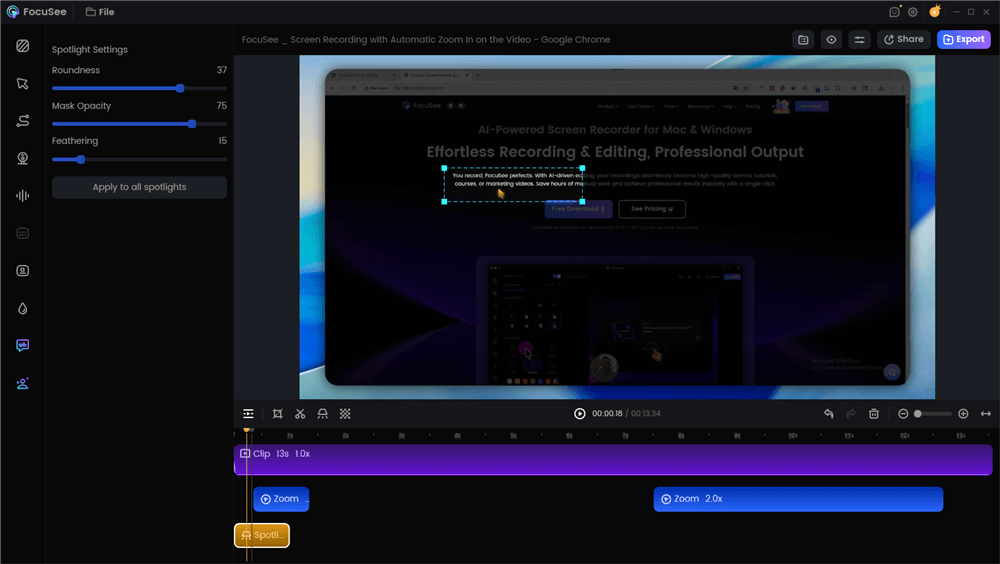
Spotlight Effect
2. Solves Time-Consuming Editing with AI-Powered Tools.
The biggest barrier to personalization at scale is editing. FocuSee’s AI can automatically remove awkward pauses and generate captions. This allowed me to create polished, personalized videos in minutes instead of hours.
3. Solves Security Concerns with a Professional Recording Experience.
Showing a product often risks exposing sensitive data. FocuSee’s Blur Masking feature allowed me to record within my live demo environment but hide other customers’ information, ensuring compliance and building trust.
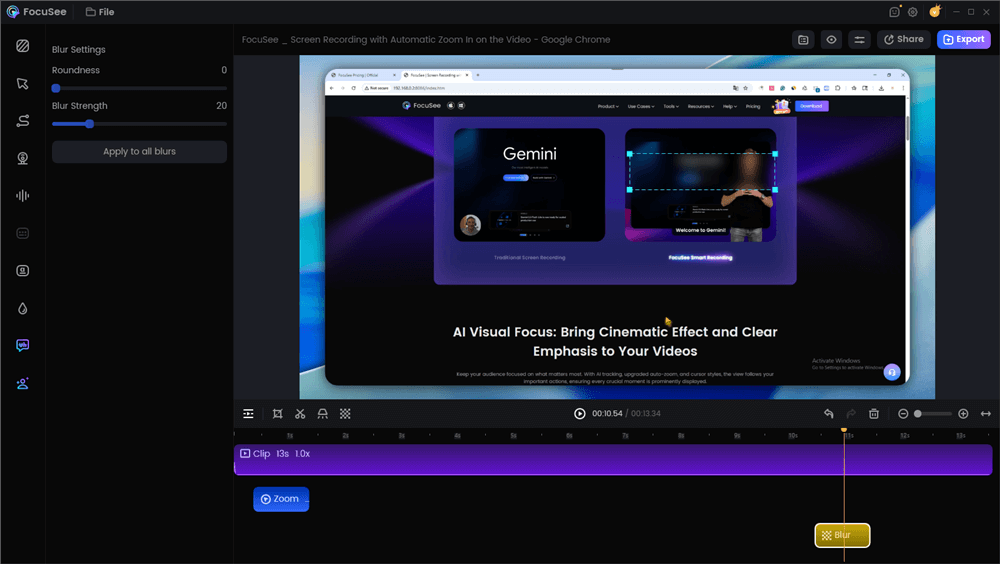
Blur Effect
By adopting these features, my team was able to standardize our playbook and consistently achieve higher meeting-booked rates. [Internal Link Suggestion: Link the preceding phrase to ‘/case-study-how-saas-team-tripled-meetings’]
Sales Video Best Practices for Delivery and Tracking
A great video is ineffective if it isn’t delivered and tracked properly. Your goal is to maximize visibility and attribute engagement directly to sales activities in your CRM.
Email Delivery Best Practices
To maintain high email deliverability with video, never attach the video file directly. Large files trigger spam filters. Instead, embed an animated GIF as a personalized thumbnail that links to the video. This technique significantly increases click-through rates. For immediate impact, place your primary call-to-action, like a calendar link, in the first sentence of your email.
LinkedIn Native Video Optimization
For LinkedIn outreach, always upload your video directly. LinkedIn native video is favored by the algorithm, resulting in higher reach and completion rates compared to external links. For prospecting videos, export them in a vertical (9:16) aspect ratio to optimize for the mobile experience, where most users will see them.
Attribution and CRM Integration Tracking
A critical best practice is establishing a clear attribution framework.
- Use a Naming Convention: Name video files consistently (e.g., `Campaign-Prospect-Date`) to enable automated rules.
- Use UTM Parameters: When sharing a video link, append UTM parameters to track the source and medium.
- Set Up CRM Triggers: This data allows you to create automation in your CRM. For example, when a contact’s watch-time in HubSpot exceeds 75%, you can automatically create a task for a follow-up call, ensuring timely and relevant engagement.
Frequently Asked Questions About Creating Sales Videos
What types of sales videos should I use at each stage of the sales cycle?
Use personalized intros for prospecting, discovery recaps after qualification calls, micro-demos for specific questions, and proposal walkthroughs to align stakeholders before closing.
How long should a sales video be to keep attention?
Keep prospecting videos between 45-60 seconds to quickly establish value. A discovery recap or a sales demo video can be slightly longer, around 60-90 seconds, as it builds on an existing conversation.
Do I need professional gear to make sales videos?
No. Your laptop’s built-in webcam and a quality USB microphone are sufficient for most sales videos. Good lighting and clear audio are more important than cinematic camera quality. Authenticity often performs better than high production value.
How do I personalize videos quickly for dozens of prospects?
Adopt a “modular” approach. Record a personalized 5-second intro (showing their website and saying their name), attach a pre-recorded 30-second core demo of a key feature, and finish with a personalized 5-second outro. This hybrid method provides personalization without requiring you to re-record the entire video each time. [Internal Link Suggestion: Link the preceding phrase to ‘/outreach-video-templates-for-sales’]
How can I track who watched my video and connect it to my CRM?
Use a specialized video platform that offers CRM integration tracking. These tools provide analytics on watch time and can send that data back to the contact record in your CRM, allowing you to trigger automated follow-up tasks.
What should I show on screen without exposing sensitive data?
The safest method is to use a “clean” demo environment that contains no real customer data. If that isn’t possible, use a recording tool with a blur or masking feature to hide any personally identifiable information (PII) in real-time as you record.
Do I need to worry about legal rights for music or showing logos?
Yes. For music, always use royalty-free music libraries to avoid copyright issues. Regarding logos, showing a prospect’s own logo on their website is generally fine for outreach. Be cautious about using other company logos (like your current customers) in a video without their explicit permission. When in doubt, consult your legal team.
Final Thought
Creating effective sales videos is no longer a complex, time-consuming project. By adopting a structured workflow—from the 30-minute sprint to the funnel-stage playbook—you can build a predictable system for booking meetings. The key is to stop thinking like a filmmaker and start thinking like a problem-solver, using video to deliver personalized, timely value. The technical friction and security concerns that once made video outreach difficult can now be managed with the right tools.
You can implement these video selling techniques today. To remove the challenges of editing, hosting, and tracking, explore a solution designed for sales professionals. See how FocuSee can help you create polished, secure, and personalized videos in minutes.