5 Best Product Demo Examples That Convert & The “Moment of Truth” Script Strategy

This guide is based on an analysis of 50+ SaaS product videos and hands-on testing of recording workflows on both macOS (Retina displays) and Windows 11 (4k scaling). The strategies below focus on browser-based and desktop-app recording scenarios common to US-based marketing teams.
You are likely here because your sales team is asking for a new asset to send prospects, leadership wants “Apple-quality” visuals on a startup budget, and you are staring at a blank script, worried about creating another generic video that nobody watches.
We often speak with product marketers who face a specific, recurring nightmare: The Feature Dump. They spend days recording a 10-minute video that methodically clicks through every menu item, only to see engagement metrics flatline after 30 seconds.
The problem usually isn’t the software; it’s the structure.
To fix this, we analyzed high-converting SaaS product demo examples from industry leaders. We discovered that the best demos don’t just show features; they sell outcomes using a specific narrative structure. Below, you will find real-world examples categorized by intent, a comparison matrix to help you choose the right format, and a copy-paste script template.
Finally, we will address the “production bottleneck”—how to produce these videos in minutes using automated tools like FocuSee versus the hours required for manual editing in tools like Premiere Pro.
The Strategy Matrix: Choosing the Right Demo Type
Before you hit record, you must define the job the video needs to do. A video meant for a cold lead on Instagram cannot be the same asset you send to a CIO evaluating security features.
Use this matrix to identify exactly which type of demo your funnel is missing:
| Primary Goal | Funnel Stage | Ideal Length | Key Characteristic | |
| 1. The Teaser | Generate Interest (Click “Trial”) | Top (Ads, Home) | 30–60s | Fast cuts, high energy, zero setup steps. |
| 2. The Deep Dive | Education & Trust | Middle (Docs, Pricing) | 2–5m | Linear workflow, clear cursor movement. |
| 3. The Interactive | Hands-on Experience | Middle (Product Tour) | N/A (Self-paced) | Guided clicks, “sandbox” environment. |
| 4. The Problem-Solver | Overcome Objections | Middle/Bottom (Email) | 60–90s | Testimonial-led, proves a specific outcome. |
| 5. The Micro-Demo | Retention & Updates | Post-Sale (Social/Changelog) | 15–30s | Loops focuses on a single new button/feature. |
5 Product Demo Examples (And Why They Work)
We selected these five examples not just because they look good, but because they perfectly execute the strategy for their specific category.
1. The Teaser: Linear
Best for: Landing Pages, Social Ads.
The Example: Linear (the project management tool) is famous for its “high-speed” brand. Their teaser videos rarely show a login screen or a dashboard initialization.
- The Technique: They use rapid, rhythmic cuts synced to music. They show the interface reacting instantly to keyboard shortcuts.
- Why it converts: It promises speed. By editing the video tightly and speeding up animations, the medium becomes the message. It respects the viewer’s intelligence and answers “What does it feel like?” rather than “How do I configure settings?”
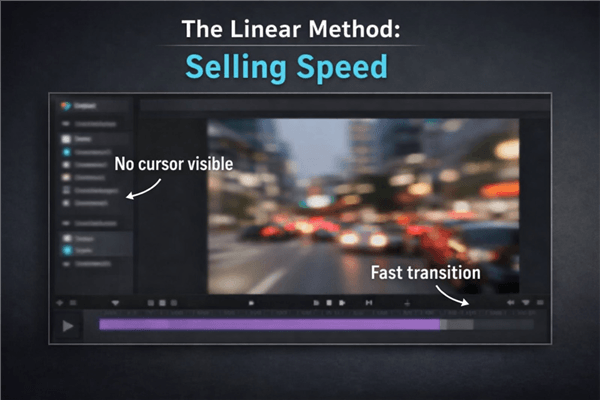
Linear-style Video Frame
2. The Deep Dive: Ahrefs
Best for: Help Centers, “How-to” YouTube Content, Evaluation.
The Example: Ahrefs (SEO software) produces walkthroughs that are practically educational courses.
- The Technique: They don’t just show the tool; they teach a marketing concept using the tool. The cursor movement is deliberate and smooth. They zoom in significantly on small data points so the viewer never squints.
- Why it converts: It builds authority. If you watch a 4-minute video on “Keyword Research” and the product is central to the workflow, you trust the tool operates as advertised. It removes the fear of “vaporware.”
3. The Interactive Demo: Slack (Onboarding)
Best for: Product Tours, High-Intent Leads.
The Example: While many use tools like Navattic or Arcade for this, Slack’s early onboarding “bot” style set the standard. It forces the user to click “Send” to proceed.
- The Technique: Guided friction. The user cannot passively watch; they must perform the core action (sending a message) to advance.
- Why it converts: It triggers the “Ikea Effect.” Because the user helped build the workspace (even by just clicking a few buttons), they feel a sense of ownership before they have even paid.
4. The Problem-Solver: Loom
Best for: Sales Follow-up emails, Case Studies.
The Example: Loom often uses its own product to demo the product. A sales rep records a video with their face in the corner (bubble) overlaying a prospect’s website.
- The Technique: Personalization. The script isn’t “Here is Loom.” The script is “I saw your website has a broken link here—let me show you how to flag that for your dev team using Loom.”
- Why it converts: It validates the use case immediately. It proves the tool solves a problem the prospect currently has.
5. The Micro-Demo: Stripe (Changelog)
Best for: Twitter/X, LinkedIn, Slack Communities.
The Example: Stripe’s developer updates are masterclasses in brevity. They often post looping GIFs or 15-second clips of a new API call or dashboard button.
- The Technique: Zero fluff. No intro, no “Hey guys,” no outro. Just the feature in action, looping forever.
- Why it converts: It signals constant innovation. For existing customers, it reinforces that their subscription fee is funding active development.
The “Moment of Truth” Framework: A Script Strategy
Most demos fail because they are chronological. They start with “Log in,” move to “Setup,” and eventually get to the value. By minute two, the viewer has clicked away.
Expert Insight: You must flip the script. Product demo best practices dictate that you show the “Moment of Truth” (the outcome) within the first 15–30 seconds.
Use this Outcome-First Sequence to rewrite your current draft:
1. The Hook (0:00–0:15)
State the pain and the promise in one sentence.
- Bad: “Welcome to our platform. Today we will show you the dashboard.”
- Good: “If you are tired of manually reconciling invoices, here is how our tool auto-matches them in 30 seconds.”
2. The Moment of Truth (0:15–0:45)
Show the successful outcome immediately. Do not make the viewer wait for the “aha” moment. Show the completed report, the signed contract, or the clean inbox.
- Why: This proves you can solve the problem. Now the viewer is willing to watch how you did it.
3. The Rewind (0:45–2:00)
Once the viewer is hooked by the result, rewind to show the minimal workflow steps that explain how it happened.
- Technique: “Now that you’ve seen the report, let’s look at the three clicks it took to generate it.”
4. The Proof & CTA (2:00+)
Add proof points immediately after the workflow.
- Action: “Join 500+ teams like [Company X]. Start your free trial.”
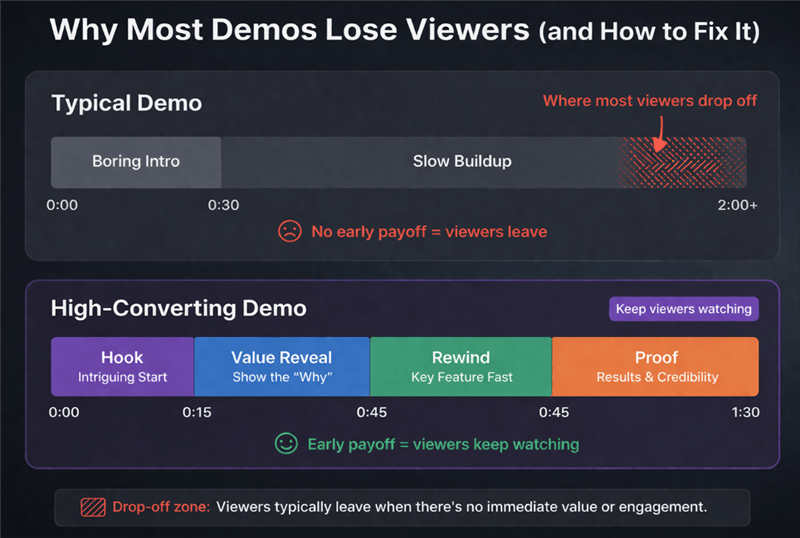
Typical Demo vs High-Converting Demo
Production Reality Check: DIY Editing vs. Automated Tools
Once you have your script, you face a technical hurdle. Recording software demos is deceptively difficult, especially regarding screen resolution and pacing. You generally have two paths: the manual “Pro” route or the automated “Efficiency” route.
Path A: Manual Screen Recording (Premiere Pro / OBS)
If you have a dedicated video editor and 4–6 hours per video, this path offers granular control.
- The Workflow: Record your screen using OBS or QuickTime. Import footage into Adobe Premiere or Camtasia. Manually add keyframes to zoom in on buttons. Create a masking layer to blur sensitive data.
- The Hidden Pain: Resolution Scaling. If you record on a 4k monitor or a Mac Retina display, the UI elements will look tiny when exported to 1080p. You will spend hours digitally “punching in” so viewers can read the text.
Path B: Automated Demo Software (FocuSee)
If you need to ship a polished asset in 30 minutes, specialized tools are the logical choice. Tools like FocuSee are designed specifically to solve the “tiny text” and “boring static screen” problems automatically.
- How it saves time: instead of manually setting zoom keyframes, the software tracks your mouse clicks. It automatically zooms in when you interact with the UI and zooms out when you switch contexts.
- The Polish: It applies consistent cursor smoothing (so your mouse doesn’t look jittery) and can generate diverse backgrounds instantly, removing the need for a green screen.
- Privacy: Automated masking features allow you to blur out email addresses or API keys without frame-by-frame editing.
| Manual | FocuSee | |
| Zoom / Pan | Manual Keyframing (Hrs) | Auto-Follow Mouse (Instant) |
| High-Res / Retina | Manual Scaling | Auto-Optimization |
Recommendation: If you are making a Super Bowl commercial, use Premiere. If you are making 10 help-center videos or a sales asset that needs to launch tomorrow, use an automated tool to bypass the editing bottleneck.
Your Launch Kit: Checklist & Metrics
To ensure your demo actually drives revenue, use this checklist before you publish.
1. The ‘Fill-in-the-Blanks’ Script Template
- [Hook – 0:00-0:10]: “Struggling with [Specific Pain Point]? Here is how [Product Name] fixes it in [Timeframe].”
- [Moment of Truth – 0:10-0:30]: Show the final result (e.g., the generated report).
- [Rewind & Walkthrough – 0:30-1:30]: “Let’s see how we got there.” Show only essential clicks.
- [Proof & CTA – 1:30+]: “This helped [Customer] achieve [Result]. Start your trial today.”
2. Measuring Success (Beyond View Counts)
Don’t just count views. To know if your product demo best practices are working, you need to track intent.
- Play Rate: (Views / Page Impressions). If this is low, your thumbnail or headline is weak.
- Drop-off Rate: Check the retention curve. If viewers leave at the 10-second mark, your intro is too slow.
- Demo-to-Trial Conversion: This is the metric that matters.
How to track: Do not just look at total signups. Use a UTM parameter on the CTA button inside or below the video (e.g., ?utm_source=product_demo_video). In Google Analytics 4 (GA4) or HubSpot, filter conversions by this specific source to see exactly how many deals the video influenced.
Frequently Asked Questions About Product Demos
What makes a product demo example ‘good’ (and not just flashy)?
A good demo is defined by clarity and speed to value. The best examples focus on a specific use case rather than listing every feature. If a viewer watches your demo and still asks, “But what does it do?”, the demo has failed, regardless of how good the motion graphics are.
Should I use a Video or an Interactive Demo?
- Video Demo: Best for passive consumption (Landing Pages, Ads). It controls the narrative and guarantees the viewer sees the value.
- Interactive Demo: Best for high-intent users (Pricing Pages). It allows hands-on exploration but carries a higher risk of user confusion if the UI isn’t intuitive.
How do I record on a high-resolution monitor?
If you record a 4k screen and shrink it to a standard video player size, text becomes unreadable. You must either lower your monitor resolution to 1080p before recording (which ruins your window layouts) or use a tool like FocuSee that automatically handles the zoom-and-pan to keep the focal point legible.
Conclusion: Stop Editing, Start Converting
You do not need a Hollywood budget to create product demo examples that convert. You simply need to respect your viewer’s time.
By shifting your script to the “Moment of Truth” framework—showing the value first—and utilizing tools to automate the technical polish, you can break the cycle of “feature dumping.”
Whether you choose to edit manually or use automation to speed up the process, the goal remains the same: Prove the value, prove it quickly, and give the user a clear path to the next step.