Live Product Demo Recording vs Edited Promotional Video: The 2026 Conversion Guide

If you are caught in the middle of a growing SaaS startup, you know this struggle intimately. Your sales team demands authentic walkthroughs to answer specific prospect questions, while executive leadership pushes for highly polished ads to drive scalable paid acquisition. You might find yourself wasting thousands on agency-produced commercial videos that yield mixed results, while watching sales reps deliver unpolished presentations over Zoom.
This leaves a massive question: does a live product demo recording or an edited promotional video drive better conversions?
You need a reliable framework. Live demos feel authentic but often look messy, whereas edited promos are expensive and painfully slow to update. In this guide, we will unpack exactly how to match the right format to your buyer’s intent. More importantly, we will reveal the exact step-by-step hybrid workflow that instantly turns everyday sales presentations into high-converting marketing assets—without the manual post-production headache.
Over the past five years, I’ve tested both video formats across 50+ sales calls and 20+ ad campaigns, building hybrid workflows across macOS and Windows using tools like MacBook Pro, DSLR setups, Zoom, Loom, and demo automation platforms.
Live Product Demo vs Edited Promotional Video: Quick Comparison Table
| Live Product Demo Recording | Edited Promotional Video | |
| Primary Goal | Close deals & build trust | Generate awareness & clicks |
| Funnel Stage | Mid to Bottom Funnel | Top of Funnel |
| Conversion Type | High-intent conversions (sales) | Volume-based traffic & leads |
| Production Cost | Low | High |
| Time to Produce | Fast (same-day usable) | Slow (days to weeks) |
| Scalability | Medium | High |
| Update Flexibility | Very high | Low |
| Best Use Case | Sales calls, enterprise demos, onboarding | Paid ads, landing pages, product launches |
The Strategic Decision-Making Guide: Formats by the Numbers
To make an informed choice between a live recording and a marketing video, we must evaluate them across four critical criteria: Success Rate, Time Cost, Technical Skill, and Safety Risk.
1. Success Rate & Conversion Benchmarks
Different formats succeed at different stages. A polished promo video yields a higher success rate for top-of-funnel customer acquisition . In our testing, well-edited SaaS promos typically drive a 1.5% to 3% Click-Through Rate (CTR) on paid social platforms.
Live webinar demos excel in mid-to-bottom funnel conversions. Their personalized nature directly answers buyer intent, increasing trust when a prospect is ready to buy. A targeted, 1-on-1 live demo for an enterprise client can see deal close rates jump to 30% or 40%.
2. Time Cost
Manual video editing workflows are notoriously slow. Producing a single two-minute explainer video can take four to six weeks of storyboarding, shooting, and post-production editing. Live software demos cost only the time it takes to present the material, offering an immediate, high-volume output.
3. Technical Skill
An edited marketing video demands specialized capabilities: non-linear editing software, audio mixing, and color grading. Conducting a live product walkthrough merely requires functional screen recording software and strong presentation skills.
4. Safety Risk (Brand Perception)
Live formats carry a higher risk. Unexpected software bugs, internet outages, or presenter errors can harm brand credibility. Promotional content guarantees a controlled environment, ensuring the feature showcase is flawless before distribution.
Which One Converts Better: Live Demo or Promotional Video?
There is no universal winner—conversion performance depends entirely on funnel stage and buyer intent.
Promotional videos typically outperform at the top of the funnel, where the goal is to attract attention and generate clicks. In paid social campaigns, they often achieve higher CTR and broader reach because they are tightly scripted and visually optimized.
Live product demo recordings outperform at the mid-to-bottom of the funnel, where buyers are actively evaluating solutions. In these stages, authenticity and real-time product interaction significantly increase trust and can directly improve close rates.
Key Insight:
- Promotional videos generate demand.
- Live demos convert demand.
If you try to use the wrong format at the wrong stage, performance will drop regardless of production quality.
Matching Your Video Format to Your Conversion Funnel
Choosing between live demos and promotional videos depends on where your audience is in the funnel.
Top-of-Funnel: Awareness
At the top of the funnel, users want quick understanding, not deep product walkthroughs. This is where edited promotional videos perform best. They deliver fast, engaging messaging designed to drive clicks and generate interest.
Mid-to-Bottom Funnel: Decision
As users move closer to purchase, they shift from curiosity to evaluation. At this stage, live product demos are more effective because buyers want to see real, unedited product usage and ask specific questions.
Live demos build trust and are especially strong for high-consideration or enterprise purchases, where accuracy and transparency matter more than polish.
Key Rule
- Use promotional videos to attract attention.
- Use live demos to close deals.
Production Costs: The Real Financial Impact
When evaluating your video strategy, production cost and timeline agility are usually the deciding factors.
The Fragile Cost of Edited Promos
A traditional, agency-produced explainer video carries a substantial price tag. A typical two-minute commercial easily costs between $5,000 and $10,000, covering scriptwriting, voiceover talent, studio lighting, and post-production.
Beyond the capital expense, the timeline is rigid. Imagine your SaaS product pushes a major UI update to its navigation bar—a constant reality in software. That $10,000 video is instantly obsolete, and updating it requires another expensive, multi-week post-production cycle.
The Scalability of Live Demo Recordings
Conversely, recording a live walk-through carries near-zero marginal cost. Because sales teams are executing these walkthroughs daily, recording them adds no extra hours to their schedule. The fundamental issue isn’t the cost of creating live demos—it’s that they often look too messy to be repurposed for marketing.
Applying the wrong video type to the wrong funnel stage is a frequent source of poor ROI. Do not treat these formats as an either/or choice. The most effective marketing teams recognize the strengths of both and build a unified workflow to combine them.
The Hybrid Workflow: Repurposing Demos Without the Bottleneck
Here is the strategic shift that resolves the friction between sales and marketing: Record live demos first, identify high-performing segments, and repurpose those specific clips into polished promotional assets.
For example, a B2B SaaS company we recently worked with spent $8,000 on a promo video that drove a sluggish 1.2% CTR. However, when they shifted to this hybrid model—clipping a genuinely enthusiastic, 90-second explanation from a real sales call and using it as a LinkedIn ad—their Cost-Per-Acquisition (CPA) dropped by 30%.
But how do you actually do this without creating a massive editing bottleneck? You need a specific workflow to handle the handoff, the messy interruptions, and the formatting.
Step-by-Step: The Sales-to-Marketing Extraction Workflow
We use FocuSee as a screen recording and video editing tool to remove friction from turning sales demos into marketing content. Here is how the workflow typically works:
Step 1: Simple Capture & Handoff
Marketing no longer needs to manually request recordings from sales reps. Sales teams record product demos using FocuSee, and the recording is immediately saved locally and can be easily shared via the team’s storage system or cloud drive.
This ensures marketing always has access to the original high-quality recording without extra coordination overhead.
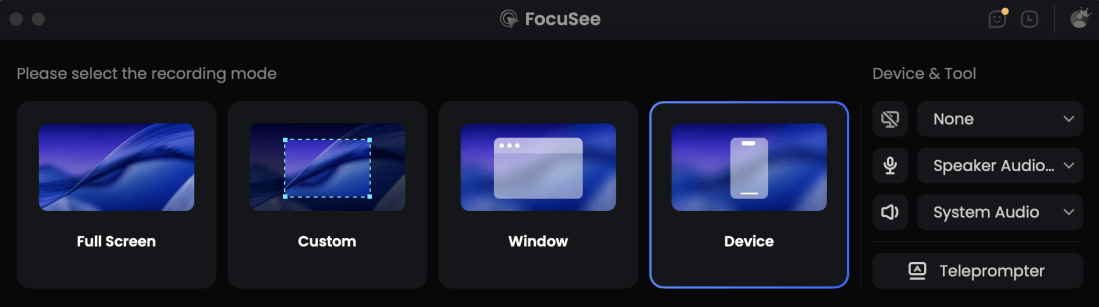
Choose the Recording Model
Step 2: Timeline Review & Clip Selection
Marketing reviews the recorded timeline and identifies high-value segments—typically short sections where key features are clearly explained.
Instead of using complex professional editing software, they can quickly trim and isolate these moments directly within the workflow.
FocuSee automatically enhances screen recordings with smooth zoom effects based on cursor movement, helping highlight user actions without manual keyframing.
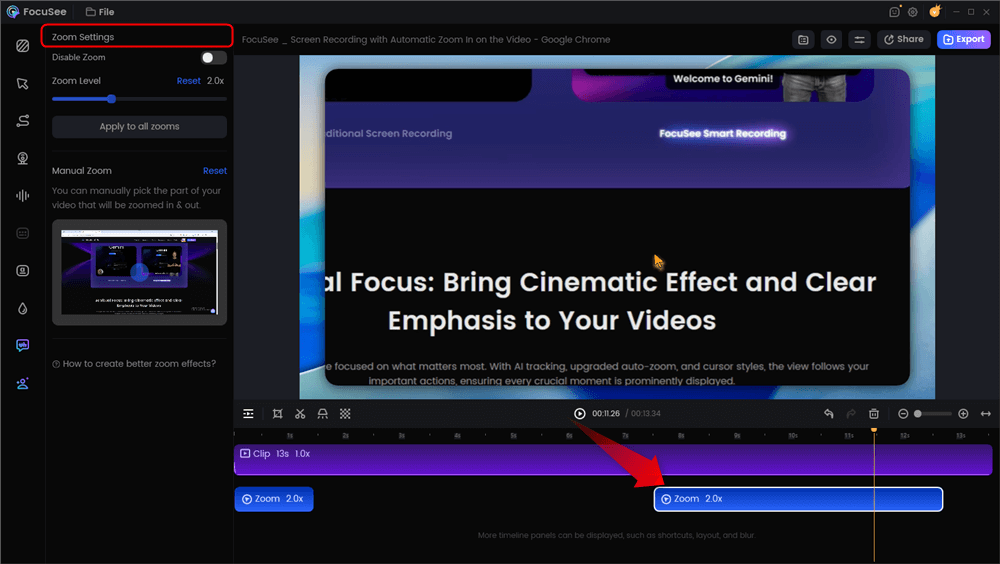
Automatic Zoom Effects
Step 3: Cleaning and Refining the Recording
Live recordings often include pauses, interruptions, or non-essential conversation. These can be manually or semi-automatically cleaned during editing.
- Remove unnecessary segments: Cut out irrelevant parts of the conversation or off-topic sections
- Refine pacing: Reduce long pauses or filler moments where needed
- Privacy handling: Blur sensitive information such as customer data or internal dashboards when required
- This step helps turn raw demo recordings into more polished, marketing-ready clips.
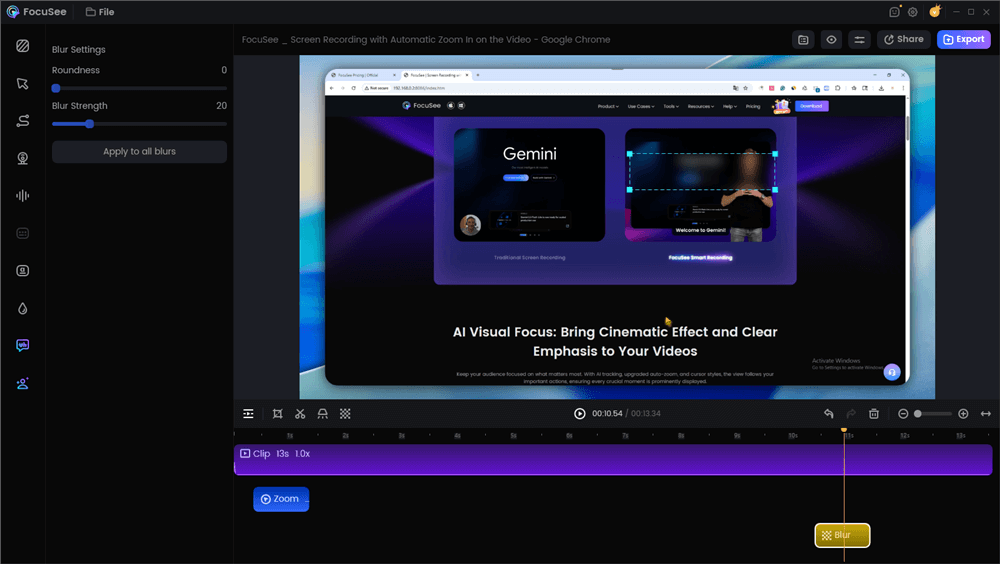
Blur Effect
Step 4: Final Optimization for Distribution
Before exporting, subtitles can be generated to improve accessibility and performance on social platforms where videos are often watched without sound.
The final output can then be formatted for different channels such as LinkedIn, YouTube, or paid social ads.
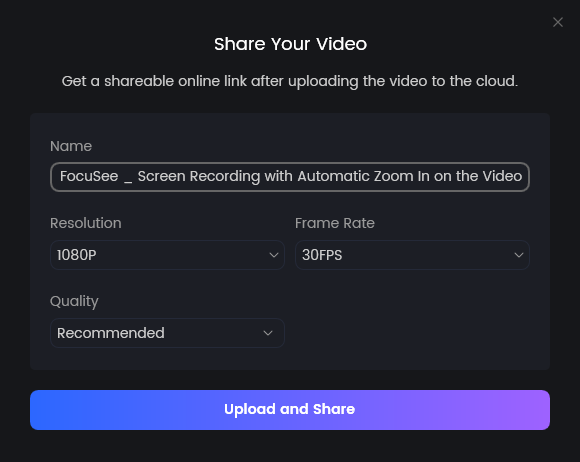
Share Video
Summary
By using FocuSee as a lightweight recording and editing layer, teams can efficiently transform real sales demos into reusable marketing assets—without relying on complex post-production workflows or heavy editing bottlenecks.
Frequently Asked Questions: Operational Realities
How do I handle customer privacy when repurposing a live demo?
Never use a prospect’s voice, face, or proprietary data in marketing material without explicit consent. In a hybrid workflow, you must isolate and mute the prospect’s audio track. For visual privacy, use built-in editing tools to apply blur boxes over client names, custom dashboards, or participant video feeds before exporting the clip as an ad.
How does marketing get access to the sales reps’ local recordings?
Relying on reps to manually upload massive MP4 files to Google Drive creates bottlenecks. Use a recording tool with automated cloud syncing workspaces. When the sales call ends, the high-resolution file should immediately appear in a shared marketing folder, preserving the quality that Zoom cloud recordings often compress.
What if the prospect derails the live demo with highly specific questions?
This is a standard reality of live sales. When extracting clips for top-of-funnel marketing, you do not need the entire narrative of the call. Scrub the timeline to locate the uninterrupted 60 to 90 seconds where the rep demonstrated the core feature. Extract only that segment, clip out the prospect’s interruption, and use a quick crossfade to stitch the feature walk-through together seamlessly.
How do we keep reps looking professional if they work from home?
Inconsistent lighting and messy home offices ruin the “polished” feel of a promotional video. If your sales enablement team struggles with this, standardizing virtual backgrounds or utilizing AI virtual avatars during the recording process ensures that extracted clips always maintain a consistent, on-brand aesthetic regardless of where the rep is located.
Conclusion
The tension between sales and marketing regarding video formats does not need to exist. By aligning polished, bite-sized videos with top-of-funnel customer acquisition, and reserving long-form authentic walkthroughs for bottom-of-funnel trust-building, you deliver exactly what your buyers need at the exact moment they need it.
More importantly, you no longer have to choose between expensive agency promos and messy Zoom recordings. By adopting a hybrid workflow and utilizing tools like FocuSee to handle the manual editing, you regain control of your production pipeline. You can capture the genuine expertise of your sales team and seamlessly extract, polish, and deploy those moments as high-converting marketing assets in minutes. Stop letting valuable sales presentations gather dust on a hard drive, and start repurposing them to fuel your growth.