Demonstration Video Meaning: A Strategic Definition & Guide

You know the feeling: you’ve spent weeks and thousands of dollars on a marketing asset that simply isn’t performing. Imagine you are a product manager at a mid-stage startup tasked with fixing a leaky conversion funnel. You commission a high-end video, thinking it will solve the problem. But when you launch, engagement remains flat.
Why? Because you likely created an abstract explainer video when your users were desperately searching for a demonstration video—they wanted to see the actual product, not cartoons.
If you are researching the meaning of the demonstration video because you fear wasting your budget on the wrong format, you are in the right place. This confusion is common, but it is also solvable. This guide defines the core concepts, separates the “fluff” from the functionality, and provides a clear strategy—including pre-production tips and tool comparisons—to ensure your next video acts as a true conversion tool.
Defining the Product Demonstration Video Meaning
At its core, a demonstration video centers on “proof of capability.” While marketing materials often promise value, a product demo provides the evidence. It is a visual verification of your product’s features in action, moving beyond abstract benefits to show the actual workflow, interface, and user experience.
For software and SaaS demo contexts, this distinction is critical. If your video relies on animated characters, metaphors, or stock footage rather than the actual software interface, you are creating an explainer video, not a demonstration. Understanding this difference is the first step toward building a video strategy that effectively moves prospects from curiosity to conviction.
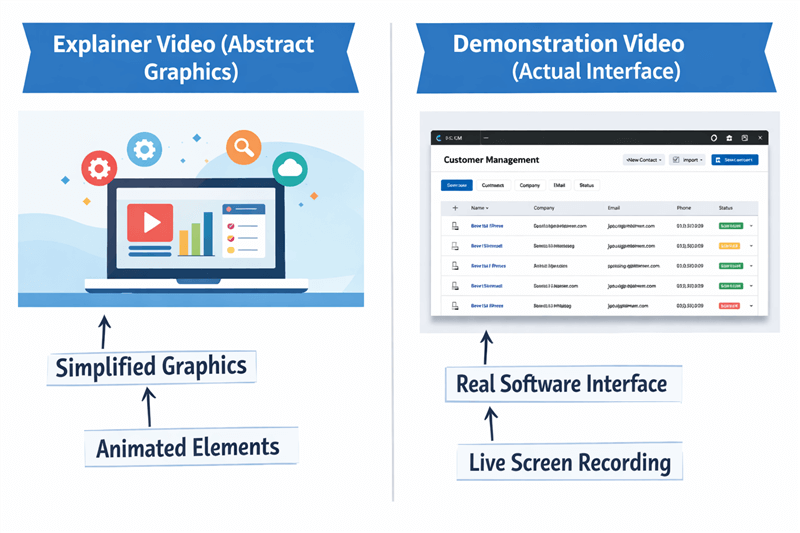
Explainer Video vs. Demonstration Video
The “Show, Don’t Just Tell” Principle
A true demonstration video adheres to the principle of “Show, Don’t Just Tell.” It acts as a feature showcase that validates your marketing claims through direct visual evidence.
I recall working with a Fintech Product Manager who was struggling with high bounce rates on their “How it Works” page. They were using a beautiful, expensive animation that explained the concept of decentralized finance. However, user feedback revealed that prospects weren’t confused about the concept—they were skeptical about the interface. They wanted to know: Is the dashboard confusing? How many clicks does it take to transfer funds?
Once we swapped the animation for a 90-second screen recording of a live transaction, conversion rates on that page jumped by 18%. The users didn’t need philosophy; they needed proof.
If you are not recording the screen or showing the physical product, you are likely creating top-of-funnel marketing content, not a true walkthrough or demo.
Decision Framework: Demo Video vs. Explainer Video vs. Tutorial
Selecting the correct video format is crucial for protecting your marketing budget. Conflating a demo video vs explainer video often leads to mismatched user expectations.
Use this framework to distinguish between the three primary types. This clarity will help you explain the concept to stakeholders who may be pushing for the wrong type of content.
1. Explainer Video
- Primary Goal: Generate interest and explain the “Why.”
- Buyer Stage: Awareness (Top of Funnel).
- Content Style: Abstract graphics, cartoons, high-level metaphors, or talking heads.
- User Intent: “I have a problem, and I want to know if a solution exists.”
2. Demonstration Video (The Focus of This Guide)
- Primary Goal: Prove capability and show the “What.”
- Buyer Stage: Consideration (Middle of Funnel).
- Content Style: Real screen recordings, use case video scenarios, and specific feature showcases.
- User Intent: “I know your solution exists. Now, prove to me that it actually works and is easy to use.”
3. Tutorial Video (or Instructional Video)
- Primary Goal: Teach specific steps and explain the “How.”
- Buyer Stage: Retention/Support (Post-Purchase).
- Content Style: Deep-dive instructional video steps, often slower-paced, granular, and longer.
- User Intent: “I bought this tool. How do I configure the settings?”
Strategic Comparison Table
| Explainer Video | Demonstration Video | Tutorial Video | |
| Focus | The Problem & Solution | The Capabilities & Workflow | The Step-by-Step Instruction |
| Visuals | Illustrations / Animations | Screen Recording / Product Shots | Detailed UI / Menus |
| Duration | 60–90 Seconds | 2–5 Minutes | 5–15+ Minutes |
| Key Metric | Views / Impressions | Free Trial Sign-ups | Support Ticket Reduction |
When deciding on your strategy, ask yourself: Is the user trying to understand the problem (Explainer), evaluating your solution (Demo), or learning to use the tool they already bought (Tutorial)? Misaligning these stages often results in low retention rates.
Strategic Placement: Where Demos Fit in the Buyer Journey
Defining the demonstration video meaning is only half the battle; knowing where to place it is equally critical. Based on SERP analysis and user behavior data, a key insight is that demonstration videos fail most often when they are used too early in the buyer journey.
The “Premature Demo” Mistake
Many marketing teams mistakenly lead with feature-heavy demos before users even understand the problem being solved. If you present a complex SaaS demo to a cold lead who is only just realizing they have a pain point, the technical details will overwhelm rather than convert. They don’t care about your dashboard widgets yet; they care about their problem.
The Middle-of-Funnel (MOFU) Sweet Spot
High-performing demo videos are typically placed after problem awareness, during the Consideration and Decision phases. At this stage, the potential buyer knows they have a problem and is actively evaluating solutions.
To maximize impact, reserve your detailed product demonstration video examples for:
- Landing Pages: Specifically, those targeting high-intent keywords (e.g., “best project management software”).
- Email Nurture Sequences: Sent to active leads who have already downloaded a whitepaper or engaged with top-of-funnel content.
- Sales Enablement: Assets for sales teams to send to prospects after an initial discovery call.
By aligning the content with the user’s readiness to buy, you transform the video from a confusing technical display into a persuasive tool that validates their decision to choose your software.
Real-World Examples: SaaS Demos That Convert
It is impossible to fully grasp the demonstration video’s meaning without seeing it in action. The most effective videos share a common trait: they focus on a single, specific workflow rather than trying to showcase the entire platform at once.
1. Slack: The “Show, Don’t Tell” Approach
Slack is a prime example of staying within the product interface. Instead of a spokesperson talking about “collaboration,” their demos typically zoom straight into the channel list, showing a message being typed, a file being dropped, and a reaction emoji being clicked.
Why it works: It mimics the exact eye movement of a user. You feel like you are using the app just by watching.
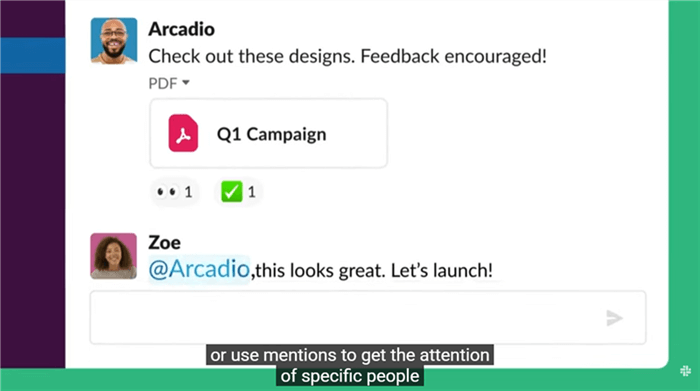
A Slack Demonstration Video
2. Notion: The “Use Case” Specificity
Notion avoids the trap of the “General Overview.” Instead, they produce specific demos like “How to use Notion for Wikis” or “Notion for Project Management.”
Why it works: They understand that a generic “Platform Overview” is often too broad. By narrowing the scope to one problem, they can show the solution in under two minutes without rushing.
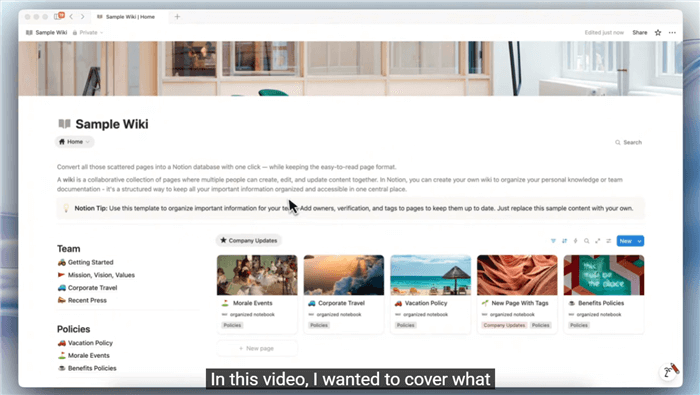
Saas Demo Example – Notion
3. Loom: The “Dogfooding” Demo
Loom uses its own tool to record its demos. This is the ultimate proof of capability. You see the product (the bubble in the corner) working while they explain a feature.
Why it works: It builds immense trust. If the product is good enough for the marketing team to use, it’s good enough for the customer.
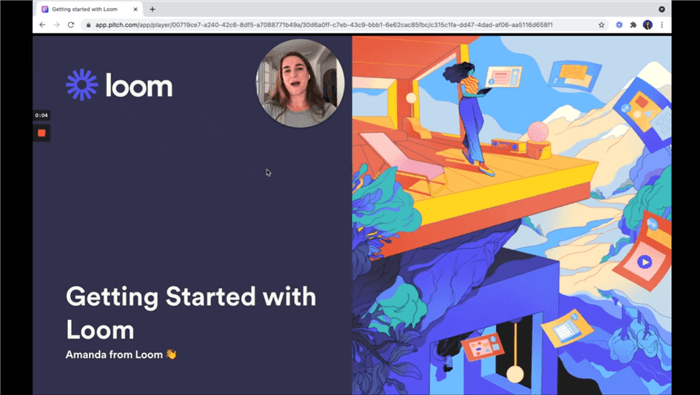
Saas Demo Example – Loom
Phase 1: Pre-Production Essentials
Before opening your recording software, spend a few minutes preparing your setup. One of the most common mistakes is hitting “Record” immediately, which often results in poor audio, unwanted notifications, or a cluttered screen. A quick setup avoids all of that.
Plan the Click Path
Don’t wing the demo. You don’t need a full script, but you should know what you’re about to click. Example:
- Open dashboard
- Click “New Project”
- Name the project
- Show success banner
This keeps the demo smooth and prevents awkward pauses.
Use Decent Audio
You don’t need an expensive microphone, but avoid your laptop’s built-in mic. It tends to capture keyboard noise and fan sounds. A simple pair of wired earbuds or a basic USB mic is usually enough.
Clean Up the Screen
Before recording: Hide desktop icons, enable Do Not Disturb/Focus Assist, and record at 1080p (1920×1080) for better readability. These small steps make the final demo look far more professional.
Phase 2: Choosing Your Recording Tool
Creating a high-quality software demonstration video often presents a technical barrier. How do you get that smooth, professional look where the camera zooms in on the button you are clicking?
Here is the landscape of tools available to you, ranging from free to automated.
Option A: OBS Studio (The Free, Technical Route)
OBS is the industry standard for streamers. It is powerful and completely free.
- Pros: Zero cost, high customization.
- Cons: Extremely steep learning curve. You have to manually set up scenes and sources. It does not automatically zoom or highlight your mouse; you have to do that in post-production editing software like Premiere Pro.
Option B: Loom (The Quick, Personal Route)
Loom is excellent for quick, informal demos.
- Pros: Fast, hosted online immediately.
- Cons: Limited editing capabilities. It is great for 1:1 sales updates but can sometimes feel too casual for a homepage asset or a high-stakes landing page.
Option C: FocuSee (The Automated “Pro” Route)
For marketing teams that need the polish of a high-end edit without the learning curve of OBS or Premiere, we recommend FocuSee. It bridges the gap between casual and professional.
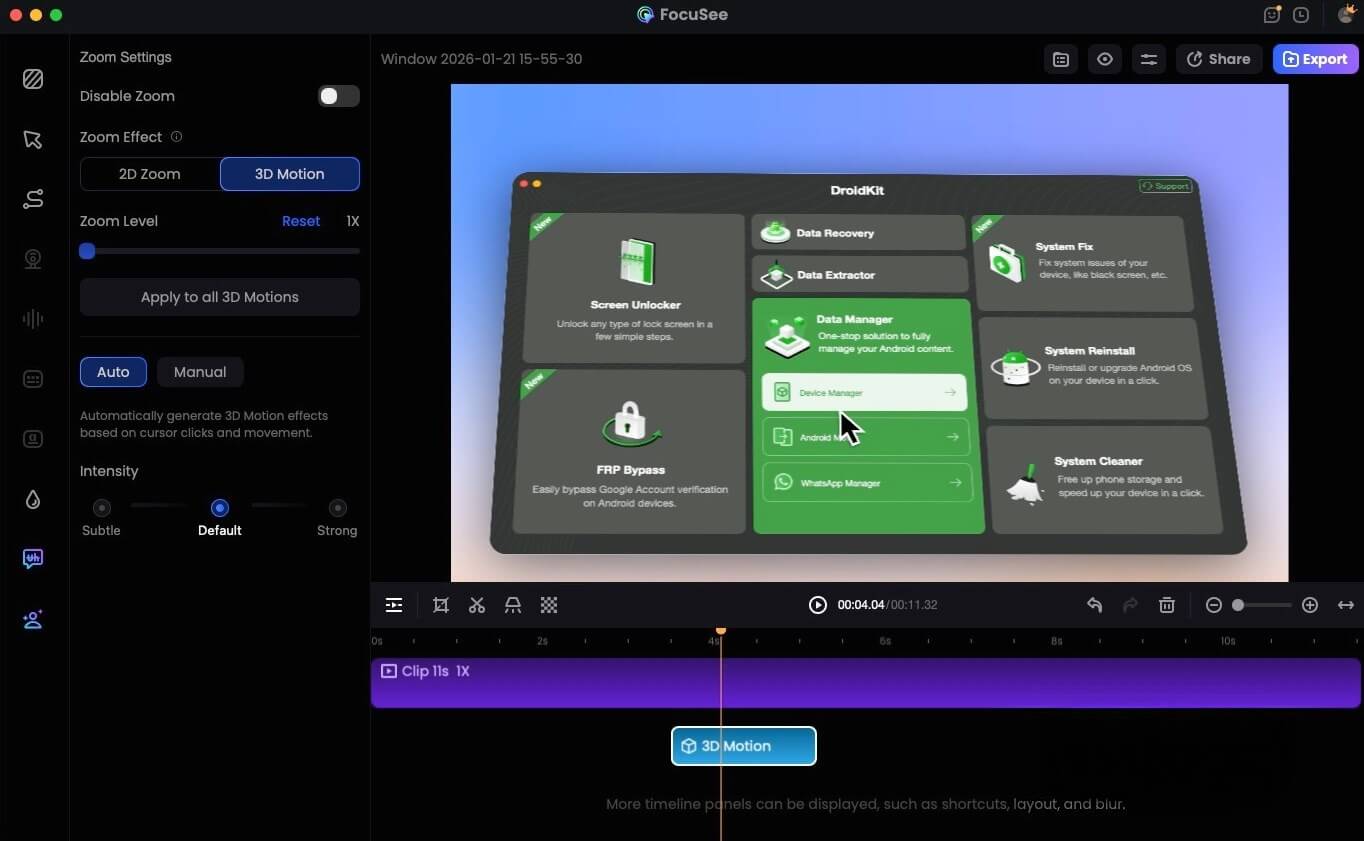
FocuSee 3D Motion
Why consider FocuSee?
It automates the post-production heavy lifting. When you record, the tool’s Smart Focus technology tracks your cursor and click actions. It then automatically generates smooth zoom-ins and highlights without you needing to edit a single frame.
- Smart Focus & Auto-Zoom: Eliminates the need for manual “Ken Burns” effects or keyframing.
- Customizable Cursor Effects: Makes the walkthrough easier to follow on small screens by highlighting clicks.
- Privacy Blur: Essential for SaaS demo creation, allowing you to hide sensitive data (like emails or API keys) quickly.
While FocuSee is a paid solution, it is the most efficient choice for teams that cannot afford a dedicated video editor. It reduces hours of editing into minutes of rendering, allowing you to focus on your script rather than the timeline.
Best Practices for Your Recording
Effective SaaS demo videos prioritize clarity over style.
- Steady Pacing: Don’t rush. Allow the viewer to process what is happening on the screen. If you click too fast, the user gets lost.
- Legible Text: Ensure that menus and text within the software are readable. This is where auto-zoom features (like in FocuSee) or manual zooming (in editing) are invaluable.
- Smooth Mouse Movement: Move your mouse deliberately. Avoid circling the cursor around an object repeatedly—it’s a nervous tic that distracts the viewer.
Frequently Asked Questions About Demonstration Video Strategy
What is the definition of a demonstration video?
A demonstration video is a visual recording that proves a product’s functionality. Its meaning is rooted in evidence—showing exactly how a tool performs a task. It is the video equivalent of a “try before you buy” experience.
How long should a good demonstration video be?
For a standard product demo, aim for 2 to 3 minutes. This duration is sufficient to show a complete workflow without losing the viewer’s attention. If you are creating a more granular tutorial video, you can extend this to 5 minutes or more.
Can a demonstration video increase conversions?
Yes, but only if used correctly. As noted in our strategy section, these videos perform best in the middle of the funnel. When a prospect is evaluating competitors, a clear, honest walkthrough that respects their intelligence will often outperform a flashy but vague sales pitch.
Is a demonstration video the same as an explainer video?
No. An explainer video focuses on the problem and the concept of the solution (often using animation). A demonstration video focuses on the product interface and the reality of using it.
When should I use a demonstration video instead of a tutorial?
Use a demonstration video when you are trying to convince someone to buy or sign up. Use a tutorial video when the user has already signed up and needs to learn how to perform a specific task. The demo sells; the tutorial teaches.
Conclusion: Take Control of Your Video Strategy
Understanding the demonstration video meaning is about more than just definitions; it is about respecting your budget and your user’s time. By distinguishing between explainers, demos, and tutorials, you eliminate the confusion that plagues so many product launches. You no longer need to fear choosing the wrong format or wasting thousands on a video that doesn’t convert.
Whether you choose to use free tools like OBS, quick tools like Loom, or automated pro tools like FocuSee, the goal remains the same: clarity.
Don’t let technical anxiety stall your marketing strategy. Clean up your desktop, plug in a decent microphone, and start recording. Your users are waiting to see what your product can actually do.