Scaling SaaS Growth: The Ultimate Guide to the Automated Product Demo

As inbound demand grows, many B2B SaaS teams hit the same bottleneck: too many introductory calls and not enough selling time. Sales talent gets trapped handling repetitive demos while high-intent prospects wait.
Automated product demos solve this by separating lead education from sales availability. Prospects can explore your product on their own time, 24/7, while your team focuses on qualified opportunities.
But automation only works when implemented strategically. Choosing the right format—video or interactive—and integrating it into your funnel is critical. This guide shows how to deploy automated demos to reduce noise, improve efficiency, and accelerate pipeline growth.
What Is an Automated Product Demo?
An automated product demo is a pre-built, self-serve walkthrough of your software that prospects can watch or interact with on demand—without needing a live sales presentation. It typically uses recorded video, guided tours, or interactive flows to demonstrate the product’s key value moments in a controlled, repeatable way.
Unlike manual live demos, automated demos are consistent, scalable, and available 24/7. Teams create the core experience once, then distribute it to many prospects while optionally personalizing elements like messaging, data examples, or industry context.
The primary goals of an automated product demo are to:
- Reduce sales workload and scheduling friction
- Deliver a polished, error-free “happy path” experience
- Help buyers quickly understand relevance and value
- Qualify and educate prospects earlier in the funnel
Modern B2B teams often use automated demos alongside live calls: the automated version handles initial education and qualification, while sales conversations focus on deeper technical or commercial questions.
Automated Product Demo: Video vs. Interactive HTML Demos
Before diving into strategy, we must clarify a critical distinction that often confuses SaaS leaders. When we discuss automated product demos, we are generally referring to two distinct technologies. Choosing the wrong one for your stage of growth can result in wasted budget and poor engagement.
1. Screen Recording Videos (Passive)
These are high-fidelity video assets where the user watches a curated walkthrough.
- Best for: High-level overviews, mobile users, and storytelling where you want to control the narrative pacing.
- Tech Stack: Tools like FocuSee, Camtasia, or Loom.
- User Experience: “Lean back and watch.”
2. Interactive Product Tours (Active)
These are HTML captures of your application (not a video file) that allow users to click through a safe, sandboxed version of your front end.
- Best for: “Feeling” the product, exploring complex dashboards, and proving technical capability.
- Tech Stack: Platforms like Navattic, Storylane, or Reprise.
- User Experience: “Lean forward and click.”
This guide focuses on a holistic strategy that may use either (or both), but it is vital to know that video automation excels at persuasion and narrative, while interactive automation excels at technical validation.
Live Walkthroughs vs. Self-Serve Automated Product Demos
Transitioning to an automated SaaS demo strategy requires an objective look at where manual effort yields diminishing returns. While live walkthroughs offer high-touch personalization, they suffer from severe scalability limits. As inbound volume increases, the “time cost per lead” for manual demos becomes unsustainable.
Conversely, self-serve automated product demos provide perfect consistency. Every prospect sees the best version of your pitch, free from technical glitches, internet lag, or presenter fatigue. This approach aligns with modern sales enablement strategies where speed and accessibility often trump scheduled interactions.
| Manual Live Demos | Automated Demos | |
| Success Rate | Variable (depends on the presenter and live conditions) | More predictable and repeatable |
| Time Cost per Lead | High (prep + live delivery required each time) | Low (create once, reuse at scale) |
| Consistency | Low–Medium (human variability) | High (standardized experience) |
| Technical Risk | High (live bugs, latency, data issues) | Low (controlled “happy path”) |
Streamlining Production: Creating High-Fidelity Video Assets
If you determine that a video-based automated demo is the right starting point for your funnel (often because it is easier to produce and control than a full HTML capture), you face a production hurdle. Standard screen recordings look flat and static. To effectively engage a user, the visual experience must match the quality of the software being sold.
This is where specialized tools like FocuSee fit into the stack. While you can use general video editors, FocuSee is designed specifically to automate the post-production elements that make software look exciting. It bridges the gap between a quick screencast and a professional self-serve automated product demo, allowing you to deploy assets faster.
Automating the “Director’s Cut”
When you record a workflow, FocuSee’s Smart Focus and Auto-Zoom features automatically detect where you click. The software pans and zooms to highlight the active area, ensuring the viewer’s eye follows the action without manual keyframing. This directly solves the issue of varying demo quality; the tool enforces a professional standard regardless of the presenter’s video editing skills.
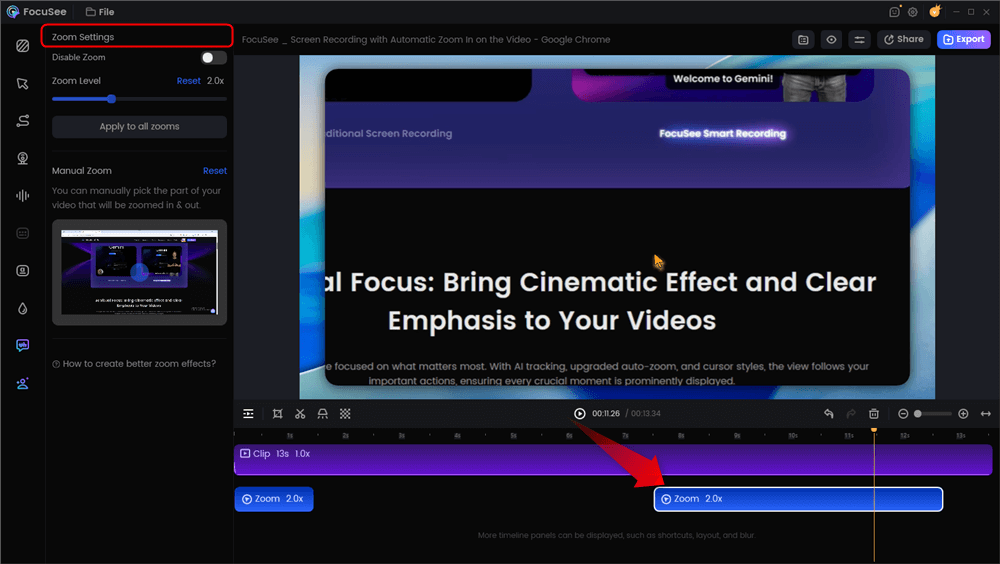
Automatic Zoom Effects
Enhancing Engagement with Visual Cues
For deeper engagement, the 3D Motionicon feature adds cinematic cursor movement, transforming a basic mouse track into a dynamic visual. Additionally, features like Auto-Subtitle generation and AI Smart Cut (removing filler words like “um” and “uh”) reduce editing time. By using a dedicated tool for this format, you convert raw functionality into a polished marketing asset that commands attention.
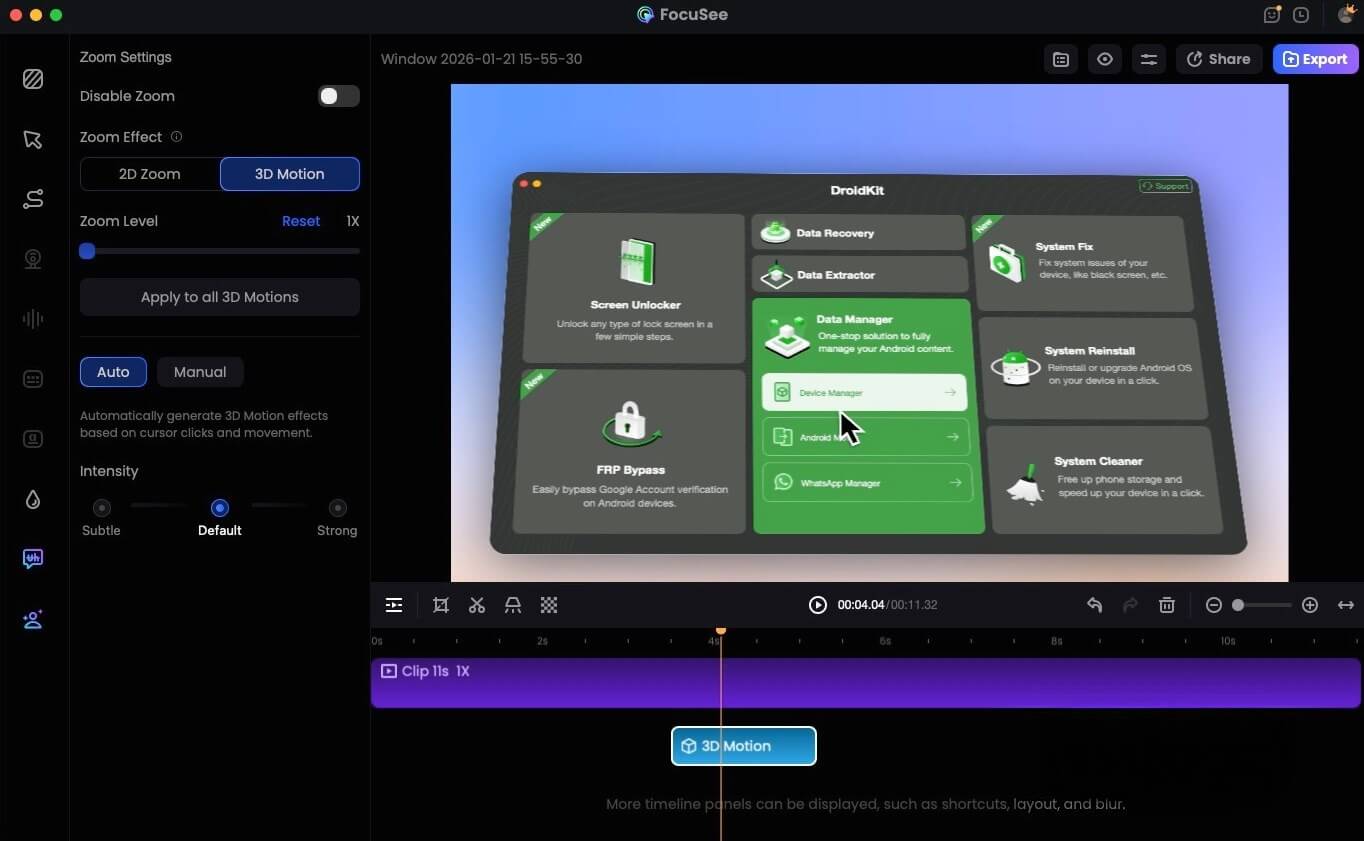
FocuSee 3D Motion
Strategic Implementation: How to Deploy and Gate Your Demo
A common misconception is that automated demo tools for B2B SaaS exist to replace the sales team entirely. Based on industry data and successful use cases like Ryan’s, the expert insight is that automated product demos are most effective when designed as qualification tools rather than full product replacements.
High-performing teams use product demo automation to handle education and early validation, intentionally gating advanced workflows for sales-assisted conversations. But where does the asset actually live?
1. The Deployment Strategy
You generally have three options for placing this asset, depending on your goal:
- Public Embedding (Top of Funnel): Embed the demo directly on your homepage or product page using an iframe. This maximizes views but provides zero lead data.
- The “Intent-Based” Pop-Up: Use a “Watch Demo” CTA that triggers a modal overlay. This keeps the user on the page while immersing them in the experience.
- The Gated Landing Page (Middle of Funnel): Host the demo on a dedicated URL. Gate it behind a lightweight email capture form. This is the standard for qualification.
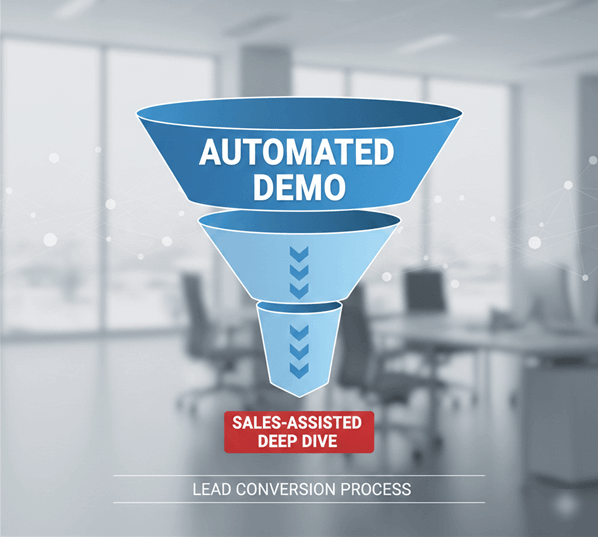
Automated Demo Funnel
2. The Qualification Workflow
Returning to Ryan’s experience, the turning point came when he shifted his strategy. After implementing automated product demos, prospects could explore key workflows on demand before speaking to sales. This reduced the volume of “tire-kicker” calls. However, the quality of the remaining calls skyrocketed. Sales cycles were shortened because the prospects entering the pipeline were already educated on the basics.
To implement this effectively:
- Placement: Place your interactive product demo at the top or middle of your SaaS marketing funnel.
- Purpose: Use it to answer the “What is this?” and “How does it look?” questions.
- Handoff: Clear the calendar of repetitive introductory calls, ensuring your Account Executives focus only on high-intent opportunities where their expertise adds revenue-generating value.
Handling Complexity: Building an Interactive Product Demo that Converts
Whether you are using a video tool or an HTML capture platform, the temptation with complex software is to record everything. This is a mistake. An effective interactive product demo should focus strictly on “Aha!” moments—the specific actions where the user realizes the value of your tool. Automating a 45-minute setup wizard will bore viewers; automating a 30-second report generation sequence will hook them.
Highlighting the Vital Few
For dense dashboards, clarity is critical. If using video automation, tools like FocuSee offer a Spotlight feature to dim irrelevant metrics. If using HTML capture, ensure you disable non-essential buttons to prevent users from getting lost in a maze of settings. You must guide the viewer’s eye through a busy interface to prevent cognitive overload.
Signaling Speed and Mastery
Furthermore, for tools targeting power users (like developer tools or financial platforms), demonstrating speed is vital. Video tools can automatically capture Keyboard Shortcuts to visualize hotkeys used during the recording. This subtle detail signals efficiency and mastery to the viewer, proving that your product supports rapid, professional workflows. By curating these specific, high-impact moments, you create a product-led growth asset that simplifies complexity rather than amplifying it.
Measuring Success: ROI and Integration Context
Implementing automated demos for SaaS is an investment that requires precise measurement. A high view count is irrelevant if it does not correlate with pipeline growth. To truly evaluate ROI, you must look beyond vanity metrics and ensure your data flows into your system of record.
1. Data Integration: The Missing Link
To prove the value of automation, you cannot leave the data siloed in your demo platform. You must ensure your demo software (whether video or interactive) integrates with your CRM (Salesforce, HubSpot) or marketing automation platform (Marketo).
- The Setup: Configure your tool to push a demo_completed event or a percentage_watched property to the contact record.
- The Scoring: Map this event to your Lead Scoring model. For example, a user who watches 75% of a demo might get +20 points, pushing them from “Marketing Qualified” to “Sales Ready.”
2. Sales Engineering Hours Saved
Calculate the direct operational impact. Multiply the number of completed automated demos by the average duration of a live intro call.
- Example: 100 automated demos × 20 minutes/call = ~33 hours saved.
This number represents capacity created for high-value selling and closing deals.
3. Pipeline Influence
Your attribution models should track if leads who interact with the demo close faster or at a higher value than those who do not. This data validates the role of automation in the buyer journey, proving that the tool is not just a video player, but a revenue engine.
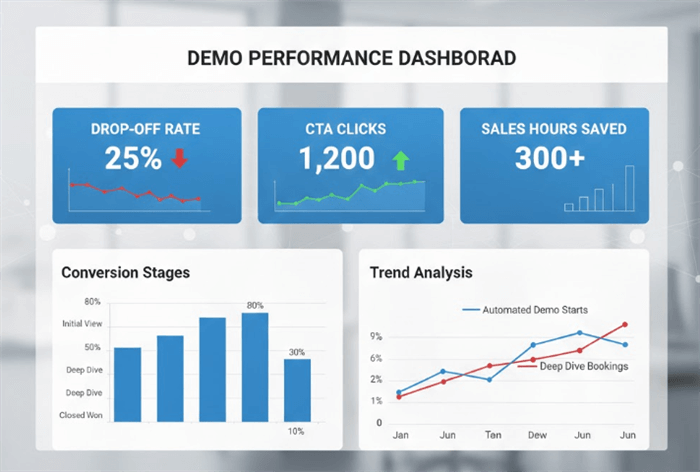
Demo Performance Dashboard
Frequently Asked Questions on Demo Automation
What is the difference between an interactive demo and a video demo?
An interactive demo (HTML capture) allows users to click buttons and navigate a simulated version of your software. A video demo (screen recording) is a passive watching experience. Interactive demos are better for “feeling” the product; video demos are better for controlled storytelling.
Can automated product demos replace sales demos?
Generally, no. Demo automation works best for top-of-funnel education and qualification. It replaces the repetitive introductory “discovery” demo but should support, not replace, the deep-dive consultation provided by sales teams for closing deals.
How do I embed an automated demo on my site?
Most platforms provide a Javascript snippet or an iframe code. You can paste this code into your website’s HTML, a landing page builder (like Unbounce), or trigger it via a button click as a pop-up overlay.
Are automated demos suitable for complex SaaS products?
Yes, provided you focus on specific use cases. Instead of showing the entire platform, create targeted automated product demos for specific features or “Aha!” moments. Use tools to highlight complex workflows clearly without overwhelming the user.
What metrics should I track for automated product demos?
Focus on engagement time, completion rate, CTA click-through rate, and conversion to free trial. Crucially, track “sales hours saved” to measure operational efficiency and ensure your CRM is capturing viewer data.
Conclusion
The bottleneck of limited sales bandwidth does not have to restrict your growth. By adopting an automated product demo strategy, you solve the dual challenge of scaling inbound demand while maintaining consistent presentation quality. This approach allows your prospects to educate themselves immediately, ensuring that when they do speak to your team, they are informed, qualified, and ready to buy.
Whether you choose high-fidelity video tools like FocuSee or interactive HTML platforms, the key is to integrate the asset into your funnel as a qualification engine. Regain control of your sales calendar and start automating your growth today.